¶ Digital Twin-Based Prediction of Indoor Channel Variability Due to Moving Objects in Manufacturing Environments
Members: Dil JoshiUG, Minhajur RahmanGR
Faculty advisors: Professor Mandayam
¶ PROJECT OVERVIEW
To predict how moving objects: human workers, AGVs, and robotic arms, change wireless channel characteristics on an indoor factory floor, using a site-specific Sionna ray tracing digital twin at sub-6 GHz. Validate those predictions against real SDR measurements on the COSMOS testbed at Rutgers.
¶ PROGRESS LOG
Week One: This week was an introduction to some of the basic components of the project. Dove into OFDM transmission and Receival for GNURadio, Review of Ray Tracing, Channel Impulse/frequency Response,and LIDAR to create a render of an environment. Understanding the uses of Sionna to determine the bouncing and effects of the Radio Signal on a Manufacturing Floor.
Week Two: This week was all about learning how Wireless Signals are impacted by motion. This included research about the Doppler Effect, Fading, Shadowing, etc. After this it was a continuation of Sionna and learning how to use the Linux Commands to get Sionna to operate on the GPU (increase the speed of the work) instead of working on Google Colab.
Week Three: Moving on from Google Colab this week was about using the servers on the sandboxes to load an image of Sionna and use a Jupyter Notebook and Chrome Remote Desktop to run the simulation of ray tracing on a moving receiver on the manufacturing floor. This includes learning how Sionna handles motion, and how to go from a static ray trace to continuous frames. The code to do so was provided by the phD candidate I am working with, Minhajur.
Week Four: Sionna can handle motion but the velocity must be constant for actual measurements. Worked in a team to determine the best way to handle this, and chose a Pioneer 3DX robot as the best solution. From here it was troubleshooting and saving the image to create code using the Robot Operating System (ROS) to have the robot move at constant velocity.
Week Five: This week was all about ROS and Sionna. In essence went through documentation of Sionna to understand how it can handle Channel Impulse and Frequency Response (including for movement). Determined what the node that is being used with the Pioneer Robot uses for it's operations; ROS1 Melodic. Went through documentation to determine how to move in this environment and what was still needed to include on the image.
Week Six: Created working code in C++ to make the robot move in a straight line at a constant velocity (tested and confirmed). Troubleshooted connection between the nook and the USRP and updated image. Research into how UHD python is used in the chain for OFDM channel transmission and reception.
Week Seven: This Week included completing a Single OTA OFDM Transmission and Reception though there were Issues with setting up and then accessing it. I also Created Code to make the robot move and receive in parallel.
Week Eight: This week was largely a continuation of the last week. In addition to a meeting to catch up with sibling-project, the main work for this week was to troubleshoot both the code and the NUC. In the prior week and first two days of the this week the main issue was that the uhd and python bindings were not working together to allow for the USRP's and ROS robot to work in tandem, leading to a lot of troubleshooting before fixing the issue and creating a new image with the issues resolved. Then the next day revolved around removing the Transmitter from the NUC code (only having the receiver and moving bot) and then solving the memory space issue for the capture (until it finally captured every moment). How to Run the moveReceive file 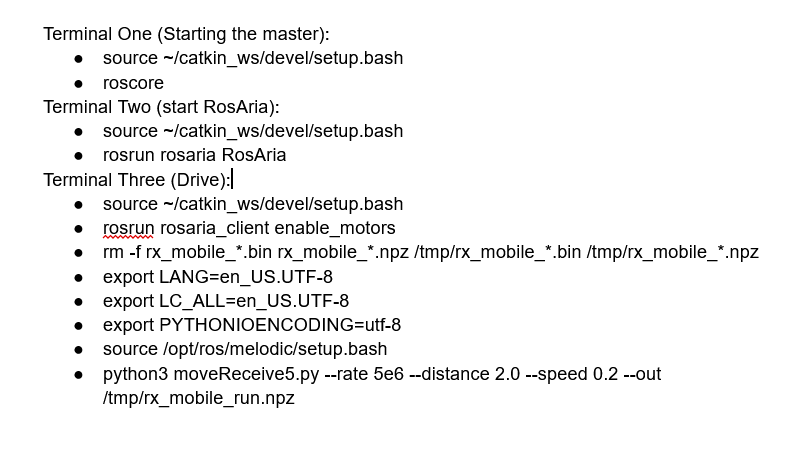
Week Nine: After the success of making the robot move and receive simultaneously the early part of this week was to have the robot move and receive from a parallelly-working transmitter. This was done but took time to set up due to the differences in connections of USRP's and networks, along with difficulty ssh-ing into the node's root/native. Then it also included research into how others who worked with stationary receivers and compared with Sionna model (really just CFR). Finally it also included configuring the post rocess Jupyter Notebook to work with movement.
Week Ten: Used Shell Script and resized image to have more space per run. Took actual Data at Richard Weeks Hall and processed in Jupyter Notebook.
Week Eleven: Determined CIR, CFR with Sionna Model and compared Results with actual data taken in previous week. Completed work on the final presentation and project poster before presenting to Open House Panel on last day.