¶ RZRAVEN USB Stick — Jackdaw Contiki Platform
Compile a Contiki OS image for the RZRAVEN USB stick, load it onto the device via the Atmel-ICE debugger, and interact with the Jackdaw network stack running on a grid node.
¶ Overview
This tutorial demonstrates how to use the RZRAVEN USB stick attached to an ORBIT/COSMOS grid node to run the Contiki embedded OS. The Contiki operating system is a minimal-footprint, resource-efficient, low-power OS designed for microcontrollers with limited memory. The RZRAVEN stick contains an AT90USB1287 AVR microcontroller and an IEEE 802.15.4 radio.
The workflow covers detecting the RZRAVEN and the Atmel-ICE CMSIS-DAP debugger on a node, compiling the Contiki ravenusbstick example from source, flashing the resulting .hex file onto the device using avrdude over JTAG, bringing the device up as a USB network card, and connecting to its interactive menu to perform an RF energy scan across IEEE 802.15.4 channels 11–26 (2.4 GHz band).
¶ Learning outcomes
After completing this tutorial you will be able to:
- Identify the RZRAVEN USB stick and Atmel-ICE debugger in the Linux kernel log with
dmesg. - Compile the Contiki
ravenusbstickexample using AVR cross-compilation tools. - Flash an AVR
.heximage onto the RZRAVEN usingavrdudewith the JTAG3/ICE programmer. - Bring up the Contiki Jackdaw USB network interface and connect to its serial console.
- Run an IEEE 802.15.4 RF energy scan and interpret the per-channel RSSI output.
¶ At a glance
| Difficulty | Beginner |
| Estimated time | 45 min |
| Domain / sandbox | ORBIT grid (example: node18-18) |
| Topic group | Bluetooth & ZigBee / IEEE 802.15.4 |
| Last verified | Not re-tested (migrated 2026-06-20) |
¶ Prerequisites
Background knowledge
- The six-step experiment life cycle — see Basic Tutorial 1.
- Basic familiarity with AVR microcontrollers and cross-compilation is helpful but not required.
Account & access
- A COSMOS account — register here.
- An approved reservation on the ORBIT grid with nodes that have RZRAVEN USB sticks attached — check the Inventory/Status page for nodes with IoT IEEE 802.15.4 devices.
- SSH access to the domain console — see SSH access.
¶ Resources required
Devices / nodes
| Resource | Role | Qty | Notes |
|---|---|---|---|
| node18-18 (or similar grid node with IoT attachment) | Host for RZRAVEN + ICE debugger | 1 | Must have RZRAVEN USB stick and Atmel-ICE CMSIS-DAP attached; check inventory |
Disk images
| Image | Load onto | Provides |
|---|---|---|
| ubuntu-16-04-64bit-rzraven.ndz | node18-18 | Ubuntu 16.04 64-bit with AVR tools and Contiki 2.6 source preinstalled |
Software components
| Component | Version | Source |
|---|---|---|
| Contiki OS | 2.6 | Preinstalled in image at ~/contiki-2.6/; original source at https://github.com/contiki-os/contiki/archive/2.6.zip |
| gcc-avr / binutils-avr / avr-libc | as shipped in image | Preinstalled; apt-get install step confirms/updates |
| avrdude | 6.2 | Preinstalled in image |
| screen | system package | Preinstalled |
Spectrum / RF
The RZRAVEN stick uses the IEEE 802.15.4 2.4 GHz band (channels 11–26). The energy scan is receive-only. No over-the-air transmission is required for the steps in this tutorial.
¶ Topology
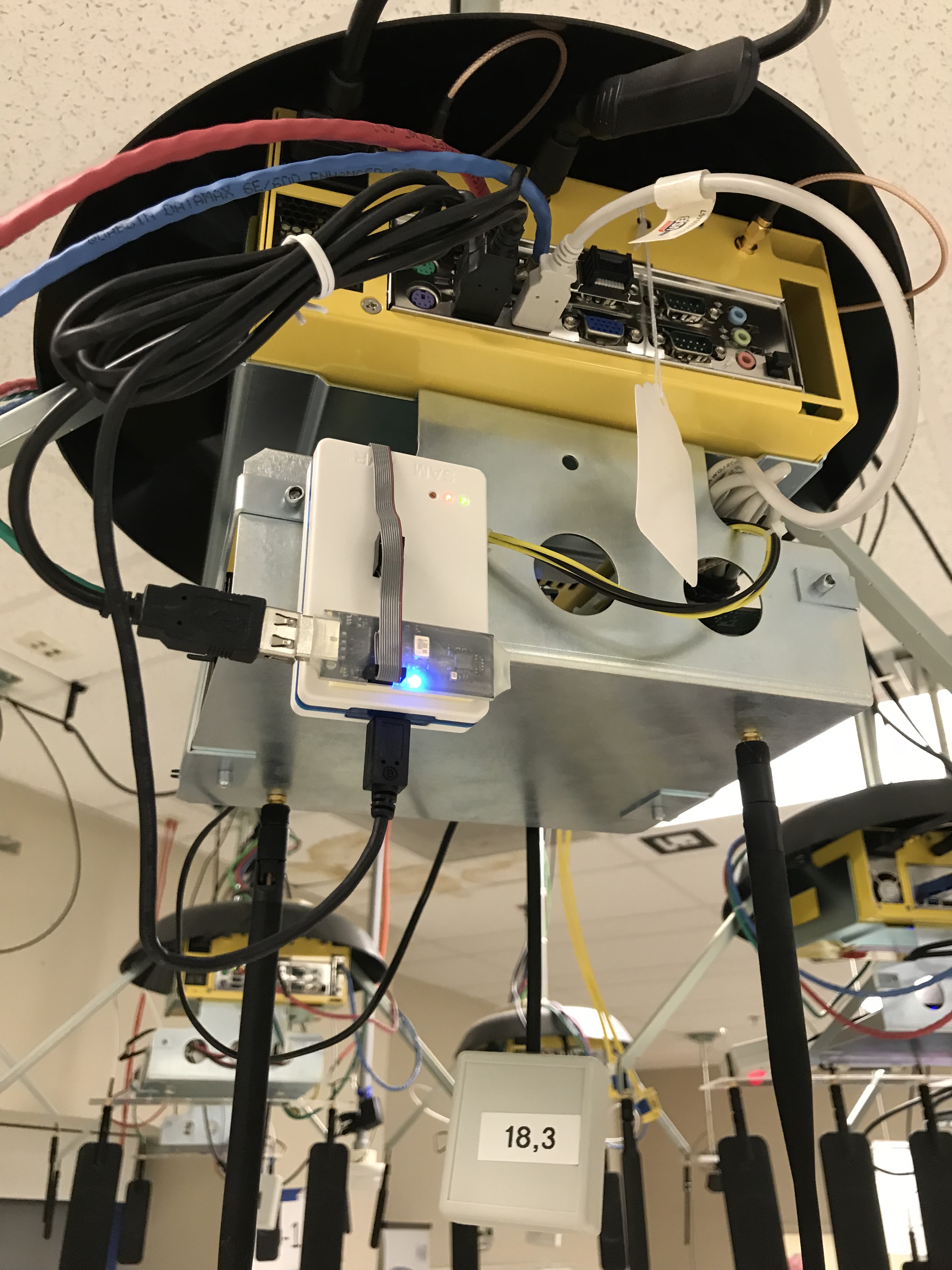
A single grid node hosts two USB-attached devices:
- RZRAVEN USB stick (AT90USB1287 + IEEE 802.15.4 radio) — provides the
ttyACM0serial console and, after flashing, ausb0Ethernet-over-USB network interface. - Atmel-ICE CMSIS-DAP debugger — connected between the node's USB port and the RZRAVEN JTAG header; used exclusively for flashing the firmware.
The node is controlled from the ORBIT grid console over SSH.
¶ Setup
- Reserve the grid resources (see Prerequisites) and log into the console:
ssh <username>@console.grid.cosmos-lab.org - Use the Inventory/Status page to identify a node with IoT IEEE 802.15.4 devices (e.g., node18-18).
- Make sure the node is off before imaging:
omf tell -a offh -t node18-18 - Load the image:
omf load -i ubuntu-16-04-64bit-rzraven.ndz -t node18-18 - Turn the node on and confirm it is up:
omf tell -a on -t node18-18 omf stat -t node18-18 - SSH into the node from the console:
ssh root@node18-18
¶ Instructions
¶ Step 1 — Verify the RZRAVEN and ICE debugger are detected
After the node has booted, check dmesg to confirm both USB devices are registered with the kernel.
Check for the Atmel-ICE CMSIS-DAP debugger:
root@node18-18:~# dmesg | grep ICE
Expected output:
[    2.004469] usb 2-1.2: Product: Atmel-ICE CMSIS-DAP
[    2.984950] hid-generic 0003:03EB:2141.0001: hiddev0,hidraw0: USB HID v1.11 Device [Atmel Corp. Atmel-ICE CMSIS-DAP] on usb-0000:00:1d.0-1.2/input0
Check for the RZRAVEN CDC-ACM serial interface (ttyACM0):
root@node18-18:~# dmesg | grep acm
Expected output:
[    9.184102] cdc_acm 2-1.1:129.2: ttyACM0: USB ACM device
[    9.184345] usbcore: registered new interface driver cdc_acm
[    9.184345] cdc_acm: USB Abstract Control Model driver for USB modems and ISDN adapters
¶ Step 2 — Update AVR software utilities
Ensure the AVR cross-compilation tools are current:
root@node18-18:~# apt-get update
root@node18-18:~# apt-get install make gcc-avr binutils-avr avr-libc avrdude
¶ Step 3 — Verify the ICE debugger is recognized by avrdude
Check /etc/avrdude.conf for the programmer entry id="jtag3" and confirm that USB PID 0x2141 (Atmel-ICE CMSIS-DAP) is listed in usbpid. The relevant section should look like this:
programmer
  id    = "jtag3";
  desc  = "Atmel AVR JTAGICE3 in JTAG mode";
  type  = "jtagice3";
  connection_type = usb;
  usbpid = 0x2110, 0x2140, 0x2141;
;
¶ Step 4 — Compile the Contiki ravenusbstick example
The Contiki 2.6 source is preinstalled on the image. Change to the example directory and build:
root@node18-18:~# cd contiki-2.6/examples/ravenusbstick
root@node18-18:~# make clean
root@node18-18:~# make all
After a successful build the following output files are produced:
-rwxr-xr-x 1 root root  241840 Jan 23 14:14 ravenusbstick.elf
-rw-r--r-- 1 root root  119181 Jan 23 14:14 contiki-avr-ravenusb.map
-rw-r--r-- 1 root root  105342 Jan 23 14:14 ravenusbstick.hex
¶ Step 5 — Erase the device
Before flashing, erase the AT90USB1287 microcontroller to start from a clean state:
root@node18-18:~# avrdude -u -c jtag3 -p usb1287 -e
Expected output:
avrdude: AVR device initialized and ready to accept instructions

Reading | ################################################## | 100% 0.07s

avrdude: Device signature = 0x1e9782 (probably usb1287)
avrdude: erasing chip

avrdude done.  Thank you.
¶ Step 6 — Flash the executable onto the device
Load ravenusbstick.hex onto the RZRAVEN via the ICE debugger:
root@node18-18:~# avrdude -u -c jtag3 -p usb1287 -v -U ravenusbstick.hex
Expected output (abridged):
avrdude: Version 6.2
        Copyright (c) 2000-2005 Brian Dean, http://www.bdmicro.com/
        Copyright (c) 2007-2014 Joerg Wunsch

        System wide configuration file is "/etc/avrdude.conf"
        User configuration file is "ro/ot/.avrduderc"
        User configuration file does not exist or is not a regular file, skipping

        Using Port                    : usb
        Using Programmer              : jtag3
avrdude: usbdev_open(): Found Atmel-ICE CMSIS-DAP, serno: J41800077809
avrdude: Found CMSIS-DAP compliant device, using EDBG protocol
        AVR Part                      : AT90USB1287
        Chip Erase delay              : 9000 us
        PAGEL                         : PD7
        BS2                           : PA0
        RESET disposition             : dedicated
        RETRY pulse                   : SCK
        serial program mode           : yes
        parallel program mode         : yes
        Timeout                       : 200
        StabDelay                     : 100
        CmdexeDelay                   : 25
        SyncLoops                     : 32
        ByteDelay                     : 0
        PollIndex                     : 3
        PollValue                     : 0x53
        Memory Detail                 :

                                 Block Poll               Page                       Polled
          Memory Type Mode Delay Size  Indx Paged  Size   Size #Pages MinW  MaxW   ReadBack
          ----------- ---- ----- ----- ---- ------ ------ ---- ------ ----- ----- ---------
          eeprom        65    10     8    0 no       4096    8      0  9000  9000 0x00 0x00
          flash         65     6   256    0 yes    131072  256    512  4500  4500 0x00 0x00
          lfuse          0     0     0     0 no          1    0      0  9000  9000 0x00 0x00
          hfuse          0     0     0     0 no          1    0      0  9000  9000 0x00 0x00
          efuse          0     0     0     0 no          1    0      0  9000  9000 0x00 0x00
          lock           0     0     0     0 no          1    0      0  9000  9000 0x00 0x00
          calibration    0     0     0     0 no          1    0      0     0     0 0x00 0x00
          signature      0     0     0     0 no          3    0      0     0     0 0x00 0x00

        Programmer Type : JTAGICE3
        Description     : Atmel AVR JTAGICE3 in JTAG mode
        ICE hardware version: 0
        ICE firmware version: 1.39 (rel. 130)
        Serial number   : J41800077809
        Vtarget         : 3.26 V
        JTAG clock megaAVR/program: 7500 kHz
        JTAG clock megaAVR/debug:   1000 kHz
        JTAG clock Xmega: 1000 kHz
        PDI clock Xmega : 1000 kHz

avrdude: JTAG ID returned: 0x3f 0x20 0x78 0x49
avrdude: AVR device initialized and ready to accept instructions

Reading | ################################################## | 100% 0.07s

avrdude: Device signature = 0x1e9782 (probably usb1287)
avrdude: NOTE: "flash" memory has been specified, an erase cycle will be performed
        To disable this feature, specify the -D option.
avrdude: erasing chip
avrdude: reading input file "ravenusbstick.hex"
avrdude: input file ravenusbstick.hex auto detected as Intel Hex
avrdude: writing flash (37448 bytes):

Writing | ################################################## | 100% 1.62s

avrdude: 37448 bytes of flash written
avrdude: verifying flash memory against ravenusbstick.hex:
avrdude: load data flash data from input file ravenusbstick.hex:
avrdude: input file ravenusbstick.hex auto detected as Intel Hex
avrdude: input file ravenusbstick.hex contains 37448 bytes
avrdude: reading on-chip flash data:

Reading | ################################################## | 100% 0.68s

avrdude: verifying ...
avrdude: 37448 bytes of flash verified

avrdude done.  Thank you.
¶ Step 7 — Bring up the USB network interface
After flashing, Contiki presents the RZRAVEN as an Ethernet-over-USB device (usb0). Bring the interface up:
root@node18-18:~#  ifconfig usb0 up
root@node18-18:~#  ifconfig usb0
Expected output:
usb0      Link encap:Ethernet  HWaddr 02:12:13:14:15:16
          inet6 addr: fe80::12:13ff:fe14:1516/64 Scope:Link
          UP BROADCAST RUNNING MULTICAST  MTU:1298  Metric:1
          RX packets:0 errors:0 dropped:0 overruns:0 frame:0
          TX packets:8 errors:0 dropped:0 overruns:0 carrier:0
          collisions:0 txqueuelen:1000
          RX bytes:0 (0.0 B)  TX bytes:1000 (1000.0 B)
¶ Step 8 — Connect to the Jackdaw terminal and run an energy scan
Connect to the Contiki interactive menu over the CDC-ACM serial interface:
root@node18-18:~# screen /dev/ttyACM0
The Jackdaw menu appears:
Type 'h' to bring up menu

*********** Jackdaw Menu **********
        [Built Jan 23 2018]
*  m        Print current mode    *
*  s        Set to sniffer mode   *
*  n        Set to network mode   *
*  c        Set RF channel        *
*  p        Set RF power          *
*  6        Toggle 6lowpan        *
*  r        Toggle raw mode       *
*  d        Toggle RS232 output   *
*  S        Enable sneezer mode   *
*  e        Energy Scan           *
*  R        Reset (via WDT)       *
*  h,?      Print this menu       *
*                                 *
* Make selection at any time by   *
* pressing your choice on keyboard*
***********************************
Type e to invoke an energy scan across IEEE 802.15.4 channels 11–26:
Type 'e' to invoke an enery scan.
Energy Scan:
................
 11: -53dB ######################:::::::::::::::::
 12: -50dB ##########################################
 13: -50dB ##########################################
 14: -62dB #########################:::::
 15: -68dB ########::::::::::::::::
 16: -71dB #####################
 17: -68dB ########################
 18: -74dB ##################
 19: -83dB #::::::::
 20: -83dB :::::::::
 21: -62dB ##########::::::::::::::::::::
 22: -53dB #################################::::::
 23: -59dB #####################::::::::::::
 24: -62dB ####::::::::::::::::::::::::::
 25: -92dB
 26: -71dB #####::::::::::::::::
Done.
To exit the screen session press Ctrl+A then D.
Note: If the debug interface stops responding in
screen, typeRto reset the stick via the watchdog timer and then reconnect.
¶ Verification
dmesg | grep ICEshows the Atmel-ICE CMSIS-DAP device attached on a USB HID interface.dmesg | grep acmshowsttyACM0: USB ACM device.avrdudeexits withavrdude done. Thank you.and reports37448 bytes of flash verified.ifconfig usb0shows the interfaceUP BROADCAST RUNNING MULTICASTwith an IPv6 link-local address in thefe80::/64range.- The energy scan in the Jackdaw menu completes and prints RSSI values for channels 11–26.
¶ Cleanup
omf tell -a offh -t node18-18
The image does not need to be saved after this tutorial unless you have made additional modifications.
¶ Troubleshooting
| Symptom | Likely cause | Fix |
|---|---|---|
dmesg | grep ICE shows nothing |
ICE debugger not physically attached or USB not enumerated | Check USB cabling; try lsusb to list all USB devices; reboot node |
avrdude exits with initialization failed or usbdev_open(): did not find any USB device |
USB PID 0x2141 not in /etc/avrdude.conf under id="jtag3" |
Manually add 0x2141 to the usbpid list in that section |
avrdude exits with can't open device |
Permission on USB HID device | Run as root (image default); or add udev rules for the ICE |
ifconfig usb0 — interface not present |
Firmware not running yet or flashing failed | Re-run the flash step; check avrdude output for errors |
screen /dev/ttyACM0 — device not found |
ttyACM0 not enumerated |
Confirm with ls /dev/ttyACM*; check dmesg | grep acm |
| Jackdaw menu not responding | Device locked up | Type R in the screen session to trigger a watchdog reset |
¶ References
- RZRAVEN USB stick hardware
- Contiki OS 2.6 documentation
- Contiki OS source (GitHub)
- Atmel-ICE product page
- Basic Tutorial 1 — Testbed operations
- ORBIT/COSMOS Inventory/Status page
Author(s): COSMOS team · Last verified: Not re-tested (migrated 2026-06-20) · Tested image/release: ubuntu-16-04-64bit-rzraven.ndz · Tags: bluetooth-zigbee, ieee802154, contiki, rzraven, avr, avrdude, jackdaw