¶ Wideband Channel Sounding with USRP X310s
Measure the power delay profile (PDP) of a radio channel up to 100 MHz wide using RFNoC-capable USRP X310 radios on the ORBIT grid and a real-time browser display.
¶ Overview
Channel sounding is the process of evaluating the characteristics of a radio environment. Measuring the power delay profile (PDP) of a radio channel provides the multipath structure needed for developing statistical channel simulation models.
This tutorial uses the RFNoC channel sounder design to obtain the PDP of channels up to 100 MHz wide. An FPGA correlator module (Corrmag63avg8k) computes real-time correlation power; an averaging module accumulates contiguous PDP snapshots and streams results to the host CPU. The design runs entirely on third-generation Ettus USRP devices and requires no offline post-processing — results are visible in a live browser display.
Two USRP X310 units located in the massive MIMO mini-racks on the ORBIT grid are used: one as the transmitter (spreading a wideband signal) and one as the receiver (correlating and averaging the PDP). Pairs are pre-assigned by topology group color so that multiple student groups can run simultaneously without interfering.
¶ Learning outcomes
After completing this tutorial you will be able to:
- Verify that a USRP X310 carries the required RFNoC blocks using
uhd_usrp_probe. - Run the
channel_sounding_txandchannel_sounding_rxexample applications. - Use the
channel_sounding_display.htmlbrowser tool to visualize the real-time PDP. - Interpret the power delay profile of a measured wideband channel.
¶ At a glance
| Difficulty | Intermediate |
| Estimated time | 60 min |
| Domain / sandbox | grid.cosmos-lab.org (ORBIT grid, massive MIMO mini-racks) |
| Topic group | Channel Sounding & MIMO |
| Last verified | Not re-tested (migrated 2026-06-20) |
¶ Prerequisites
Background knowledge
- Familiarity with the COSMOS/ORBIT experiment life cycle — see COSMOS workflow.
- Basic RF concepts: bandwidth, carrier frequency, multipath, power delay profile.
- Familiarity with RFNoC and USRP X310 hardware is helpful but not required.
Account & access
- A COSMOS account — register here.
- An approved reservation on the ORBIT grid with a topology group assigned — see Make a reservation.
- SSH access to the grid console — see SSH access.
¶ Resources required
Devices / nodes
| Resource | Role | Qty | Notes |
|---|---|---|---|
| node19-1 (example) | TX host | 1 | Any pair of grid nodes assigned by topology; example uses node19-1/node20-1 |
| node20-1 (example) | RX host | 1 | See topology group table below for actual node↔USRP assignment |
| USRP X310 (TX) | Wideband transmitter | 1 | Located in massive MIMO mini-rack; IP 10.10.23.x (or PCIe RIO0 for some groups) |
| USRP X310 (RX) | Correlator / receiver | 1 | IP 10.10.24.x (or PCIe RIO0 for some groups) |
Disk images
| Image | Load onto | Provides |
|---|---|---|
| channel-sounder.ndz | TX node, RX node | UHD with RFNoC channel sounder examples pre-built |
Software components
| Component | Version | Source |
|---|---|---|
| UHD (USRP Hardware Driver) | TODO: verify | preinstalled in channel-sounder.ndz |
| channel_sounding_tx | TODO: verify | /root/uhd/host/build/examples/channel_sounding_tx in image |
| channel_sounding_rx | TODO: verify | ./uhd/host/build/examples/channel_sounding_rx in image |
| channel_sounding_display.html | TODO: verify | downloadable from |
Spectrum / RF / special
The X310 radios transmit a wideband spread-spectrum signal at up to 100 MHz bandwidth. Stay within the spectrum limits specified in your reservation. Radios are inside the massive MIMO mini-racks — over-the-air paths are within the rack enclosure.
¶ Topology
Two grid nodes each connect to a USRP X310 in the massive MIMO mini-rack. Network-connected USRPs are reached via the 10.10.23.0/24 (TX) and 10.10.24.0/24 (RX) subnets. Some groups (gray, brown, silver, gold) use a local PCIe-connected X310 (resource=RIO0) as the RX instead. Both nodes are controlled via SSH from the grid console.
¶ Setup
-
Reserve the ORBIT grid with a topology group and log into the console:
ssh <username>@console.grid.cosmos-lab.org -
Turn resources off before imaging:
omf tell -a offh -t system:topo:allres -
Load the channel sounder image onto your assigned pair of nodes (substitute your group name):
omf load -i channel-sounder.ndz -t system:topo:group-red -
Turn the nodes on and confirm they are up:
omf tell -a on -t system:topo:group-red omf stat -t system:topo:group-redExpected output (example with group-red → node19-1 / node20-1):
----------------------------------------------- Node: node19-1.grid.cosmos-lab.org State: POWERON Node: node20-1.grid.cosmos-lab.org State: POWERON ----------------------------------------------- -
SSH to the TX node:
ssh root@node19-1
¶ Instructions
¶ Step 1 — Identify your USRP pair from the topology group table
Each topology group color maps to a fixed TX/RX USRP X310 IP address pair:
| Group color | TX USRP (addr) | RX USRP (addr) |
|---|---|---|
| red | 10.10.23.16 | 10.10.24.16 |
| yellow | 10.10.23.1 | 10.10.24.18 |
| green | 10.10.23.14 | 10.10.24.14 |
| purple | 10.10.23.15 | 10.10.24.15 |
| blue | 10.10.23.12 | 10.10.24.13 |
| black | 10.10.23.11 | 10.10.24.11 |
| cyan | 10.10.23.13 | 10.10.24.12 |
| white | 10.10.23.18 | 10.10.24.17 |
| orange | 10.10.23.2 | 10.10.23.3 |
| pink | 10.10.23.4 | 10.10.23.5 |
| tan | 10.10.23.6 | 10.10.23.7 |
| gray | 10.10.24.3 | local X310 (PCIe) |
| brown | 10.10.24.4 | local X310 (PCIe) |
| silver | 10.10.24.5 | local X310 (PCIe) |
| gold | 10.10.24.6 | local X310 (PCIe) |
Note the TX and RX addresses for your assigned group; you will use them in the next step.
¶ Step 2 — Verify the RFNoC modules on each USRP
The channel sounder requires specific RFNoC blocks to be present in the USRP X310 FPGA image.
For a network-connected USRP (most groups), run on the TX node:
root@node19-1:~# uhd_usrp_probe --args="addr=10.10.23.16"
For a PCIe-connected (local) USRP (groups gray/brown/silver/gold), run:
root@node3-20:~# uhd_usrp_probe --args="resource=RIO0"
At the end of the output, confirm you see all of the following RFNoC blocks:
|   | _________________________________________________
|   |/ |
|   |   RFNoC blocks on this device:
|   |   |
|   |   * DmaFIFO_0
|   |   * Radio_0
|   |   * Radio_1
|   |   * DDC_0
|   |   * DUC_0
|   |   * Corrmag63avg8k_0
|   |   * Spreader_0
|   |   * SpecSense2k_0
|   |   * FIFO_0
|   |   * FIFO_1
Spreader_0 spreads the transmit signal. Corrmag63avg8k_0 is the FPGA correlator on the receive side. If any of these blocks are missing, the USRP is not loaded with the channel sounder bitfile — contact testbed support.
Repeat the probe for the RX USRP (substitute the RX address from your group's row in the table above).
¶ Step 3 — Start the transmit application
On the TX node (e.g., node19-1), start the channel sounder transmitter. Substitute your group color for red:
root@node19-1:~# /root/uhd/host/build/examples/channel_sounding_tx --group red
This command spreads the wideband signal (up to 100 MHz) using Spreader_0 and streams it continuously through the TX USRP assigned to your group.
¶ Step 4 — Start the receive application
Open a second SSH session from the console to the RX node (e.g., node20-1):
prasanthi@console.grid:~$ ssh root@node20-1
Start the channel sounder receiver, substituting your group color:
root@node20-1:~# ./uhd/host/build/examples/channel_sounding_rx --group red
The receiver uses Corrmag63avg8k_0 to compute real-time correlation power and streams averaged PDP snapshots to the host CPU.
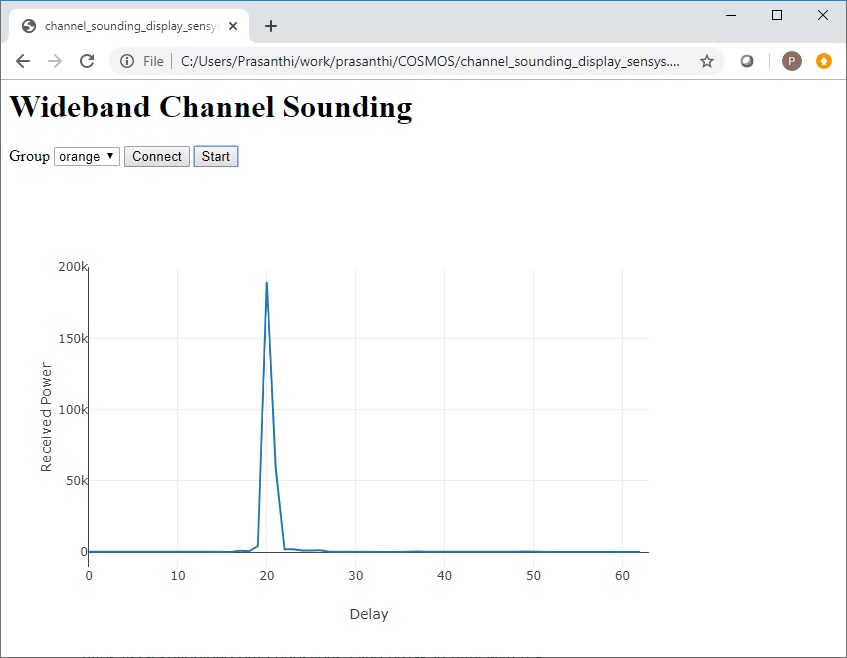
¶ Step 5 — Visualize the power delay profile
- Download
channel_sounding_display.htmlfrom (also attached at the bottom of the original tutorial page) and open it in your local browser. - Select your group color from the drop-down menu and click Connect.
- Click Start.
You should see the real-time PDP of the channel update in the browser.
¶ Verification
uhd_usrp_probeon each USRP shows all ten required RFNoC blocks (DmaFIFO_0, Radio_0, Radio_1, DDC_0, DUC_0, Corrmag63avg8k_0, Spreader_0, SpecSense2k_0, FIFO_0, FIFO_1).- With both
channel_sounding_txandchannel_sounding_rxrunning,channel_sounding_display.htmldisplays a live PDP with visible multipath peaks rather than a flat noise floor.
¶ Cleanup
omf tell -a offh -t system:topo:group-red
No omf save is needed unless you modified the image.
¶ Troubleshooting
| Symptom | Likely cause | Fix |
|---|---|---|
uhd_usrp_probe cannot reach USRP |
Wrong IP or node not on data network | Confirm your group's TX/RX IPs from the table; verify the node can ping the USRP IP |
| Missing RFNoC blocks in probe output | USRP loaded with wrong bitfile | Reload the USRP firmware/bitfile or contact testbed support |
channel_sounding_rx produces no data |
TX not running or mismatched group | Confirm channel_sounding_tx --group <color> is streaming on the TX node |
| Browser display shows no PDP / cannot connect | Wrong group selected or RX not running | Verify the group color in the drop-down matches your assigned group; confirm RX application is running |
¶ References
- COSMOS workflow
- SSH access to console
- ORBIT grid massive MIMO mini-racks
- UHD / RFNoC documentation
- OMF commands reference
Author(s): COSMOS team · Last verified: Not re-tested (migrated 2026-06-20) · Tested image/release: channel-sounder.ndz · Tags: channel-sounding, usrp, x310, rfnoc, pdp, mimo, wideband