¶ Getting Started with Alveo FPGA Acceleration
Run an accelerated FPGA kernel on a COSMOS compute server equipped with an Xilinx Alveo U200 card, using the Vitis unified software platform and a prebuilt matrix-multiplication example.
¶ Overview
COSMOS compute servers (and ORBIT Sandbox 9 cloud computing nodes) are equipped with Xilinx Alveo U200 accelerator cards, each containing a Virtex UltraScale+ XCU200-2FSGD2104E FPGA. These cards are connected to an Intel Xeon host CPU over a PCIe Gen3 x16 bus and are well suited to accelerating compute-intensive workloads such as machine learning and video processing.
This tutorial demonstrates how to validate the Alveo card, flash the correct deployment shell if needed, and run a pre-built hardware-accelerated matrix multiplication kernel on the platform. The Vitis unified software platform 2019.2 and the Xilinx RunTime (XRT) library are used for deployment.
¶ Learning outcomes
After completing this tutorial you will be able to:
- Load and boot a COSMOS node with the
alveo-runtime.ndzimage. - Validate an Alveo U200 card's PCIe presence and firmware shell using
lspciandxbmgmt. - Flash the correct deployment shell onto the card when the firmware is out of date.
- Run a hardware-accelerated OpenCL application (matrix multiplication) on the FPGA.
- Open the Vitis Analyzer to inspect system-estimate reports and hardware-emulation waveforms.
¶ At a glance
| Difficulty | Intermediate |
| Estimated time | 60 min |
| Domain / sandbox | COSMOS BED domain (console.bed.cosmos-lab.org) |
| Topic group | Cloud & Edge Computing |
| Last verified | Not re-tested (migrated 2026-06-20) |
¶ Prerequisites
Background knowledge
- Familiarity with the COSMOS experiment workflow — see the COSMOS workflow page.
- Basic understanding of PCIe, FPGAs, and OpenCL host–device programming is helpful but not required.
Account & access
- A COSMOS account — register here.
- An approved reservation on the COSMOS BED domain — see Make a reservation.
- SSH access to the domain console — see SSH access.
¶ Resources required
Devices / nodes
| Resource | Role | Qty | Notes |
|---|---|---|---|
srv1-lg1 |
Compute server with Alveo U200 | 1 | COSMOS BED domain; Alveo U200 on PCIe Gen3 x16. Source also mentions nodes in ORBIT SB9 as an alternative. |
Disk images
| Image | Load onto | Provides |
|---|---|---|
alveo-runtime.ndz |
srv1-lg1 |
Vitis 2019.2, XRT (Xilinx RunTime), Alveo U200 XDMA deployment shell (xilinx_u200_xdma_201830_2), and pre-built Vitis-Tutorials examples including the matrix-multiplication xclbin files |
Software components
| Component | Version | Source |
|---|---|---|
| Vitis unified software platform | 2019.2 | preinstalled in alveo-runtime.ndz |
| XRT (Xilinx RunTime) | TODO: verify | preinstalled in alveo-runtime.ndz (/opt/xilinx/xrt/) |
| Alveo U200 XDMA deployment shell | xilinx_u200_xdma_201830_2 |
preinstalled in alveo-runtime.ndz |
| Vitis-Tutorials matrix-multiplication example | TODO: verify | cloned into ~/Vitis-Tutorials/docs/Pathway3/ on the image |
Spectrum / RF / special
Not applicable.
¶ Topology
One COSMOS compute server (srv1-lg1) with an Alveo U200 card attached over PCIe Gen3 x16. The host CPU communicates with the FPGA fabric via XRT and OpenCL API calls. No network interconnect between nodes is required for this tutorial.
¶ Setup
- Reserve the COSMOS BED resources and log into the console:
ssh <username>@console.bed.cosmos-lab.org - Make sure the target server is off before imaging:
omf tell -a offh -t srv1-lg1 - Load the Alveo runtime image:
omf load -i alveo-runtime.ndz -t srv1-lg1 - Once imaging completes, turn the node on and confirm it is up:
omf tell -a on -t srv1-lg1 omf stat -t srv1-lg1 - After the node has had time to power up and boot, SSH into it:
ssh root@srv1-lg1
¶ Instructions
¶ Step 1 — Validate the card and check the shell installation
Check whether the Alveo U200 card is present on the PCIe bus. If the card is successfully installed, two PCIe physical functions should appear per card — one for management and one for user.
root@srv1-lg1:~# sudo lspci -vd 10ee:
d8:00.0 Processing accelerators: Xilinx Corporation Device d000
        Subsystem: Xilinx Corporation Device 000e
        Flags: bus master, fast devsel, latency 0, IRQ 267, NUMA node 1
        Memory at f0000000 (32-bit, non-prefetchable) [size=32M]
        Memory at f2000000 (32-bit, non-prefetchable) [size=64K]
        Capabilities: [40] Power Management version 3
        Capabilities: [48] MSI: Enable- Count=1/1 Maskable- 64bit+
        Capabilities: [70] Express Endpoint, MSI 00
        Capabilities: [100] Advanced Error Reporting
        Capabilities: [1c0] #19
        Capabilities: [400] Access Control Services
        Kernel driver in use: xclmgmt
        Kernel modules: xclmgmt
If only the management function (d8:00.0) appears (as above), the FPGA firmware needs to be updated before proceeding.
¶ Step 2 — Flash the deployment shell (if needed)
If the previous step showed only the management function, flash the correct deployment shell. The image ships with xilinx_u200_xdma_201830_2. This step takes a few minutes.
root@srv1-lg1:~# sudo /opt/xilinx/xrt/bin/xbmgmt flash --update --shell xilinx_u200_xdma_201830_2
         Status: shell needs updating
         Current shell: xilinx_u200_GOLDEN_3
         Shell to be flashed: xilinx_u200_xdma_201830_2
Are you sure you wish to proceed? [y/n]: y

Updating SC firmware on card[0000:d8:00.0]
INFO: found 4 sections
.....................................
INFO: Loading new firmware on SC

Updating shell on card[0000:d8:00.0]
INFO: ***Found 700 ELA Records
Idcode byte[0] ff
Idcode byte[1] 20
Idcode byte[2] bb
Idcode byte[3] 21
Idcode byte[4] 10
Enabled bitstream guard. Bitstream will not be loaded until flashing is finished.
Erasing flash...................................
Programming flash...................................
Cleared bitstream guard. Bitstream now active.
Successfully flashed Card[0000:d8:00.0]

1 Card(s) flashed successfully.
Cold reboot machine to load the new image on card(s).
After flashing, power-cycle the node from the console:
omf tell -a offh -t srv1-lg1
omf tell -a on -t srv1-lg1
Wait for the node to boot, then SSH back in:
ssh root@srv1-lg1
Run lspci again to confirm both functions now appear:
root@srv1-lg1:~# lspci -vd 10ee:
d8:00.0 Processing accelerators: Xilinx Corporation Device 5000
        Subsystem: Xilinx Corporation Device 000e
        Flags: bus master, fast devsel, latency 0, NUMA node 1
        Memory at 387ff2000000 (64-bit, prefetchable) [size=32M]
        Memory at 387ff4000000 (64-bit, prefetchable) [size=128K]
        Capabilities: [40] Power Management version 3
        Capabilities: [60] MSI-X: Enable+ Count=33 Masked-
        Capabilities: [70] Express Endpoint, MSI 00
        Capabilities: [100] Advanced Error Reporting
        Capabilities: [1c0] #19
        Capabilities: [400] Access Control Services
        Capabilities: [410] #15
        Kernel driver in use: xclmgmt
        Kernel modules: xclmgmt

d8:00.1 Processing accelerators: Xilinx Corporation Device 5001
        Subsystem: Xilinx Corporation Device 000e
        Flags: bus master, fast devsel, latency 0, IRQ 289, NUMA node 1
        Memory at 387ff0000000 (64-bit, prefetchable) [size=32M]
        Memory at 387ff4020000 (64-bit, prefetchable) [size=64K]
        Memory at 387fe0000000 (64-bit, prefetchable) [size=256M]
        Capabilities: [40] Power Management version 3
        Capabilities: [60] MSI-X: Enable+ Count=33 Masked-
        Capabilities: [70] Express Endpoint, MSI 00
        Capabilities: [100] Advanced Error Reporting
        Capabilities: [400] Access Control Services
        Capabilities: [410] #15
        Kernel driver in use: xocl
        Kernel modules: xocl
Both d8:00.0 (management, xclmgmt) and d8:00.1 (user, xocl) must be present before proceeding.
¶ Step 3 — Confirm shell and firmware versions
Scan the card to verify the firmware version installed on the FPGA matches the deployment shell installed on the host:
root@srv1-lg1:~# /opt/xilinx/xrt/bin/xbmgmt flash --scan
Card [0000:d8:00.0]
    Card type:          u200
    Flash type:         SPI
    Flashable partition running on FPGA:
        xilinx_u200_xdma_201830_2,[ID=0x000000005d1211e8],[SC=4.2.0]
    Flashable partitions installed in system:
        xilinx_u200_xdma_201830_2,[ID=0x000000005d1211e8],[SC=4.2.0]
The "running on FPGA" and "installed in system" IDs must match.
¶ Step 4 — Validate the card with xbutil
Run the full card validation suite:
root@srv1-lg1:~# /opt/xilinx/xrt/bin/xbutil validate
INFO: Found 1 cards

INFO: Validating card[0]: xilinx_u200_xdma_201830_2
INFO: == Starting AUX power connector check:
INFO: == AUX power connector check PASSED
INFO: == Starting PCIE link check:
INFO: == PCIE link check PASSED
INFO: == Starting verify kernel test:
Host buffer alignment 4096 bytes
Compiled kernel = /opt/xilinx/dsa/xilinx_u200_xdma_201830_2/test/verify.xclbin
Error
Exception:
argument 1: <type 'exceptions.TypeError'>: Don't know how to convert parameter 1
FAILED TEST

ERROR: == verify kernel test FAILED
INFO: Card[0] failed to validate.

ERROR: Some cards failed to validate.
If the verify kernel test fails as shown above, reload the XRT kernel modules and re-validate:
root@srv1-lg1:~# rmmod xocl
root@srv1-lg1:~# rmmod xclmgmt
root@srv1-lg1:~# modprobe xocl
root@srv1-lg1:~# modprobe xclmgmt
root@srv1-lg1:~# /opt/xilinx/xrt/bin/xbutil validate
INFO: Found 1 cards

INFO: Validating card[0]: xilinx_u200_xdma_201830_2
INFO: == Starting AUX power connector check:
INFO: == AUX power connector check PASSED
INFO: == Starting PCIE link check:
INFO: == PCIE link check PASSED
INFO: == Starting verify kernel test:
INFO: == verify kernel test PASSED
INFO: == Starting DMA test:
Buffer Size: 256 MB
Host -> PCIe -> FPGA write bandwidth = 8402.31 MB/s
Host <- PCIe <- FPGA read bandwidth = 12156.5 MB/s
INFO: == DMA test PASSED
INFO: == Starting device memory bandwidth test:
...........
Maximum throughput: 52428 MB/s
INFO: == device memory bandwidth test PASSED
INFO: == Starting PCIE peer-to-peer test:
P2P BAR is not enabled. Skipping validation
INFO: == PCIE peer-to-peer test SKIPPED
INFO: == Starting memory-to-memory DMA test:
bank0 -> bank1 M2M bandwidth: 11990.1 MB/s
bank0 -> bank2 M2M bandwidth: 12025.6 MB/s
bank0 -> bank3 M2M bandwidth: 12038 MB/s
bank1 -> bank2 M2M bandwidth: 12057.3 MB/s
bank1 -> bank3 M2M bandwidth: 12025 MB/s
bank2 -> bank3 M2M bandwidth: 12058.4 MB/s
INFO: == memory-to-memory DMA test PASSED
INFO: Card[0] validated successfully.

INFO: All cards validated successfully.
The card is ready once All cards validated successfully. is printed.
¶ Step 5 — Run the accelerated matrix multiplication application
Multiple Vitis example applications from the Xilinx repositories have been cloned onto the node image. A matrix multiplication example from the Vitis-Tutorials repository is used here. The xclbin files for software emulation, hardware emulation, and the hardware target have been pre-built on the image. Run the accelerated application on the Alveo U200 target:
root@srv1-lg1:~/Vitis-Tutorials/docs/Pathway3/reference-files/run# ./host mmult.hw.xilinx_u200_xdma_201830_2.xclbin
Found Platform
Platform Name: Xilinx
INFO: Reading mmult.hw.xilinx_u200_xdma_201830_2.xclbin
Loading: 'mmult.hw.xilinx_u200_xdma_201830_2.xclbin'

INPUT MATRIX
0 1 2 3 4 5 6 7 8 9 0 1 2 3 4 5
6 7 8 9 0 1 2 3 4 5 6 7 8 9 0 1
2 3 4 5 6 7 8 9 0 1 2 3 4 5 6 7
8 9 0 1 2 3 4 5 6 7 8 9 0 1 2 3
4 5 6 7 8 9 0 1 2 3 4 5 6 7 8 9
0 1 2 3 4 5 6 7 8 9 0 1 2 3 4 5
6 7 8 9 0 1 2 3 4 5 6 7 8 9 0 1
2 3 4 5 6 7 8 9 0 1 2 3 4 5 6 7
8 9 0 1 2 3 4 5 6 7 8 9 0 1 2 3
4 5 6 7 8 9 0 1 2 3 4 5 6 7 8 9
0 1 2 3 4 5 6 7 8 9 0 1 2 3 4 5
6 7 8 9 0 1 2 3 4 5 6 7 8 9 0 1
2 3 4 5 6 7 8 9 0 1 2 3 4 5 6 7
8 9 0 1 2 3 4 5 6 7 8 9 0 1 2 3
4 5 6 7 8 9 0 1 2 3 4 5 6 7 8 9
0 1 2 3 4 5 6 7 8 9 0 1 2 3 4 5

OUTPUT MATRIX
250 310 230 290 270 330 220 280 230 290 250 310 230 290 270 330
330 406 262 338 254 330 356 432 318 394 330 406 262 338 254 330
250 322 294 366 298 370 312 384 286 358 250 322 294 366 298 370
250 318 306 374 222 290 248 316 334 402 250 318 306 374 222 290
290 374 298 382 366 450 344 428 382 466 290 374 298 382 366 450
250 310 230 290 270 330 220 280 230 290 250 310 230 290 270 330
330 406 262 338 254 330 356 432 318 394 330 406 262 338 254 330
250 322 294 366 298 370 312 384 286 358 250 322 294 366 298 370
250 318 306 374 222 290 248 316 334 402 250 318 306 374 222 290
290 374 298 382 366 450 344 428 382 466 290 374 298 382 366 450
250 310 230 290 270 330 220 280 230 290 250 310 230 290 270 330
330 406 262 338 254 330 356 432 318 394 330 406 262 338 254 330
250 322 294 366 298 370 312 384 286 358 250 322 294 366 298 370
250 318 306 374 222 290 248 316 334 402 250 318 306 374 222 290
290 374 298 382 366 450 344 428 382 466 290 374 298 382 366 450
250 310 230 290 270 330 220 280 230 290 250 310 230 290 270 330

TEST PASSED
The host code uses OpenCL API calls to transfer both input matrices to the FPGA, configure the kernel, launch the computation, and read the output matrix back. The received result is compared against a host-side computation.
¶ Step 6 — Analyze FPGA kernel performance (optional)
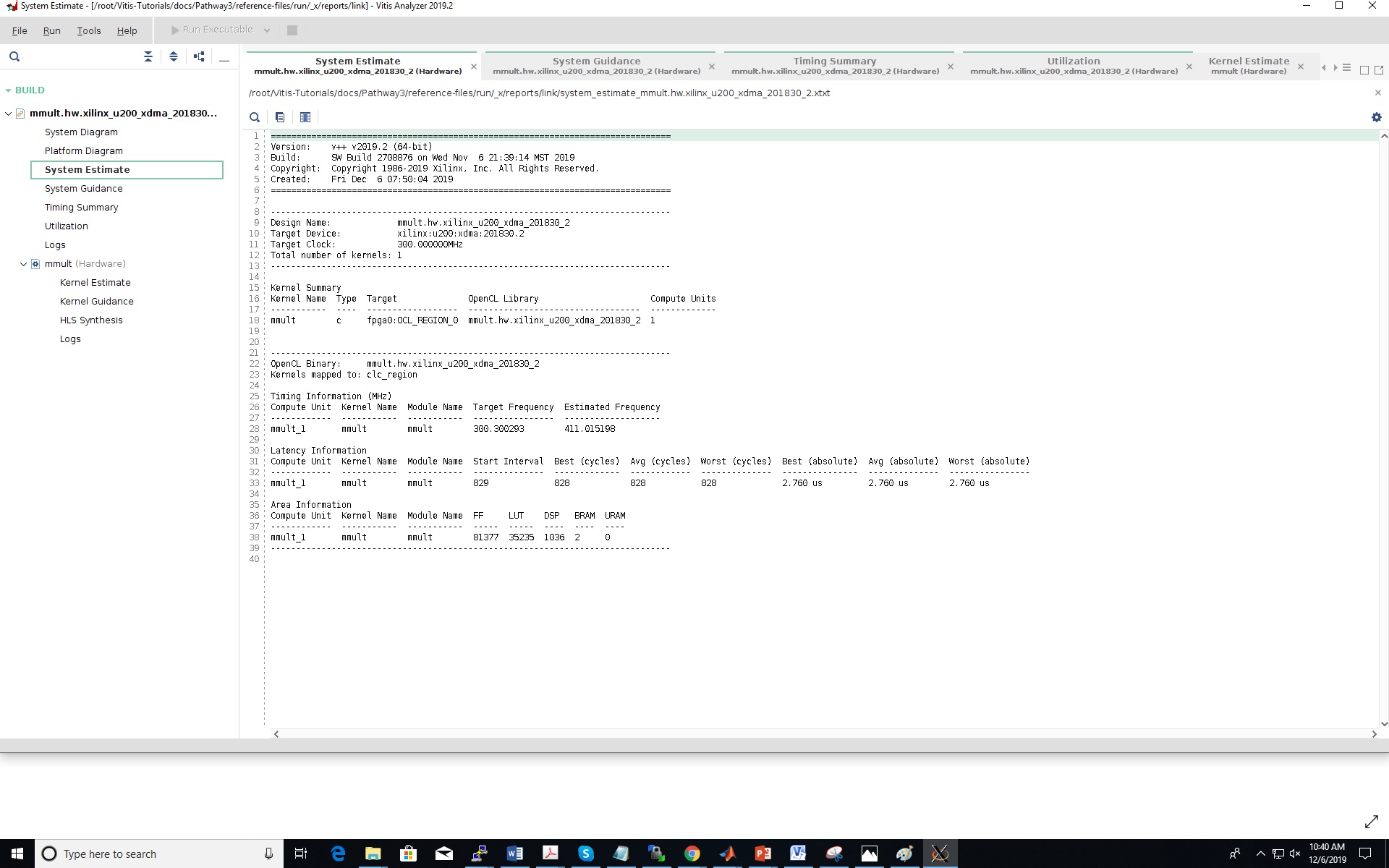
Vitis provides profile summary, timeline trace, and waveform view reports. Use Vitis Analyzer to inspect them.
System estimate report — generated when the hardware target xclbin was built; shows resource usage, clock frequency, and kernel latency estimates:
root@srv1-lg1:~/Vitis-Tutorials/docs/Pathway3/reference-files/run# vitis_analyzer mmult.hw.xilinx_u200_xdma_201830_2.xclbin.link_summary
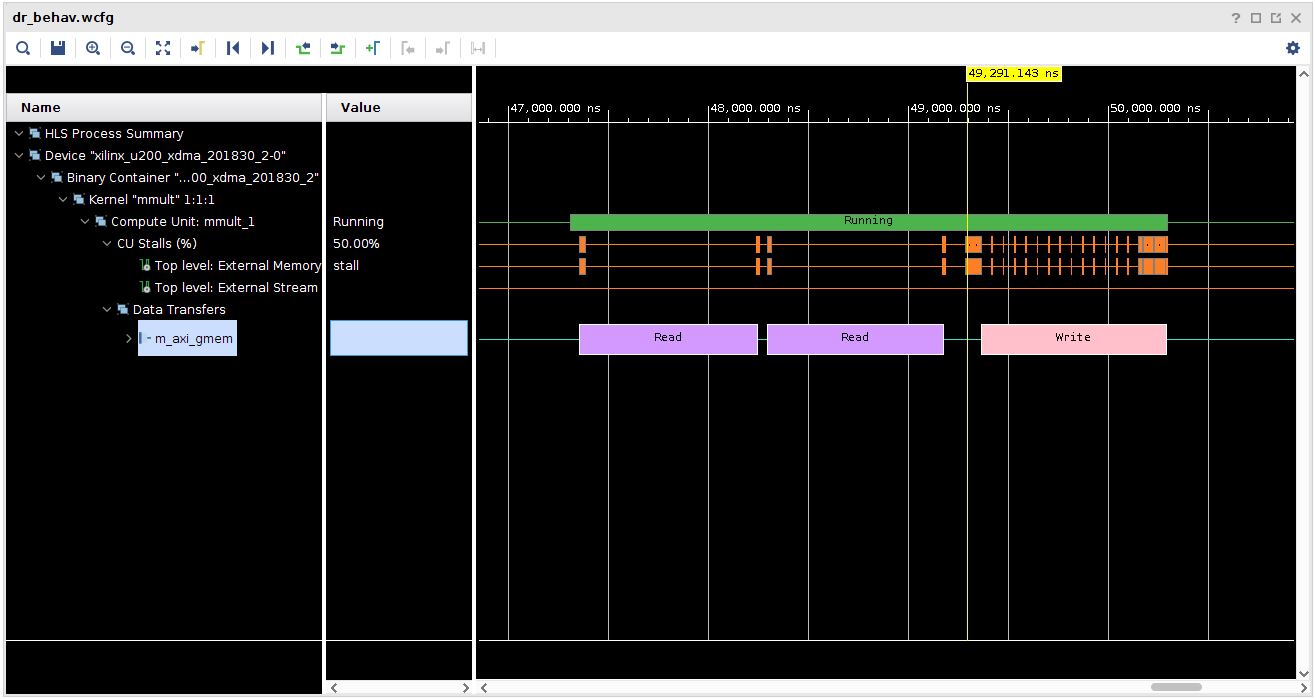
Waveform view (hardware emulation) — enable waveform capture by editing xrt.ini, then run the hardware emulation binary:
export XCL_EMULATION_MODE=hw_emu
root@srv1-lg1:~/Vitis-Tutorials/docs/Pathway3/reference-files/run# ./host mmult.hw_emu.xilinx_u200_xdma_201830_2.xclbin
¶ Verification
lspci -vd 10ee:lists two PCIe functions per Alveo card — one withxclmgmt(management) and one withxocl(user).xbmgmt flash --scanshows matching IDs for "running on FPGA" and "installed in system".xbutil validatereportsAll cards validated successfully../host mmult.hw.xilinx_u200_xdma_201830_2.xclbinprintsTEST PASSEDafter displaying the output matrix.
¶ Cleanup
omf tell -a offh -t srv1-lg1
No omf save is needed unless you modified the image (e.g. built custom kernels).
¶ Troubleshooting
| Symptom | Likely cause | Fix |
|---|---|---|
lspci -vd 10ee: shows only one function (d8:00.0) |
Firmware not updated to the deployment shell | Run xbmgmt flash --update --shell xilinx_u200_xdma_201830_2, then cold-reboot the node via omf tell -a offh + omf tell -a on |
xbutil validate fails with "verify kernel test FAILED" |
XRT kernel modules in bad state | rmmod xocl; rmmod xclmgmt; modprobe xocl; modprobe xclmgmt, then retry xbutil validate |
xbmgmt flash --scan shows mismatched IDs |
Shell update incomplete or different version in image | Re-run xbmgmt flash --update --shell xilinx_u200_xdma_201830_2 and cold-reboot |
./host fails to open xclbin |
Wrong working directory or missing file | Confirm you are in ~/Vitis-Tutorials/docs/Pathway3/reference-files/run/ and the .xclbin file exists |
¶ References
- Alveo U200 Getting Started Guide (Xilinx UG1301)
- Vitis-Tutorials Pathway3 (matrix multiplication example)
- COSMOS BED domain hardware
- COSMOS workflow / getting started
- Make a reservation
- SSH access
Author(s): COSMOS team · Last verified: Not re-tested (migrated 2026-06-20) · Tested image/release: alveo-runtime.ndz / Vitis 2019.2 · Tags: fpga, alveo, xilinx, vitis, xrt, edge-computing, acceleration