¶ Open Spatial Computing Platform (OSCP)
Deploy the Open Spatial Computing Platform (OSCP) services — Spatial Service Discovery (SSD) and Spatial Content Discovery (SCD) — on a COSMOS edge compute node.
¶ Overview
The Open Spatial Computing Platform (OSCP) is an open framework for spatial AR/XR services. It provides two core discovery services: the Spatial Service Discovery (SSD) service allows clients to find nearby AR services registered for a geographic area, and the Spatial Content Discovery (SCD) service allows clients to discover spatial content anchored to physical locations.
This tutorial walks through installing and running both services on a COSMOS node. Each service is a Node.js application managed by pm2 and served behind nginx. An optional extra NVMe disk can be mounted for data storage.
¶ Learning outcomes
After completing this tutorial you will be able to:
- Mount and configure an extra NVMe disk for persistent data storage on a COSMOS node.
- Install a specific Node.js LTS version using the
nversion manager. - Clone, build, and configure the OSCP Spatial Service Discovery (SSD) service.
- Clone, build, and configure the OSCP Spatial Content Discovery (SCD) service.
- Start and manage both services with
pm2.
¶ At a glance
| Difficulty | Intermediate |
| Estimated time | 90 min |
| Domain / sandbox | TODO: verify — not specified in source; a COSMOS node with edge compute capability (NVMe storage recommended) |
| Topic group | Cloud & Edge |
| Last verified | Not re-tested (migrated 2026-06-20) |
¶ Prerequisites
Background knowledge
- Familiarity with Linux command-line administration (package installation, file editing, disk mounting).
- Basic understanding of Node.js and npm.
- Optional: familiarity with Auth0 for authentication configuration.
Account & access
- A COSMOS account — register here.
- An approved reservation on the domain above — see Make a reservation.
- SSH access to the domain console — see SSH access.
¶ Resources required
Devices / nodes
| Resource | Role | Qty | Notes |
|---|---|---|---|
| TODO: verify | Edge compute node running OSCP services | 1 | NVMe secondary disk recommended for data storage (/dev/nvme1n1) |
Disk images
| Image | Load onto | Provides |
|---|---|---|
| TODO: verify | Edge compute node | Ubuntu with ubuntu user; sudo access; internet connectivity for npm/git |
Software components
| Component | Version | Source |
|---|---|---|
| Node.js | LTS (installed via n) |
https://raw.githubusercontent.com/tj/n/master/bin/n |
npm n version manager |
latest | sudo npm install -g n |
| nginx | distro default | apt install nginx |
| pm2 | latest | sudo npm install pm2 -g |
| oscp-spatial-service-discovery | latest (main) |
https://github.com/OpenArCloud/oscp-spatial-service-discovery.git |
| oscp-spatial-content-discovery | latest (main) |
https://github.com/OpenArCloud/oscp-spatial-content-discovery.git |
¶ Topology
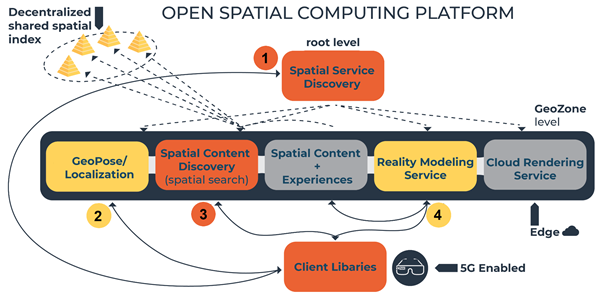
A single COSMOS node hosts both OSCP services. Each service listens on a dedicated TCP port (SSD: 4100, SCD: 3100) and is managed by pm2. In a full deployment, nginx would front both services and DNS records would point to the node's public address. In this tutorial, /etc/hosts entries substitute for DNS.
Not applicable (no SDR or RF resources used).
¶ Setup
-
Reserve the resources (see Prerequisites) and log into the console:
ssh <username>@console.<sandbox>.cosmos-lab.org -
SSH into the node:
ssh ubuntu@<node> -
Modify
/etc/hoststo add references for named services. In a real deployment this would require modifying DNS records:sudo nano /etc/hostsAdd entries for the service hostnames as needed by your deployment.
-
Make sure the resources are off before imaging:
omf tell -a offh -t system:topo:allres -
Load the image(s):
omf load -i <image>.ndz -t <target> -
Turn the nodes on and confirm they are up:
omf tell -a on -t <target>
omf stat -t <target>
¶ Instructions
¶ Step 1 — Create extra disk space (if needed)
If the node has a secondary NVMe disk (/dev/nvme1n1), format and mount it for data storage:
sudo mkfs -t xfs /dev/nvme1n1
sudo mkdir /data
sudo mount /dev/nvme1n1 /data
sudo cp /etc/fstab /etc/fstab.orig
sudo lsblk -o +UUID
Note the UUID printed for /dev/nvme1n1. Then update /etc/fstab with a new line (replace the UUID below with the one from the previous command):
UUID=4cec62c2-7f6b-4141-86f7-8c2a38e6f3fa /data xfs defaults,nofail 0 2
Remount and verify, then set ownership:
sudo umount /data
sudo mount -a
sudo chown ubuntu:ubuntu /data
¶ Step 2 — Install prerequisite packages
Install the Node.js LTS version using the n version manager:
curl -L https://raw.githubusercontent.com/tj/n/master/bin/n -o n
sudo bash n lts
sudo npm install -g n
Install nginx and pm2:
sudo apt update
sudo apt install nginx
sudo npm install pm2 -g
¶ Step 3 — Install Spatial Service Discovery (SSD)
Create a folder for the code and build files (the path is your choice):
mkdir /data/ssddev
cd /data/ssddev
Create a folder for the data store (the path is your choice; it will be referenced in the .env file via KAPPA_CORE_DIR):
mkdir data
git clone https://github.com/OpenArCloud/oscp-spatial-service-discovery.git
cd oscp-spatial-service-discovery
Optionally disable authentication (not recommended for production deployments):
cp src/router-noauth.ts src/router.ts
Install the dependencies and build the project:
npm install
npm run-script build
Add an appropriate .env file:
touch .env
nano .env
Make sure it contains the following (adjust paths and values for your deployment):
KAPPA_CORE_DIR="/home/native/dev/ssd_data"
SWARM_TOPIC_PREFIX="orbit_ssd"
AUTH0_ISSUER=https://ssd-oscp.us.auth0.com/
AUTH0_AUDIENCE=https://ssd.orbit-lab.org
COUNTRIES=AT,BE,BG,CY,CZ,DE,DK,EE,ES,FI,FR,GR,HR,HU,IE,IT,LT,LV,LU,MT,NL,PL,PT,RO,SE,SI,SK,US
PORT=4100
WARNING: Having or not having a trailing slash in
AUTH0_AUDIENCEmust match the entry configured in Auth0. In addition, the way the username is extracted from JSON Web Tokens with thejwt-decodelibrary assumes there is no trailing slash in the audience URI.
WARNING: The trailing
/inAUTH0_ISSUERis important. Without it, the client's POST request will return an error thathttps://ssd-oscp.us.auth0.com.well-knownis not found.
Start the service:
pm2 start dist/server.js --name ssd_orbit
¶ Step 4 — Install Spatial Content Discovery (SCD)
Create a folder for the code and build files (the path is your choice):
mkdir /data/scddev
cd /data/scddev
Create a folder for the data store:
mkdir data
git clone https://github.com/OpenArCloud/oscp-spatial-content-discovery.git
cd oscp-spatial-content-discovery
Optionally disable authentication (not recommended for production):
cp src/router-noauth.ts src/router.ts
Install the dependencies and build the project:
npm install
npm run-script build
Add an appropriate .env file:
touch .env
nano .env
Make sure it contains:
KAPPA_CORE_DIR="/home/native/dev/scd_data"
AUTH0_ISSUER=https://scd-oscp.us.auth0.com/
AUTH0_AUDIENCE=https://scd.orbit-lab.org
GEOZONE="4671654"
TOPICS="transit,history,entertainment,general"
PORT=3100
WARNING: Having or not having a trailing slash in
AUTH0_AUDIENCEmust match the entry in Auth0.
WARNING: The trailing
/inAUTH0_ISSUERis important. Without it, the client's POST request will return an error thathttps://scd-oscp.us.auth0.com.well-knownis not found.
Start the service:
pm2 start dist/server.js --name scd_orbit
¶ Verification
Check that both services are running with pm2:
pm2 list
Both ssd_orbit and scd_orbit should appear with status online.
Test that each service responds on its port:
curl http://localhost:4100    # SSD
curl http://localhost:3100    # SCD
TODO: verify — the source does not include expected response content or client-side test steps; add endpoint-specific smoke tests once confirmed.
¶ Cleanup
pm2 stop ssd_orbit
pm2 stop scd_orbit
omf tell -a offh -t system:topo:allres
(No omf save needed unless you customized the image and wish to preserve it.)
¶ Troubleshooting
| Symptom | Likely cause | Fix |
|---|---|---|
npm run-script build fails |
Node.js version mismatch | Re-run sudo bash n lts && sudo npm install -g n; verify node --version |
pm2 start exits immediately |
Build output missing or .env path wrong |
Run ls dist/server.js; verify npm run-script build completed without errors |
Auth0 POST returns error about .well-known not found |
Missing trailing / in AUTH0_ISSUER |
Ensure AUTH0_ISSUER value ends with / in .env |
| Auth token rejected | Trailing slash mismatch in AUTH0_AUDIENCE vs Auth0 app settings |
Match exactly (with or without trailing slash) on both sides |
/data not mounted after reboot |
/etc/fstab entry missing or wrong UUID |
Check sudo lsblk -o +UUID and verify the fstab entry matches |
¶ References
- OpenArCloud / oscp-spatial-service-discovery — TODO: verify correct URL
- OpenArCloud / oscp-spatial-content-discovery
- OpenArCloud project
- pm2 documentation
- n — Node.js version manager
Author(s): COSMOS team · Last verified: Not re-tested (migrated 2026-06-20) · Tested image/release: TODO: verify · Tags: edge, cloud-edge, oscp, spatial-computing, ar, node.js, pm2, nginx