¶ Signal Transmission — Visualizing AM and FM Waves (Grade 8)
Teach the properties of waves by visualizing amplitude-modulated (AM) and frequency-modulated (FM) signals in the time and frequency domains using software-defined radios on the COSMOS testbed.
¶ Overview
This tutorial is part of the COSMOS Education Toolkit series and targets the MS-PS4-1 Next Generation Science Standard. Students use two SDR nodes on the COSMOS testbed as a transmitter–receiver pair to observe FM signals in real time. The experiment is driven entirely through a web interface served by the toolkit software; no manual command-line radio configuration is required.
One node acts as the FM receiver: it listens on a selected center frequency (400 MHz, 2.4 GHz, or 5 GHz), demodulates the incoming FM signal, and streams the audio over TCP. The other node acts as the FM transmitter. Students switch roles, observe the spectrum display, and record their findings before sharing out as a class.
The tutorial assumes the COSMOS Education Toolkit setup steps (web server, GNU Radio flowgraphs, etc.) have already been completed by following the Education Toolkit parent tutorial.
¶ Learning outcomes
After completing this tutorial you will be able to:
- Explain the difference between amplitude modulation (AM) and frequency modulation (FM) in terms of wave properties.
- Observe the spectrum of an FM signal at the transmitter and compare it with what is received.
- Describe how the amplitude of a wave is related to its energy.
- Use the COSMOS Education Toolkit web interface to start and stop a remote transmit/receive experiment.
- Interpret time-domain and frequency-domain plots of a real-world RF signal.
¶ At a glance
| Difficulty | Beginner |
| Estimated time | 45 min |
| Domain / sandbox | Sandbox 1 — console.sb1.cosmos-lab.org |
| Topic group | Education Toolkit |
| Last verified | Node names and image verified 2026-08-03 (lesson not re-run end-to-end) |
¶ Prerequisites
Background knowledge
- Completion of the COSMOS Education Toolkit setup tutorial — the toolkit web server must be running before this experiment can be conducted.
- Basic concepts of waves: frequency, wavelength, amplitude.
- MS-PS4-1 background reading on wave properties (provided in the toolkit lesson plan).
Account & access
- A COSMOS account — register here.
- An approved reservation on the domain above — see Make a reservation.
- SSH access to the domain console — see SSH access.
¶ Resources required
Devices / nodes
| Resource | Role | Qty | Notes |
|---|---|---|---|
sdr2-s1-lg1 |
Node #1 (receiver or transmitter) | 1 | SDR node on the Main Rooftop SDR deployment; USRP Krypton 2974 via PCIe |
sdr2-md1 |
Node #2 (transmitter or receiver) | 1 | SDR node on the Main Rooftop SDR deployment; USRP Krypton 2974 via PCIe |
Disk images
| Image | Load onto | Provides |
|---|---|---|
education-toolkit.ndz |
sdr2-s1-lg1, sdr2-md1 |
COSMOS Education Toolkit web server + GNU Radio FM flowgraphs |
Software components
| Component | Version | Source |
|---|---|---|
| COSMOS Education Toolkit | As shipped in education-toolkit.ndz |
Preinstalled in the toolkit image; web UI at http://localhost:8081 (node #1) / http://localhost:8082 (node #2) |
| GNU Radio | As shipped in education-toolkit.ndz |
Preinstalled in toolkit image |
| TCP audio client | As shipped in education-toolkit.ndz |
Attached to the toolkit — connects to the forwarded audio port (8101 node #1 / 8102 node #2) |
Spectrum / RF
Center frequency options: 400 MHz, 2.4 GHz, or 5 GHz (selected in the web interface). Experiment is conducted over the air between the two nodes. Ensure the reservation covers the chosen frequency band.
¶ Topology
Two SDR nodes (sdr2-s1-lg1 and sdr2-md1) on sandbox 1 transmit and receive FM signals over the air. Each node serves its interface on port 80, forwarded to the student's laptop as http://localhost:8081 (node #1, sdr2-s1-lg1) and http://localhost:8082 (node #2, sdr2-md1) by the toolkit setup. The receiver node additionally opens a TCP server on port 8100, forwarded as 8101 (node #1) / 8102 (node #2), to stream demodulated audio back to the student's local machine.
¶ Setup
The toolkit web server and GNU Radio back-end must already be running as described in the Education Toolkit parent tutorial. Once that is complete:
- Reserve
sdr2-s1-lg1andsdr2-md1on sandbox 1 and log into the console:ssh <username>@console.sb1.cosmos-lab.org - Confirm both nodes are powered on and reachable (the toolkit setup should have handled imaging):
omf stat -t sdr2-s1-lg1,sdr2-md1 - Open the toolkit web interface in a browser — each node has its own port:
http://localhost:8081for node #1 (sdr2-s1-lg1),http://localhost:8082for node #2 (sdr2-md1). If the setup was done correctly you will see the toolkit home page.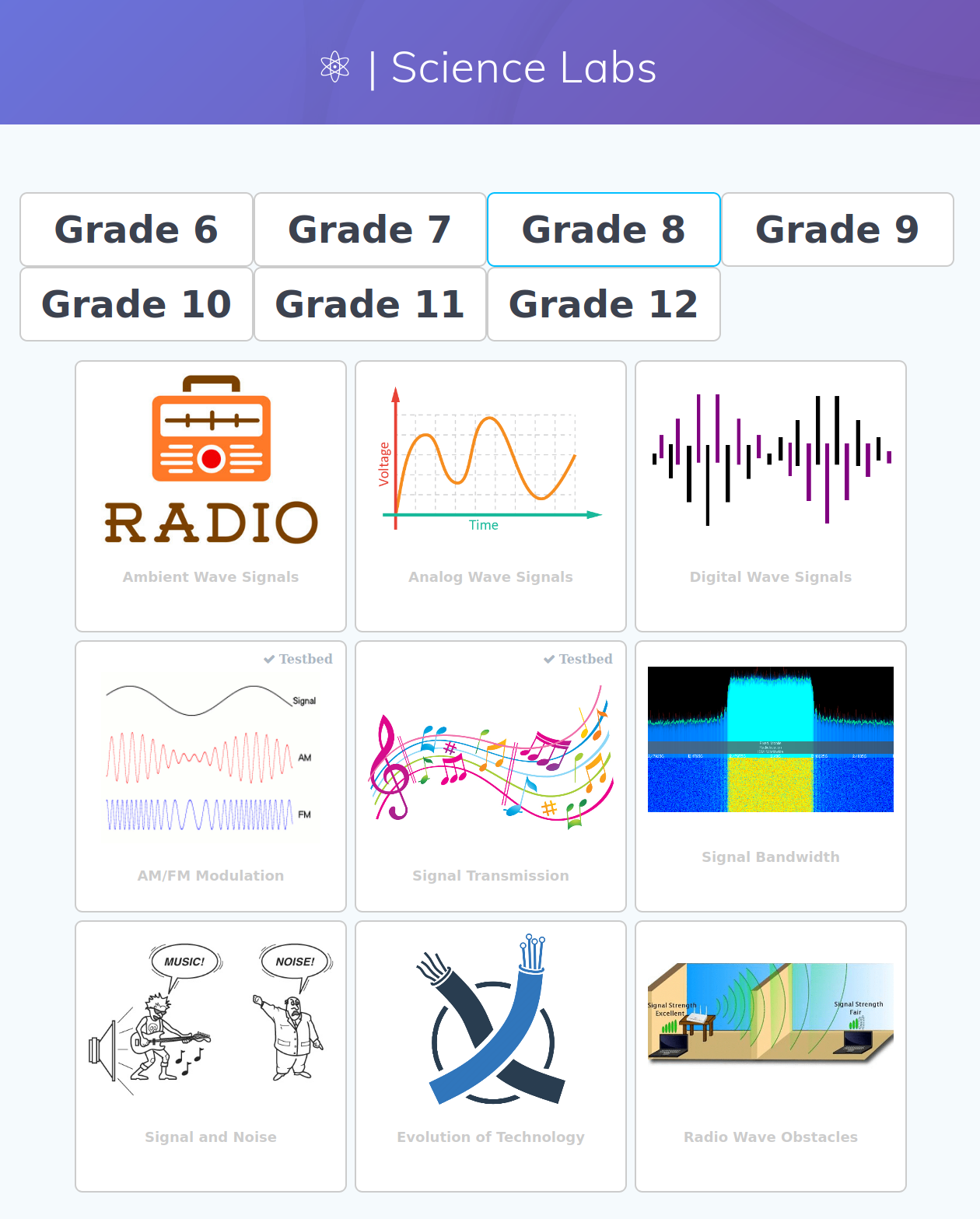
¶ Instructions
¶ Step 1 — Navigate to the Grade 8 Signal Transmission lesson
-
In the toolkit web interface, press the Science radio button to open the science lesson plan page.
-
Select Grade 8.
Note: The toolkit contains 100+ lesson plans and labs. Only a subset currently supports remote experimentation via the COSMOS website; the selection grows over time.
-
Select Signal Transmission from the Grade 8 lesson list.
The lesson page shows:
- A detailed description of the experiment.
- The MS-PS4-1 educational standard being addressed.
- Step-by-step experiment execution instructions.
-
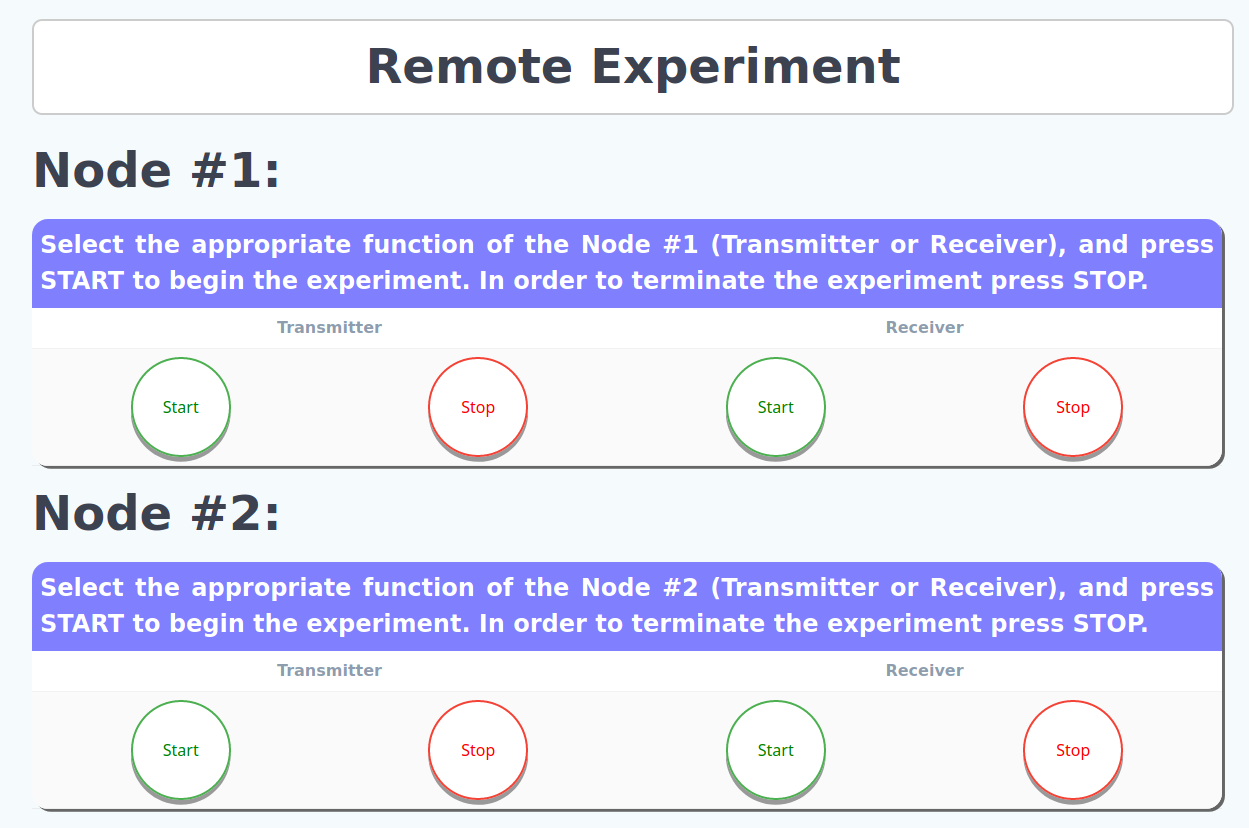
Expand the Remote Experiment section on that page to reveal the START/STOP controls for each node.
¶ Step 2 — Start the receiver
Press START under the receiver panel on either Node #1 (sdr2-s1-lg1) or Node #2 (sdr2-md1).
- The receiver begins listening on the selected center frequency (400 MHz, 2.4 GHz, or 5 GHz).
- It demodulates any incoming FM signal.
- It opens a TCP server on port
8100to stream the audio back to the local host.
In this tutorial Node #1 is
sdr2-s1-lg1and Node #2 issdr2-md1. If Node #1 is the receiver, then Node #2 will be the transmitter, and vice versa.
¶ Step 3 — Connect the local TCP audio client
Start the TCP client application on the student's local machine (distributed as part of the toolkit) to connect to the remote receiver and play back the incoming audio.
At this point students should hear noise only — the transmitter has not yet been started.
¶ Step 4 — Start the transmitter
Press START under the transmitter panel on the other node (whichever node is not the receiver in Step 2).
The transmitter begins sending an FM signal on the same center frequency.
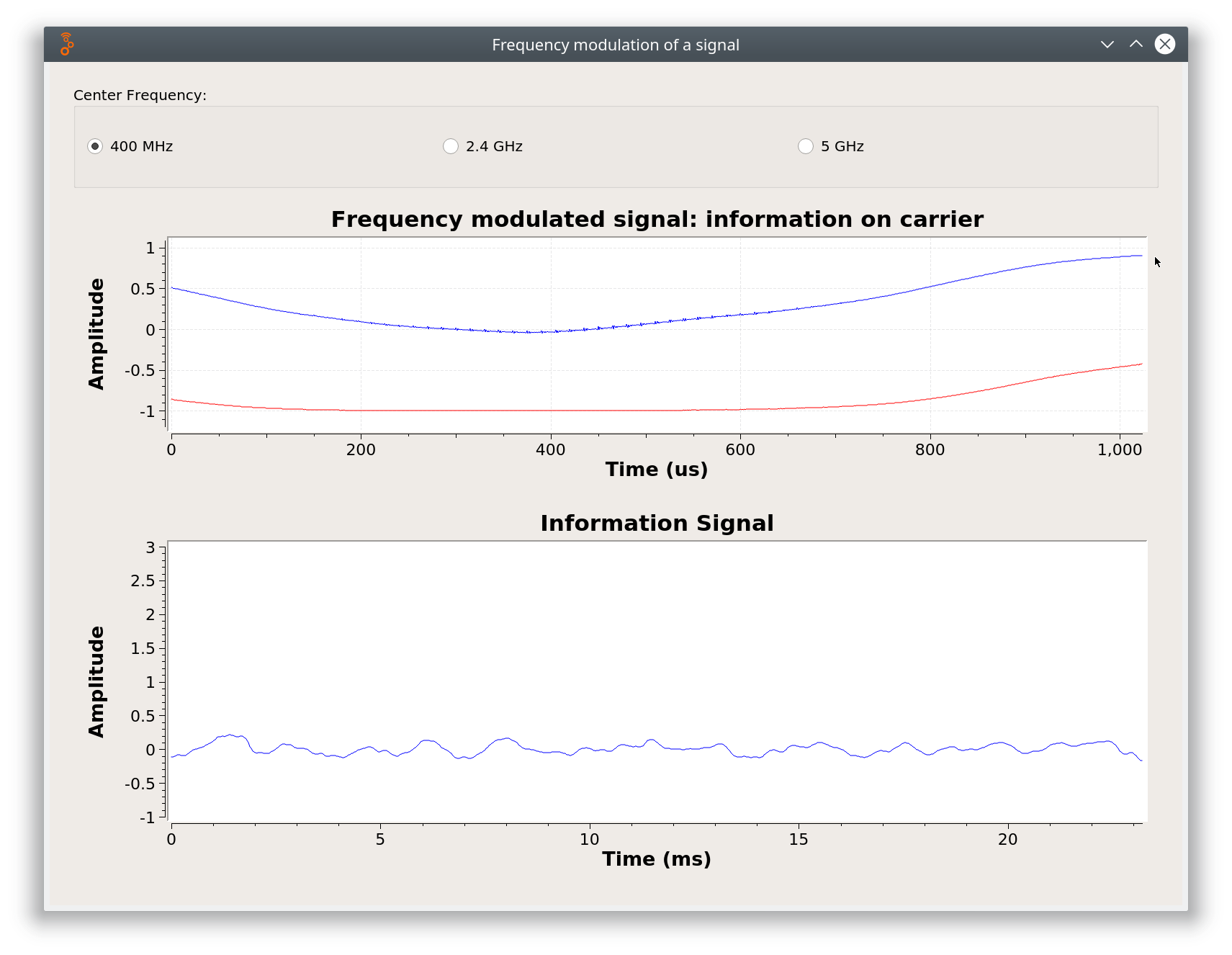
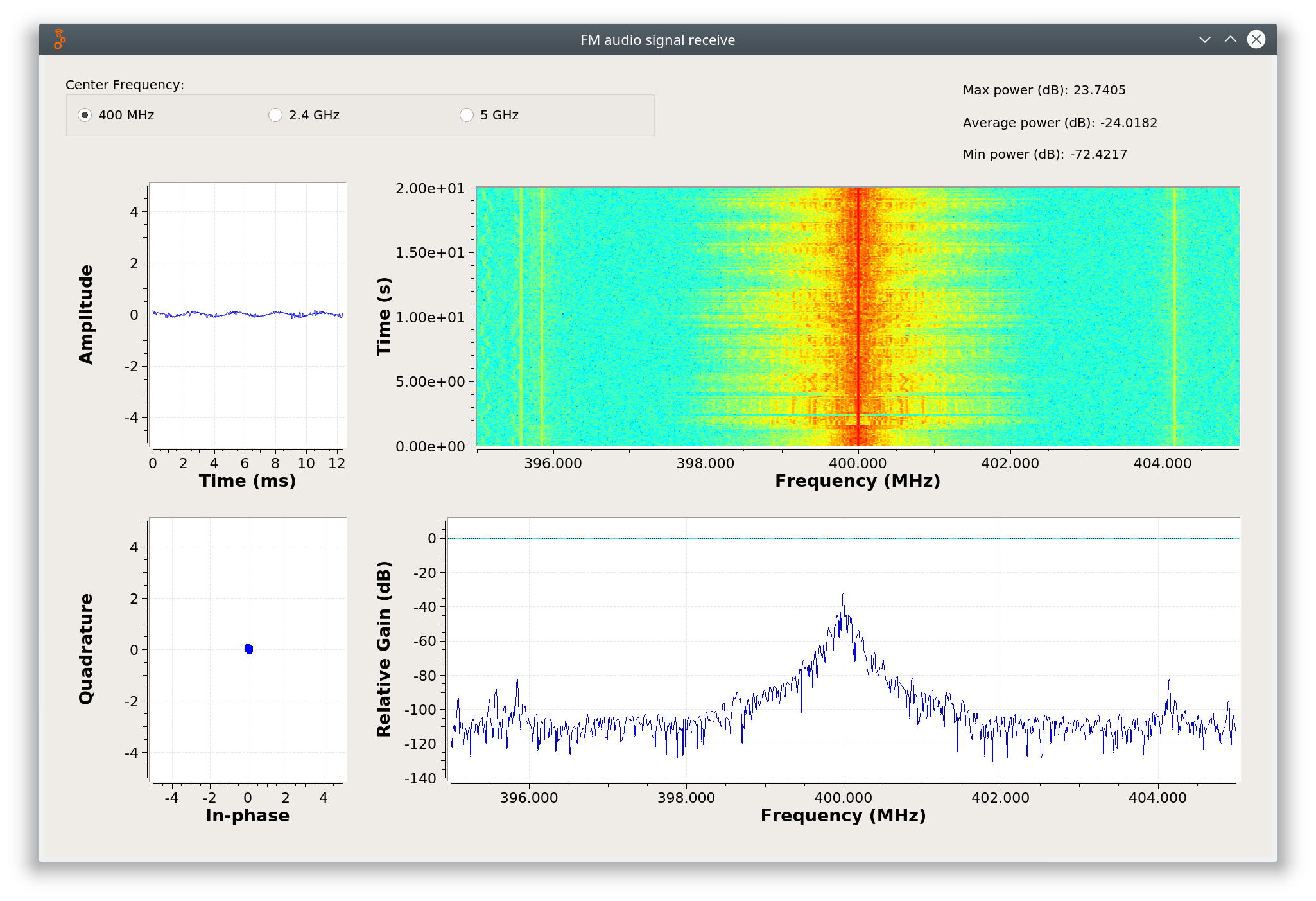
Observe the spectrum display in the web interface and record observations. Students should note changes in both the time-domain waveform and the frequency-domain spectrum as the transmitter comes on.
 |
 |
|---|---|
| (a) FM signal at the transmitter | (b) FM signal at the receiver |
¶ Step 5 — Stop the experiment and share observations
When the experiment is complete, press STOP on both the transmitter and the receiver nodes.
Students compare their observations of the FM signal and state their interpretations. After all students complete their handouts, conduct a class share-out of observations and comments.
¶ Verification
- After starting the receiver (Step 2), the audio client plays audible noise.
- After starting the transmitter (Step 4), the spectrum display shows a clear FM signal peak at the chosen center frequency, and any modulated audio becomes audible through the TCP client.
- Stopping the transmitter causes the FM peak in the spectrum display to disappear and the audio to return to noise.
¶ Cleanup
Press STOP on both nodes through the toolkit web interface, then power off from the console:
omf tell -a offh -t system:topo:allres
(No omf save needed unless the toolkit image was modified.)
¶ Troubleshooting
| Symptom | Likely cause | Fix |
|---|---|---|
Web interface at http://localhost:8081 / 8082 does not load |
Toolkit web server not started | Follow the Education Toolkit setup tutorial to start the server on the node |
Audio client cannot connect to port 8100 |
Receiver not yet started, or firewall/SSH tunnel misconfigured | Confirm the receiver node shows RUNNING in the web UI; verify the SSH tunnel forwarding port 8100 |
| No FM signal visible on the spectrum display | Transmitter not started, or center frequency mismatch between TX and RX | Confirm START was pressed on the transmitter panel and both nodes use the same frequency |
| Spectrum shows signal but audio is noise | Demodulation parameter mismatch | Stop both nodes and restart; verify toolkit software version |
¶ References
- COSMOS Education Toolkit parent tutorial
- NGSS MS-PS4-1 standard
- Available SDR hardware on COSMOS
- Make a reservation
- SSH access
Author(s): Panagiotis Skrimponis (NYU), Nikos Makris (NYU); COSMOS team · Last verified: Not re-run end-to-end; image access restored and node names verified 2026-08-03 · Tested image/release: education-toolkit.ndz (Sep 2020) · Tags: education, education-toolkit, fm, am, signal-transmission, grade-8, waves, sdr