¶ MobilityFirst Experiment 1 — mfping over Ethernet, WiFi, and OAI
Run simple mfping application across MobilityFirst routers, host stack, and GNRS
using Ethernet, WiFi, and OAI interfaces on a five-node sandbox.
¶ Overview
The MobilityFirst project was started
in 2010 with funding from the National Science Foundation's Future Internet
Architecture (FIA) program as one of the four clean-slate architectures. The major
design goals of the architecture are:
- Mobility as a norm with dynamic host and network mobility at scale
- Robustness with respect to intrinsic properties of the wireless medium
- Trustworthiness in the form of enhanced security and privacy for both mobile
networks and wired infrastructure - Support for context-aware pervasive mobile services, evolvable network services,
manageability, and economic viability
This tutorial describes running the simple mfping application using MobilityFirst
routers, host stack, and GNRS across three interface types: Ethernet (Experiment 1),
WiFi (Experiment 2), and OAI (Experiment 3). Only Experiment 1 (Ethernet) is fully
documented in the original source; Experiments 2 and 3 show topology diagrams only.
¶ Learning outcomes
After completing this tutorial you will be able to:
- Load a pre-built MobilityFirst image onto testbed nodes.
- Configure GNRS (Global Name Resolution Service) with node IP bindings.
- Start MobilityFirst routers using Click and host stacks using
mfstack. - Run
mfpingbetween two hosts through MobilityFirst routers over Ethernet.
¶ At a glance
| Difficulty | Intermediate |
| Estimated time | 90 min |
| Domain / sandbox | sb4.cosmos-lab.org (originally ORBIT SB4) |
| Topic group | misc |
| Last verified | Not re-tested (migrated 2026-06-20) |
¶ Prerequisites
Background knowledge
- Familiarity with the COSMOS/ORBIT experiment workflow — see Make a reservation.
- Basic Linux networking (IP addresses, interface names).
- Basic understanding of Future Internet Architectures and GUID-based routing is helpful.
Account & access
- A COSMOS account — register here.
- An approved reservation on the domain above — see Make a reservation.
- SSH access to the domain console — see SSH access.
¶ Resources required
Devices / nodes
| Resource | Role | Qty | Notes |
|---|---|---|---|
| node1-3 | Host 1 (MF client, sender) | 1 | eth1 = core interface, eth0 = edge interface |
| node1-4 | Router 2 | 1 | Click MF router; eth1 = core, eth0 = edge |
| node1-6 | Host 4 (MF server, receiver) | 1 | eth1 = core, eth0 = edge |
| node1-7 | Router 3 | 1 | Click MF router; eth1 = core, eth0 = edge |
| node1-8 | GNRS server | 1 | Runs Java GNRS; binds on eth1 address (10.14.1.8) |
Disk images
| Image | Load onto | Provides |
|---|---|---|
| mf-exp1.ndz | node1-3, node1-4, node1-6, node1-7, node1-8 | MobilityFirst host stack, routers (Click), and GNRS source code pre-built |
Software components
| Component | Version | Source |
|---|---|---|
MobilityFirst host stack (mfstack) |
TODO: verify | preinstalled in mf-exp1.ndz |
MobilityFirst Click router (MF_IPAccessMultiRouter.click) |
TODO: verify | preinstalled in mf-exp1.ndz |
| GNRS Java server | 1.0.0-SNAPSHOT | preinstalled in mf-exp1.ndz (~/mf/gnrs/jserver/) |
mfping |
TODO: verify | preinstalled in mf-exp1.ndz |
| Bash experiment scripts | n/a | git clone https://gitlab.orbit-lab.org/pnetalkar/cosmos-mf-tutorial.git |
Spectrum / RF / special
Experiments 2 (WiFi) and 3 (OAI) require wireless interfaces. Experiment 1
(Ethernet only) has no RF requirements.
¶ Topology
¶ Experiment 1 — Ethernet
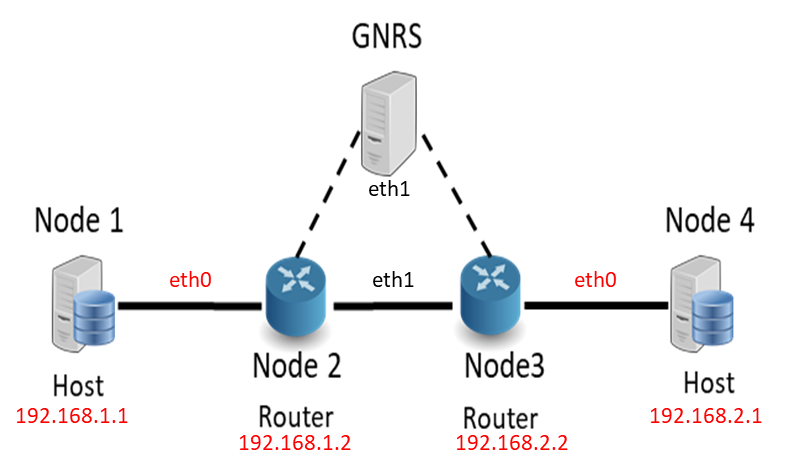
Fig. 1 — MF Topology setup for Experiment 1.
Five nodes: two MF hosts (node1-3 as Host 1, node1-6 as Host 4) connected through
two MF routers (node1-4 as Router 2, node1-7 as Router 3) with a GNRS server
(node1-8). In each node eth1 is the core interface and eth0 is the edge interface.
The GNRS server's core (eth1) address is 10.14.1.8.
¶ Experiment 2 — WiFi
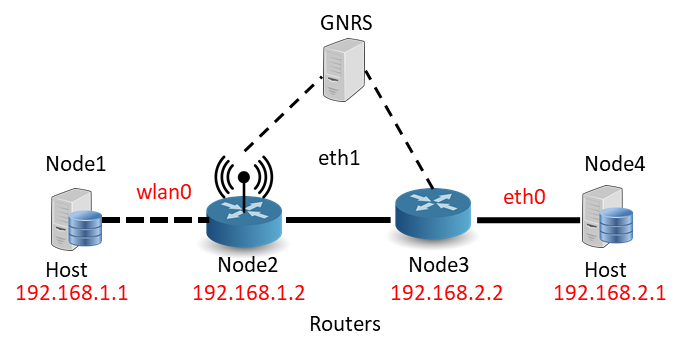
Fig. 2 — MF Topology setup for Experiment 2 (WiFi). Steps not documented in source.
¶ Experiment 3 — OAI
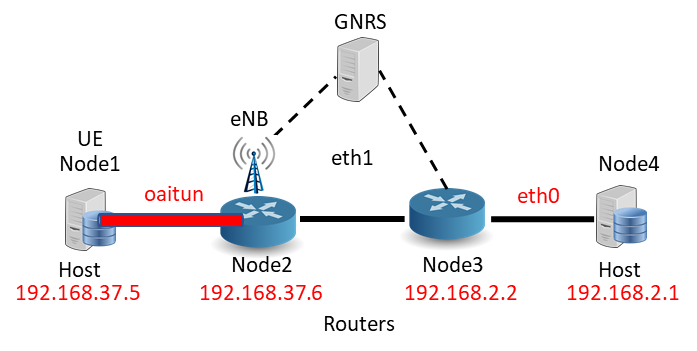
Fig. 3 — MF Topology setup for Experiment 3 (OAI). Steps not documented in source.
¶ Setup
- Reserve the resources and log into the console:
ssh <username>@console.sb4.cosmos-lab.org - Make sure the nodes are off before imaging:
omf tell -a offh -t node1-3,node1-4,node1-7,node1-6,node1-8 - Load the image onto all five nodes:
omf load -i mf-exp1.ndz -t node1-3,node1-4,node1-7,node1-6,node1-8 - Turn the nodes on:
omf tell -a on -t node1-3,node1-4,node1-7,node1-6,node1-8 - Confirm the nodes are up:
omf stat -t node1-3,node1-4,node1-7,node1-6,node1-8 - Download the experiment scripts to the console:
console:~$ git clone https://gitlab.orbit-lab.org/pnetalkar/cosmos-mf-tutorial.git - Open separate terminal sessions to each of the five nodes (e.g., using MobaXterm
or PuTTY).
¶ Instructions
The following steps cover Experiment 1 (Ethernet). Experiments 2 (WiFi) and 3
(OAI) are not yet documented beyond the topology diagrams above.
¶ Step 1 — Configure config.sh
Edit cosmos_tutorial/exp1/config.sh to match the node assignments for your
reservation:
#!/bin/bash

log_level="1"

#Node IDs
n1="1"
n2="2"
n3="3"
n4="4"

#Node Address
node1="node1-3"
node2="node1-4"
node3="node1-7"
node4="node1-6"
nodegnrs="node1-8"
¶ Step 2 — Configure GNRS on node1-8
Log into the GNRS node:
console:~$ ssh root@node1-8
Edit the IPv4 address in the GNRS net config file to the eth1 address of node1-8
(10.14.1.8):
root@node1-8:~# vim ~/mf/gnrs/jserver/sample-configs/single-server/net-ipv4.xml
Change the IPv4 address and binding port in the AS binding file:
root@node1-8:~# vim ~/mf/gnrs/jserver/sample-configs/single-server/as-binding.ipv4
Set X.X.X.X to 10.14.1.8 in both files.
¶ Step 3 — Configure host stack config files
Before copying host configuration files, edit the mfstack config files in the
conf folder of exp1. Inside mfstack1.conf and mfstack4.conf, configure the
GUID and the interface with the respective next-hop IP and MAC address of the router:
# Required.
DEFAULT_GUID = 1

#INTERFACE = ether,eth0,ip,auto
INTERFACE = ether,eth0,ip,manual,192.168.1.2,d8:50:e6:d4:f5:2d
¶ Step 4 — Set up interfaces
From the console, run the interface-setup script to configure the IP addresses of
the eth0 interfaces on each node as shown in the topology figure above:
console:~/cosmos_tutorial/exp1$ ./setup_interfaces.sh
¶ Step 5 — Copy router topology file
Run the script to copy the topo file required by the Click routers:
console:~/cosmos_tutorial/exp1$ ./copy_router_conf.sh
¶ Step 6 — Copy host stack configuration files
Run the script to copy the host stack config files to the respective nodes:
console:~/cosmos_tutorial/exp1$ ./copy_hostconf.sh
¶ Step 7 — Start GNRS
Start the GNRS server on node1-8:
console:~/cosmos_tutorial/exp1$ ./start_gnrs.sh
Verify GNRS is running by tailing its log on node1-8:
root@node1-8:~# tail -f /var/log/mfgnrs.log
Manual GNRS start (if the script is unavailable):
root@node1-8:~# cd mf/gnrs/jserver
root@node1-8:~/mf/gnrs/jserver# java -Dlog4j.configuration=file:sample-configs/single-server/log4j.xml -jar target/gnrs-server-1.0.0-SNAPSHOT-jar-with-dependencies.jar sample-configs/single-server/server.xml
¶ Step 8 — Start routers
Start the MF routers on node1-4 and node1-7:
console:~/cosmos_tutorial/exp1$ ./start_routers.sh
Verify router status by tailing the log on each router node:
root@node1-4:~# tail -f /var/log/mfrouter2.log
root@node1-7:~# tail -f /var/log/mfrouter3.log
Manual router start (if the script is unavailable):
root@node1-4:~# cd ~/mf/router/click/conf
root@node1-4:~/mf/router/click/conf# click MF_IPAccessMultiRouter.click my_GUID=X topo_file=topo core_dev=ethX GNRS_server_ip=x.x.x.x GNRS_server_port=5000 GNRS_listen_ip=y.y.y.y GNRS_listen_port=5001 edge_dev=ethx edge_dev_ip=z.z.z.z
¶ Step 9 — Start host stacks
Start the MF host stacks on node1-3 and node1-6:
console:~/cosmos_tutorial/exp1$ ./start_hosts.sh
Verify host status by tailing the log on each host node:
root@node1-3:~# tail -f /var/log/mfhost1.log
root@node1-6:~# tail -f /var/log/mfhost4.log
Manual host stack start (if the script is unavailable):
root@node1-3:~# cd mf/mfclient/hoststack/conf
root@node1-3:~/mf/mfclient/hoststack/conf# mfstack -d mfstack.conf
¶ Step 10 — Run mfping
On Host 4 (node1-6) — start the server first:
root@node1-6:~# mfping -m 4 -o 1 -s -d
On Host 1 (node1-3) — run the client:
root@node1-3:~# mfping -d -m 1 -o 4 -c -n 10
¶ Step 11 — Stop all services
console:~/cosmos_tutorial/exp1$ ./stop_gnrs.sh
console:~/cosmos_tutorial/exp1$ ./stop_routers.sh
console:~/cosmos_tutorial/exp1$ ./stop_hosts.sh
¶ Verification
- The GNRS log on node1-8 (
tail -f /var/log/mfgnrs.log) shows the server
started and bound to10.14.1.8. - The router logs (
/var/log/mfrouter2.log,/var/log/mfrouter3.log) show
the Click routers running without errors. - The host logs (
/var/log/mfhost1.log,/var/log/mfhost4.log) confirm the
MF host stacks are up. - The
mfpingclient on node1-3 receives replies from node1-6 (10 ping
responses for-n 10).
¶ Cleanup
omf tell -a offh -t node1-3,node1-4,node1-7,node1-6,node1-8
No omf save is needed unless you customized the image.
¶ Troubleshooting
| Symptom | Likely cause | Fix |
|---|---|---|
mfping client gets no replies |
GNRS or routers not fully started | Check all log files (mfgnrs.log, mfrouter*.log, mfhost*.log) for errors before running mfping |
| GNRS fails to bind | Wrong IP in net-ipv4.xml or as-binding.ipv4 |
Confirm eth1 address on node1-8 with ip addr; update both XML config files |
| Router fails to start | Wrong topo_file, core_dev, or edge_dev parameters |
Re-run ./copy_router_conf.sh; confirm interface names with ip link on the router node |
| Host stack does not start | Wrong GUID or interface/MAC in mfstack*.conf |
Confirm eth0 IP and MAC with ip addr / ip link; edit config files and re-run ./copy_hostconf.sh |
| Script repo not cloned | Git clone not run yet | git clone https://gitlab.orbit-lab.org/pnetalkar/cosmos-mf-tutorial.git |
¶ References
- MobilityFirst project
- NSF Future Internet Architecture program
- OMF commands reference
- Make a reservation / getting started
- SSH access
Author(s): COSMOS team · Last verified: Not re-tested (migrated 2026-06-20) · Tested image/release: mf-exp1.ndz · Tags: mobilityfirst, mf, gnrs, click, mfping, future-internet