¶ Outdoor spectrum usage and allocation
Demonstrate outdoor spectrum usage on the BED domain using the RF control service and verify spectrum access by running a custom SDR application to transfer packet data over a shared / non-federal frequency band.
¶ Overview
This tutorial shows how to use the COSMOS RF control service to configure the transmit (TX) chain and power amplifier of an outdoor X310 SDR, then exercise a custom SDR application (sdrapp) to perform an over-the-air packet data transfer between two X310 nodes on bed.cosmos-lab.org.
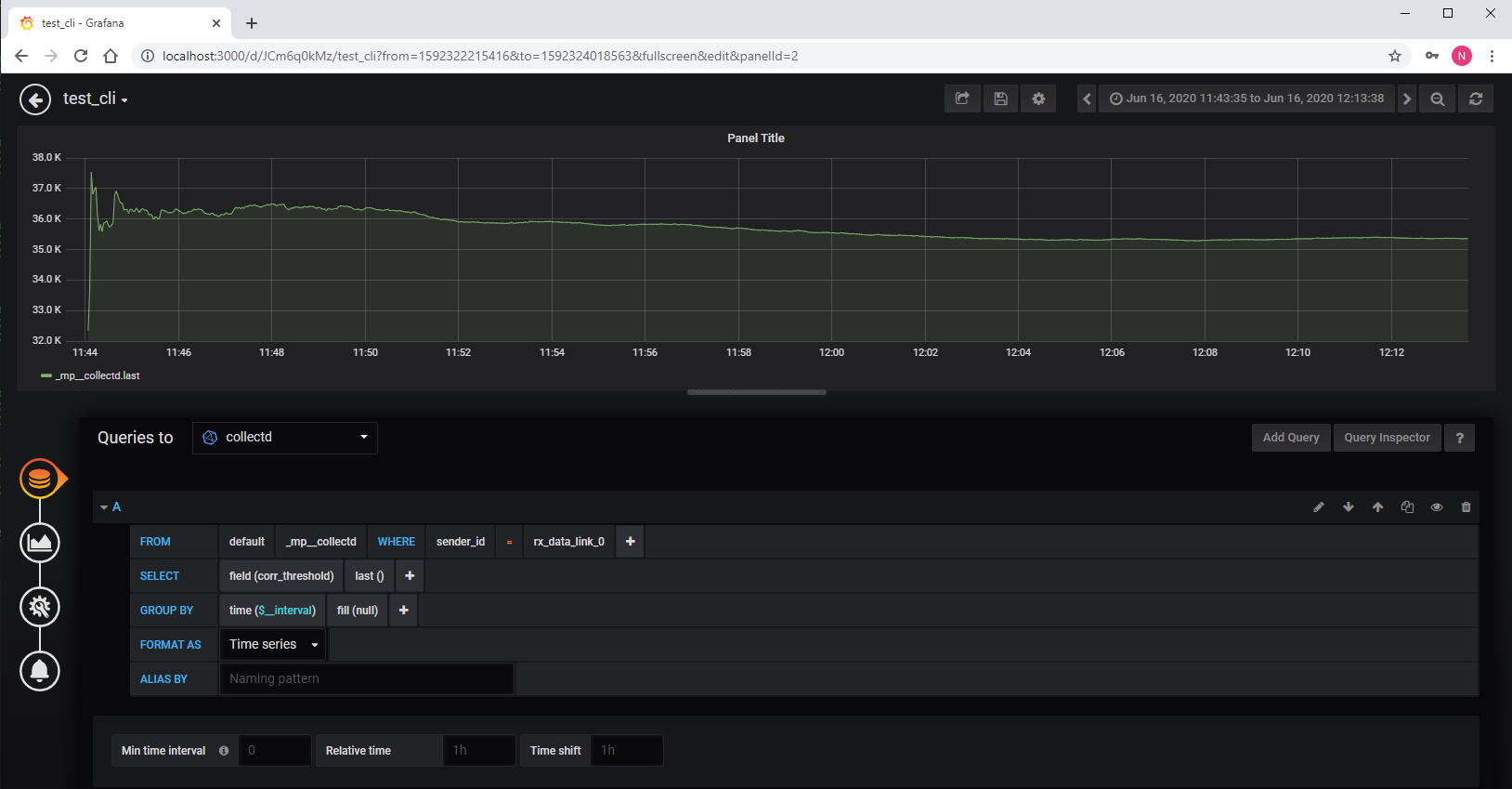
One node acts as the transmitter (sdr2-s3-lg1.bed.cosmos-lab.org) and one as the receiver (sdr2-s2-lg1.bed.cosmos-lab.org). Radio parameters (frequency, rate, gain) are configured remotely from the console via a Python control script. Optionally, received packet metrics (sequence number, packet length, correlation strength) can be recorded to an InfluxDB time-series database and visualized in Grafana.
¶ Learning outcomes
After completing this tutorial you will be able to:
- Use the COSMOS RF control service to inspect and configure an outdoor SDR's TX path and power amplifier.
- Build and deploy the
sdrappcustom SDR application onto COSMOS X310 nodes using a Makefile-based workflow. - Configure radio parameters (frequency, sample rate, gain) remotely via the
rc.pycommand script. - Execute an over-the-air packet data transfer and interpret the transmit/receive summary output.
- Verify RF control by comparing results with the power amplifier on versus off.
- (Optional) Record and query packet metrics in InfluxDB and view them in Grafana.
¶ At a glance
| Difficulty | Intermediate |
| Estimated time | 90 min |
| Domain / sandbox | bed.cosmos-lab.org |
| Topic group | Misc |
| Last verified | Not re-tested (migrated 2026-06-20) |
¶ Prerequisites
Background knowledge
- Familiarity with COSMOS resource reservations and OMF commands — see Make a reservation and OMF commands.
- Basic RF concepts (carrier frequency, sample rate, power amplifier, frequency allocation).
- The RF control service and the RF front-end TX chain.
- Outdoor frequency allocation policy — check the Outdoor frequency allocation table for permitted bands before transmitting.
Account & access
- A COSMOS account — register here.
- An approved reservation on
bed.cosmos-lab.org— see Make a reservation. - SSH access to the domain console — see SSH access.
¶ Resources required
Devices / nodes
| Resource | Role | Qty | Notes |
|---|---|---|---|
| sdr2-s3-lg1.bed.cosmos-lab.org | Transmitter (TX) | 1 | USRP X310 outdoor SDR |
| sdr2-s2-lg1.bed.cosmos-lab.org | Receiver (RX) | 1 | USRP X310 outdoor SDR |
Disk images
| Image | Load onto | Provides |
|---|---|---|
| baseline-uhd.ndz | sdr2-s2-lg1, sdr2-s3-lg1 | Base OS with UHD support for X310 |
Software components
| Component | Version | Source |
|---|---|---|
| UHD (USRP Hardware Driver) | TODO: verify | preinstalled in baseline-uhd.ndz |
sdrapp (custom SDR application) |
TODO: verify | SDRAPP.tar.gz attachment (see Setup) |
rc.py (remote control script) |
TODO: verify | included in SDRAPP.tar.gz |
| InfluxDB | 1.7 | idb2 server (optional, for metrics recording) |
| Grafana | TODO: verify | idb2:3000 (optional, for metrics visualization) |
Spectrum / RF
Over-the-air outdoor transmit on bed.cosmos-lab.org. The example uses a center frequency of 2600 MHz with a 10 MHz sample rate. Consult the Outdoor frequency allocation table for permitted bands before transmitting. The power amplifier frequency range used in this example is 2500–2680 MHz.
¶ Topology
Two outdoor USRP X310 SDR nodes on bed.cosmos-lab.org communicate over the air. Both nodes are controlled from the console.bed.cosmos-lab.org console. The sdrapp daemon runs on each node and listens on TCP ports 5180 (command) and 6180 (data). The rc.py Python script, run from the console, sends configuration and run commands to the daemons on each node.
Optionally, the receiver node writes packet metrics to an InfluxDB instance (idb2) accessible within the testbed. Grafana running on idb2:3000 can be tunneled to localhost for browser-based visualization.
¶ Setup
-
Reserve resources on
bed.cosmos-lab.org(see Prerequisites) and log into the console:ssh <username>@console.bed.cosmos-lab.org -
Make sure the resources are turned off before imaging:
omf tell -a offh -t sdr2-s2-lg1.bed.cosmos-lab.org,sdr2-s3-lg1.bed.cosmos-lab.org -
Load the image onto both nodes:
omf load -i baseline-uhd.ndz -t sdr2-s2-lg1.bed.cosmos-lab.org,sdr2-s3-lg1.bed.cosmos-lab.org -
Turn on the resources:
omf tell -a on -t sdr2-s2-lg1.bed.cosmos-lab.org,sdr2-s3-lg1.bed.cosmos-lab.org -
Download and extract the application source code from the console:
wget https://wiki.cosmos-lab.org/raw-attachment/wiki/Tutorials/Wireless/OutdoorSpectrumUsage/SDRAPP.tar.gz
tar -zxvf SDRAPP.tar.gz
cd SDRAPP
¶ Instructions
¶ Step 1 — Build and start sdrapp on the transmitter
Open a terminal on the console and set the NODE environment variable to the transmitting SDR:
export NODE=sdr2-s3-lg1.bed.cosmos-lab.org
Run the following make commands to install dependencies and build the sdrapp application on the transmitter node:
make remote-install-deps
make remote-install-websocket
make remote-install-oml
make remote-make
SSH into the transmitter node and start sdrapp:
ssh root@$NODE
root@sdr2-s3-lg1:~# cd SDRAPP/build/
root@sdr2-s3-lg1:~/SDRAPP/build# ./sdrapp --cmd "make resource=rio0"
When the radio is ready, output similar to the following is shown:
:
Number mboards        = 1
Number of rx channels = 2
Number of tx channels = 2
Setting device timestamp to 0...
Device storage: TX
 channels:          2
 buffers  / channel 80
 samples / buffer   256
 bytes / sample     8
 shared memory      0
Device storage: RX
 channels:          2
 buffers  / channel 78125
 samples / buffer   256
 bytes / sample     8
 shared memory      0
[INFO] [main.cpp] Rsp: make resource=rio0

[INFO] [main.cpp] Starting data server at 6180
[INFO] [main.cpp] Starting command server at 5180
[INFO] [main.cpp] Starting websock server at 9002
Leave this terminal running.
¶ Step 2 — Build and start sdrapp on the receiver
Open a second terminal on the console and set NODE to the receiving SDR:
export NODE=sdr2-s2-lg1.bed.cosmos-lab.org
Install dependencies and build sdrapp on the receiver node:
make remote-install-deps
make remote-install-websocket
make remote-install-oml
make remote-make
SSH into the receiver node and start sdrapp:
ssh root@$NODE
root@sdr2-s2-lg1:~# cd SDRAPP/build/
root@sdr2-s2-lg1:~/SDRAPP/build# ./sdrapp --cmd "make resource=rio0"
The same startup output as Step 1 is expected. Leave this terminal running.
¶ Step 3 — Configure the transmitter's RF front end
Open a third terminal on the console. First, inspect the current TX path configuration for the transmitter:
curl "am-rt1.cosmos-lab.org:5054/rf_control/get_tx_path?node=sdr2-s3-lg1.bed.cosmos-lab.org"
Expected output:
<response status="OK">
  <nodes>
    <node name="sdr2-s3-lg1.bed.cosmos-lab.org">
      <rf_port number="0" antenna="1" connected="true" power_amp="OFF" f_lower="2350" f_upper="2800"/>
      <rf_port number="1" antenna="3" connected="true" power_amp="OFF" f_lower="2350" f_upper="2800"/>
    </node>
  </nodes>
</response>
Turn on the power amplifier and set the frequency range. This example uses a center frequency of 2600 MHz (2500–2680 MHz band). Consult the Outdoor frequency allocation table before choosing a frequency:
curl "am-rt1.cosmos-lab.org:5054/rf_control/set_tx_path?node=sdr2-s3-lg1.bed.cosmos-lab.org&rf_port=0&power_amp=on&f_lower=2500&f_upper=2680"
¶ Step 4 — Run the data transfer script
From the third console terminal, execute the run script to configure radio parameters and begin streaming packet data:
sh run_data_script.sh
The script configures the SDR application on both nodes with radio parameters and begins streaming packets for a few seconds, then exits. The sdrapp handlers on each node continue running for the specified duration.
On the transmit side, the output should contain rows of INFO statements similar to:
:
[INFO] [tx_data_link_0]   [sent]   seq_num: 62  pkt_len: 29
[INFO] [tx_data_link_0]   [sent]   seq_num: 63  pkt_len: 8
[INFO] [tx_data_link_0]   [sent]   seq_num: 64  pkt_len: 49
[INFO] [tx_data_link_0]   [sent]   seq_num: 65  pkt_len: 42
[INFO] [tx_data_link_0]   [sent]   seq_num: 66  pkt_len: 63
[INFO] [tx_data_link_0]   [sent]   seq_num: 67  pkt_len: 34
[INFO] [tx_data_link_0]   [sent]   seq_num: 68  pkt_len: 2
:
[INFO] [tx_data_link_0] Transmit complete - summary:
[INFO] [tx_data_link_0] --raw packets:   80 / 21760 bytes
[INFO] [tx_data_link_0] Exitting
:
On the receive side, similar output is expected:
:
[INFO] [rx_data_link_0]   [rcvd]  pkt: OK  seq_num: 55  pkt_len: 18  corr_strength: 18131.3
[INFO] [rx_data_link_0]   [rcvd]  pkt: OK  seq_num: 56  pkt_len: 15  corr_strength: 18124.4
[INFO] [rx_data_link_0]   [rcvd]  pkt: OK  seq_num: 57  pkt_len: 3  corr_strength: 18132.9
[INFO] [rx_data_link_0]   [rcvd]  pkt: OK  seq_num: 58  pkt_len: 53  corr_strength: 18148.1
[INFO] [rx_data_link_0]   [rcvd]  pkt: OK  seq_num: 59  pkt_len: 2  corr_strength: 18128.3
[INFO] [rx_data_link_0]   [rcvd]  pkt: OK  seq_num: 60  pkt_len: 34  corr_strength: 18161.1
[INFO] [rx_data_link_0]   [rcvd]  pkt: OK  seq_num: 61  pkt_len: 62  corr_strength: 18135.7
[INFO] [rx_data_link_0]   [rcvd]  pkt: OK  seq_num: 62  pkt_len: 29  corr_strength: 18164.7
:
[INFO] [rx_data_link_0] Receive complete - summary:
[INFO] [rx_data_link_0] --raw packets:   79 / 21488 bytes
[INFO] [rx_data_link_0] Avg correlation threshold of successful detections: 18148.4
[INFO] [rx_data_link_0] Exitting
:
¶ Step 5 — Verify RF control by disabling the power amplifier
Turn off the RF front end:
curl "am-rt1.cosmos-lab.org:5054/rf_control/set_tx_path?node=sdr2-s3-lg1.bed.cosmos-lab.org&rf_port=0&power_amp=off"
Expected response:
<response status="OK">
  <message>OK</message>
</response>
Execute the run script again. The transmitter will attempt to send packets but with the power amplifier off, nothing is transmitted over the air. The receiver summary should show 0 packets received:
:
[INFO] [rx_data_link_0] Receive complete - summary:
[INFO] [rx_data_link_0] --raw packets:   0 / 0 bytes
[INFO] [rx_data_link_0] Avg correlation threshold of successful detections: nan
[INFO] [rx_data_link_0] Exitting
:
¶ Step 6 (optional) — Record metrics to InfluxDB and view in Grafana
To enable recording of packet metrics (seq_num, pkt_len, corr_strength) to InfluxDB, recompile sdrapp on the receiver with the _USE_OML_ flag.
If sdrapp is still running on the receiver, stop it with Ctrl-C and exit back to the console.
Edit the Makefile on the console (in the SDRAPP directory) by appending -D_USE_OML_ to CPPFLAGS:
CPPFLAGS ?= $(INC_FLAGS) -MMD -MP -Ofast --fast-math -finline-functions -std=c++11 -D_USE_OML_
Rebuild and redeploy the receiver application:
make remote-clean
make remote-make
Edit run_data_script.sh to run for a longer duration (2000 seconds) so enough data is recorded:
## BEGIN data transfer
##  Invoke receive handler
##                       rxsig_data <runtime_in_milliseconds> <correlation threshold>
python rc.py $RXNODE 5180 "rxsig_data 2000000 10000"

##  Invoke transmit handler
##                       txsig_data <runtime_in_milliseconds> <delay_between_burst_in_msec>
python rc.py $TXNODE 5180 "txsig_data 2000000 1000"

echo "DONE!"
Re-enable the RF front end:
curl "am-rt1.cosmos-lab.org:5054/rf_control/set_tx_path?node=sdr2-s3-lg1.bed.cosmos-lab.org&rf_port=0&power_amp=on&f_lower=2500&f_upper=2680"
Restart both sdrapp instances (Steps 1–2) and rerun the script. Metrics are written to InfluxDB (idb2, database collectd, sender id rx_data_link_0).
Query recorded values via the InfluxDB API:
curl -XPOST 'http://idb2:8086/query?db=collectd&pretty=true' --data-binary 'q=select * from _mp__collectd'
Expected output (abridged):
    "results": [
        {
            "statement_id": 0,
            "series": [
                {
                    "name": "_mp__collectd",
                    "columns": [
                        "time",
                        "corr_threshold",
                        "pkt_len",
                        "sender_id",
                        "seq_no",
                        "seq_num",
                        "time_stamp",
                        "time_stamp_server"
                    ],
                    "values": [
                        [
                            "2020-06-16T15:44:04.310022857Z",
                            32221.601562,
                            7,
                            "rx_data_link_0",
                            "1",
                            1,
                            "2.266386",
                            "2.309666"
                        ],

:
:
:
                        [
                            "2020-06-16T16:17:20.274931375Z",
                            35238.019531,
                            2,
                            "rx_data_link_0",
                            "2049",
                            205,
                            "1998.270517",
                            "1998.274432"
                        ],
                        [
                            "2020-06-16T16:17:21.276384485Z",
                            35233.40625,
                            63,
                            "rx_data_link_0",
                            "2050",
                            206,
                            "1999.272047",
                            "1999.276026"
                        ],
                        [
                            "2020-06-16T16:17:22.276512538Z",
                            35226.476562,
                            34,
                            "rx_data_link_0",
                            "2051",
                            207,
                            "2000.272036",
                            "2000.276081"
                        ]

:
To view data in Grafana, create an SSH tunnel from localhost port 3000 to idb2:3000, then open http://localhost:3000 in a browser. The following is an example correlation threshold trace:
¶ run_data_script.sh — annotated details
The script uses a Python helper (rc.py) to remotely configure and invoke handlers on both sdrapp daemons from the console. The CONFIGURABLES section targets the two nodes:
## CONFIGURABLES
export TXNODE=sdr2-s3-lg1.bed.cosmos-lab.org
export RXNODE=sdr2-s2-lg1.bed.cosmos-lab.org
Radio parameters are set for the X310 (2 daughter cards, 2 channels each; both channels must use the same sample rate):
## SET UP RADIO PORTION HERE
##  Script is set up for x310 which has 2 daughter cards hence 2 channels: {0,1}
##  Both channels must be set to the same sampling rate otherwise HW will barf!

##  Set up transmit / receive chain
##                       txconfig <ch> <freq> <rate> <gain>
##                       rxconfig <ch> <freq> <rate> <gain>

python rc.py $TXNODE 5180 "txconfig 0 2600e6 10e6 25"
python rc.py $TXNODE 5180 "rxconfig 0 2400e6 10e6 5"
python rc.py $TXNODE 5180 "txconfig 1 2000e6 10e6 0"
python rc.py $TXNODE 5180 "rxconfig 1 2050e6 10e6 5"

python rc.py $RXNODE 5180 "rxconfig 0 2600e6 10e6 5"
python rc.py $RXNODE 5180 "txconfig 0 2400e6 10e6 25"
python rc.py $RXNODE 5180 "rxconfig 1 2000e6 10e6 5"
python rc.py $RXNODE 5180 "txconfig 1 2050e6 10e6 0"
Data transfer is initiated with the receiver started first, then the transmitter. The default runtime is 20 seconds with 250 ms intervals between bursts:
## BEGIN data transfer
##  Invoke receive handler
##                       rxsig_data <runtime_in_milliseconds> <correlation threshold>
python rc.py $RXNODE 5180 "rxsig_data 20000 10000"

##  Invoke transmit handler
##                       txsig_data <runtime_in_milliseconds> <delay_between_burst_in_msec>
python rc.py $TXNODE 5180 "txsig_data 20000 250"

echo "DONE!"
The script header describes known gotchas:
## DESCRIPTION
##  Performs one way data transfer over the air using x310 USRPS.
##  sdrapp daemon must be running on the nodes specified under CONFIGURABLES.

## Python is used to script the sequence of commands issued to the sdrapp daemon.
## Usage:
##   python rc.py <MACHINE_NAME> <PORT> <sdrapp sub-command>
##
##     <MACHINE_NAME> is hostname of machine running sdrapp daemon
##     <PORT>         command listening port
## Format of python sub-commands are described below.
## Sub-commands have a companion handler in the sdrapp daemon.

## Note: This script can be run multiple times while sdrapp is running.
## However this is subject to the following known gotchas:
##  1) if the <rate> parameter is changed in the set up section
##     then the sdrapp must be restarted.
##  2) when rerunning this script the running handlers in sdrapp
##     must finish and exit first.
¶ Verification
- With the power amplifier on,
run_data_script.shcompletes and the receiver summary shows a non-zero packet count (--raw packets: 79 / 21488 bytes) with a valid average correlation threshold (~18148). - With the power amplifier off, the receiver summary shows
--raw packets: 0 / 0 bytesandAvg correlation threshold of successful detections: nan. - (Optional) InfluxDB query returns rows with
corr_threshold,pkt_len, andseq_numfields populated under sender idrx_data_link_0.
¶ Cleanup
Turn off the RF front end before ending your session:
curl "am-rt1.cosmos-lab.org:5054/rf_control/set_tx_path?node=sdr2-s3-lg1.bed.cosmos-lab.org&rf_port=0&power_amp=off"
Stop the sdrapp processes on both nodes (Ctrl-C in their respective terminal sessions), then power off the nodes:
omf tell -a offh -t sdr2-s2-lg1.bed.cosmos-lab.org,sdr2-s3-lg1.bed.cosmos-lab.org
(No omf save is needed unless you modified the disk image.)
¶ Troubleshooting
| Symptom | Likely cause | Fix |
|---|---|---|
sdrapp fails to detect radio / make resource=rio0 errors |
UHD not configured or X310 not reachable | Verify UHD installation in baseline-uhd.ndz; check network connectivity to the SDR |
run_data_script.sh hangs or rc.py cannot connect |
sdrapp daemon not running on node |
Confirm sdrapp is running and listening on port 5180; check with ssh root@$NODE "netstat -tlnp" |
| Receiver summary shows 0 packets but TX side shows sent packets | Power amplifier off or wrong frequency | Confirm power_amp=on via get_tx_path; verify TX and RX frequencies match |
| Second run of script fails immediately | Previous handler still running | Wait for the handler runtime to expire before rerunning; handlers must exit before a new run |
Changing --rate parameter breaks streaming |
sdrapp must be restarted for rate changes |
Stop sdrapp with Ctrl-C, restart it, then rerun the script |
| InfluxDB query returns no results | _USE_OML_ flag not set during build |
Recompile sdrapp with -D_USE_OML_ in CPPFLAGS (see Step 6) |
¶ References
- RF control service
- RF front-end TX chain
- Outdoor frequency allocation table
- InfluxDB querying data guide
- InfluxDB overview
- Grafana documentation
- Make a reservation
- OMF commands
- SSH access
Author(s): COSMOS team · Last verified: Not re-tested (migrated 2026-06-20) · Tested image/release: baseline-uhd.ndz · Tags: sdr, x310, rf-control, outdoor, spectrum, uhd, influxdb, grafana