¶ Transmit and Receive at 60 GHz Using Sivers mmWave Front-Ends on sb1
Transmit and receive a sine wave through the 60 GHz Sivers EVK06002 mmWave front-ends on COSMOS Sandbox 1, using USRP X310s for baseband processing and GNU Radio on the host servers.
¶ Overview
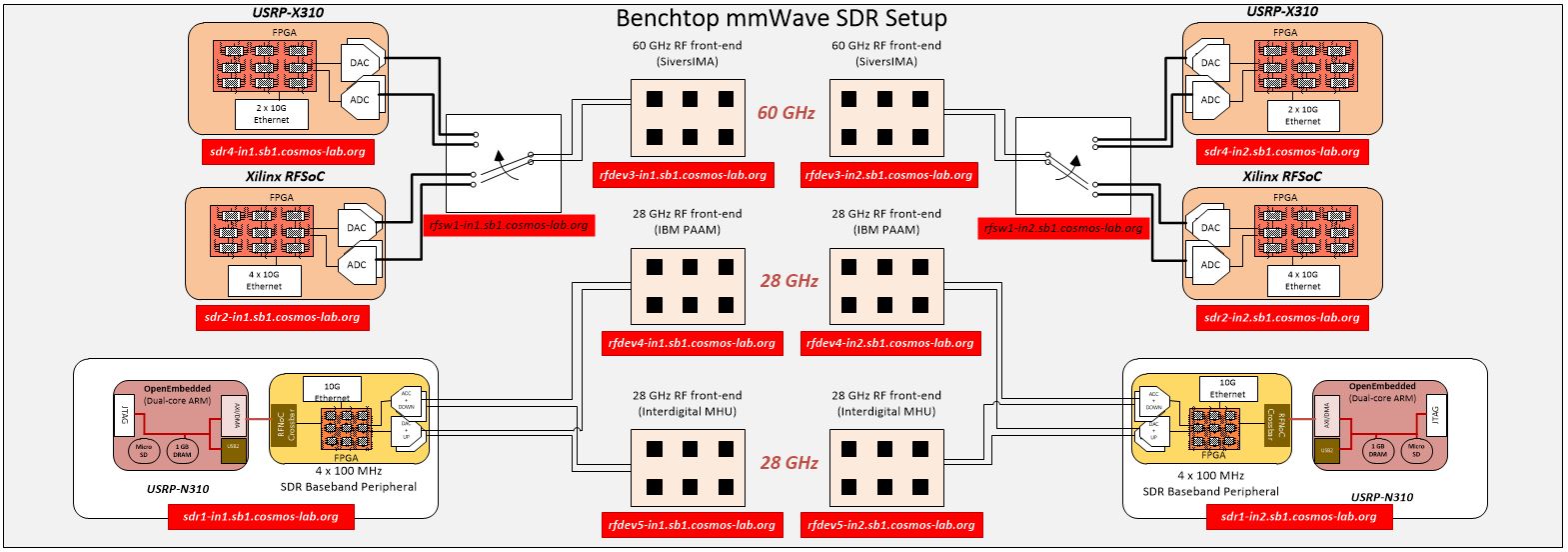
COSMOS Sandbox 1 hosts three pairs of mmWave front-ends: 60 GHz Sivers IMA transceivers, 28 GHz IBM PAAM boards, and 28 GHz Interdigital MHUs. This tutorial focuses on the 60 GHz Sivers EVK06002 path. The Sivers 57–66 GHz transceiver system (evaluation kit for TRX BF/01) is designed for WiGig / 802.11ad applications. It includes 16-element patch antenna arrays for TX and RX and supports beam steering via an application GUI or Python API over USB.
In this setup the two host servers (srv1-in1, srv1-in2) run GNU Radio and UHD applications. They communicate with the USRP X310 units (sdr4-in1, sdr4-in2) over 10 GbE links, and the Sivers front-ends (rfdev3-in1, rfdev3-in2) are controlled from the same servers over USB.
RF switch boxes in the sandbox select between the X310 and RFSoC baseband paths. This tutorial uses the X310 path (all switches set to port 1).
¶ Learning outcomes
After completing this tutorial you will be able to:
- Configure the 10 GbE data1 interfaces on the host servers to reach the USRP X310s.
- Verify X310 reachability with
uhd_find_devices. - Launch the Sivers control GUI to enable TX/RX on a 60 GHz front-end pair.
- Verify the RF switch state and switch the baseband path to X310.
- Transmit a sine wave from one server through the 60 GHz link and observe it on the receiving server with
rx_ascii_art_dft.
¶ At a glance
| Difficulty | Intermediate |
| Estimated time | 60 min |
| Domain / sandbox | sb1.cosmos-lab.org |
| Topic group | mmWave & PAAM |
| Last verified | Not re-tested (migrated 2026-06-20) |
¶ Prerequisites
Background knowledge
- Familiarity with the COSMOS experiment life cycle — see Make a reservation.
- Basic UHD / GNU Radio concepts (frequency, sample rate, waveform generation).
- Optional: RF Switch service documentation for RF path configuration.
Account & access
- A COSMOS account — register here.
- An approved reservation on sb1.cosmos-lab.org — see Make a reservation.
- SSH access to the console — see SSH access.
¶ Resources required
Devices / nodes
| Resource | Role | Qty | Notes |
|---|---|---|---|
| srv1-in1 | TX host server | 1 | Runs GNU Radio / UHD; controls Sivers TX front-end over USB |
| srv1-in2 | RX host server | 1 | Runs GNU Radio / UHD; controls Sivers RX front-end over USB |
| sdr4-in1 | TX USRP X310 | 1 | 10 GbE (XG FPGA image); IP 10.38.14.1; hard-coded |
| sdr4-in2 | RX USRP X310 | 1 | 10 GbE (XG FPGA image); IP 10.38.14.2; hard-coded |
| rfdev3-in1 | Sivers 60 GHz TX front-end | 1 | USB-controlled from srv1-in1 |
| rfdev3-in2 | Sivers 60 GHz RX front-end | 1 | USB-controlled from srv1-in2 |
| rfsw1.sb1.cosmos-lab.org | RF switch box 1 | 1 | Selects X310 vs RFSoC path |
| rfsw2.sb1.cosmos-lab.org | RF switch box 2 | 1 | Selects X310 vs RFSoC path |
Disk images
| Image | Load onto | Provides |
|---|---|---|
| sivers_sb1_cosmos.ndz | srv1-in1, srv1-in2 | baseline_gr.ndz + Sivers control software (ederenv) preinstalled |
Software components
| Component | Version | Source |
|---|---|---|
| UHD (USRP Hardware Driver) | 3.15.0.0-release (as shipped in image) | preinstalled in sivers_sb1_cosmos.ndz |
| GNU Radio | TODO: verify | preinstalled in sivers_sb1_cosmos.ndz |
Sivers ederenv control software |
TODO: verify | preinstalled in sivers_sb1_cosmos.ndz |
Spectrum / RF / special
- Frequency band: 57–66 GHz (60 GHz WiGig / 802.11ad).
- Over-the-air transmission between two 16-element patch antenna arrays.
- RF switch boxes select between X310 and RFSoC basebands; this tutorial requires all switch ports set to 1 (X310 path).
- RF path full details: https://wiki.cosmos-lab.org/wiki/Architecture/Domains/cosmos_sb1#RFPathConfigurationsformmWaveDevelopmentPlatforms
¶ Topology
Two host servers (srv1-in1 / srv1-in2) each connect to a dedicated USRP X310 (sdr4-in1 / sdr4-in2) over 10 GbE. The servers also control the Sivers 57–66 GHz front-ends (rfdev3-in1 / rfdev3-in2) over USB. The Sivers front-ends transmit and receive over the air at 60 GHz. RF switch boxes in the signal path allow the same mmWave front-ends to be connected to either X310 or RFSoC basebands; here all switches are set to port 1 (X310).
¶ Setup
-
Reserve sb1 resources and log into the console with two SSH sessions:
ssh <username>@console.sb1.cosmos-lab.org -
Make sure all resources are off before imaging:
omf tell -a offh -t system:topo:allres -
Load the Sivers image onto the two host servers:
omf load -i sivers_sb1_cosmos.ndz -t srv1-in1,srv1-in2 -
Turn on all required resources and verify status:
omf tell -a on -t srv1-in1,srv1-in2,sdr4-in1,sdr4-in2,rfdev3-in1,rfdev3-in2omf stat -t system:topo:allres -
Open SSH sessions to the nodes (use
-Yto forward X11 for the Sivers GUI):ssh -Y root@srv1-in1ssh -Y root@srv1-in2
¶ Instructions
¶ Step 1 — Configure the data1 network interfaces and find the USRPs
The X310 10 GbE ports have hard-coded IP addresses: sdr4-in1 = 10.38.14.1, sdr4-in2 = 10.38.14.2. Set the data1 interfaces on the servers so they can reach these addresses.
On srv1-in1:
root@srv1-in1:~# ifconfig data1 10.38.1.3 netmask 255.255.0.0 mtu 9000 up
On srv1-in2:
root@srv1-in2:~# ifconfig data1 10.38.1.4 netmask 255.255.0.0 mtu 9000 up
Run uhd_find_devices on srv1-in1 to verify both X310s are reachable:
root@srv1-in1:~# uhd_find_devices
Expected output:
[INFO] [UHD] linux; GNU C++ version 7.5.0; Boost_106501; UHD_3.15.0.0-release
--------------------------------------------------
-- UHD Device 0
--------------------------------------------------
Device Address:
    serial: 31B6FFA
    addr: 10.38.14.2
    fpga: XG
    name: sdr4-in2
    product: X310
    type: x300

--------------------------------------------------
-- UHD Device 1
--------------------------------------------------
Device Address:
    serial: 31B8F3F
    addr: 10.38.14.1
    fpga: XG
    name: sdr4-in1
    product: X310
    type: x300
¶ Step 2 — Set kernel network buffer sizes
On both srv1-in1 and srv1-in2, increase the socket buffer limits to avoid sample drops:
sysctl -w net.core.wmem_max=62500000
sysctl -w net.core.rmem_max=62500000
¶ Step 3 — Prepare the Sivers 60 GHz front-ends
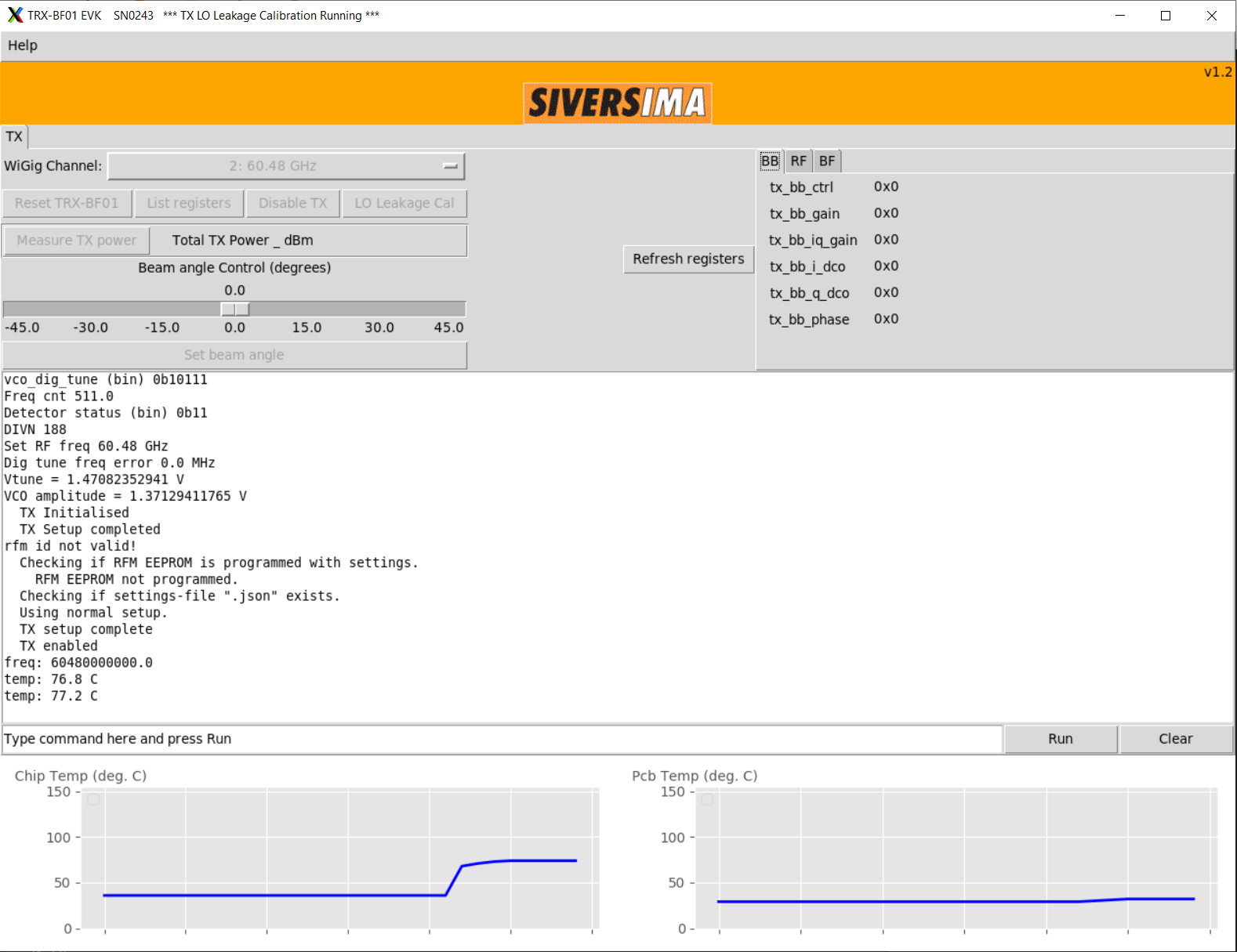
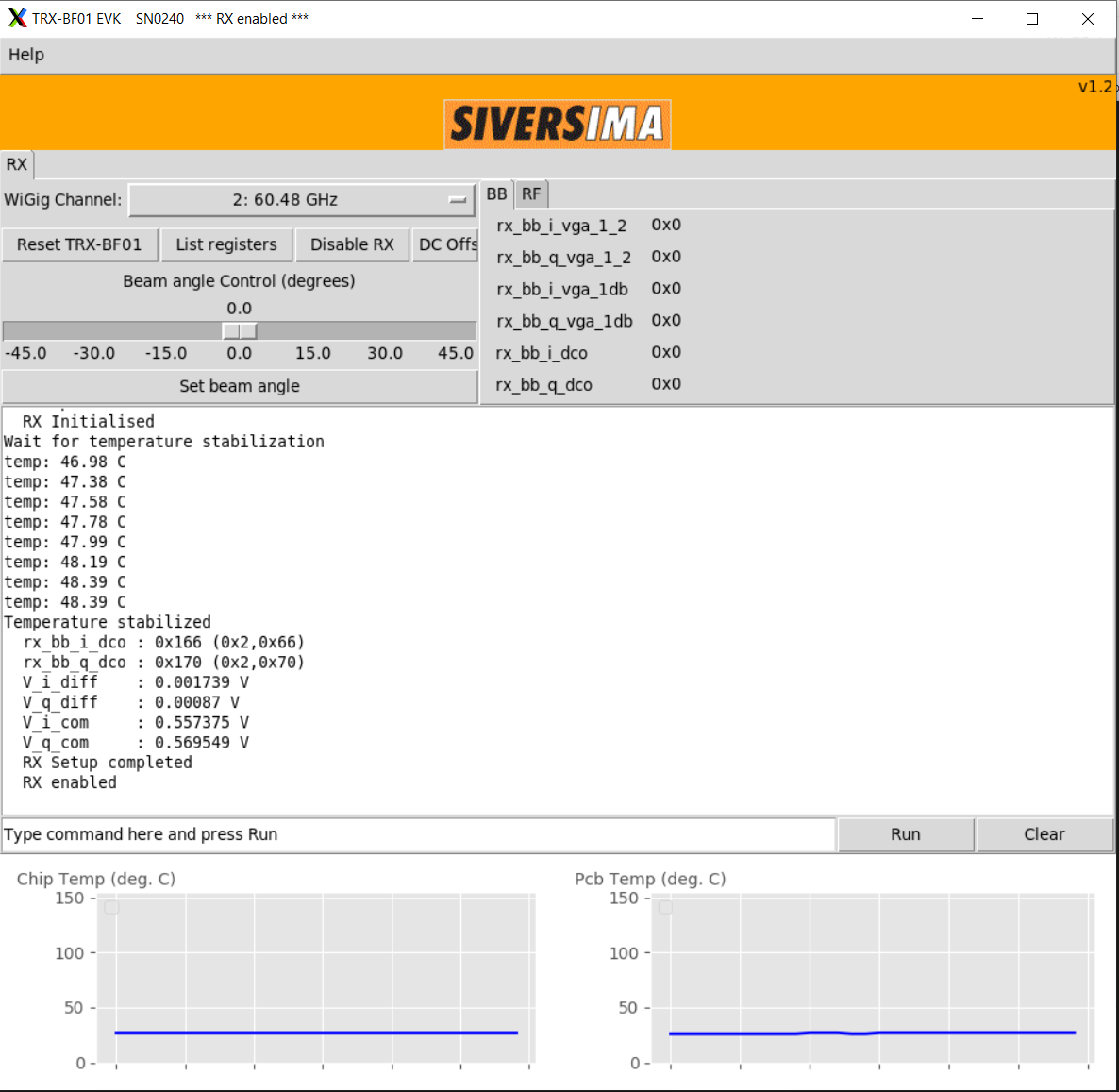
This example uses Sivers front-end SN0243 as the transmitter and SN0240 as the receiver.
On srv1-in1 (TX):
root@srv1-in1:~/ederenv# ./start_mb1.sh -gui SN0243
In the GUI that opens, click "TX enable" and then "LO leakage Cal".
On srv1-in2 (RX):
root@srv1-in2:~/ederenv# ./start_mb1.sh -gui SN0240
In the GUI that opens, click "RX enable".
¶ Step 4 — Verify and set the RF switch state
Check that the RF switch boxes are configured to use the X310 path (all switches at port 1). Run this from the console:
root@console:~# curl am-rt1.cosmos-lab.org:5054/rf_switch/status?name=rfsw1.sb1.cosmos-lab.org,rfsw2.sb1.cosmos-lab.org
Expected output (all switches on port 1):
<response status="OK">
  <rf_switch name="rfsw1.sb1.cosmos-lab.org" num_of_switches="4">
    <switch number="1" port="1"/>
    <switch number="2" port="1"/>
    <switch number="3" port="1"/>
    <switch number="4" port="1"/>
  </rf_switch>
  <rf_switch name="rfsw2.sb1.cosmos-lab.org" num_of_switches="4">
    <switch number="1" port="1"/>
    <switch number="2" port="1"/>
    <switch number="3" port="1"/>
    <switch number="4" port="1"/>
  </rf_switch>
</response>
If any switch shows port 2, set all to port 1:
curl "am-rt1.cosmos-lab.org:5054/rf_switch/set?name=rfsw1.sb1.cosmos-lab.org,rfsw2.sb1.cosmos-lab.org&switch=1,2,3,4&port=1"
¶ Step 5 — Transmit a sine wave (srv1-in1)
On srv1-in1, start transmitting a 1 MHz sine wave through sdr4-in1 at an IF of 100 MHz:
root@srv1-in1:~# /usr/lib/uhd/examples/tx_waveforms --args="addr=10.38.14.1" --freq 100e6 --rate 10e6 --ant AB --subdev A:AB --wave-freq 1e6 --wave-type SINE
¶ Step 6 — Observe the received signal (srv1-in2)
On srv1-in2, run the ASCII DFT display on sdr4-in2 at the same frequency:
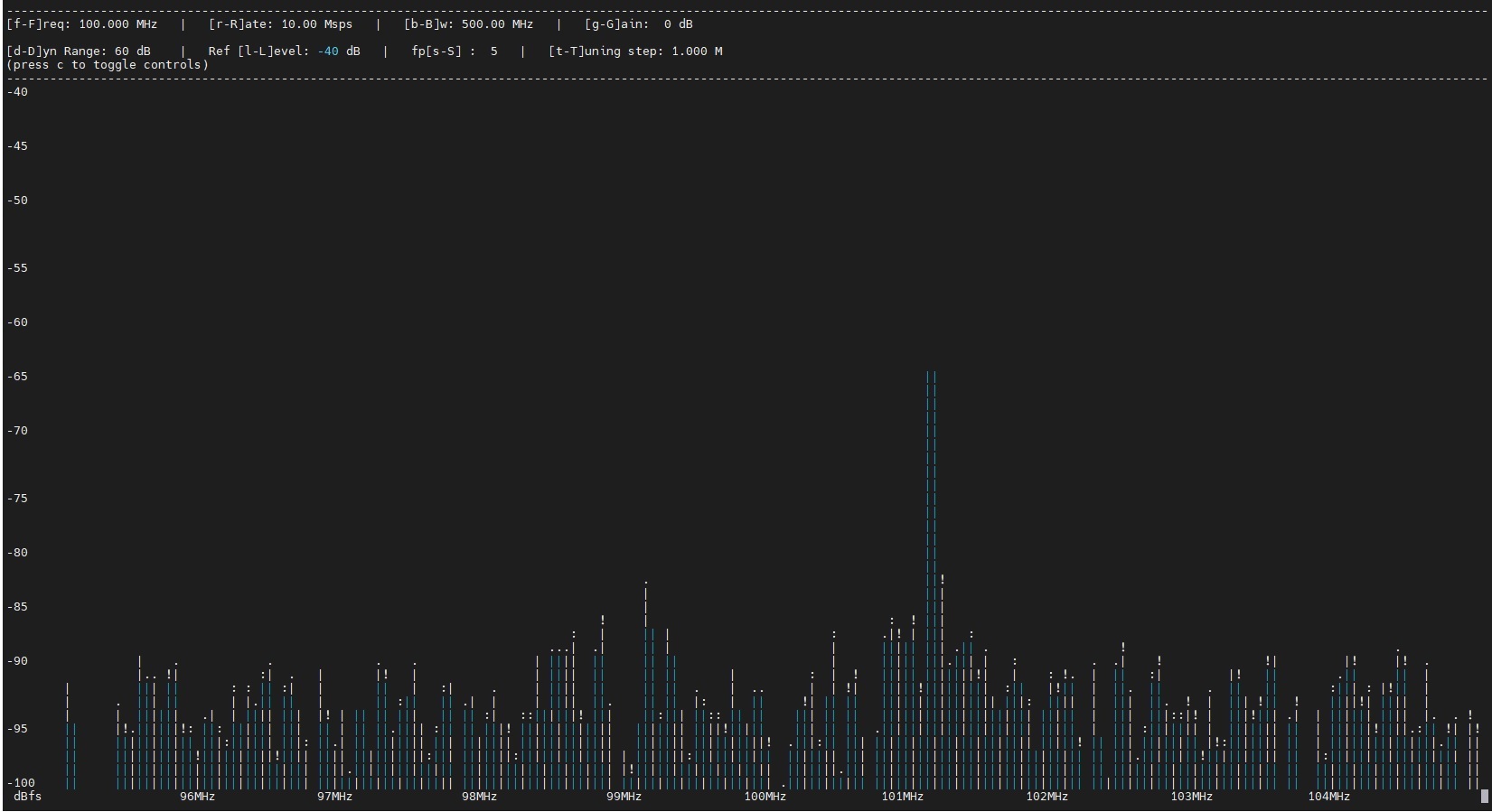
root@srv1-in2:~# /usr/lib/uhd/examples/rx_ascii_art_dft --args="addr=10.38.14.2" --freq 100e6 --rate 10e6 --ref-lvl -40 --ant AB --subdev B:AB
You should see a peak in the spectrum display at 100 MHz (IF carrier) with the 1 MHz tone visible as a sideband. Stopping tx_waveforms on srv1-in1 collapses the peak to the noise floor.
¶ Verification
uhd_find_deviceson srv1-in1 lists both sdr4-in1 (10.38.14.1) and sdr4-in2 (10.38.14.2) withfpga: XG.- The Sivers GUI on srv1-in1 confirms TX enabled and LO leakage calibration completed; the GUI on srv1-in2 confirms RX enabled.
- The RF switch status query returns all switches at port 1.
rx_ascii_art_dfton srv1-in2 shows a clear spectral peak that disappears whentx_waveformson srv1-in1 is stopped.
¶ Cleanup
omf tell -a offh -t system:topo:allres
No omf save is needed unless you modified the image.
¶ Troubleshooting
| Symptom | Likely cause | Fix |
|---|---|---|
uhd_find_devices returns no devices |
data1 interface not configured | Run ifconfig data1 10.38.1.3 netmask 255.255.0.0 mtu 9000 up on srv1-in1 (10.38.1.4 on srv1-in2); then ping 10.38.14.1 |
| Sivers GUI does not open | X11 forwarding not enabled | Re-SSH with ssh -Y root@srv1-in1 |
No signal peak in rx_ascii_art_dft |
RF switch in wrong position | Check switch status; set all to port 1 (see Step 4) |
| No signal peak despite correct switch | Sivers TX not enabled / beam misaligned | Confirm "TX enable" clicked in Sivers GUI; verify antenna alignment |
| UHD sample drops / overruns | Socket buffers too small | Run sysctl -w net.core.rmem_max=62500000 and wmem_max=62500000 (Step 2) |
¶ References
- COSMOS sb1 domain hardware and RF path configuration
- RF Switch service documentation
- Make a reservation
- SSH / console access
- OMF commands reference
Author(s): COSMOS team · Last verified: Not re-tested (migrated 2026-06-20) · Tested image/release: sivers_sb1_cosmos.ndz · Tags: mmwave, 60ghz, sivers, usrp, x310, gnuradio, sb1