¶ Setting up a Virtual / Simulated Optical Network using the Mininet-Optical Software Emulator
Configure a software-emulated packet-optical network with Mininet-Optical, then switch an optical light path between two destinations to reproduce a C-RAN handoff scenario — all running on a Linux VM or server without COSMOS testbed hardware.
¶ Overview
This tutorial uses Mininet-Optical to create a virtual optical network that mirrors the topology of the COSMOS optical hardware testbed. Mininet-Optical was developed as part of the COSMOS and COSM-IC projects and adds optical network emulation and simulation capabilities to Mininet, including modeling of optical transmission effects and impairments.
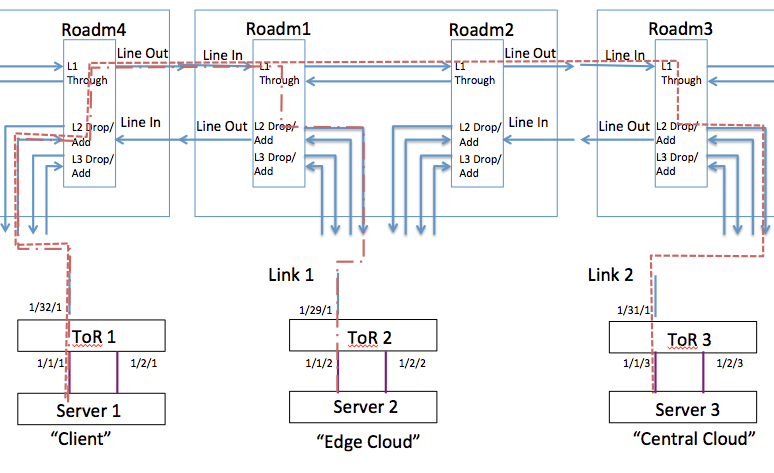
The experiment demonstrates a C-RAN light-path switching scenario: traffic between a "Client" (server1/ToR1) is first routed to an "Edge Cloud" (server2/ToR2) and then switched to a "Central Cloud" (server3/ToR3) by reconfiguring the ROADMs. The slightly longer round-trip time to server3 reflects the added propagation delay across two 22 km fiber spans.
This tutorial is a Mininet-Optical adaptation of the hardware testbed tutorial at Tutorials/Optical/Tutorial1. The same network topology and the same experiment are implemented in software, showing how an experiment designed for the COSMOS optical testbed can be adapted for a software emulation environment and how Mininet-Optical can be used to prototype experiments before running them on hardware.
Because this tutorial runs entirely inside a VM or Linux server, no COSMOS testbed reservation is required. All commands are run locally.
¶ Learning outcomes
After completing this tutorial you will be able to:
- Install and launch Mininet-Optical and understand its topology API.
- Build a packet-optical topology with ROADMs, ToR switches, and compute servers using the Python
Topoclass. - Configure ROADM connections using both the REST API (
curl) and the NETCONF interface (nc_add_connection.py). - Connect Ethernet interfaces to WDM transceivers on a Mininet-Optical Terminal (ToR).
- Switch an optical light path between destinations and observe the corresponding change in reachability and propagation delay using
ping.
¶ At a glance
| Difficulty | Intermediate |
| Estimated time | 60–90 min |
| Domain / sandbox | None — runs on any Linux VM or server with Mininet-Optical installed |
| Topic group | Optical |
| Last verified | Not re-tested (migrated 2026-06-20) |
¶ Prerequisites
Background knowledge
- Familiarity with optical networking concepts (ROADM, WDM, wavelength channels, ToR switch).
- Basic Python and Linux command-line skills.
- Recommended: review the hardware tutorial at Tutorials/Optical/Tutorial1 to understand the COSMOS testbed topology this emulates.
Account & access
- A COSMOS account is not required for this tutorial — the emulation runs locally.
- If you plan to later run the experiment on COSMOS hardware: a COSMOS account — register here — and an approved reservation — see Make a reservation.
¶ Resources required
Devices / nodes
| Resource | Role | Qty | Notes |
|---|---|---|---|
| Linux VM or server | Runs entire Mininet-Optical emulation | 1 | Must support Linux network namespaces; root/sudo required |
Disk images
| Image | Load onto | Provides |
|---|---|---|
| Not applicable. | — | Tutorial runs on native Linux with Mininet-Optical installed. |
Software components
| Component | Version | Source |
|---|---|---|
| Mininet-Optical | cosmos-tutorial branch |
github.com/mininet-optical/mininet-optical |
| Mininet | as bundled with Mininet-Optical | installed via make install |
| Python 3 | system | preinstalled on most Linux distributions |
| curl | system | preinstalled on most Linux distributions |
| OpenSSL (for NETCONF TLS) | system | required for make certs |
Spectrum / RF / special
Not applicable. This is a software emulation with no RF or optical hardware.
¶ Topology
roadm4 <-> roadm1 <-> roadm2 <-22km-> roadm3
 |          |                          |
tor1       tor2                       tor3
 |          |                          |
server1    server2                    server3
Three compute servers are each connected via Ethernet to a ToR switch. Each ToR contains an Ethernet interface and a WDM transceiver pair (output/input ports):
tor1-eth111 <--> server1    tor1-wdm 320/321 (output/input)
tor2-eth112 <--> server2    tor2-wdm 290/291 (output/input)
tor3-eth113 <--> server3    tor3-wdm 310/311 (output/input)
Four ROADMs form the optical switching fabric:
roadm1  localhost:1831
roadm2  localhost:1832
roadm3  localhost:1833
roadm4  localhost:1834
All transceivers operate on wavelength 1553.30 nm / 193.00 THz — channel C34 on Mininet-Optical's default 50 GHz grid (C1 = 191350 GHz; C34 = 191350 + 33 × 50 = 193000 GHz; bandwidth ~[192.95, 193.05] THz).
The ROADM port numbering follows the Lumentum ROADM20 convention:
LINEIN = 5101    LINEOUT = 4201
ADD    = 4100    DROP    = 5200
A 22 km fiber span (with ~73 µs propagation delay) connects roadm2 and roadm3, corresponding to a fiber spool in the COSMOS testbed.
¶ Setup
All commands are run in a terminal on the Linux VM or server where Mininet-Optical is installed. A COSMOS testbed reservation is not required.
-
Navigate to the Mininet-Optical source directory:
cd ~/mininet-optical -
Verify the tutorial scripts are present:
ls examples/cosmostutorial.py ls examples/config-cosmostutorial.sh -
If either script is missing, fetch and install the
cosmos-tutorialbranch:git fetch git checkout cosmos-tutorial make install -
Generate self-signed SSL certificates for the ROADM NETCONF agents (required even if you use the REST interface):
make certs
¶ Instructions
¶ Step 1 — Review the topology script
The emulated network is created by the Python script examples/cosmostutorial.py. The topology is built using Mininet's high-level topology template API: we subclass Topo and override its build() method.
¶ Topology class skeleton
class TutorialTopo( Topo ):
...
    def build( self ):
¶ Adding ROADMs and ToR switches
ROADMs and ToR switches are added using addSwitch() calls:
# ROADMs
        NC = NetconfPortBase
        roadm4 = self.addSwitch('roadm4', cls=LROADM, netconfPort=NC+4)
        ...
        # ToR switches
        tor1 = self.addSwitch('tor1', cls=Terminal, transceivers=[('32', 0*dBm)])
        ...
¶ Adding servers
Servers are added using addHost() calls:
# Servers
        server1 = self.addHost('server1')
        ...
¶ Adding WDM fiber links
WDM fiber links are unidirectional and are added using wdmLink() calls. Note the 22 km span between roadm2 and roadm3 (with a delay='73us') and the add/drop link wiring tor1 to roadm4 on ports 320/321 and ADD+2:
# Inter-ROADM links
        # We put 22km of fiber between roadm2 and roadm3
        # Default fiber length is 1m if not specified
        self.wdmLink(roadm4, roadm1, LINEOUT, LINEIN)
        self.wdmLink(roadm1, roadm4, LINEOUT, LINEIN)
        self.wdmLink(roadm1, roadm2, DROP+1, ADD+1)  # passthrough
        self.wdmLink(roadm2, roadm1, DROP+1, ADD+1)  # passthrough
        # Sub-millisecond delays won't be accurate (due to scheduler timing
        # granularity and running in a VM) but this will add observable
        # propagation delay for the longer links.
        self.wdmLink(roadm2, roadm3, LINEOUT, LINEIN, spans=[22*km], delay='73us')
        self.wdmLink(roadm3, roadm2, LINEOUT, LINEIN, spans=[22*km], delay='73us')
        ...
        # ROADM add/drop 2 <-> ToR transceiver links
        self.wdmLink(tor1, roadm4, 320, ADD+2)
        self.wdmLink(roadm4, tor1, DROP+2, 321)
¶ Startup and teardown
Lastly, the topology and network objects are instantiated and everything is started up (and shut down) in the __main__ section of the script:
if __name__ == '__main__':
    ...
    topo = TutorialTopo()
    net = Mininet( topo=topo, controller=None )
    restServer = RestServer( net )
    net.start()
    restServer.start()
    netconfServer = NetconfServer(
        net, username=username, password=password, sslkeyfile=sslkeyfile )
    netconfServer.start()
    ...
    if 'test' in argv:
        test(net)
    else:
        info(TutorialTopo.__doc__+'\n')
        CLI(net)
    netconfServer.stop()
    restServer.stop()
    net.stop()
    info( 'Done.\n')
¶ Step 2 — Launch Mininet-Optical and create the emulated network
Run the tutorial topology script with root privileges:
sudo examples/cosmostutorial.py
Note: If you need X11 features such as
xtermorplot, usesudo HOME=~instead of plainsudo.
Expected output:
        COSM-IC mini-tutorial topology:

        roadm4 <-> roadm1 <-> roadm2 <-22km-> roadm3
         |          |                          |
        tor1       tor2                       tor3
         |          |                          |
        server1    server2                    server3

        This is for the COSMOS mini-tutorial at:
        https://wiki.cosmos-lab.org/wiki/Tutorials/Optical/MininetOpticalTutorial1

    *** Starting CLI:
    mininet-optical>
Leave this terminal open. Mininet-Optical CLI commands may be entered at the mininet-optical> prompt.
Open a second terminal on the same VM/server for the configuration commands below. Unless specified, all configuration commands are run in this second window at the shell prompt.
cd ~/mininet-optical
¶ Step 3 — Configure ToR switches and transceivers
Connect each ToR's Ethernet interface to its WDM transceiver and set channel C34 using the REST API:
curl "localhost:8080/connect?node=tor1ðPort=1&wdmPort=320&wdmInPort=321&channel=34"
curl "localhost:8080/connect?node=tor2ðPort=2&wdmPort=290&wdmInPort=291&channel=34"
curl "localhost:8080/connect?node=tor3ðPort=3&wdmPort=310&wdmInPort=311&channel=34"
Turn on all transceivers:
curl "localhost:8080/turn_on?node=tor1"
curl "localhost:8080/turn_on?node=tor2"
curl "localhost:8080/turn_on?node=tor3"
¶ Step 4 — Assign IP addresses to compute nodes
This can be done at the mininet-optical> CLI prompt in the first terminal:
mininet-optical> server1 ifconfig server1-eth0 192.168.1.1/24
mininet-optical> server2 ifconfig server2-eth0 192.168.1.2/24
mininet-optical> server3 ifconfig server3-eth0 192.168.1.3/24
Alternatively, from the second terminal using the ~/mininet/util/m helper (which executes commands in the appropriate network namespace):
~/mininet/util/m server1 ifconfig server1-eth0 192.168.1.1/24
~/mininet/util/m server2 ifconfig server2-eth0 192.168.1.2/24
~/mininet/util/m server3 ifconfig server3-eth0 192.168.1.3/24
¶ Step 5 — Configure Connection 1: ToR1 ↔ ToR2
¶ Using REST
Configure roadm4 to add/drop channel 34 on the tor1 side:
curl "localhost:8080/connect?node=roadm4&port1=4102&port2=4201&channels=34"
curl "localhost:8080/connect?node=roadm4&port1=5101&port2=5202&channels=34"
Configure roadm1 to add/drop channel 34 on the tor2 side:
curl "localhost:8080/connect?node=roadm1&port1=4102&port2=4201&channels=34"
curl "localhost:8080/connect?node=roadm1&port1=5101&port2=5202&channels=34"
¶ Using NETCONF (alternative to REST)
The NETCONF servers for roadm1–roadm4 listen on localhost ports 1831–1834. Module 1 = MUX/ADD/LINEOUT; module 2 = DEMUX/DROP/LINEIN. Connection ID is 10; attenuation is 5 (may be ignored in the emulator).
roadm4 (localhost:1834):
examples/nc_add_connection.py localhost:1834 1 10 in-service false 4102 4201 192950 193050 5 Exp1-FromTor1
examples/nc_add_connection.py localhost:1834 2 10 in-service false 5101 5202 192950 193050 5 Exp1-TorwardTor1
roadm1 (localhost:1831):
examples/nc_add_connection.py localhost:1831 1 10 in-service false 4102 4201 192950 193050 5 Exp1-FromTor2
examples/nc_add_connection.py localhost:1831 2 10 in-service false 5101 5202 192950 193050 5 Exp1-TorwardTor2
¶ Step 6 — Verify Connection 1: ping server1 → server2
At the mininet-optical> prompt (first terminal):
mininet-optical> server1 ping 192.168.1.2
Expected output:
PING 192.168.1.2 (192.168.1.2) 56(84) bytes of data.
64 bytes from 192.168.1.2: icmp_seq=1 ttl=64 time=0.068 ms
64 bytes from 192.168.1.2: icmp_seq=2 ttl=64 time=0.062 ms
64 bytes from 192.168.1.2: icmp_seq=3 ttl=64 time=0.089 ms
^C
--- 192.168.1.2 ping statistics ---
3 packets transmitted, 3 received, 0% packet loss, time 2043ms
rtt min/avg/max/mdev = 0.062/0.073/0.089/0.011 ms
¶ Step 7 — Configure Connection 2: ToR1 ↔ ToR3
This reconfigures the optical path so that traffic from server1 (ToR1) reaches server3 (ToR3) instead of server2 (ToR2). Channel 34 now passes through roadm1 and roadm2 instead of dropping at them.
¶ Using REST
roadm4 (same as Connection 1 — tor1 side unchanged):
curl "localhost:8080/connect?node=roadm4&port1=4102&port2=4201&channels=34"
curl "localhost:8080/connect?node=roadm4&port1=5101&port2=5202&channels=34"
roadm1 (pass through instead of add/drop):
curl "localhost:8080/connect?node=roadm1&port1=4101&port2=4201&channels=34"
curl "localhost:8080/connect?node=roadm1&port1=5101&port2=5201&channels=34"
roadm2 (pass through):
curl "localhost:8080/connect?node=roadm2&port1=4101&port2=4201&channels=34"
curl "localhost:8080/connect?node=roadm2&port1=5101&port2=5201&channels=34"
roadm3 (add/drop to tor3):
curl "localhost:8080/connect?node=roadm3&port1=4102&port2=4201&channels=34"
curl "localhost:8080/connect?node=roadm3&port1=5101&port2=5202&channels=34"
¶ Using NETCONF (alternative to REST)
roadm4 (localhost:1834 — same as Connection 1):
examples/nc_add_connection.py localhost:1834 1 10 in-service false 4102 4201 192950 193050 5 Exp1-FromTor1
examples/nc_add_connection.py localhost:1834 2 10 in-service false 5101 5202 192950 193050 5 Exp1-TorwardTor1
roadm1 (localhost:1831 — pass through):
examples/nc_add_connection.py localhost:1831 1 10 in-service false 4101 4201 192950 193050 5 Exp1-EastR1
examples/nc_add_connection.py localhost:1831 2 10 in-service false 5101 5201 192950 193050 5 Exp1-WestR1
roadm2 (localhost:1832 — pass through):
examples/nc_add_connection.py localhost:1832 1 10 in-service false 4101 4201 192950 193050 5 Exp1-WestR2
examples/nc_add_connection.py localhost:1832 2 10 in-service false 5101 5201 192950 193050 5 Exp1-EastR2
roadm3 (localhost:1833 — add/drop to tor3):
examples/nc_add_connection.py localhost:1833 1 10 in-service false 4102 4201 192950 193050 5 Exp1-FromTor2
examples/nc_add_connection.py localhost:1833 2 10 in-service false 5101 5202 192950 193050 5 Exp1-TorwardTor2
¶ Step 8 — Verify Connection 2: ping server1 → server3
At the mininet-optical> prompt:
mininet-optical> server1 ping 192.168.1.3
Expected output:
PING 192.168.1.3 (192.168.1.3) 56(84) bytes of data.
64 bytes from 192.168.1.3: icmp_seq=1 ttl=64 time=0.354 ms
64 bytes from 192.168.1.3: icmp_seq=2 ttl=64 time=0.292 ms
64 bytes from 192.168.1.3: icmp_seq=3 ttl=64 time=0.363 ms
^C
--- 192.168.1.3 ping statistics ---
3 packets transmitted, 3 received, 0% packet loss, time 2052ms
rtt min/avg/max/mdev = 0.292/0.336/0.363/0.031 ms
Note the slightly higher RTT (~0.3 ms) compared to server2 (~0.07 ms), reflecting the propagation time across two 22 km fiber spans to the "Central Cloud" data center.
Emulator note: Mininet-Optical models the ROADM dataplane using OvS switching in the Linux kernel, so each hop adds some delay not present in hardware. Process scheduling, OS, and VM overhead can create additional latency variation.
¶ Verification
sudo examples/cosmostutorial.pystarts without errors and displays the topology ASCII diagram followed by*** Starting CLI:.- After Connection 1 (ToR1↔ToR2):
server1 ping 192.168.1.2shows 0% packet loss. - After Connection 2 (ToR1↔ToR3):
server1 ping 192.168.1.3shows 0% packet loss with RTT noticeably higher than the ToR2 ping, reflecting the 22 km fiber propagation delay. server1 ping 192.168.1.2fails (or shows packet loss) after switching to Connection 2, confirming the path switch.
¶ Cleanup
To exit Mininet-Optical, type exit or press Ctrl-D at the mininet-optical> prompt:
mininet-optical> exit
No omf save or testbed power-down is needed — the emulation terminates cleanly when the CLI exits.
¶ Troubleshooting
| Symptom | Likely cause | Fix |
|---|---|---|
sudo examples/cosmostutorial.py fails with import error |
Mininet-Optical not installed | Run make install from ~/mininet-optical; confirm cosmos-tutorial branch is checked out |
REST curl returns connection refused |
REST server not started | Ensure cosmostutorial.py is still running in the first terminal |
NETCONF nc_add_connection.py returns SSL error |
Certificates not generated | Run make certs from ~/mininet-optical |
ping shows 100% packet loss after configuring connections |
Transceiver or ROADM connection misconfigured | Verify curl turn_on calls succeeded; check port numbers match the topology (port 4102 = ADD2, port 5202 = DROP2, etc.) |
| RTT to server3 not higher than server2 | 22 km fiber delay below scheduler timing granularity | Expected in some VM environments; the ~73 µs delay may not be observable. Functional connectivity (0% loss) is the primary success criterion. |
cosmostutorial.py or tutorial scripts not found |
Wrong branch | Run git fetch && git checkout cosmos-tutorial && make install |
¶ References
- COSMOS Optical Hardware Testbed Tutorial 1: Tutorials/Optical/Tutorial1
- Mininet-Optical Tutorial 1 network script: https://github.com/Mininet-Optical/mininet-optical/blob/cosmos-tutorial/mnoptical/examples/cosmostutorial.py
- Mininet-Optical Tutorial 1 configuration script: https://github.com/Mininet-Optical/mininet-optical/blob/cosmos-tutorial/mnoptical/examples/config-cosmostutorial.sh
- Mininet-Optical documentation: https://mininet-optical.org
- Mininet-Optical code: https://github.com/mininet-optical/mininet-optical
- (Packet) Mininet web site: https://mininet.org
Author(s): COSMOS team (converted by Bob Lantz; original hardware tutorial by A. Minakhmetov, C. Gutterman, M. Sherman, J. Yu, T. Chen) · Last verified: Not re-tested (migrated 2026-06-20) · Tested image/release: Mininet-Optical cosmos-tutorial branch (July 2022) · Tags: optical, roadm, wdm, mininet-optical, emulation, c-ran