¶ Setting Up an Optical Network on the COSMOS Testbed
Configure a reconfigurable optical network on COSMOS using ROADMs and the Calient S320 space switch, then perform a light-path switching experiment that emulates C-RAN fronthaul path migration between Edge Cloud and Central Cloud.
¶ Overview
The COSMOS testbed provides reconfigurable optical networking infrastructure including ROADMs (Reconfigurable Optical Add-Drop Multiplexers) interconnected via a Calient S320 spatial optical switch. This tutorial walks through setting up an optical topology and running a switching experiment (Experiment 1) that demonstrates how an optical light path between two Top-of-Rack (ToR) switch ports can be changed dynamically.
The experiment models a C-RAN scenario: a "Client" (srv1) initially communicates through one optical path (ToR1↔ToR2) representing a connection to an Edge Cloud (srv2). The experiment then switches the light path to ToR1↔ToR3, representing migration of baseband processing to a Central Cloud (srv3) — with the signal routed through a 22 km fiber loop at 32 Avenue of the Americas, NYC, to emulate real geographic distance.
Three compute nodes (srv1-lg1, srv2-lg1, srv3-lg1) in the BED domain provide the client and cloud endpoints, while four ROADMs and the Calient S320 switch form the optical fabric.
¶ Learning outcomes
After completing this tutorial you will be able to:
- Understand the COSMOS optical testbed topology including ROADMs, the Calient S320 switch, and ToR transceiver interfaces.
- Configure Calient S320 optical cross-connections to establish a multi-hop ROADM path.
- Configure ROADM MUX/DEMUX ports and add optical connections using Python/NETCONF scripts.
- Set up a "Snake" connection to satisfy ROADM Line In port requirements.
- Configure ToR switch VLANs and wavelengths for optical transceiver interfaces.
- Validate an end-to-end optical path by pinging between compute nodes via the optical network.
- Switch a light path from one server to another and verify the change with connectivity tests.
¶ At a glance
| Difficulty | Intermediate |
| Estimated time | TODO: verify |
| Domain / sandbox | bed.cosmos-lab.org |
| Topic group | Optical Networking |
| Last verified | Not re-tested (migrated 2026-06-20) |
¶ Prerequisites
Background knowledge
- Familiarity with VLAN configuration on Ethernet switches.
- Basic optical networking concepts: ROADM, DWDM, wavelength/channel assignment, MUX/DEMUX.
- Familiarity with NETCONF or the Python scripts used to control ROADMs on COSMOS .
Account & access
- A COSMOS account — register here.
- An approved reservation on the BED domain — see Make a reservation.
- SSH access to the domain console — see SSH access.
- Access to the ToR switch (
sw-tor-lg1) and ROADMs (requires coordinator approval for optical resources).
¶ Resources required
Devices / nodes
| Resource | Role | Qty | Notes |
|---|---|---|---|
| srv1-lg1.bed.cosmos-lab.org | Client / source server | 1 | data1 iface eo1 on ToR port twentyFiveGigE 1/1/1; data2 iface eo2 on ToR port twentyFiveGigE 1/2/1 |
| srv2-lg1.bed.cosmos-lab.org | Edge Cloud server | 1 | data1 iface eo1 on ToR port twentyFiveGigE 1/1/2; data2 iface eo2 on ToR port twentyFiveGigE 1/2/2 |
| srv3-lg1.bed.cosmos-lab.org | Central Cloud server | 1 | data1 iface eo1 on ToR port twentyFiveGigE 1/1/3; data2 iface eo2 on ToR port twentyFiveGigE 1/2/3 |
| srv4-lg1.bed.cosmos-lab.org | (Additional node, not used in Experiment 1) | 1 | data1 on twentyFiveGigE 1/1/4; data2 on twentyFiveGigE 1/2/4 |
| srv1-co1.bed.cosmos-lab.org | (Additional node, not used in Experiment 1) | 1 | data1 on twentyFiveGigE 1/11/3; data2 on twentyFiveGigE 1/12/3 |
| srv2-co1.bed.cosmos-lab.org | (Additional node, not used in Experiment 1) | 1 | data1 on twentyFiveGigE 1/11/4; data2 on twentyFiveGigE 1/12/4 |
| roadm1-co1.cosmos-lab.org (10.104.1.1) | ROADM 1 | 1 | Controlled via Python/NETCONF |
| roadm2-co1.cosmos-lab.org (10.104.1.2) | ROADM 2 | 1 | Controlled via Python/NETCONF |
| roadm3-co1.cosmos-lab.org (10.104.1.3) | ROADM 3 | 1 | Controlled via Python/NETCONF |
| roadm4-co1.cosmos-lab.org (10.104.1.4) | ROADM 4 | 1 | Controlled via Python/NETCONF |
| Calient S320 optical switch | Space switch interconnecting ROADMs and ToR | 1 | TODO: verify management address/access |
| sw-tor-lg1 | Top-of-Rack switch with DWDM transceivers | 1 | Configured via CLI; hosts optical transceiver interfaces |
Disk images
| Image | Load onto | Provides |
|---|---|---|
| TODO: verify baseline image name | srv1-lg1, srv2-lg1, srv3-lg1 | Base Ubuntu OS; net-tools must be installed after imaging |
Software components
| Component | Version | Source |
|---|---|---|
Python ROADM control scripts (add_connection.py, etc.) |
TODO: verify | TODO: verify — preinstalled or available from COSMOS repository |
net-tools (ifconfig) |
TODO: verify | apt install net-tools after imaging |
Spectrum / RF / special
This tutorial uses DWDM optical wavelengths, not RF spectrum. Two wavelengths are used:
- Experiment 1 data wavelength: 1553.30 nm / 193.00 THz (DWDM channel), bandwidth ~[192.95; 193.05] THz
- Snake wavelength: DWDM Channel C60, 1529.55 nm / 196.00 THz, frequency range [195.95, 196.05] THz
All ROADMs, the Calient S320 switch, and the DWDM transceivers on the ToR switch are shared testbed infrastructure and require coordination with COSMOS staff before use.
¶ Topology
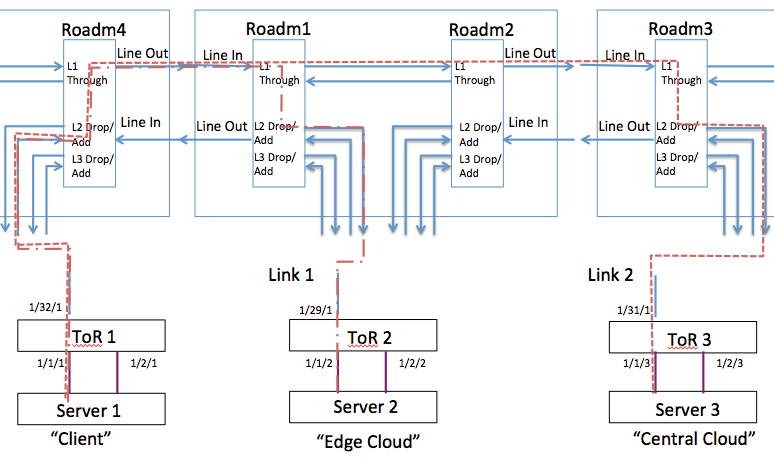 Fig. 1 — Logical Topology of Experiment 1 (image not yet migrated; see TODO above)
The physical optical fabric is built around the Calient S320 space switch, which has ports connected to:
- Four ROADMs (ROADM1–ROADM4)
- The ToR switch (
sw-tor-lg1) transceiver ports (tengigabitethernet 1/29/1, 1/31/1, 1/32/1, 1/33 for snake) - A 22 km fiber loop at 32 Avenue of the Americas, NYC (ports P1_P2 and P3_P4)
- Three loopback connections (e.g., port 5.5.1 used for Snake)
Compute node interfaces on ToR (sw-tor-lg1):
twentyFiveGigE 1/1/1↔ srv1-lg1 (data1)twentyFiveGigE 1/1/2↔ srv2-lg1 (data1)twentyFiveGigE 1/1/3↔ srv3-lg1 (data1)twentyFiveGigE 1/2/1..4↔ srv1..4-lg1 (data2)twentyFiveGigE 1/11/3..4↔ srv1..2-co1 (data1)twentyFiveGigE 1/12/3..4↔ srv1..2-co1 (data2)
VLAN-to-transceiver mapping for Experiment 1:
| VLAN | Server-facing port | Optical transceiver port |
|---|---|---|
| 121 | twentyFiveGigE 1/1/1 (srv1-lg1) | tengigabitethernet 1/32/1 |
| 122 | twentyFiveGigE 1/1/2 (srv2-lg1) | tengigabitethernet 1/29/1 |
| 123 | twentyFiveGigE 1/1/3 (srv3-lg1) | tengigabitethernet 1/31/1 |
Calient S320 cross-connections for Experiment 1 (see Setup — Calient S320 for full table):
The Calient S320 connects ROADM ports, ToR transceivers, and the 22 km loop to form the required optical paths.
Logical experiment scenario:
- Connection 1 (ToR1↔ToR2): srv1 ↔ ROADM4 ↔ ROADM1 ↔ srv2 (Edge Cloud path)
- Connection 2 (ToR1↔ToR3): srv1 ↔ ROADM4 ↔ ROADM1 ↔ ROADM2 ↔ 22 km loop ↔ ROADM3 ↔ srv3 (Central Cloud path)
¶ Setup
¶ Step 1 — Reserve resources and access the console
Reserve the BED domain including optical resources (coordinate with COSMOS staff for ROADM/switch access). Then log into the BED console:
ssh <username>@console.bed.cosmos-lab.org
¶ Step 2 — Load and boot compute nodes
Load the baseline image onto the three servers:
omf load -i <baseline-image>.ndz -t srv1-lg1,srv2-lg1,srv3-lg1
Power on and confirm nodes are up:
omf tell -a on -t srv1-lg1,srv2-lg1,srv3-lg1
omf stat -t srv1-lg1,srv2-lg1,srv3-lg1
¶ Step 3 — Configure Calient S320 optical cross-connections
The Calient S320 must be configured with the cross-connections from Table 1 before the ROADMs can be configured. The connections below establish the physical optical fiber paths.
Table 1. Calient S320 Connections for Experiment 1
| ID | Ports Connection | Devices Connection | Comment |
|---|---|---|---|
| 1 | 1.1.1–1.4.1 | ROADM1.port_1 to ROADM2.port_1 | Forming pass-through connection between ROADM1 and ROADM2 |
| 2 | 1.1.2–5.7.1 | ROADM1.port_2 to ToR.port_29 | Connecting transceiver on ToR port 29 to ROADM1 add/drop port 2 |
| 3 | 1.4.8–5.8.1 | ROADM2.line to 32AoA.P1_P2 | Connecting line port of ROADM2 to port P1_P2 of the 22 km fiber loop through 32 AoA |
| 4 | 1.7.2–5.7.3 | ROADM3.port_2 to ToR.port_31 | Connecting transceiver on ToR port 31 to ROADM3 add/drop port 2 |
| 5 | 1.7.4–5.5.1 | ROADM3.port_4 to Loopback.port_1 | Connecting ROADM3 add/drop port 4 to a loopback connection (needed for Snake) |
| 6 | 2.2.8–1.1.8 | ROADM4.line to ROADM1.line | Connecting line ports of ROADM1 and ROADM4 |
| 7 | 5.7.4–2.2.2 | ROADM4.port_2 to ToR.port_32 | Connecting transceiver on ToR port 32 to ROADM4 add/drop port 2 |
| 8 | 5.7.5–2.2.4 | ROADM4.port_4 to ToR.port_33 | Connecting transceiver on ToR port 33 to ROADM4 add/drop port 4 (needed for Snake) |
| 9 | 5.8.2–1.7.8 | ROADM3.port_2 to 32AoA.P3_P4 | Connecting line port of ROADM3 to port P3_P4 of the 22 km fiber loop through 32 AoA |
For the Snake connection, connections 1, 3, 5, 6, 8, and 9 must be in place.
¶ Step 4 — Configure ROADMs: Snake connection
Correct ROADM operation requires the Line In port of every ROADM to receive light continuously. A dedicated transceiver (tengigabitethernet 1/33 on the ToR) sends light through all four ROADMs via a loopback connection on the Calient S320 (port 5.5.1), forming a "Snake" loop.
Snake transceiver (tengigabitethernet 1/33 on ToR): DWDM Channel C60, 1529.55 nm / 196.00 THz, frequency range [195.95, 196.05] THz.
MUX/DEMUX port assignments for Snake:
| ROADM | DEMUX IN/OUT ports | MUX IN/OUT ports |
|---|---|---|
| ROADM 4 | 5101/5204 | 4104/4201 |
| ROADM 1 | 5101/5201 | 4101/4201 |
| ROADM 2 | 5101/5201 | 4101/4201 |
| ROADM 3 | 5101/5204 | 4104/4201 |
ALS (Automatic Laser Shutdown) Disable Sequence — disable for 60 seconds in this order:
- ROADM 4 booster
- ROADM 2 booster
- ROADM 3 booster
- ROADM 1 booster
All ROADM configurations are performed using Python scripts that send NETCONF commands to each ROADM. The general form used for adding connections in the experiment steps below is:
python add_connection.py <roadm-ip> <param1> <param2> in-service false <in-port> <out-port> <freq-low> <freq-high> <param> <connection-name>
¶ Step 5 — Configure ToR switch (sw-tor-lg1)
Log into the ToR switch CLI.
5a. Prepare interfaces as VLAN switch ports:
sw-tor-lg1#configure
sw-tor-lg1(conf)#interface twentyFiveGigE 1/1/1
sw-tor-lg1(conf-if-tf-1/1/1)#switchport
sw-tor-lg1(conf-if-tf-1/1/1)#no shutdown
sw-tor-lg1(conf-if-tf-1/1/1)#exit
sw-tor-lg1(conf)#interface twentyFiveGigE 1/1/2
sw-tor-lg1(conf-if-tf-1/1/2)#switchport
sw-tor-lg1(conf-if-tf-1/1/2)#no shutdown
sw-tor-lg1(conf-if-tf-1/1/2)#exit
sw-tor-lg1(conf)#interface twentyFiveGigE 1/1/3
sw-tor-lg1(conf-if-tf-1/1/3)#switchport
sw-tor-lg1(conf-if-tf-1/1/3)#no shutdown
sw-tor-lg1(conf-if-tf-1/1/3)#exit
sw-tor-lg1(conf)#interface tengigabitethernet 1/31/1
sw-tor-lg1(conf-if-te-1/31/1)#switchport
sw-tor-lg1(conf-if-te-1/31/1)#no shutdown
sw-tor-lg1(conf-if-te-1/31/1)#exit
sw-tor-lg1(conf)#interface tengigabitethernet 1/29/1
sw-tor-lg1(conf-if-te-1/29/1)#switchport
sw-tor-lg1(conf-if-te-1/29/1)#no shutdown
sw-tor-lg1(conf-if-te-1/29/1)#exit
sw-tor-lg1(conf)#interface tengigabitethernet 1/32/1
sw-tor-lg1(conf-if-te-1/32/1)#switchport
sw-tor-lg1(conf-if-te-1/32/1)#no shutdown
sw-tor-lg1(conf-if-te-1/32/1)#exit
5b. Assign interfaces to VLANs:
sw-tor-lg1#configure
sw-tor-lg1(conf)#interface vlan 121
sw-tor-lg1(conf-if-vl-121)#untagged twentyFiveGigE 1/1/1
sw-tor-lg1(conf-if-vl-121)#untagged tengigabitethernet 1/32/1
sw-tor-lg1(conf-if-vl-121)#exit
sw-tor-lg1(conf)#interface vlan 122
sw-tor-lg1(conf-if-vl-122)#untagged twentyFiveGigE 1/1/2
sw-tor-lg1(conf-if-vl-122)#untagged tengigabitethernet 1/29/1
sw-tor-lg1(conf-if-vl-122)#exit
sw-tor-lg1(conf)#interface vlan 123
sw-tor-lg1(conf-if-vl-123)#untagged twentyFiveGigE 1/1/3
sw-tor-lg1(conf-if-vl-123)#untagged tengigabitethernet 1/31/1
sw-tor-lg1(conf-if-vl-123)#exit
sw-tor-lg1(conf)#exit
5c. Assign wavelengths to transceivers:
sw-tor-lg1#configure
sw-tor-lg1(conf)#interface tengigabitethernet 1/32/1
sw-tor-lg1(conf-if-te-1/32/1)#wavelength 1553.3
sw-tor-lg1(conf-if-te-1/32/1)#exit
sw-tor-lg1(conf)#interface tengigabitethernet 1/29/1
sw-tor-lg1(conf-if-te-1/29/1)#wavelength 1553.3
sw-tor-lg1(conf-if-te-1/29/1)#exit
sw-tor-lg1(conf)#interface tengigabitethernet 1/32/1
sw-tor-lg1(conf-if-te-1/32/1)#wavelength 1553.3
sw-tor-lg1(conf-if-te-1/32/1)#exit
sw-tor-lg1(conf)#exit
5d. Verify VLANs:
sw-tor-lg1#show vlan
Expected output:
Codes: * - Default VLAN, G - GVRP VLANs, R - Remote Port Mirroring VLANs, P - Primary, C - Community, I - Isolated
       O - Openflow, Vx - Vxlan
Q: U - Untagged, T - Tagged
   x - Dot1x untagged, X - Dot1x tagged
   o - OpenFlow untagged, O - OpenFlow tagged
   G - GVRP tagged, M - Vlan-stack
   i - Internal untagged, I - Internal tagged, v - VLT untagged, V - VLT tagged

    NUM    Status    Description                     Q Ports
    121    Active                                    U Te 1/32/1
                                                     U Tf 1/1/1
    122    Active                                    U Te 1/29/1
                                                     U Tf 1/1/2
    123    Active                                    U Te 1/31/1
                                                     U Tf 1/1/3
¶ Step 6 — Configure compute node network interfaces
SSH into each server from the console and configure the eo1 (data1) interface with its experiment IP address.
First, install net-tools on each server (after loading the baseline image):
sudo apt-get update
sudo apt install net-tools
Then assign IP addresses to the eno1 interface on each server:
native@srv1-lg1:~$ sudo ifconfig eno1 192.168.1.1 netmask 255.255.255.0
native@srv2-lg1:~$ sudo ifconfig eno1 192.168.1.2 netmask 255.255.255.0
native@srv3-lg1:~$ sudo ifconfig eno1 192.168.1.3 netmask 255.255.255.0
Note: The source uses
eo1as the interface label in the topology description buteno1in the actual commands. Useip linkto confirm the correct interface name on each node.
¶ Instructions
¶ Step 1 — Establish Connection ToR1↔ToR2 (Edge Cloud path)
Configure ROADM 4 and ROADM 1 for Connection 1 using the Python NETCONF scripts.
ROADM 4:
- Enable MUX port 4102 "From ToR 1"
- Add Connection "Exp1-FromTor1" with Input/Output Port 4102/4201, bandwidth [192.95; 193.05]:
python add_connection.py 10.104.1.4 1 10 in-service false 4102 4201 192950 193050 5 Exp1-FromTor1 - Enable DEMUX port 5202 "Towards ToR 1"
- Add Connection "Exp1-TorwardTor1" with I/O Port 5101/5202:
python add_connection.py 10.104.1.4 2 10 in-service false 5101 5202 192950 193050 5 Exp1-TorwardTor1
ROADM 1:
- Enable MUX port 4102 "From ToR 2"
- Add Connection "From ToR 2" with I/O Port 4102/4201, bandwidth [192.95; 193.05]
- Enable DEMUX port 5202 "Towards ToR 2"
- Add Connection "Towards ToR 2" with I/O Port 5101/5202
¶ Step 2 — Test connectivity over Connection 1
Try a ping from srv1 to srv2:
native@srv1-lg1:~$ ping 192.168.1.2
Expected output:
PING 192.168.1.2 (192.168.1.2) 56(84) bytes of data.
64 bytes from 192.168.1.2: icmp_seq=1 ttl=64 time=0.460 ms
64 bytes from 192.168.1.2: icmp_seq=2 ttl=64 time=0.423 ms
Note: The source lists the ping target as
192.168.1.3in step 2 of "Perform Experiment_1" while describing a srv1↔srv2 test. Based on context the target is192.168.1.2(srv2).
¶ Step 3 — Switch to Connection ToR1↔ToR3 (Central Cloud path)
Now reconfigure the ROADMs to redirect the light path from srv2 (Edge Cloud) to srv3 (Central Cloud), routing through the 22 km loop at 32 AoA.
ROADM 4 (same configuration as for Connection 1):
- Enable MUX port 4102 "From ToR 1"
- Add Connection "From ToR 1" with I/O Port 4102/4201, bandwidth [192.95; 193.05]
- Enable DEMUX port 5202 "Towards ToR 1"
- Add Connection "Towards ToR 1" with I/O Port 5101/5202, bandwidth [192.95; 193.05]
ROADM 1 (different from Connection 1 — through-port configuration):
- Enable MUX port 4101 "Through Port" (enabled for Snake)
- Add Connection "Through In" with I/O Port 4101/4201, bandwidth [192.95; 193.05]
- Enable DEMUX port 5201 "Through Port" (enabled for Snake)
- Add Connection "Through Out" with I/O Port 5101/5201, bandwidth [192.95; 193.05]
ROADM 2 (same as ROADM 1 — through-port configuration):
- Enable MUX port 4101 "Through Port" (enabled for Snake)
- Add Connection "Through In" with I/O Port 4101/4201, bandwidth [192.95; 193.05]
- Enable DEMUX port 5201 "Through Port" (enabled for Snake)
- Add Connection "Through Out" with I/O Port 5101/5201, bandwidth [192.95; 193.05]
ROADM 3 (add/drop to ToR3):
- Enable MUX port 4102 "From ToR 3"
- Add Connection "From ToR 3" with I/O Port 4102/4201, bandwidth [192.95; 193.05]
- Enable DEMUX port 5202 "Towards ToR 3"
- Add Connection "Towards ToR 3" with I/O Port 5101/5202, bandwidth [192.95; 193.05]
¶ Step 4 — Test connectivity over Connection 2
Try a ping from srv1 to srv3:
native@srv1-lg1:~$ ping 192.168.1.3
Expected output is similar to Connection 1: successful ICMP replies from 192.168.1.3.
¶ Verification
show vlanonsw-tor-lg1shows VLANs 121, 122, and 123 active with correct port assignments.- Ping from
srv1-lg1(192.168.1.1) tosrv2-lg1(192.168.1.2) succeeds when Connection 1 (ToR1↔ToR2) is established. - After switching to Connection 2 (ToR1↔ToR3), ping from
srv1-lg1tosrv2-lg1times out and ping tosrv3-lg1(192.168.1.3) succeeds. - ROADM Python scripts complete without error for each connection configuration.
¶ Cleanup
Remove ROADM connections and disable the optical paths via the Python scripts when done. Turn off compute nodes:
omf tell -a offh -t srv1-lg1,srv2-lg1,srv3-lg1
Notify COSMOS staff that optical resources (ROADMs, Calient switch) are released.
¶ Troubleshooting
| Symptom | Likely cause | Fix |
|---|---|---|
| Ping between servers fails after ROADM configuration | ROADM connection not established correctly, or Snake not in place | Verify Snake connections (IDs 1,3,5,6,8,9 in Table 1) are active; check ALS disable sequence was run in correct order |
| ROADM Python script errors | Incorrect ROADM IP or port numbers | Verify ROADM IPs (10.104.1.1–.4) are reachable; check port numbering against MUX/DEMUX table |
ToR VLAN not showing in show vlan |
Interface not set to switchport mode or not shut down cleanly | Re-run switchport + no shutdown for the affected interface |
Interface name eno1 not found on server |
Image-dependent naming | Check with ip link; apply ifconfig to the correct interface name |
| Light path does not switch to Connection 2 | Old Connection 1 ROADM entries still active | Remove Connection 1 entries from ROADM 1 before adding Connection 2 through-port entries |
¶ References
- COSMOS optical testbed overview: https://www.cosmos-lab.org
- Calient S320 space switch documentation:
- COSMOS ROADM Python control scripts:
- Related publication: Minakhmetov et al., Telecom Paris / Columbia / Rutgers / University of Arizona / Columbia — see author list for contact
Author(s): COSMOS team (original authors: Artur Minakhmetov / Telecom Paris, Craig Gutterman / Columbia University, Michael Sherman / Rutgers University, Jiakai Yu / University of Arizona, Tingjun Chen / Columbia University) · Last verified: Not re-tested (migrated 2026-06-20) · Tested image/release: TODO: verify · Tags: optical, roadm, dwdm, calient, c-ran, optical-switching