¶ Optical Path Switching on the COSMOS Testbed (SigComm 2022)
Configure an optical network on the COSMOS testbed and demonstrate dynamic switching between a short 1-hop path and a long 2-hop path through reconfigurable ROADM units and a Calient S320 optical switch.
¶ Overview
This tutorial walks through setting up an optical network experiment on the COSMOS testbed as presented at SigComm 2022. The experiment demonstrates optical path switching between a short path (1-hop, 10 km fiber spool) connecting srv1-co1 to srv1-lg1, and a long path (2-hop, 10 km fiber spool + 32 km Manhattan dark fiber) connecting srv1-co1 to srv2-lg1.
The scenario represents dynamic light-path reconfiguration in a C-RAN architecture, where a "Client" changes its baseband processing location between a nearby "Edge Cloud" and a further "Central Cloud". Background traffic is injected via a comb source to simulate a realistic wavelength-division multiplexing (WDM) environment.
The optical interconnections are all realized through a Calient S320 optical circuit switch. ROADMs are configured via NETCONF using Python scripts developed for the COSMOS testbed.
¶ Learning outcomes
After completing this tutorial you will be able to:
- Describe the physical topology of the COSMOS optical testbed, including ROADM units, fiber spools, dark fiber, and the Calient S320 switch.
- Configure Calient S320 port connections for a desired optical topology.
- Configure ROADM MUX/DEMUX ports for add/drop operations on specific WDM channels.
- Set up background traffic using a comb source.
- Execute an optical path switch between a 1-hop and a 2-hop route and verify connectivity with
ping.
¶ At a glance
| Difficulty | Advanced |
| Estimated time | TODO: verify |
| Domain / sandbox | bed.cosmos-lab.org |
| Topic group | Optical |
| Last verified | Not re-tested (migrated 2026-06-20) |
¶ Prerequisites
Background knowledge
- Familiarity with WDM/DWDM optical networking concepts (wavelengths, ROADM add/drop, MUX/DEMUX).
- Basic Linux networking (interface configuration with
ifconfig). - Familiarity with NETCONF/YANG for network device configuration is helpful.
- Understanding of the COSMOS testbed optical infrastructure — see COSMOS optical hardware .
Account & access
- A COSMOS account — register here.
- An approved reservation on
bed.cosmos-lab.orgwith access to optical resources — see Make a reservation. - SSH access to the domain console — see SSH access.
- Access to the Python NETCONF scripts for COSMOS ROADM configuration .
¶ Resources required
Devices / nodes
| Resource | Role | Qty | Notes |
|---|---|---|---|
| srv1-co1.bed.cosmos-lab.org | Client / transmitter node (CO1 site) | 1 | 10G DWDM transceiver on ToR sw-da-co1 Eth 1/1/66 (VLAN 1066) |
| srv1-lg1.bed.cosmos-lab.org | Edge Cloud node (LG1 site, short path endpoint) | 1 | 10G DWDM transceiver on ToR sw-da-lg1 Eth 1/1/33 (VLAN 1033) |
| srv2-lg1.bed.cosmos-lab.org | Central Cloud node (LG1 site, long path endpoint) | 1 | 10G DWDM transceiver on ToR sw-da-lg1 Eth 1/1/34 (VLAN 1034) |
| rdm1-co1 (10.104.1.1) | ROADM unit at CO1 site | 1 | Managed via NETCONF |
| rdm2-co1 (10.104.1.2) | ROADM unit at CO1 site | 1 | Managed via NETCONF |
| rdm1-lg1 (10.104.2.1) | ROADM unit at LG1 site | 1 | Managed via NETCONF |
| rdm2-lg1 (10.104.2.2) | ROADM unit at LG1 site | 1 | Managed via NETCONF |
| Calient S320 optical circuit switch | All optical cross-connects | 1 | Port connections listed in topology tables below |
| Comb source | WDM background traffic source | 1 | Split 1×2 to Calient ports 5.8.5 and 5.8.8 |
Disk images
| Image | Load onto | Provides |
|---|---|---|
| TODO: verify | srv1-co1, srv1-lg1, srv2-lg1 | Linux OS with net-tools; Python NETCONF scripts for ROADM configuration |
Software components
| Component | Version | Source |
|---|---|---|
| Python ROADM NETCONF scripts | TODO: verify | TODO: verify — repo/package not stated in source |
net-tools (ifconfig) |
TODO: verify | apt install net-tools |
Spectrum / RF / special
This tutorial uses optical fiber infrastructure (C-band DWDM). No RF spectrum is used. Key optical resources:
- 10 km fiber spools (×2) — 1-hop path segment
- 32 km Manhattan dark fiber (×2 strands) — 2-hop path additional segment
- DWDM Snake channel: C60, 1529.55 nm, 196.00 THz (range 195.95–196.05 THz), on ToR tengigabitethernet 1/33/1
- Transceiver channel for experiment traffic: channel 62
- Comb source open channels:
10-19, 40-44, 46-49, 80-89 - Comb source through channels:
10-19, 40-49, 80-89
¶ Topology
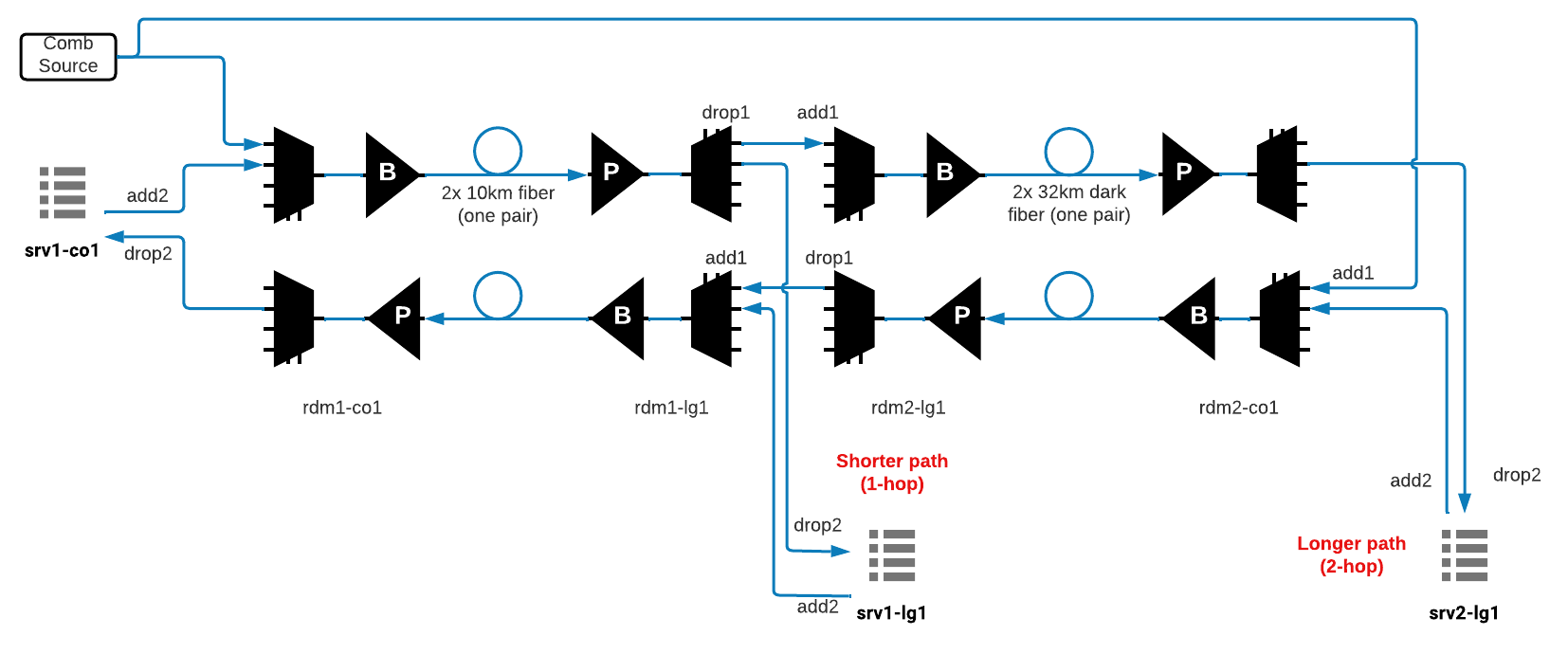
Figure 1. Topology setup of the experiment.
The experiment operates in the bed.cosmos-lab.org domain. Three compute servers at two sites (CO1 and LG1) are connected through four ROADM units via a Calient S320 all-optical circuit switch.
Short path (1-hop, ~10 km): srv1-co1 → ROADM1-CO1 → 10 km fiber spool → ROADM1-LG1 → srv1-lg1
Long path (2-hop, ~42 km): srv1-co1 → ROADM1-CO1 → 10 km fiber spool → ROADM1-LG1 → ROADM2-LG1 → 32 km dark fiber → ROADM2-CO1 → srv2-lg1
A "Snake" loopback connection through all ROADMs ensures each ROADM Line In port always receives light, which is required for correct ROADM operation.
ToR switch port assignments:
sw-da-co1: Eth 1/1/1:1 (VLAN 1066) → srv1-co1 data1; Eth 1/1/66 (VLAN 1066) → 10G DWDM tunable (to Calient 5.7.3)sw-da-lg1: Eth 1/1/1:1 (VLAN 1033) → srv1-lg1 data1; Eth 1/1/1:2 (VLAN 1034) → srv2-lg1 data1; Eth 1/1/33 (VLAN 1033) → 10G DWDM tunable (to Calient 5.7.5); Eth 1/1/34 (VLAN 1034) → 10G DWDM tunable (to Calient 5.7.6)
¶ Setup
- Reserve
bed.cosmos-lab.orgresources with optical access and log into the console:ssh <username>@console.bed.cosmos-lab.org - Make sure the compute nodes are off before imaging:
omf tell -a offh -t system:topo:allres - Load the image onto the three compute servers:
omf load -i <image>.ndz -t srv1-co1,srv1-lg1,srv2-lg1 - Turn the compute nodes on and confirm they are up:
omf tell -a on -t srv1-co1,srv1-lg1,srv2-lg1 omf stat -t srv1-co1,srv1-lg1,srv2-lg1 - Establish the physical Calient S320 port connections as described in the Topology section (see the connection tables in the Instructions below). This is done via the COSMOS optical control plane or by coordinating with testbed staff .
¶ Instructions
¶ Step 1 — Configure Calient S320 port connections (base topology)
All optical cross-connects are realized through the Calient S320 switch. The following connections must be in place for the experiment base topology. These include connections for the comb source (background traffic) and the Snake loopback.
Comb source and Snake connections (required for all routes):
| ID | Ports Connection | Devices Connection | Comment |
|---|---|---|---|
| 1 | 5.8.5 → 1.1.1 | comb_source_1 to ROADM1-CO1.port_1 | Background traffic into ROADM1-CO1 add port 1 |
| 2 | 5.8.8 → 1.4.1 | comb_source_2 to ROADM2-CO1.port_1 | Background traffic into ROADM2-CO1 add port 1 |
| 4 | 5.7.3 ↔ 1.1.1 | srv1-co1 with ROADM1-CO1.port_2 | Connecting srv1-co1 with ROADM1-CO1 add/drop port 1 |
| 5 | 1.1.8 → 5.5.1 | ROADM1-CO1.line_port to fiber_spool_1 | ROADM1-CO1 line out to 10 km fiber spool |
| 6 | 5.5.2 → 1.1.8 | fiber_spool_2 to ROADM1-CO1.line_port | 10 km fiber spool to ROADM1-CO1 line in |
| 7 | 5.5.1 → 1.4.8 | fiber_spool_1 to ROADM1-LG1.line_port | 10 km fiber spool to ROADM1-LG1 line in |
| 8 | 1.4.8 → 5.5.2 | ROADM1-LG1.line_port to fiber_spool_2 | ROADM1-LG1 line out to 10 km fiber spool |
| 9 | 2.1.8 → 4.6.1 | ROADM2-LG1.line_port to dark_fiber_1 | ROADM2-LG1 line out to 34 km dark fiber |
| 10 | 4.6.2 → 2.1.8 | dark_fiber_2 to ROADM2-LG1.line_port | 34 km dark fiber to ROADM2-LG1 line in |
| 11 | 4.6.1 → 2.4.8 | dark_fiber_1 to ROADM2-CO1.line_port | 34 km dark fiber to ROADM2-CO1 line in |
| 12 | 2.4.8 → 4.6.2 | ROADM2-CO1.line_port to dark_fiber_2 | ROADM2-CO1 line out to 34 km dark fiber |
Short route (1-hop, 10 km) — Calient connection:
| ID | Ports Connection | Devices Connection | Comment |
|---|---|---|---|
| 1 | 2.4.1 ↔ 5.7.5 | ROADM1-LG1.port_2 with srv1-lg1 | ROADM1-LG1 add/drop port 2 to srv1-lg1 (Edge Cloud) |
Long route (2-hop, 10 km + 32 km) — Calient connection:
| ID | Ports Connection | Devices Connection | Comment |
|---|---|---|---|
| 1 | 2.4.1 ↔ 5.7.6 | ROADM2-CO1.port_2 with srv2-lg1 | ROADM2-CO1 add/drop port 2 to srv2-lg1 (Central Cloud) |
¶ Step 2 — Configure ROADM MUX/DEMUX ports
All ROADM configuration is performed using Python scripts that send NETCONF commands to each ROADM unit.
ROADM MUX/DEMUX port assignments:
rdm1-co1: DEMUX ports: [5202 (drop2)]; MUX ports: [4101 (add1), 4102 (add2)]rdm2-co1: DEMUX ports: [5202 (drop2)]; MUX ports: [4101 (add1), 4102 (add2)]rdm1-lg1: DEMUX ports: [5201 (drop1), 5202 (drop2)]; MUX ports: [4101 (add1), 4102 (add2)]rdm2-lg1: DEMUX ports: [5201 (drop1)]; MUX ports: [4101 (add1)]
¶ Set the Snake connection
The Snake connection passes light through all ROADMs in a loopback to ensure each ROADM Line In port always receives a signal (required for correct ROADM operation). The Snake uses tengigabitethernet 1/33/1 on the ToR switch operating on DWDM Channel C60 (1529.55 nm, 196.00 THz, range 195.95–196.05 THz).
Base connections required for the Snake (from Table 1 IDs): 1, 3, 5, 6, 8, 9.
¶ Disable ALS (Automatic Laser Shutdown) for 60 seconds
Disable ALS in this order:
- ROADM1-CO1 booster
- ROADM2-CO1 booster
¶ Configure background traffic using the comb source
Forward direction:
- Add connection from comb source 1 to ROADM1-CO1 add port 4101 with
channels_comb_openpass-through - Add connection from srv1-co1 transceiver to ROADM1-CO1 add port 4102 with
channels_transpass-through - Connect ROADM1-CO1 line out to 10 km fiber spool 1
- Connect 10 km fiber spool 1 to ROADM1-LG1 line in
- Make DEMUX of ROADM1-LG1 to pass both
channels_comb_throughandchannels_transto drop port 5211 - Make MUX of ROADM2-LG1 to pass both
channels_comb_throughandchannels_transto add port 4111 - Connect ROADM2-LG1 line out to 34 km dark fiber 1
- Connect 34 km dark fiber 1 to ROADM2-CO1 line in
- Make DEMUX of ROADM2-CO1 to pass only
channels_transto drop port 5202
Backward direction:
- Add connection from comb source 2 to ROADM2-CO1 add port 4101 with
channels_comb_openpass-through - Add connection from srv2-co1 transceiver to ROADM2-CO1 add port 4102 with
channels_transpass-through - Connect ROADM2-CO1 line out to 34 km dark fiber 2
- Connect 34 km dark fiber 2 to ROADM2-LG1 line in
- Make DEMUX of ROADM2-LG1 to pass both
channels_comb_throughandchannels_transto drop port 5211 - Make MUX of ROADM1-LG1 to pass both
channels_comb_throughandchannels_transto add port 4111 - Connect ROADM1-LG1 line out to 10 km fiber spool 2
- Connect 10 km fiber spool 2 to ROADM1-LG1 line in
- Make DEMUX of ROADM1-CO1 to pass only
channels_transto drop port 5202
¶ Step 3 — Configure compute node interfaces
SSH into each server from the console and configure the DATA1 interface.
- Install net-tools on each server:
sudo apt install net-tools
- Configure the
DATA1interface on each server and assign IP addresses:
root@srv1-co1:~$ sudo ifconfig DATA1 10.111.1.1 netmask 255.255.0.0 up
root@srv1-lg1:~$ sudo ifconfig DATA1 10.111.2.1 netmask 255.255.0.0 up
root@srv2-lg1:~$ sudo ifconfig DATA1 10.111.2.2 netmask 255.255.0.0 up
¶ Step 4 — Configure the short route (1-hop)
¶ ROADMs
- Make DEMUX of ROADM1-LG1 to drop only
channels_transto port 5202 - Add connection from srv1-lg1 to ROADM1-LG1 add port 4102
¶ Calient switch
- Add connections between srv1-lg1 and ROADM1-LG1 add port 4102 and drop port 5202
¶ Step 5 — Configure the long route (2-hop)
¶ ROADMs
- Add DEMUX of ROADM1-LG1 to pass
channels_transto drop port 5211 - Add MUX of ROADM1-LG1 to pass
channels_transto add port 4111 - Add DEMUX of ROADM2-CO1 to drop only
channels_transto port 5202 - Add MUX of ROADM2-CO1 to add only
channels_transto port 4102
¶ Calient switch
- Add connections between srv2-lg1 and ROADM2-CO1 add port 4102 and drop port 5202
¶ Step 6 — Run the path switching experiment
-
Establish the long route (2-hop) configuration (Step 5 above).
-
Ping from
srv1-co1tosrv2-lg1(long path). At this pointsrv1-lg1should not be reachable fromsrv1-co1.
root@srv1-co1:~# ping 10.111.2.2
PING 10.111.2.2 (10.111.2.2) 56(84) bytes of data.
64 bytes from 10.111.2.2: icmp_seq=1 ttl=64 time=0.555 ms
64 bytes from 10.111.2.2: icmp_seq=2 ttl=64 time=0.508 ms
-
Switch to the short route (1-hop) configuration (Step 4 above).
-
Ping from
srv1-co1tosrv1-lg1(short path, 10.111.2.1). At this pointsrv2-lg1(10.111.2.2) should not be reachable fromsrv1-co1.
¶ Verification
- After establishing the long route:
ping 10.111.2.2fromsrv1-co1succeeds;ping 10.111.2.1fails. - After switching to the short route:
ping 10.111.2.1fromsrv1-co1succeeds;ping 10.111.2.2fails. - Successful path switching demonstrates that the optical cross-connect is working correctly through the Calient S320 and ROADM configuration.
¶ Cleanup
omf tell -a offh -t srv1-co1,srv1-lg1,srv2-lg1
Restore ROADM and Calient S320 configurations to their default/idle state via the NETCONF Python scripts or by coordinating with testbed staff. No omf save is needed unless the disk image was modified.
¶ Troubleshooting
| Symptom | Likely cause | Fix |
|---|---|---|
ping fails after establishing a route |
ROADM MUX/DEMUX or Calient connection not configured correctly | Verify each Calient port connection and ROADM add/drop port assignment against the tables above |
ping succeeds in both directions at once |
Route switch incomplete — both routes still active | Ensure the previous route's ROADM and Calient connections were torn down before activating the new route |
ifconfig DATA1 fails / interface not found |
Interface name differs from DATA1 |
Identify the correct interface name with ip link show; apply the static IP to that interface |
| ROADM does not respond to NETCONF | ALS (Automatic Laser Shutdown) triggered | Re-run the ALS disable sequence (ROADM1-CO1 booster first, then ROADM2-CO1 booster) |
| No light on ROADM Line In port | Snake loopback connection missing or misconfigured | Verify Calient Snake connections (Table 1 IDs 1, 3, 5, 6, 8, 9) are in place |
¶ References
- COSMOS Testbed Optical Infrastructure
- COSMOS Testbed — bed.cosmos-lab.org domain
- Make a reservation
- SSH access to console
- SigComm 2022 COSMOS Tutorial — Zehao Wang and Tingjun Chen, Duke University
Author(s): COSMOS team (tutorial by Zehao Wang and Tingjun Chen, Duke University) · Last verified: Not re-tested (migrated 2026-06-20) · Tested image/release: TODO: verify · Tags: optical, roadm, dwdm, calient, wdm, fiber, bed, sigcomm2022