¶ Receiving ADS-B Aircraft Transponders with a USRP B210
Point a COSMOS grid B210 at 1090 MHz and decode the ADS-B messages that airliners broadcast — call sign, altitude, and live position — with a ten-line experiment description and one command.
¶ Overview
Aircraft continuously broadcast ADS-B (Automatic Dependent Surveillance–Broadcast) on 1090 MHz: their ICAO address, flight number, barometric altitude, and GPS position, in Mode-S extended-squitter frames. Any SDR that tunes 1090 MHz with a few MHz of bandwidth can receive them, and open-source decoders turn the raw IQ into a live aircraft list.
This tutorial uses a USRP B210 on the COSMOS grid as the receiver and wiedehopf/readsb as the decoder. It is a passive, receive-only experiment: nothing transmits.
You can run it two ways, and both are shown below. The manual path is every command spelled out, so you can see exactly what happens to the node. The Ansible path is the supported one: the orchestration framework is already installed on every console, so you supply only the experiment description and it selects a node, readies it, builds the decoder, runs it, and collects the results.
¶ Learning outcomes
After completing this tutorial you will be able to:
Understanding the signal
- Explain how Mode S puts bits on the air: 1 Mbit/s pulse-position modulation, a four-pulse preamble, and why every bit period carries its own clock.
- Recover frames yourself from recorded IQ — preamble correlation, PPM slicing, CRC-24 — and say why a CRC-valid frame is evidence where a peak in a spectrum is not.
- Read a DF17 extended squitter field by field: the 24-bit ICAO address, the type code, and from it a callsign, an altitude, a ground speed and heading, or a CPR position.
- Say where the information lives in three different systems you can receive on this testbed — FM in the instantaneous frequency, VDL Mode 2 in the phase change between symbols, Mode S in the amplitude alone — and why the same IQ stream serves all three.
Running it on COSMOS
- Decode live ADS-B traffic with a USRP on COSMOS.
- Select the radio explicitly through SoapyUHD so the decoder does not grab a networked X310.
- Write an experiment description that asks for a capability (
sdr.usrp: {model: b210}) instead of naming a node. - Read the decoded aircraft table and confirm live reception.
¶ At a glance
| Difficulty | Beginner |
| Estimated time | 20 min |
| Domain / sandbox | grid |
| Topic group | SDR & GNU Radio |
| Transmits? | No — receive only |
| Last verified | 2026-08-28 on grid (node18-19), bundle Ansible flow; earlier 2026-07-28 via cosmos-run |
¶ Prerequisites
Background knowledge — basic SSH and Linux command line. Nothing about ADS-B or readsb is assumed.
Account & access
- A COSMOS account and an approved reservation on the grid — see Getting started.
- SSH access to the grid console — see SSH access.
¶ Resources required
¶ Devices
| Role | Qty | Notes |
|---|---|---|
| B210-equipped grid node | 1 | Window-row nodes (node18-x to node20-x) hear far more aircraft than nodes deep in the grid |
¶ Images
| Image | Loaded onto | Provides |
|---|---|---|
baseline-sdr.ndz |
the B210 node | Ubuntu 24.04, UHD 4.9, SoapyUHD, GNU Radio 3.10, USRP FPGA images pre-baked. A symlink to the current reference image — load the symlink, not its target, so this page keeps working when the image is rebuilt. |
¶ Software
| Component | Version | Source |
|---|---|---|
| UHD | 4.9 | preinstalled in the image |
| SoapyUHD | matches UHD 4.9 | preinstalled in the image |
| readsb | dev |
built from source during the run |
| cosmos-orchestration | ≥ 0.1.0 | preinstalled on the console |
¶ Topology
A single node with a USRP B210 attached over USB 3.0. The control interface is used only to drive the node; the RF path is the B210's antenna receiving over the air. No inter-node connectivity is needed.
[ grid B210 node ] --USB3--> [ USRP B210 ] --ant--> 1090 MHz ADS-B (aircraft)
¶ Setup
Log into the grid console. Everything runs from there.
ssh <username>@console.grid.cosmos-lab.org
Confirm the framework is present, and note which copy is in use:
cosmos-run --version
cosmos-run (cosmos_lab.orchestration 0.1.0)
  loaded from: /usr/share/ansible/collections/ansible_collections/cosmos_lab/orchestration
Imaging and node selection are handled by the run itself — see Instructions.
¶ Instructions
Manual execution — the same experiment, command by command
Use this if you want to see exactly what happens on the node, or to debug a step by hand. Substitute your reserved node for node18-19.
# 1. Image and boot the node
omf tell -a offh -t node18-19
omf load -i baseline-sdr.ndz -t node18-19
omf tell -a on -t node18-19
omf stat -t node18-19
# 2. Confirm UHD sees the B210. type=b200 filters out networked X310s.
ssh root@node18-19 'uhd_find_devices --args "type=b200"'
--------------------------------------------------
-- UHD Device 0
--------------------------------------------------
    type: b200
    product: B210
    serial: 3073463
# 3. Install the build dependencies and fetch the decoder.
#    Note what is NOT installed: soapysdr-module-uhd from apt pulls an older
#    UHD that shadows the image's own and breaks the pairing at run time.
ssh root@node18-19 'apt-get install -y git build-essential pkg-config \
    libzstd-dev libncurses-dev zlib1g-dev libusb-1.0-0-dev'
ssh root@node18-19 'git clone --depth 1 https://github.com/wiedehopf/readsb /root/readsb'
# 4. Build with SoapySDR support
ssh root@node18-19 'cd /root/readsb && make SOAPYSDR=yes -j4'
# 5. Decode for 60 seconds
ssh root@node18-19 'UHD_IMAGES_DIR=/usr/share/uhd/4.9.0/images timeout 60 /root/readsb \
    --device-type=soapysdr --soapy-device="driver=uhd,type=b200" \
    --freq=1090000000 --gain=60 --write-json /run/readsb --write-json-every 1 --quiet'
readsb exits with code 124 when timeout stops it — that is expected, not an error.
Hearing nothing? Air traffic varies by hour. Raise
--gaintoward 65–70 and listen longer (120 s); window-row nodes hear far more than nodes deep in the grid.
# 6. Read the result
ssh root@node18-19 'cat /run/readsb/aircraft.json' | head -40
When you are done, release the node:
omf tell -a offh -t node18-19
¶ Run it with Ansible
The tutorials bundle carries this experiment ready to run:
cd ~ && wget -q https://www.cosmos-lab.org/files/cosmos-tutorials-wifi.zip
unzip -o cosmos-tutorials-wifi.zip && cd tutorials      # bundle contains all tutorials
export OMF_NODES="node18-19"                            # your reserved B210 node
ansible-playbook sdr/adsb.yml                           # add -e adsb_gain=65 -e adsb_run_secs=120 for quiet hours
A preflight play first checks the node is reachable and booted a real image; the run then
installs dependencies, builds readsb, decodes for the configured time, prints the aircraft
table, and writes a JSON result contract to /tmp/adsb-$USER/. Parameters (frequency, gain,
duration) live in group_vars/all.yml — one place for every mode.
¶ Alternative: the packaged experiment (cosmos-run)
The same experiment also ships pre-packaged on every console. Its description is the whole
experiment:
apiVersion: cosmos/v1
name: adsb-reception
description: Decode 1090 MHz ADS-B transponders with a USRP B210

resources:
  rx:
    requires:
      sdr.usrp: {model: b210}
    image: baseline-sdr.ndz
    software:
      packages: [git, build-essential, pkg-config, libzstd-dev, libncurses-dev, zlib1g-dev, libusb-1.0-0-dev]
      packages_absent: [soapysdr-module-uhd]

steps:
  - role: cosmos_lab.orchestration.readsb
    target: rx
    vars:
      cosmos_readsb_duration: 60

collect: [/run/cosmos/adsb]
Note that it names no node. requires asks for a B210 and the framework resolves that against live inventory.
Check first whether it can run right now, without booking anything:
cosmos-run sdr-gnuradio/adsb-reception.yml --resolve-only
adsb-reception on grid: rx=node18-19.grid.cosmos-lab.org
Then run it:
cosmos-run sdr-gnuradio/adsb-reception.yml
The run powers the node on if needed, probes it, images it only if the probe finds the SDR stack insufficient, installs the build dependencies, builds and runs the decoder, fetches the results to ~/cosmos-artifacts/<run-id>/, and writes a run.json recording exactly what ran.
¶ How it works
Everything above treats readsb as a black box: it prints an aircraft table and you learn how to install a package. This section opens it. The tutorial ships a recorded 6 ms sample of four real frames, so this half works whether or not anything is flying overhead, and the answers are known in advance.
¶ The whole chain
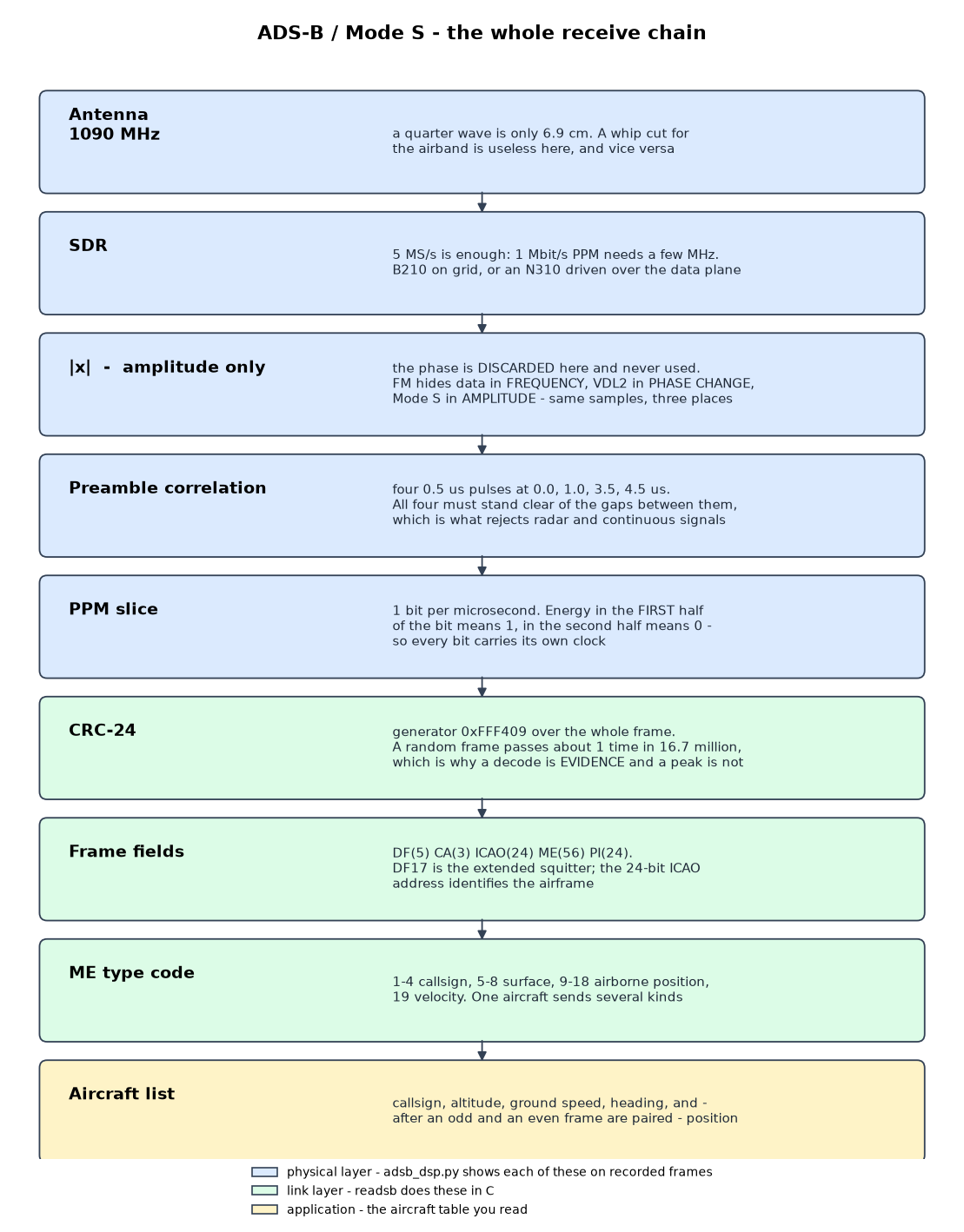
The blue stages are the physical layer and the tutorial runs every one of them in front of you. The green stages are what readsb does in C. Note where the boundary falls: everything that makes a decode trustworthy — the preamble shape, the CRC — is below it.
¶ The numbers
| Parameter | Value | Why it matters |
|---|---|---|
| Carrier | 1090 MHz | a quarter wave is 6.9 cm; an airband whip is useless here |
| Bit rate | 1 Mbit/s | one bit per microsecond |
| Modulation | PPM, amplitude only | pulse in the first half of the bit = 1, second half = 0 |
| Preamble | 4 pulses of 0.5 µs at 0.0, 1.0, 3.5, 4.5 µs | the shape is what rejects radar and continuous signals |
| Frame | 56 bits (short) or 112 (DF17) | DF17 is the extended squitter that carries ADS-B |
| Error check | CRC-24, generator 0xFFF409 |
a random frame passes about 1 time in 16.7 million |
¶ Watch it happen
The playbook runs this automatically; you can also run it by hand on the node:
python3 /root/adsb_dsp.py --iq /root/adsb_frames.cf32
1. amplitude   phase discarded; 30000 samples -> 60000 at 10/bit
2. preamble    4 positions where all four pulses stand 3x clear
3. PPM slice   first-half vs second-half energy per microsecond
4. CRC-24      generator 0xFFF409; a random frame passes 1 time in 16,777,216
5. fields      DF(5) CA(3) ICAO(24) ME(56) PI(24)

CRC-VALID DF17 FRAMES: 4
   t= 0.030 ms  ICAO A8AC35  tc=19 airborne velocity  179 kt, heading 043
   t= 1.530 ms  ICAO A441EF  tc=28 other (tc=28)
   t= 3.030 ms  ICAO A8AC35  tc=4  identification     callsign 'UAL146'
   t= 4.530 ms  ICAO AA7DD6  tc=11 airborne position  4500 ft, CPR odd (lat 89636, lon 123566)

   note: ICAO A8AC35 appears 2 times - the same aircraft, two message types.
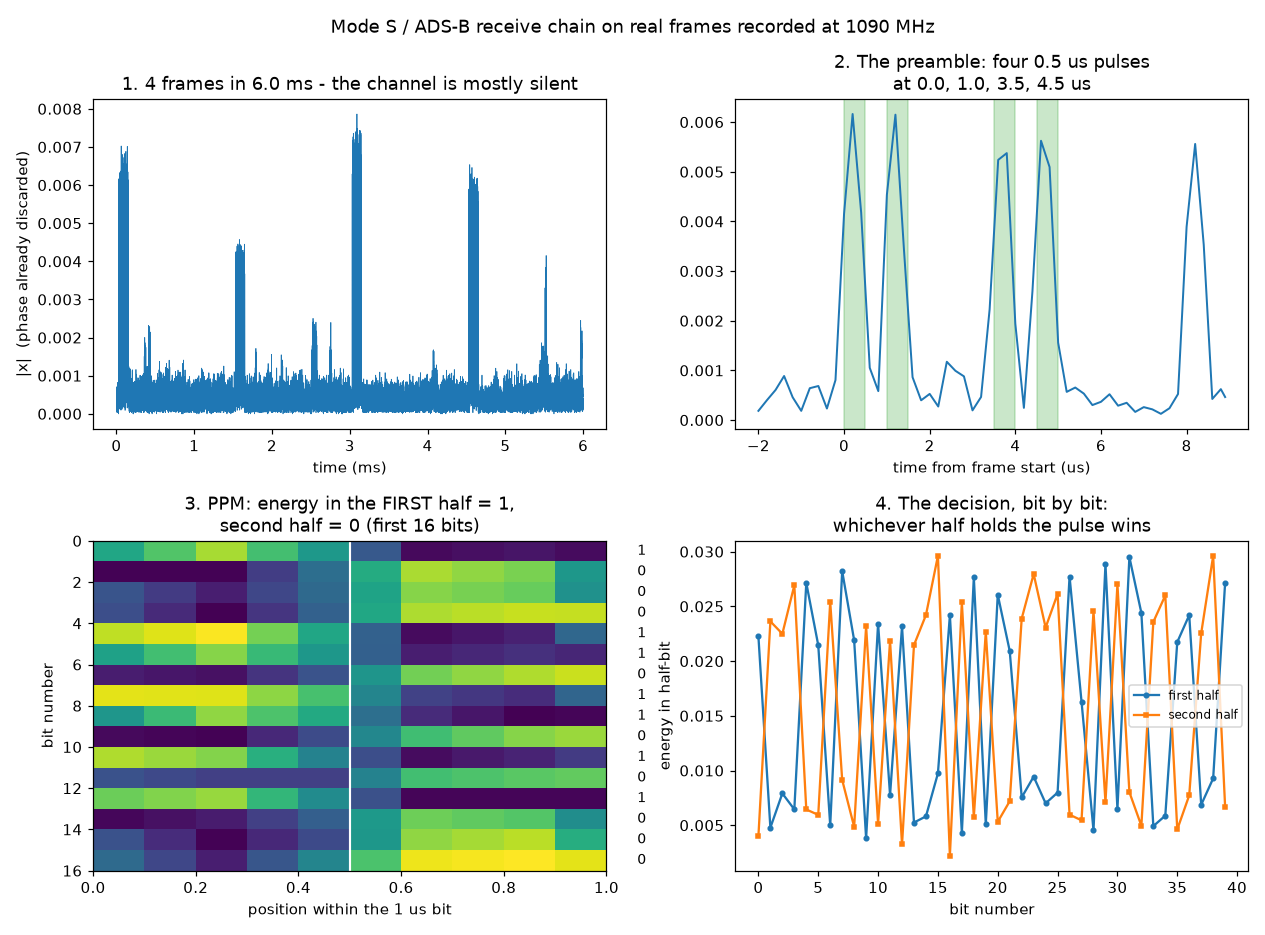
Panel 1 is the whole 6 ms: four short bursts in an otherwise silent channel. ADS-B is not a continuous transmission — aircraft squitter a few times a second and say nothing in between, which is why a spectrum analyser is the wrong instrument and a burst detector is the right one.
Panel 2 is the preamble, and it is worth dwelling on. The four pulses land exactly in the shaded bands at 0.0, 1.0, 3.5 and 4.5 µs. Requiring all four to stand clear of the gaps between them is what separates an aircraft from radar, from a spur, and from the receiver's own noise. A plain energy threshold would fire on all of those.
Panels 3 and 4 show the decision. Each microsecond is one bit, and the pulse sits in the first half or the second. That is the whole modulation — there is no constellation, no carrier recovery, no equaliser.
¶ Three systems, three places to look
The first line of the decoder throws the phase away:
mag = np.abs(x) # and the phase is never used again
Mode S is amplitude-only, so that costs nothing. It is worth comparing against the other two receive tutorials on this testbed, because they use the same dongle and the same kind of IQ stream and look somewhere completely different:
| Tutorial | Where the information is | What the receiver must recover |
|---|---|---|
| FM broadcast | instantaneous frequency | a phase derivative; DC on the carrier ruins it |
| ACARS / VDL Mode 2 | phase change between symbols | symbol timing; no carrier phase needed |
| ADS-B (this page) | amplitude | pulse position; neither phase nor frequency |
¶ Why a decoded frame is evidence
A 112-bit frame carries 24 bits of CRC, so noise passes by luck roughly once in 16.7 million attempts. That is the difference between this tutorial and a spectrum screenshot: a peak at 1090 MHz proves that something has energy there, while a CRC-valid frame with a plausible ICAO address proves an aircraft.
The same reasoning is why the shipped sample is checked with --min-frames 4. If those recorded frames ever stop decoding, the fault is in the sample or the code — it says nothing about reception, because no radio is involved.
¶ One loose end, on purpose
The position frame above reports CPR odd. You cannot turn that into a latitude and longitude on its own. ADS-B uses compact position reporting: each frame carries a position relative to a grid of zones, and the encoding alternates between an odd and an even zoning. A single frame narrows the aircraft to a set of candidate positions; pairing an odd frame with an even one from the same aircraft, close in time, resolves it. Working that out from the two raw CPR values in the sample is a good exercise, and it is exactly what readsb is doing when a row in the aircraft table gains a lat/lon.
¶ Verification
The role prints a one-line summary:
node18-19.grid.cosmos-lab.org: heard 4 aircraft, 3 with position, in 60s at 1090.0 MHz
The collected adsb.json holds the decoded table. Real traffic over central New Jersey:
hex=ac643b  flight=N898NC    alt=17225  lat=40.474704  lon=-74.28618   msgs=387  rssi=-7.1
hex=a79ed6  flight=EJA590    alt=35925  lat=40.509245  lon=-74.166267  msgs=190  rssi=-13.6
hex=a5ac3b  flight=AAL1416   alt=21000  lat=40.516617  lon=-73.911865  msgs=137  rssi=-14.0
Success = the table is non-empty and at least one aircraft reports a position. RSSI in roughly the −15 to −30 dB range indicates healthy reception. Counts vary between runs — this is a passive receiver, so what you hear depends on what is overhead.
¶ Cleanup
Nothing to save; the build lives on the node's ephemeral image and re-imaging returns it to a clean state. The framework leaves nothing running. To release the node:
omf tell -a offh -t <your node>
¶ Troubleshooting
| Symptom | Likely cause | Fix |
|---|---|---|
No UHD Devices Found |
FPGA/firmware images missing | Run uhd_images_downloader once on the node |
| Decoder grabs a networked X310 | driver=uhd matched the first UHD device on the network |
Keep type=b200 in the Soapy device string |
make fails on zstd.h |
libzstd-dev not installed |
It is in the description's packages list; check the staging step ran |
| SoapySDR/UHD version conflict at run time | soapysdr-module-uhd installed from apt shadows the image's SoapyUHD in /usr/local/lib |
Do not install it. The description lists it under packages_absent, and the run refuses to continue if it is present |
heard 0 aircraft |
Weak signal, or a node deep in the grid | Use a window-row node, attach a ~1 GHz antenna, raise the gain toward 60–70 |
readsb exits 124 |
timeout stopped it at the end of the capture window |
Expected — not an error |
¶ References
¶ Metadata
Orchestration: cosmos_lab.orchestration (cosmos-run); imaging: omf. Last verified: 2026-07-28 on grid (node18-19, baseline-sdr.ndz). Tags: sdr, uhd, soapysdr, adsb, ansible.