¶ Airband Voice — Hearing Pilots with an RTL-SDR
Pilots and air traffic controllers talk by voice on 118–137 MHz using plain amplitude modulation, the same modulation as an AM broadcast radio. This tutorial runs a receiver that demodulates eight of those channels at once and streams them to your browser. It then rebuilds that receiver in numpy, one stage at a time, on a recorded call that ships with the tutorial.
¶ Overview
One $30 RTL-SDR at the grid's window samples 2.4 MHz of the airband at once, from 127.0 to 129.2 MHz. RTLSDR-Airband cuts eight channels out of that block. For each channel it opens a squelch when a carrier appears and AM-demodulates the result. It sends every channel to a small stream server and records each transmission as its own MP3. A web page on the node plays any channel live, plays the recorded calls back to back with the silence removed, and offers noise reduction.
What you will hear is mostly aircraft. An aircraft overhead is a few kilometres away with a clear line of sight. The ground stations are tens of kilometres away behind buildings.
The tutorial has two halves and you can stop after the first:
- Listen. Start the receiver and listen in a browser through an SSH tunnel.
- Understand the signal. Run every stage of the receiver yourself on a 4-second capture of the whole 2.4 MHz block holding one real call. This half needs no radio and no traffic.
Nothing is transmitted.
¶ Learning outcomes
After completing this tutorial you will be able to:
- Explain the AM receive chain from antenna to loudspeaker, stage by stage: channel selection by mixing, filtering and decimation; squelch; envelope detection; carrier removal.
- Pick one channel out of a wideband capture with numpy, and say why decimation is done in two stages.
- Measure where an AM signal's power goes, and explain why 98% of what you receive is the carrier, which carries no information.
- Compare envelope and synchronous AM detection on real data, and say when the simple detector costs anything.
- Tell a tuner artefact from a signal: the often-quoted "DC spike" barely exists on this low-IF tuner, while steady narrow lines that ignore the channel plan do.
- Judge a null result honestly: a silent channel is usually a quiet sky, not a broken receiver.
¶ At a glance
| Difficulty | Intermediate |
|---|---|
| Estimated time | 20 min (plus a 10 min listen) |
| Domain / sandbox | grid.cosmos-lab.org |
| Image | baseline-sdr.ndz |
| Transmits? | No, receive only |
| Topic group | SDR & GNU Radio |
| Last verified | 2026-10-26 (parity on node20-18, all three modes) |
¶ Prerequisites
Background knowledge
- What IQ samples are and what a complex baseband signal is.
- Helpful but not required: the FM broadcast tutorial and the ACARS tutorial, which use the same node and dongle.
Account & access
- A COSMOS account (register here).
- An approved reservation on grid; see Make a reservation.
- SSH access to
console.grid.cosmos-lab.org; see SSH access.
¶ Resources required
Devices / nodes
| Resource | Role | Qty | Notes |
|---|---|---|---|
node20-18.grid |
receiver | 1 | RTL-SDR (Nooelec NESDR SMArt v5, R820T2) with a ~55 cm whip at the window |
The node is named because its antenna is right: a quarter-wave whip with a view of the sky. A dongle wearing a 1090 MHz ADS-B stub passes every software check and hears nothing at 128 MHz.
Disk images
| Image | Load onto | Provides |
|---|---|---|
baseline-sdr.ndz |
node20-18 | rtl-sdr tools, python3 + numpy |
Software components
| Component | Version | Source |
|---|---|---|
| RTLSDR-Airband | v6.2.0 | built by the tutorial, once per image |
| Icecast | Ubuntu 24.04 package | installed by the tutorial; listens on the node's loopback only |
cosmos-experiments-airband |
0.1.0-1 | on every console; cosmos-tutorial list shows the version |
Parameters (cosmos-tutorial params airband prints all of them)
| Key | Default | Meaning |
|---|---|---|
airband_centre_mhz |
128.1 | where the dongle is tuned; the eight channels sit within ±1.1 MHz |
airband_channels |
127.000 … 129.050 | the channels demodulated |
airband_gain |
40.2 | tuner gain in dB; must be one the tuner lists (rtl_test -t) |
airband_measure_secs |
600 | how long the run counts transmissions before its verdict |
¶ Topology
   aircraft overhead (AM voice, 127-129 MHz, line of sight)
            |
     ~55 cm whip at the window
            |
   RTL-SDR (R820T2)  --USB-->  node20-18.grid
                                 rtl_airband -> icecast (loopback) -> web page :8080
                                       |
                               one MP3 per transmission
   your browser <-- ssh -L 8080:node20-18:8080 -- console.grid
¶ Setup
- Reserve grid, then log in to the console:
ssh <username>@console.grid.cosmos-lab.org - Ask whether the tutorial can run here, now. This touches nothing:
It answers RUNNABLE or NOT RUNNABLE, with the reason for each check. Here it is on grid at 21:51Z on 2026-10-26, while another user held the reservation:export OMF_NODES=node20-18 cosmos-tutorial check airband
With your own reservation and## check 'airband' (/usr/share/cosmos-experiments/airband) PASS subdomain grid is supported FAIL grid is reserved by itheng until 2026-10-26T22:00:00Z FAIL needs 1 node(s): export OMF_NODES="node1,..." PASS console has python3 PASS console has ansible-playbook PASS console has ssh PASS console has tar INFO not in the package, provide it yourself: a VHF antenna on the dongle - node20-18 has a 55 cm whip at the window; a node with a 1090 MHz ADS-B stub passes every probe above and hears nothing NOT RUNNABLEOMF_NODESset, it also probes the node for the dongle (USB0bda:2832/2838) and checks nothing else is holding it. - If the node is not on
baseline-sdr.ndz, image it and power it on:omf load -i baseline-sdr.ndz -r 0 -t node20-18 omf tell -a on -t node20-18
¶ Instructions
Manual execution — the same experiment, command by command
# on the node (ssh root@node20-18 from the console)
apt-get update
apt-get install -y icecast2 rtl-sdr librtlsdr-dev cmake build-essential pkg-config git \
    libconfig++-dev libmp3lame-dev libshout3-dev libfftw3-dev
git clone --depth 1 --branch v6.2.0 https://github.com/charlie-foxtrot/RTLSDR-Airband.git
cd RTLSDR-Airband && mkdir build && cd build
cmake .. -DNFM=ON -DRTLSDR=ON -DSOAPYSDR=OFF -DPULSEAUDIO=OFF && make -j"$(nproc)" && make install

rtl_test -t        # the gain must be one of the values listed
The receiver needs a configuration file, an Icecast configuration and a source password. The scripted manual mode renders all three from airband_params.yml and starts the three services, so you can read every step:
cosmos-tutorial run airband --mode manual -- node20-18
¶ Run it
export OMF_NODES=node20-18
cosmos-tutorial run airband
The run renders the receiver configuration, installs Icecast, builds RTLSDR-Airband if needed, and starts three named services on the node. It then counts transmissions for ten minutes and writes its result. The stream keeps running afterwards.
The same experiment is available two other ways:
cosmos-tutorial run airband --mode manual -- node20-18   # the steps, scripted
cosmos-tutorial jupyter airband                          # the notebook: this run plus the receiver in numpy
To change a setting, write only the keys you want into a file and pass it. A key the tutorial does not have, or a value of the wrong type, is refused before anything starts:
printf 'airband_gain: 38.6\n' > my.yml
cosmos-tutorial run airband --params my.yml
Every run leaves run_record.json in ~/cosmos-runs/airband/<UTC>-<mode>/. It records the package version, your overlay, the parameters actually used, the nodes, the times and the exit status.
¶ Listen
On your own computer (not the console):
ssh -L 8080:node20-18:8080 <username>@console.grid.cosmos-lab.org
Then open http://localhost:8080/. The page shows:
- All channels: a live mix of the eight.
- Recorded calls, back to back: the last hour of transmissions with the silence removed, followed by each new call as it lands. Start here. A channel is silent until someone keys a microphone. On the morning of 2026-10-26, 28 calls in 70 minutes added up to about 1.5 minutes of audio.
- Noise reduction: off, a 300–2600 Hz voice-band filter, or spectral hiss removal at two strengths. It runs in your browser, so the receiver's audio stays untouched. On recorded calls, "strong" lowers the hiss by 17 dB and the voice by 2 dB.
- One row per channel, with a light that comes on while someone is talking, and every recorded call with its time in Eastern time and UTC.
¶ What you should see
UNIT cosmos-airband-web active
UNIT cosmos-airband-rx active
UNIT cosmos-airband-icecast active
LIVE_MOUNTS 9
RECORDINGS 116

2 transmission(s) in 120 s, 9/9 live streams
  127.000 MHz    0
  127.300 MHz    1 #
  127.600 MHz    0
  127.850 MHz    0
  128.300 MHz    0
  128.550 MHz    1 #
  128.800 MHz    0
  129.050 MHz    0
¶ How it works
¶ The whole chain
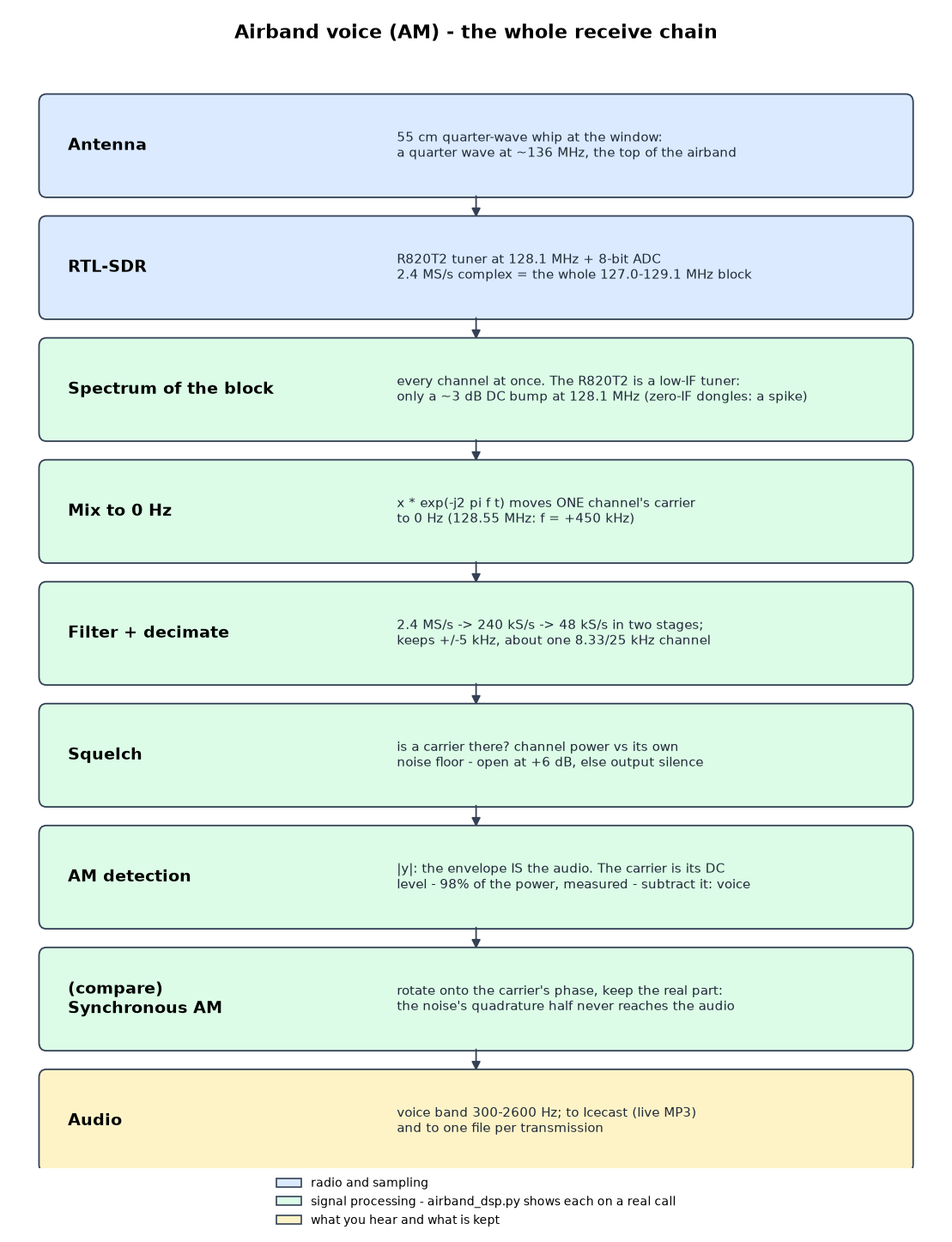
The notebook runs every green stage in front of you, using airband_dsp.py on samples/airband_127300_20261026T120042Z.cu8. That file is 4.0 s of raw dongle output: 2.4 MS/s of 8-bit IQ covering the whole block, recorded at 12:00:42 UTC on 2026-10-26. It holds one 1.7 s call on 127.300 MHz, with a second of idle channel on each side.
¶ 1. The whole block
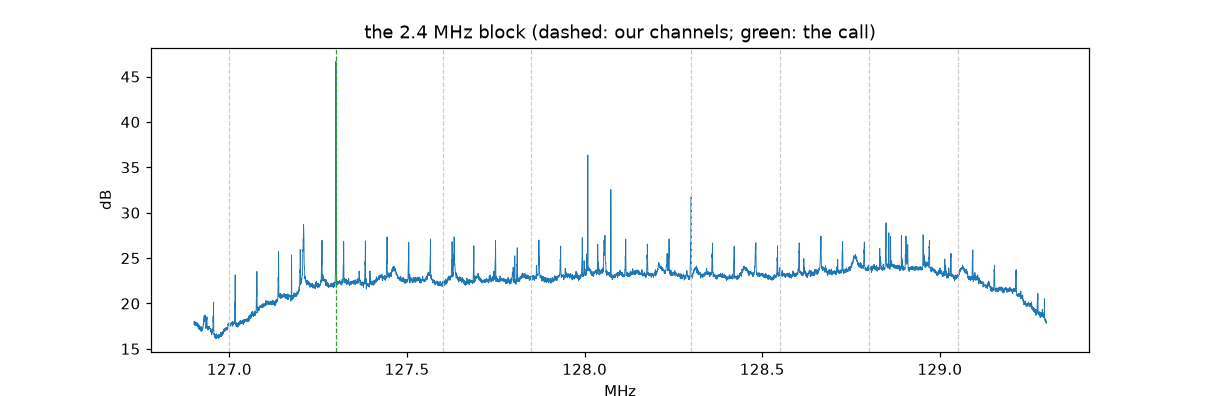
One FFT shows every channel at once, which is why one cheap dongle can serve eight channels. The call's carrier on 127.300 MHz is the tallest line. Two other things are worth noticing:
- The centre (128.1 MHz) is quiet. Many texts warn about a DC spike at the centre of an RTL-SDR capture, and a zero-IF E4000 dongle has one. This R820T2 is a low-IF tuner, and the measured residue is 2.9 dB above the local floor. No channel is placed on it anyway.
- Most of the small lines are steady. They sit at the same frequencies, at the same height, in both slices we analysed, 135 s apart, whoever was transmitting. The tallest, at 128.009 MHz, stands 20 dB up in both. Steady, narrow and unrelated to the channel plan points at the receiver itself rather than the sky, but nothing here proves which.
¶ 2. One channel
Multiplying by with kHz moves 127.300 MHz to 0 Hz. A low-pass filter then keeps ±5 kHz and discards the other channels, and keeping one sample in 50 brings 2.4 MS/s down to 48 kS/s. This is done in two stages (÷10, then ÷5). A single 5 kHz filter at 2.4 MS/s would need thousands of taps; the first stage only has to stop what would alias into the second stage's passband, so 101 taps are enough.
The carrier lands at −70 Hz, not 0. That is 0.55 ppm at 127.3 MHz: the aircraft's oscillator and the dongle's 0.5 ppm reference together. One receiver cannot tell you which of the two is off.
¶ 3. Squelch and AM detection
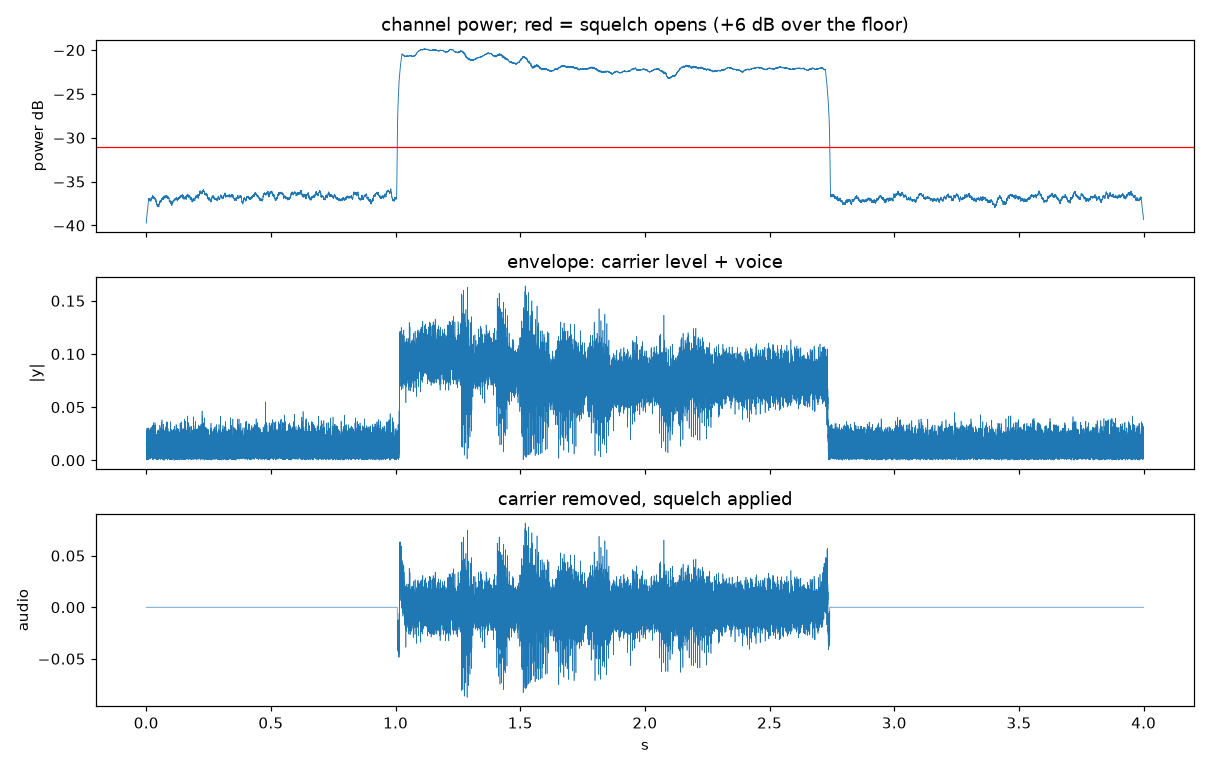
An idle channel is pure noise. The squelch compares the channel's power with its own noise floor and opens only when a carrier arrives. On this call the step is 17 dB, so a +6 dB threshold opens and closes cleanly.
AM puts the voice in the carrier's amplitude, , so the demodulator is just , the envelope. Its average level is the carrier; subtract it and the voice remains.
¶ 4. Where the power goes
| Measured on the shipped call | Value |
|---|---|
| Carrier-to-noise, 10 kHz channel | 14.9 dB |
| Share of the signal power in the carrier | 98.1% |
| Share in the voice sidebands | 1.9% |
| RMS modulation index | 0.19 |
This is the result worth remembering. An AM transmitter spends almost all its power on a carrier, a steady tone that carries no information. With a modulation index of , the two sidebands together get of the carrier's power; at that is under 2%. That is why the voice sounded weak against the hiss although the carrier stood 15 dB above it.
¶ 5. Envelope vs synchronous detection
is simple and needs no carrier tracking, but it takes the magnitude of signal plus noise. A synchronous detector rotates the signal onto the carrier's phase and keeps only the in-phase part. Measured voice-band SNR:
| Call | Carrier-to-noise | Envelope | Synchronous |
|---|---|---|---|
| shipped call | 14.9 dB | 6.8 dB | 6.8 dB |
| weaker call, same capture | 8.2 dB | 0.9 dB | 0.9 dB |
No difference, even on the weak call. The envelope detector's penalty only appears once the noise is comparable to the carrier itself. That is why airband receivers, RTLSDR-Airband included, get away with the simple one.
¶ Verification
A run is good when:
- all nine streams are live (eight channels plus the mix):
RX_UP mounts=9/9; - the result contract's
configshows the channel plan and gain you asked for; - at least one transmission was recorded, or you can explain why not (night, a quiet sky). Listen to a live channel before suspecting the receiver.
All three modes are checked against each other by the parity harness. The run below used a --params overlay setting the gain to 38.6 dB, to prove that an overlay reaches every mode:
cosmos-tutorial run airband --mode parity --params my.yml -- node20-18 120
manual   live 9/9  transmissions   4 in  120 s  PASS
ansible  live 9/9  transmissions   2 in  120 s  PASS
jupyter  live 9/9  transmissions   2 in  120 s  PASS
PARITY_PASS
The three modes heard different numbers of calls because they listened one after another and each heard whoever happened to transmit in its own window. The harness compares the configuration, not the counts.
¶ Cleanup
cosmos-tutorial run airband --mode teardown
The teardown stops the three services by name (cosmos-airband-rx, cosmos-airband-icecast, cosmos-airband-web). Recordings stay in /var/lib/cosmos-airband/rec on the node until they are 7 days old.
¶ Troubleshooting
The page plays nothing. Usually not a fault: a channel is silent until someone transmits. Use "Recorded calls, back to back". If it is empty too, check the health line at the top of the page, which says whether the receiver is streaming.
cosmos-tutorial check says NOT RUNNABLE. Read the FAIL lines; each names its reason. "reserved by …" means someone else holds grid right now. "no root ssh" means the node is off or still booting (omf tell -a on -t node20-18).
gain 44.0 is not supported by this tuner. An RTL-SDR refuses a gain it does not list instead of rounding it, and the receiver then outputs silence that sounds exactly like a quiet sky. The tutorial checks this before starting; choose a value from rtl_test -t.
Strong hiss, faint voice. Expected: only about 2% of the received power is voice (see How it works). Try the page's noise reduction.
[R82XX] PLL not locked! in the receiver log is benign. It prints at frequencies that receive perfectly.
¶ References
- RTLSDR-Airband: the receiver this tutorial runs
- ACARS over VDL Mode 2: the same window, digital instead of voice
- FM broadcast: the same dongle, and why offset tuning matters for FM
- SDR hardware on COSMOS
Tutorial: cosmos-tutorial run airband · package cosmos-experiments-airband · verified on grid node20-18, 2026-10-26 (parity on node20-18, all three modes).