¶ GNU Radio OFDM Data Transfer with USRP X310
Transfer data between two USRP X310 radios using GNU Radio OFDM flowgraphs, running both GUI and non-GUI (Python) modes.
¶ Overview
This tutorial illustrates the use of GNU Radio OFDM blocks for data transfer between a pair of USRP X310 radios. The GNU Radio flowgraphs used here were obtained from the workshop material provided for the POWDER-RENEW Mobile and Wireless Week 2019. They are based on the GRC examples available in the GNU Radio repository.
One node runs the OFDM transmitter flowgraph (TX_OFDM.grc) and reads a text file as payload; the other node runs the OFDM receiver flowgraph (RX_OFDM.grc) and writes the received payload to a local file. Both flowgraphs can also be executed without a GUI by generating Python scripts (using GRC's F5 key).
For a deeper understanding of the OFDM flowgraphs and blocks, refer to the GNU Radio wiki pages on OFDM Basics and OFDM Synchronization (Schmidl & Cox).
¶ Learning outcomes
After completing this tutorial you will be able to:
- Configure the node↔USRP X310 Ethernet interface using the provided helper script.
- Detect and probe a USRP X310 with
uhd_find_devicesanduhd_usrp_probe. - Open and run an OFDM transmitter and receiver flowgraph in GNU Radio Companion.
- Transfer a file payload over the air using OFDM modulation and verify receipt.
- Run the same flowgraphs headless (without GUI) using generated Python scripts.
¶ At a glance
| Difficulty | Intermediate |
| Estimated time | 60 min |
| Domain / sandbox | sb2.cosmos-lab.org (two USRP X310 nodes) |
| Topic group | SDR & GNU Radio |
| Last verified | Not re-tested (migrated 2026-06-20) |
¶ Prerequisites
Background knowledge
- The six-step experiment life cycle.
- Basic OFDM concepts — recommended reading: OFDM Basics and Schmidl & Cox OFDM synchronization.
- Familiarity with GNU Radio Companion (GRC) is helpful.
Account & access
- A COSMOS account — register here.
- An approved reservation on sb2 (or another sandbox with two USRP X310 nodes) — see Make a reservation.
- SSH access to the domain console with X11 forwarding (
-Y) enabled — see SSH access.
¶ Resources required
Devices / nodes
| Resource | Role | Qty | Notes |
|---|---|---|---|
| node1-1 | OFDM transmitter | 1 | USRP X310 connected via DATA2 Ethernet interface |
| node1-2 | OFDM receiver | 1 | USRP X310 connected via DATA2 Ethernet interface |
Disk images
| Image | Load onto | Provides |
|---|---|---|
| hari_OFDM.ndz | node1-1, node1-2 | UHD 4.4, GNU Radio 3.9, GNURadioOFDMExample flowgraphs |
Software components
| Component | Version | Source |
|---|---|---|
| UHD (USRP Hardware Driver) | 4.4.0.0 | preinstalled in hari_OFDM.ndz |
| GNU Radio / GRC | 3.9.8.0 | preinstalled in hari_OFDM.ndz |
| GNURadioOFDMExample (flowgraphs) | TODO: verify | preinstalled in hari_OFDM.ndz (~/GNURadioOFDMExample/) |
Spectrum / RF / special
Over-the-air transmit between two USRP X310 radios (UBX daughterboards, 10–6000 MHz). Verify that your center frequency and gain settings are within the limits of your reservation.
¶ Topology
Two sandbox nodes (node1-1 and node1-2), each with a USRP X310. The X310's port 1 is directly connected to its host node via a dedicated 10 GbE link on the DATA2 interface. The X310 uses a hardcoded IP address of 192.168.40.2; the helper script configures the host side to 192.168.40.1/24 and tunes socket buffer sizes. Both nodes are controlled from the sandbox console.
¶ Setup
-
Reserve the sandbox and log into the console with X11 forwarding:
ssh -Y <username>@console.sb2.cosmos-lab.org -
Make sure the resources are off before imaging:
omf tell -a offh -t system:topo:allres -
Load the OFDM image onto both nodes:
omf load -i hari_OFDM.ndz -t node1-1,node1-2 -
Turn the nodes on and confirm they are up:
omf tell -a on -t node1-1,node1-2 omf stat -t all -
Open two terminal sessions and SSH into each node with X11 forwarding:
ssh root@node1-1 -Y
ssh root@node1-2 -Y
¶ Instructions
¶ Step 1 — Configure the node↔USRP interface
The USRP X310 on sb2 has its port 1 directly connected to the host node, with the X310 IP address hardcoded to 192.168.40.2 (per the X310 network setup manual). Run the helper script on both nodes to set a static IP of 192.168.40.1 on the DATA2 interface and tune the socket buffers:
root@node1-2:~# ./eth_config_sb2_orbit.sh
net.core.wmem_max = 25000000
net.core.rmem_max = 25000000
root@node1-2:~# ip addr show DATA2
4: DATA2: <BROADCAST,MULTICAST,UP,LOWER_UP> mtu 9000 qdisc mq state UP group default qlen 1000
    link/ether f4:52:14:83:af:80 brd ff:ff:ff:ff:ff:ff
    inet 192.168.40.1/24 scope global DATA2
       valid_lft forever preferred_lft forever
    inet6 fe80::f652:14ff:fe83:af80/64 scope link
       valid_lft forever preferred_lft forever
Run the same command on node1-1.
¶ Step 2 — Find and probe the USRP X310
Run uhd_find_devices and uhd_usrp_probe on each node to detect the X310 and confirm that compatible firmware is installed.
root@node1-2:~# uhd_find_devices
[INFO] [UHD] linux; GNU C++ version 9.4.0; Boost_107100; UHD_4.4.0.0-0ubuntu1~focal1
--------------------------------------------------
-- UHD Device 0
--------------------------------------------------
Device Address:
    serial: 30F10F9
    addr: 192.168.40.2
    fpga: XG
    name:
    product: X310
    type: x300

root@node1-2:~# uhd_usrp_probe --args="addr=192.168.40.2"
[INFO] [UHD] linux; GNU C++ version 9.4.0; Boost_107100; UHD_4.4.0.0-0ubuntu1~focal1
[INFO] [X300] X300 initialization sequence...
[INFO] [X300] Maximum frame size: 8000 bytes.
[INFO] [GPS] No GPSDO found
[INFO] [X300] Radio 1x clock: 200 MHz
  _____________________________________________________
 /
|       Device: X-Series Device
|     _____________________________________________________
|    /
|   |       Mboard: X310
|   |   revision: 8
|   |   revision_compat: 7
|   |   product: 30818
.
.
.
.
|   |    /
|   |   |       RX Frontend: 0
|   |   |   Name: UBX RX
|   |   |   Antennas: TX/RX, RX2, CAL
|   |   |   Sensors: lo_locked
|   |   |   Freq range: 10.000 to 6000.000 MHz
|   |   |   Gain range PGA0: 0.0 to 31.5 step 0.5 dB
|   |   |   Bandwidth range: 160000000.0 to 160000000.0 step 0.0 Hz
|   |   |   Connection Type: IQ
|   |   |   Uses LO offset: No
Note: In case of a firmware mismatch, follow the directions displayed in the error message and use
uhd_image_loaderto update the firmware.
¶ Step 3 — Open the OFDM receiver on node1-2
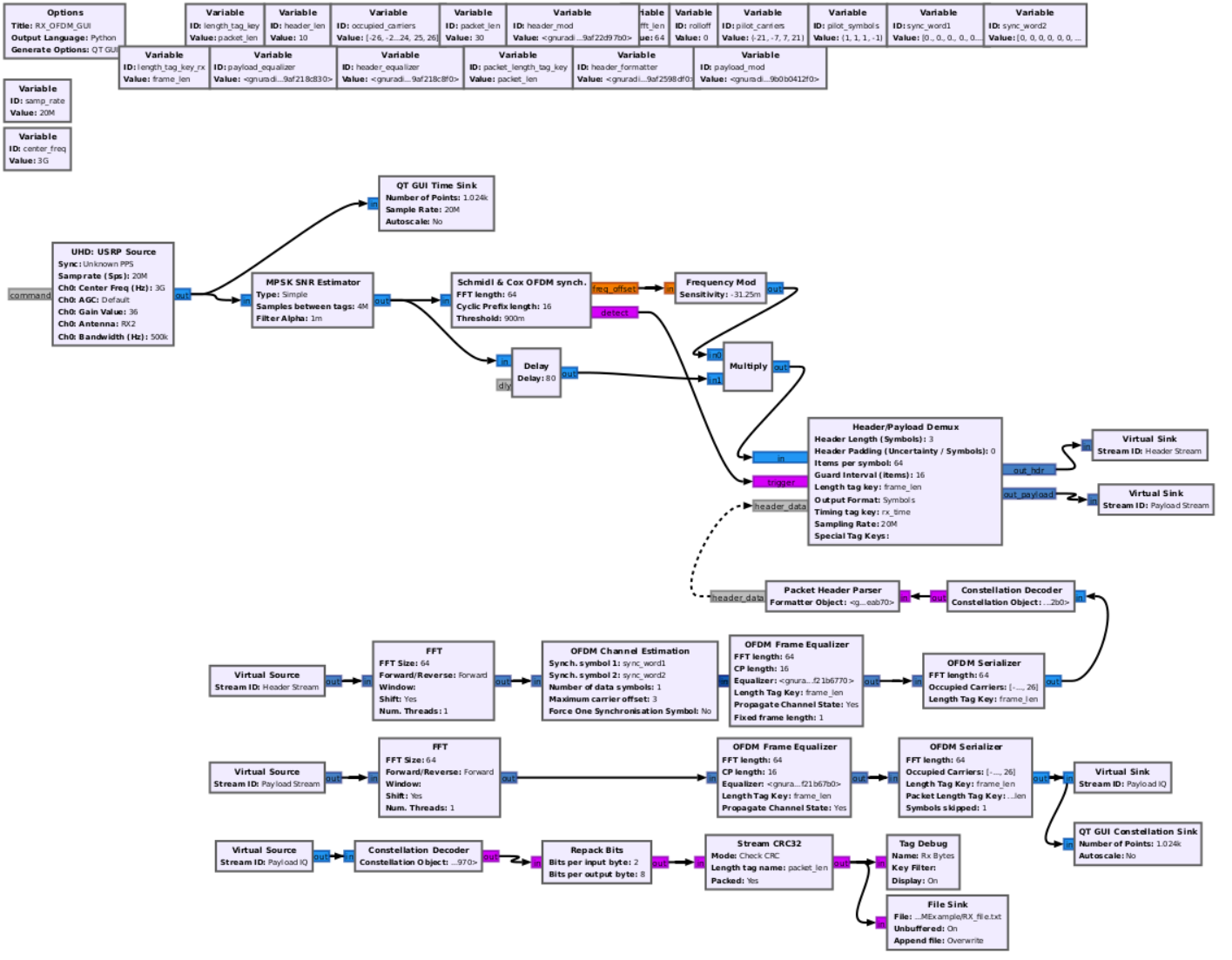
With X11 forwarding enabled, open GNU Radio Companion with the receiver flowgraph:
root@node1-2:~# cd GNURadioOFDMExample/
root@node1-2:~/GNURadioOFDMExample# gnuradio-companion RX_OFDM.grc
<<< Welcome to GNU Radio Companion 3.9.8.0 >>>

Block paths:
        /usr/local/share/gnuradio/grc/blocks

Loading: "/root/GNURadioOFDMExample/RX_OFDM.grc"
>>> Done
¶ Step 4 — Open the OFDM transmitter on node1-1
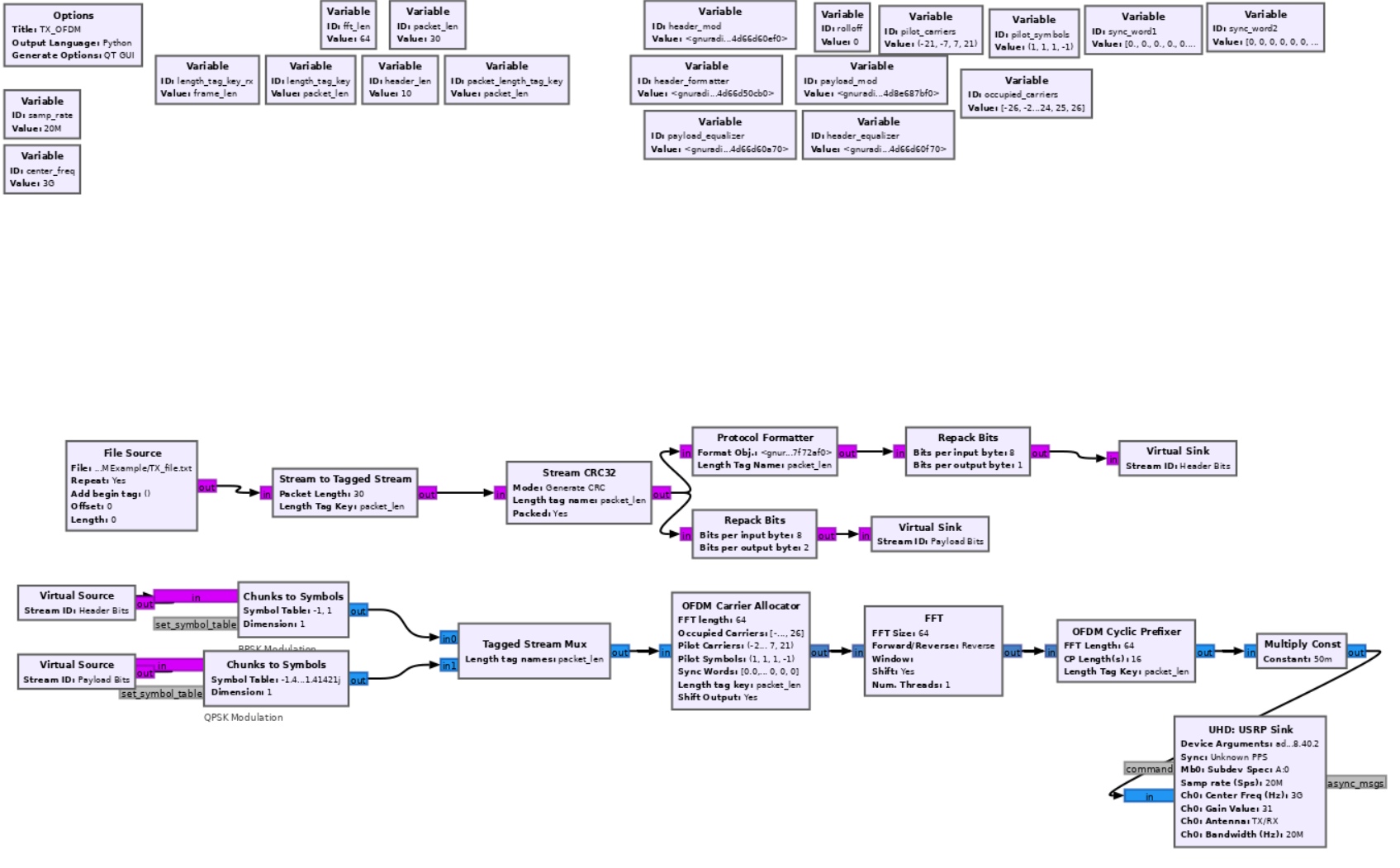
root@node1-1:~# cd GNURadioOFDMExample/
root@node1-1:~/GNURadioOFDMExample# gnuradio-companion TX_OFDM.grc
<<< Welcome to GNU Radio Companion 3.9.8.0 >>>

Block paths:
        /usr/local/share/gnuradio/grc/blocks

Loading: "/root/GNURadioOFDMExample/TX_OFDM.grc"
>>> Done
¶ Step 5 — Verify flowgraph settings before running
Before running, confirm the following in both GRC windows:
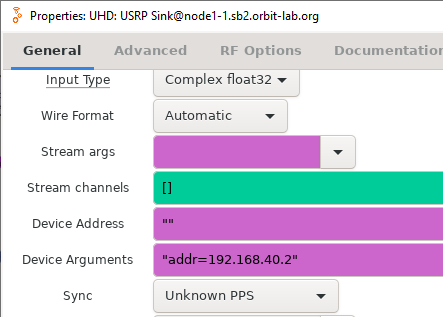
- Device arguments (
addr=192.168.40.2) are correctly set on both nodes. - The center frequency and sample rate match between
TX_OFDM.grcandRX_OFDM.grc. TX_OFDM.grccontains a File Source block pointing to the text file you want to transmit.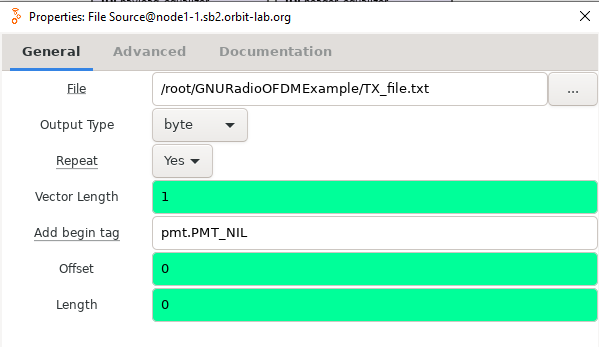
RX_OFDM.grccontains a File Sink block specifying the output file for received data.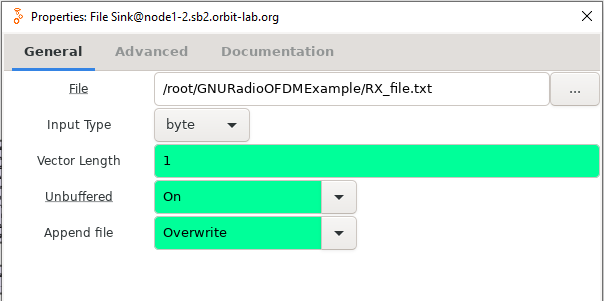
- The Tag Debug block in
RX_OFDM_GUI.grchas a Display option that can be set toonto log OFDM tags. Note that enabling tag display may generate very large output and can cause the system to hang. It is recommended to redirect output to a file when running in non-GUI mode (see Step 7 below).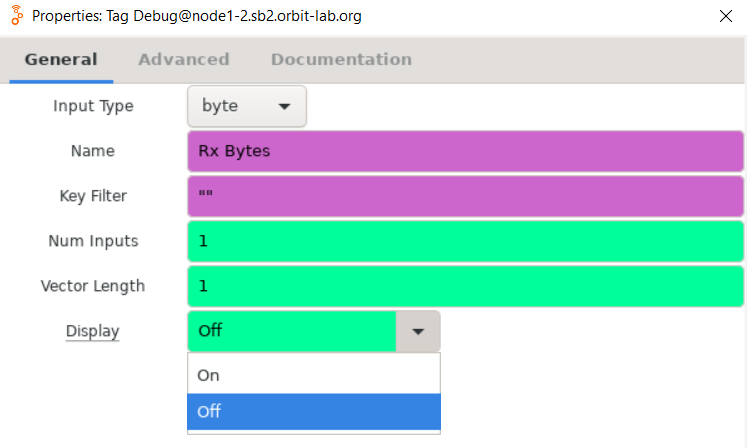
¶ Step 6 — Run the flowgraphs (GUI mode)
Start the receiver flowgraph first, then start the transmitter. Always shut down the RX side first when stopping.
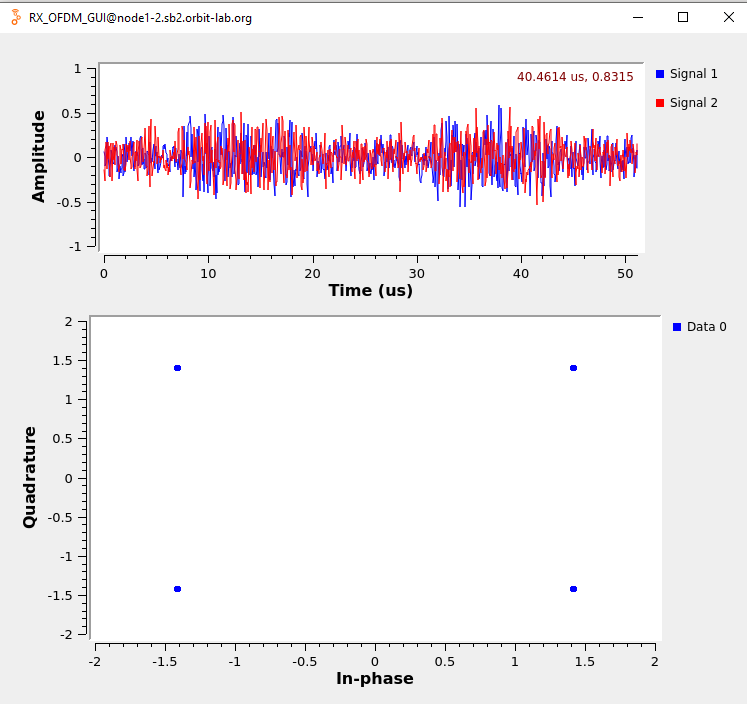
Run the receive flowgraph on node1-2, then run the transmit flowgraph on node1-1. A display window showing received IQ samples and a constellation diagram should appear. Stop the flowgraph and check the received text file written by the File Sink block.
¶ Step 7 — Run the flowgraphs without GUI (Python mode)
The flowgraphs can also be run headless by generating Python scripts. Press F5 in GRC to generate the .py files, then run them directly.
On node1-1 (transmitter):
root@node1-1:~/GNURadioOFDMExample# python3 TX_OFDM.py
On node1-2 (receiver, redirect Tag Debug output to file):
root@node1-2:~/GNURadioOFDMExample# python3 RX_OFDM_GUI.py >> TagDebug.txt
¶ Verification
uhd_find_deviceson each node returns the X310 (serial,addr: 192.168.40.2).uhd_usrp_probeshows the UBX RX/TX frontend with a frequency range of 10–6000 MHz.- In GUI mode, the RX display window shows IQ samples and a recognizable OFDM constellation while the transmitter is running.
- After stopping the flowgraphs, the File Sink output file on node1-2 contains the payload transmitted from node1-1's File Source.
¶ Cleanup
omf tell -a offh -t system:topo:allres
(No omf save needed unless you modified the image.)
¶ Troubleshooting
| Symptom | Likely cause | Fix |
|---|---|---|
uhd_find_devices → no devices found |
DATA2 interface not configured | Confirm eth_config_sb2_orbit.sh ran successfully; check ip addr show DATA2 for 192.168.40.1/24; ping 192.168.40.2 to test USRP reachability |
Firmware mismatch error from uhd_usrp_probe |
FPGA/firmware version incompatible with UHD | Follow the error message instructions and run uhd_image_loader to update |
| GRC window does not open (no X11 display) | X11 forwarding not enabled | Reconnect with ssh -Y; confirm your local X11 server is running |
| RX file is empty or garbled | TX and RX center frequencies or sample rates do not match | Double-check the device args and flowgraph parameters on both nodes; ensure RX is started before TX |
| Tag Debug output causes system to hang | Large tag log printed to terminal | Redirect output to file: python3 RX_OFDM_GUI.py >> TagDebug.txt |
¶ References
- POWDER-RENEW Mobile and Wireless Week 2019 — workshop material
- GNU Radio OFDM examples (GitHub)
- GNU Radio Wiki — OFDM Basics
- GNU Radio Wiki — Schmidl & Cox OFDM synchronization
- Ettus USRP X310 network setup manual
- Available SDR / USRP hardware
- OMF commands reference
Author(s): COSMOS team · Last verified: Not re-tested (migrated 2026-06-20) · Tested image/release: hari_OFDM.ndz · Tags: sdr, gnuradio, ofdm, usrp, x310