¶ Spectrum Sensing with USRP2974
Run a real-time spectrum sensing application on a USRP2974 (Krypton) node in the COSMOS BED domain and visualize the spectrum in a browser-based viewer.
¶ Overview
This tutorial demonstrates how to perform spectrum sensing using a USRP2974 ("Krypton") software-defined radio in the COSMOS testbed. The USRP2974 is an NI/Ettus embedded SDR platform that combines an X310 FPGA radio with an integrated host PC; the radio is accessed over a PCIe RFNoC interface rather than a standalone Ethernet connection.
The experiment loads a pre-built UHD image onto the node, detects the embedded X310 radio via uhd_find_devices, then compiles and launches a spectrum sensing application (app_read_sdr_samples) that streams IQ data and serves it to a WebSocket-based HTML viewer (spectrum_view.html). An SSH tunnel from your local machine to the Krypton host exposes the WebSocket port so the browser viewer can connect.
¶ Learning outcomes
After completing this tutorial you will be able to:
- Load a UHD-enabled disk image onto a USRP2974 node in the BED domain.
- Verify detection of the embedded X310 radio with
uhd_find_devicesanduhd_usrp_probe. - Build the
spectrum_viewapplication and its dependencies from source. - Set up an SSH tunnel to forward a WebSocket port from a remote COSMOS node to your local machine.
- Display a live spectrogram from the USRP2974 in a web browser.
¶ At a glance
| Difficulty | Intermediate |
| Estimated time | 60 min |
| Domain / sandbox | BED (sdr2-s1-lg1.bed.cosmos-lab.org) |
| Topic group | SDR & GNU Radio |
| Last verified | Not re-tested (migrated 2026-06-20) |
¶ Prerequisites
Background knowledge
- The COSMOS workflow — reservations, OMF commands, SSH access.
- Basic RF concepts (carrier frequency, spectrum, IQ samples).
- Familiarity with building C++ software (
cmake,make).
Account & access
- A COSMOS account — register here.
- An approved reservation on the BED domain — see Make a reservation.
- SSH access to the domain console — see SSH access.
¶ Resources required
Devices / nodes
| Resource | Role | Qty | Notes |
|---|---|---|---|
| sdr2-s1-lg1.bed.cosmos-lab.org | Spectrum sensing node | 1 | USRP2974 ("Krypton") — embedded X310 radio via PCIe RFNoC; UBX-TDD daughterboards on slots A & B |
Disk images
| Image | Load onto | Provides |
|---|---|---|
| baseline_uhd_1804.ndz | sdr2-s1-lg1.bed.cosmos-lab.org | Ubuntu 18.04 + UHD 3.14 + NI PCIe RFNoC driver (niusrprio.service) |
Software components
| Component | Version | Source |
|---|---|---|
| UHD (USRP Hardware Driver) | 3.14.1.1 (as shown in probe output) | preinstalled in baseline_uhd_1804.ndz |
| NI USRP RIO PCIe driver | loaded by niusrprio.service on boot |
preinstalled in baseline_uhd_1804.ndz |
| spectrum_view application | TODO: verify | downloaded from https://wiki.cosmos-lab.org/raw-attachment/wiki/tutorials/basic_usage/spectrum_view.tar.gz |
| websocketpp | TODO: verify version | cloned from https://github.com/zaphoyd/websocketpp.git |
| libboost-all-dev, liblog4cxx-dev, cmake, libfftw3-dev, libxml2-dev, libpopt-dev, libsqlite3-dev, pkg-config, libxml2-utils, gnulib | Ubuntu 18.04 apt | installed on node |
Spectrum / RF / special
The USRP2974 uses an embedded PCIe path (RIO0) rather than a network Ethernet link. The UBX-TDD daughterboards cover 10–6000 MHz. No antenna cabling or separate transmit node is required for passive spectrum sensing; the tutorial only exercises the RX path. Follow testbed spectrum policy for your reserved band.
¶ Topology
The USRP2974 is a self-contained node: the embedded X310 FPGA radio is connected to its internal host PC via PCIe. From the COSMOS console you SSH into the Krypton host (sdr2-s1-lg1). The app_read_sdr_samples process runs on that host, opens the X310 over the PCIe RFNoC interface, and serves IQ spectrum data on a local WebSocket port (9002). An SSH tunnel forwards that port to your laptop so the spectrum_view.html browser page can connect to localhost:5002.
¶ Setup
- Reserve the BED domain and log into the console:
ssh <username>@console.bed.cosmos-lab.org - Make sure the node is off before imaging:
omf tell -a offh -t sdr2-s1-lg1.bed.cosmos-lab.org - Load the UHD image:
omf load -i baseline_uhd_1804.ndz -t sdr2-s1-lg1.bed.cosmos-lab.org - Turn the node on:
omf tell -a on -t sdr2-s1-lg1.bed.cosmos-lab.org - Once the node is ready, SSH into the Krypton host from the console:
console:~$ ssh root@sdr2-s1-lg1
¶ Instructions
¶ Step 1 — Verify PCIe driver and detect the radio
The USRP2974 requires the NI PCIe driver to access the embedded X310. In the provided images this loads automatically on boot. If it fails, restart it manually:
systemctl restart niusrprio.service
Detailed driver installation and firmware update steps are documented on the Krypton usage page.
Run uhd_find_devices specifying the PCIe (x300) type to confirm the radio is detected:
root@sdr2-s1-lg1:~# uhd_find_devices --args="type=x300"
Expected output:
[INFO] [UHD] linux; GNU C++ version 7.4.0; Boost_106501; UHD_3.14.1.1-release
--------------------------------------------------
-- UHD Device 0
--------------------------------------------------
Device Address:
    serial: 3166636
    fpga: XG
    name:
    product: X310
    resource: RIO0
    type: x300
The output enumerates all detected SDRs. The Krypton has one PCIe radio device of type=x300.
¶ Step 2 — Probe the X310 radio
Use uhd_usrp_probe to get detailed hardware information. Specifying resource=rio0 ensures only the directly-connected PCIe radio is probed rather than any radios reachable over the network:
root@sdr2-s1-lg1:~# uhd_usrp_probe --args="resource=rio0,type=x300"
Expected output (abridged):
[INFO] [UHD] linux; GNU C++ version 7.4.0; Boost_106501; UHD_3.14.0.HEAD-0-g6875d061
[INFO] [X300] X300 initialization sequence...
[INFO] [X300] Connecting to niusrpriorpc at localhost:5444...
[INFO] [X300] Using LVBITX bitfile /usr/local/share/uhd/images/usrp_x310_fpga_HG.lvbitx...
[INFO] [X300] Radio 1x clock: 200 MHz
[INFO] [GPS] Found an internal GPSDO: LC_XO, Firmware Rev 0.929a
[INFO] [0/DmaFIFO_0] Initializing block control (NOC ID: 0xF1F0D00000000000)
[INFO] [0/DmaFIFO_0] BIST passed (Throughput: 1301 MB/s)
[INFO] [0/DmaFIFO_0] BIST passed (Throughput: 1303 MB/s)
[INFO] [0/Radio_0] Initializing block control (NOC ID: 0x12AD100000000001)
[INFO] [0/Radio_1] Initializing block control (NOC ID: 0x12AD100000000001)
[INFO] [0/DDC_0] Initializing block control (NOC ID: 0xDDC0000000000000)
[INFO] [0/DDC_1] Initializing block control (NOC ID: 0xDDC0000000000000)
[INFO] [0/DUC_0] Initializing block control (NOC ID: 0xD0C0000000000000)
[INFO] [0/DUC_1] Initializing block control (NOC ID: 0xD0C0000000000000)
  _____________________________________________________
 /
|       Device: X-Series Device
|     _____________________________________________________
|    /
|   |       Mboard: X310
|   |   revision: 12
|   |   revision_compat: 7
|   |   product: 30810
|   |   mac-addr0: 00:11:22:33:44:55
|   |   mac-addr1: 66:77:88:99:aa:bb
|   |   gateway: 192.168.10.1
|   |   ip-addr0: 192.168.10.2
|   |   subnet0: 255.255.255.0
|   |   ip-addr1: 192.168.40.2
|   |   subnet1: 255.255.255.0
|   |   ip-addr2: 255.255.255.255
|   |   subnet2: 255.255.255.0
|   |   ip-addr3: 255.255.255.255
|   |   subnet3: 255.255.255.0
|   |   serial: 31557B9
|   |   FW Version: 6.0
|   |   FPGA Version: 35.1
|   |   FPGA git hash: 4c165a5
|   |   RFNoC capable: Yes
|   |
|   |   Time sources:  internal, external, gpsdo
|   |   Clock sources: internal, external, gpsdo
|   |   Sensors: gps_gpgga, gps_gprmc, gps_time, gps_locked, gps_servo, ref_locked
|   |     _____________________________________________________
|   |    /
|   |   |       RX Dboard: A
|   |   |   ID: UBX-TDD (0x0203)
|   |   |   Serial: 31584CF
|   |   |     _____________________________________________________
|   |   |    /
|   |   |   |       RX Frontend: 0
|   |   |   |   Name: UBX RX
|   |   |   |   Antennas: TX/RX, RX2, CAL
|   |   |   |   Sensors: lo_locked
|   |   |   |   Freq range: 10.000 to 6000.000 MHz
|   |   |   |   Gain range PGA0: 0.0 to 31.5 step 0.5 dB
|   |   |   |   Bandwidth range: 160000000.0 to 160000000.0 step 0.0 Hz
|   |   |   |   Connection Type: IQ
|   |   |   |   Uses LO offset: No
|   |   |     _____________________________________________________
|   |   |    /
|   |   |   |       RX Codec: A
|   |   |   |   Name: ads62p48
|   |   |   |   Gain range digital: 0.0 to 6.0 step 0.5 dB
|   |     _____________________________________________________
|   |    /
|   |   |       RX Dboard: B
|   |   |   ID: UBX-TDD (0x0203)
|   |   |   Serial: 31584EE
|   |   |     _____________________________________________________
|   |   |    /
|   |   |   |       RX Frontend: 0
|   |   |   |   Name: UBX RX
|   |   |   |   Antennas: TX/RX, RX2, CAL
|   |   |   |   Sensors: lo_locked
|   |   |   |   Freq range: 10.000 to 6000.000 MHz
|   |   |   |   Gain range PGA0: 0.0 to 31.5 step 0.5 dB
|   |   |   |   Bandwidth range: 160000000.0 to 160000000.0 step 0.0 Hz
|   |   |   |   Connection Type: IQ
|   |   |   |   Uses LO offset: No
|   |   |     _____________________________________________________
|   |   |    /
|   |   |   |       RX Codec: B
|   |   |   |   Name: ads62p48
|   |   |   |   Gain range digital: 0.0 to 6.0 step 0.5 dB
|   |     _____________________________________________________
|   |    /
|   |   |       TX Dboard: A
|   |   |   ID: UBX-TDD (0x0202)
|   |   |   Serial: 31584CF
|   |   |     _____________________________________________________
|   |   |    /
|   |   |   |       TX Frontend: 0
|   |   |   |   Name: UBX TX
|   |   |   |   Antennas: TX/RX, CAL
|   |   |   |   Sensors: lo_locked
|   |   |   |   Freq range: 10.000 to 6000.000 MHz
|   |   |   |   Gain range PGA0: 0.0 to 31.5 step 0.5 dB
|   |   |   |   Bandwidth range: 160000000.0 to 160000000.0 step 0.0 Hz
|   |   |   |   Connection Type: QI
|   |   |   |   Uses LO offset: No
|   |   |     _____________________________________________________
|   |   |    /
|   |   |   |       TX Codec: A
|   |   |   |   Name: ad9146
|   |   |   |   Gain Elements: None
|   |     _____________________________________________________
|   |    /
|   |   |       TX Dboard: B
|   |   |   ID: UBX-TDD (0x0202)
|   |   |   Serial: 31584EE
|   |   |     _____________________________________________________
|   |   |    /
|   |   |   |       TX Frontend: 0
|   |   |   |   Name: UBX TX
|   |   |   |   Antennas: TX/RX, CAL
|   |   |   |   Sensors: lo_locked
|   |   |   |   Freq range: 10.000 to 6000.000 MHz
|   |   |   |   Gain range PGA0: 0.0 to 31.5 step 0.5 dB
|   |   |   |   Bandwidth range: 160000000.0 to 160000000.0 step 0.0 Hz
|   |   |   |   Connection Type: QI
|   |   |   |   Uses LO offset: No
|   |   |     _____________________________________________________
|   |   |    /
|   |   |   |       TX Codec: B
|   |   |   |   Name: ad9146
|   |   |   |   Gain Elements: None
|   |     _____________________________________________________
|   |    /
|   |   |       RFNoC blocks on this device:
|   |   |
|   |   |   * DmaFIFO_0
|   |   |   * Radio_0
|   |   |   * Radio_1
|   |   |   * DDC_0
|   |   |   * DDC_1
|   |   |   * DUC_0
|   |   |   * DUC_1
¶ Step 3 — Download and build the spectrum_view application
Download the application source from the COSMOS wiki attachment:
root@sdr2-s1-lg1:~# wget https://wiki.cosmos-lab.org/raw-attachment/wiki/tutorials/basic_usage/spectrum_view.tar.gz
root@sdr2-s1-lg1:~# tar -zxvf spectrum_view.tar.gz
Install the required build dependencies:
root@sdr2-s1-lg1:~# apt update
root@sdr2-s1-lg1:~# apt-get -y install libboost-all-dev liblog4cxx-dev cmake libfftw3-dev libxml2-dev libpopt-dev libsqlite3-dev pkg-config libxml2-utils gnulib
Clone, build, and install the websocketpp library:
root@sdr2-s1-lg1:~# git clone https://github.com/zaphoyd/websocketpp.git
root@sdr2-s1-lg1:~# pushd websocketpp
root@sdr2-s1-lg1:~/websocketpp# cmake . -DBUILD_EXAMPLES=ON -DBUILD_TESTS=ON
root@sdr2-s1-lg1:~/websocketpp# make -j 4
root@sdr2-s1-lg1:~/websocketpp# make install
root@sdr2-s1-lg1:~/websocketpp# popd
Compile the spectrum_view application. Refer to the README file in the SPECTRUM_VIEW directory for any additional instructions:
root@sdr2-s1-lg1:~/SPECTRUM_VIEW# make
¶ Step 4 — Set up the SSH tunnel
Set up an SSH tunnel from your local machine to forward port 5002 locally to port 9002 on the Krypton host. The web viewer uses this tunnel to reach the WebSocket server. See the SSH tunneling guide for the full syntax. The tunnel connects your local port 5002 to sdr2-s1-lg1.bed.cosmos-lab.org:9002 via the console.
¶ Step 5 — Run the spectrum sensing application
From within the SPECTRUM_VIEW directory on the Krypton host, run the application to read samples from the radio. There are two channels inside the radio which are read out, but only the first channel is displayed:
root@sdr2-s1-lg1:~/SPECTRUM_VIEW# ./app_read_sdr_samples
Expected output:
INFO 11:51:08.262 (main.cpp:623) - Starting command server at 5180
INFO 11:51:08.262 (main.cpp:175) - Starting websock server at 9002
...........
The application runs a server listening for commands on port 5180 and streams spectrum data over WebSocket on port 9002.
¶ Step 6 — View the spectrum in a browser
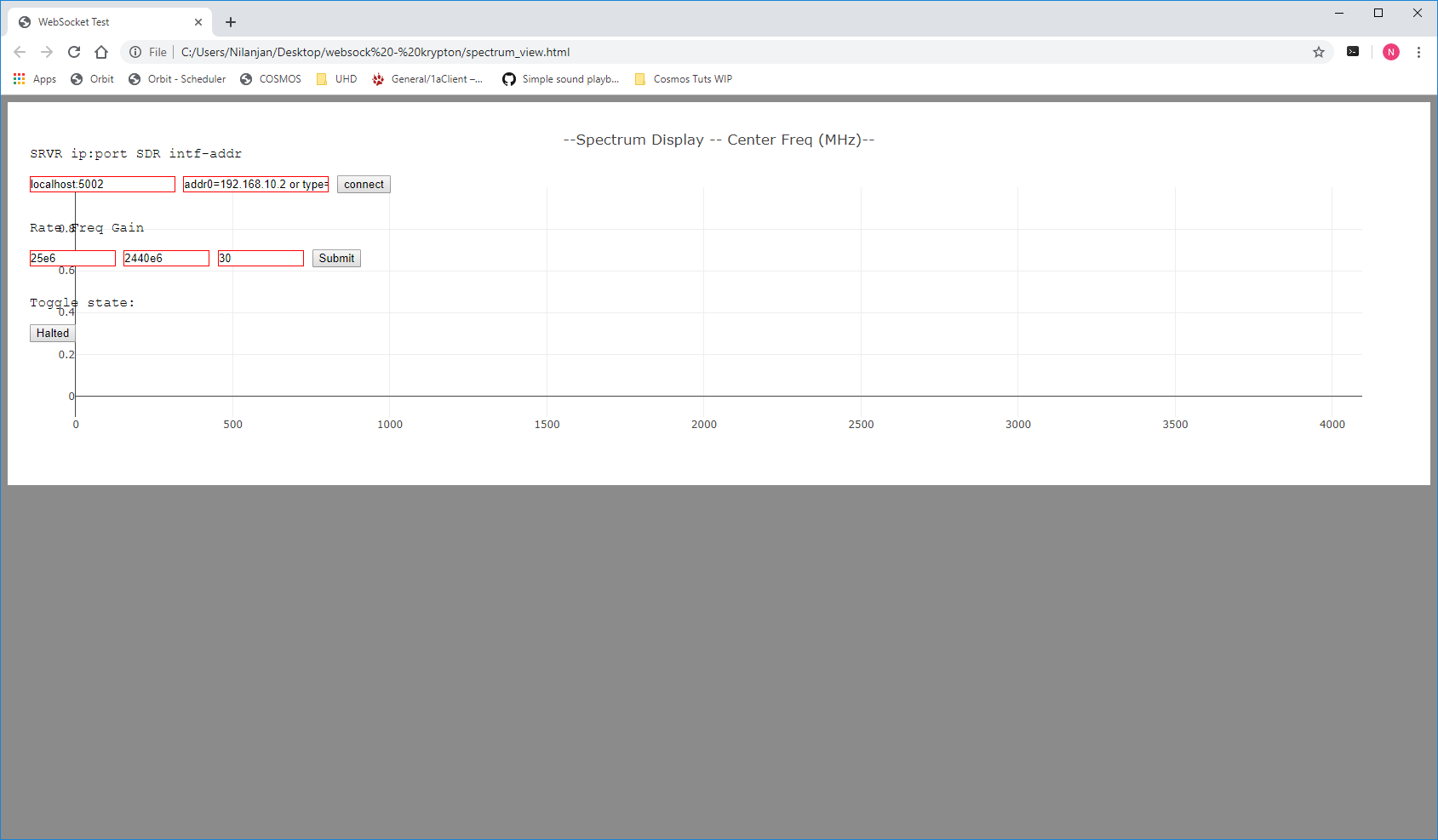
Open the spectrum_view.html file in a Chrome browser on your local machine.
When the viewer first opens, set the following fields:
- localhost field:
localhost:5002 - device type field:
type=x300
Then:
- Click connect once — the application on the Krypton should output a "WebSocket Connection" message.
- Click connect again to create a device handle.
- Click submit to apply the radio parameters (keep the default values for RATE, FREQ, and GAIN).
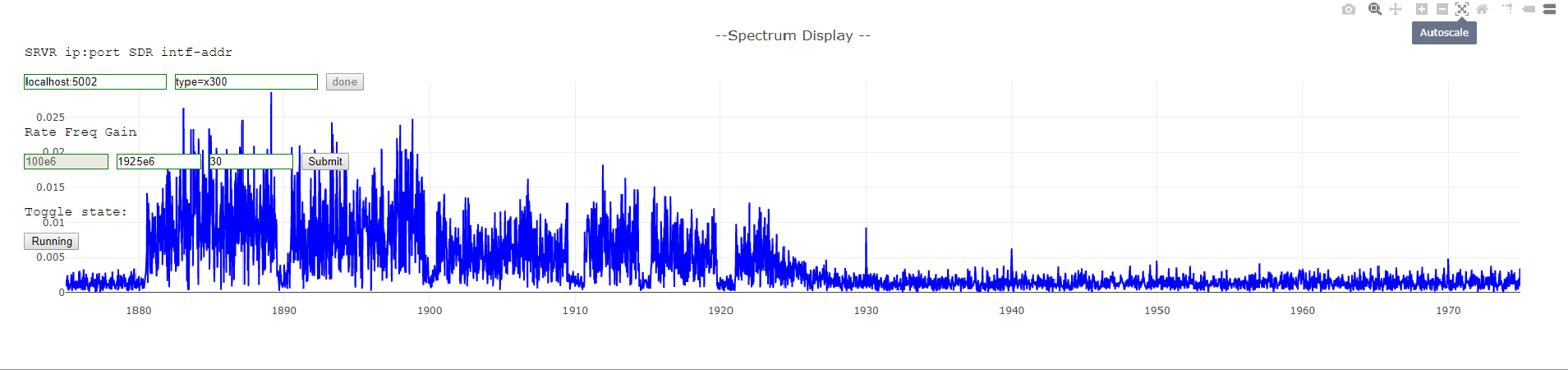
- Click the HALTED button to start displaying the spectrogram.
If all steps succeeded the browser should display a live spectrum.
¶ Verification
uhd_find_devices --args="type=x300"returns one X310 device withresource: RIO0.uhd_usrp_probe --args="resource=rio0,type=x300"completes successfully and shows the UBX-TDD daughterboards on slots A and B with a 10–6000 MHz frequency range.app_read_sdr_samplesstarts and logs both the command server (port 5180) and WebSocket server (port 9002).- The
spectrum_view.htmlbrowser viewer displays a live spectrogram after clicking HALTED.
¶ Cleanup
omf tell -a offh -t sdr2-s1-lg1.bed.cosmos-lab.org
(No omf save needed unless you modified the image.)
¶ Troubleshooting
| Symptom | Likely cause | Fix |
|---|---|---|
uhd_find_devices returns no devices |
PCIe RFNoC driver not loaded | Run systemctl restart niusrprio.service and retry |
uhd_usrp_probe fails with connection error |
Internal firmware mismatch | Follow the firmware update steps on the Krypton usage page |
make fails for spectrum_view |
Missing dependency | Confirm all packages in Step 3 installed without errors; re-run apt-get install if needed |
| Browser viewer shows no spectrum | SSH tunnel not established or wrong port | Verify the tunnel is up (localhost:5002); confirm app_read_sdr_samples is running and outputting the WebSocket connection message |
| Browser viewer shows no spectrum after clicking HALTED | Device handle not created | Ensure you clicked connect twice before clicking submit and then HALTED |
For additional troubleshooting (including firmware updates), see the Krypton usage page.
¶ References
- Krypton (USRP2974) usage page
- COSMOS workflow
- SSH access and tunneling
- OMF commands — omf load/tell/stat/save
- Available SDR hardware
- UHD documentation
- websocketpp library
Author(s): COSMOS team · Last verified: Not re-tested (migrated 2026-06-20) · Tested image/release: baseline_uhd_1804.ndz · Tags: sdr, uhd, usrp2974, krypton, spectrum-sensing, rfnoc, x310