¶ mmWave Array Management service (array_mgmt)
The array_mgmt service controls the IBM 28 GHz phased array antenna modules (PAAMs) in COSMOS:
which antenna elements are on, transmit or receive, polarization, LO source and beam direction. You
call it over HTTP from the sandbox console with curl; every call returns an XML (or JSON) report
that includes the board's supply currents, so you can see that the array really switched on.
What the hardware is, where the boards are installed, and every experiment that
uses them: mmWave & PAAM. For a
complete walk-through with two PAAMs and USRP N310 radios, start with the
IBM 28 GHz PAAM Basics tutorial.
The xy_table service
moves the mobile arrays.
¶ Before you start
- Hold an approved reservation for the sandbox that contains the board.
- Log in to that sandbox's console. Call the service through the console's AM proxy:
| Sandbox | Console | Service URL prefix |
|---|---|---|
| SB1 | console.sb1.cosmos-lab.org |
http://am-rt1.cosmos-lab.org:5054/array_mgmt |
| SB2 | console.sb2.cosmos-lab.org |
http://am-crf.cosmos-lab.org:5054/array_mgmt |
- Power the board on, and power it off again when you are done:
omf tell -a on   -t rfdev4-in1.sb1.cosmos-lab.org
omf tell -a offh -t rfdev4-in1.sb1.cosmos-lab.org
If a curl call hangs for many seconds and then fails, the board is almost always still powered off.
¶ Boards
Board (dev_name) |
Sandbox | Radio connection |
|---|---|---|
rfdev4-in1.sb1.cosmos-lab.org |
SB1 | All four quadrants combined: every one of the 64 elements reaches the radio |
rfdev4-in2.sb1.cosmos-lab.org |
SB1 | Combined, as above |
rfdev2-1.sb2.cosmos-lab.org |
SB2 | Partial: the radio's TX port reaches elements 1–4, 9–12, 17–20, 25–28; its RX port reaches elements 5–8, 13–16, 21–24, 29–32 |
rfdev2-2.sb2.cosmos-lab.org |
SB2 | Partial, as rfdev2-1 |
rfdev-mob4-1/2/3.sb1.cosmos-lab.org |
SB1 (mobile) | Combined |
On the SB2 boards you may switch on any element, but elements outside the connected part of the
array carry no signal to or from the radio; the service tells you so in a <warning> in the response.
¶ What elements, theta and phi are doing
The service turns those three parameters into 64 per-element phase shifts. If
you want to know why a given set of elements produces the beam it does - why a
single row is as sharp as the whole array in one plane and blind in the other,
why the phases wrap, or how much gain 64 elements actually buy - that is worked
through, with a script you can run without a reservation, in
How a phased array actually forms a beam.
The script takes the same elements, theta and phi you pass here, so you
can predict a pattern before you configure the board.
¶ Antenna element numbering
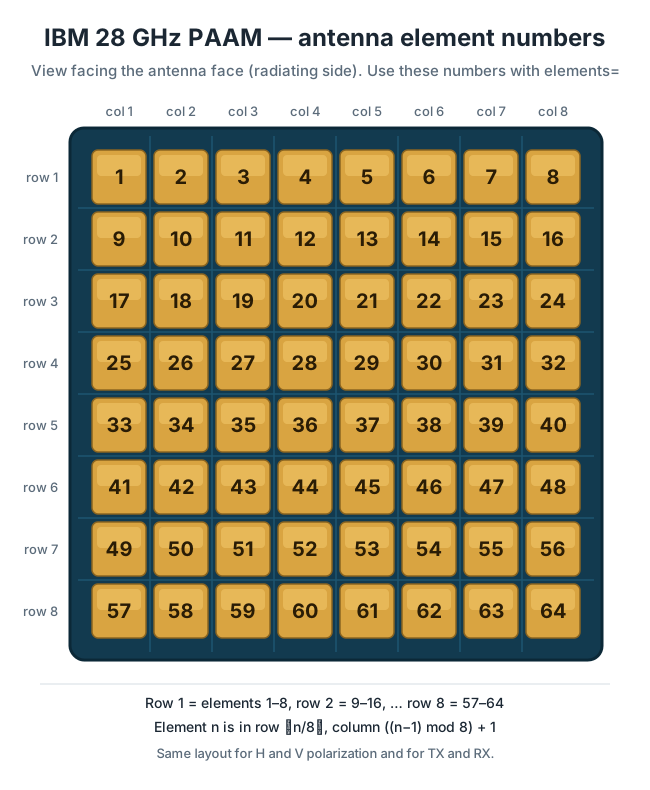
Every board has 64 antenna elements in an 8 × 8 array. They are numbered 1–64, row by row, from
the top-left corner as seen facing the antenna face (the radiating side): row 1 is elements 1–8,
row 2 is 9–16, and so on to row 8, elements 57–64. The same numbers are used for both polarizations
and for transmit and receive.
¶ Selecting antenna elements
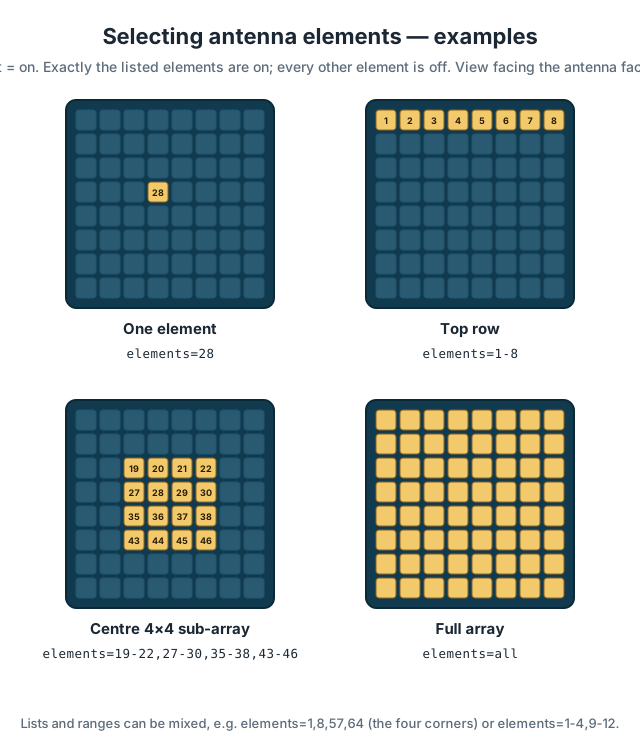
Pass elements= to configure (or to enable inside a session). You can give a single number, a
list, ranges, or all:
# exactly one element on, receiving, horizontal polarization, beam at broadside
curl "http://am-rt1.cosmos-lab.org:5054/array_mgmt/configure?dev_name=rfdev4-in1.sb1.cosmos-lab.org&elements=28&txrx=rx&pol=h&theta=0&phi=0"

# the top row plus the four corners of the bottom row
curl "http://am-rt1.cosmos-lab.org:5054/array_mgmt/configure?dev_name=rfdev4-in1.sb1.cosmos-lab.org&elements=1-8,57,64&txrx=tx&pol=v&theta=0&phi=0"

# the centre 4 x 4 sub-array
curl "http://am-rt1.cosmos-lab.org:5054/array_mgmt/configure?dev_name=rfdev4-in1.sb1.cosmos-lab.org&elements=19-22,27-30,35-38,43-46&txrx=rx&pol=v&theta=0&phi=0"

# all 64 elements
curl "http://am-rt1.cosmos-lab.org:5054/array_mgmt/configure?dev_name=rfdev4-in1.sb1.cosmos-lab.org&elements=all&txrx=tx&pol=v&theta=0&phi=0"
The same call can be sent as a POST with a JSON body, which is convenient from scripts:
curl -X POST -H 'Content-Type: application/json' \
     http://am-rt1.cosmos-lab.org:5054/array_mgmt/configure \
     -d '{"dev_name": "rfdev4-in1.sb1.cosmos-lab.org", "elements": [1, 8, 57, 64],
          "txrx": "rx", "pol": "h", "theta": 0, "phi": 0}'
What to expect:
- Exactly the elements you list are on afterwards, for the polarization and TX/RX mode in that
call. Every other element is off, whatever was on before. One call does it all, from one element
to all 64. thetaandphisteer the beam formed by the selected elements. With a single element there is
nothing to steer.- The response confirms the selection, for example
<elements count="4">1,8,57,64</elements>. elementsreplaces the oldericsandnum_elementsparameters; you cannot use both in one call.
The older parameters still work as before (num_elements=Nswitches on the same N elements in each
quarter of the array).
¶ Operations
All operations are HTTP GET requests (configure and enable also accept POST). dev_name is
required everywhere.
| Operation | What it does |
|---|---|
configure |
Everything in one call: connect, switch elements on, steer, read status, disconnect. Use this unless you need to steer repeatedly. |
connect |
Open a session with the board. Connecting resets the array: every element is off afterwards. |
enable |
Within a session: switch elements on, steer, and return status. Same parameters as configure. |
steer |
Within a session: point the beam formed by the elements that are on. Needs theta and phi. |
status |
Within a session: board ID, LO and IF switch state, supply voltages and currents. |
cleanup |
Within a session: reset the array and power down its PLL. |
disconnect |
End the session. |
¶ Parameters
| Parameter | Values | Default | Used by |
|---|---|---|---|
dev_name |
board name from the table above | — (required) | all |
elements |
1–64, lists and ranges such as 1,5,9-16, or all |
— | configure, enable |
ics |
all, 0, 1, 2, 3 (older selection method) |
all |
configure, enable |
num_elements |
1–16 per selected quarter (older selection method) |
4 |
configure, enable |
txrx |
tx or rx |
tx |
configure, enable |
pol |
h (horizontal) or v (vertical) |
v |
configure, enable |
theta |
beam angle, −60 to 60 degrees | 10 |
configure, enable, steer (required there) |
phi |
beam angle, −90 to 90 degrees | 10 |
configure, enable, steer (required there) |
lo |
internal (on-board PLL) or external |
internal |
configure, enable |
cfo |
carrier frequency offset of the internal PLL, in Hz | 0 |
configure, enable |
format |
json for a JSON response instead of XML |
XML | all |
¶ Dynamic operation (a session)
Keep the board connected and steer as the experiment runs:
P=http://am-rt1.cosmos-lab.org:5054/array_mgmt
D=dev_name=rfdev4-in1.sb1.cosmos-lab.org
omf tell -a on -t rfdev4-in1.sb1.cosmos-lab.org
curl "$P/connect?$D"
curl "$P/enable?$D&elements=all&txrx=tx&pol=v&theta=0&phi=0"
curl "$P/steer?$D&theta=15&phi=0"
curl "$P/steer?$D&theta=30&phi=0"
curl "$P/enable?$D&elements=28&txrx=tx&pol=v"      # switch to a single element
curl "$P/cleanup?$D"
curl "$P/disconnect?$D"
omf tell -a offh -t rfdev4-in1.sb1.cosmos-lab.org
¶ Reading the response
<response status="OK">
  <action service="array_mgmt" name="configure" ipaddr="10.37.7.1">
    <step name="open" duration="3.599997"/>
    <step name="enabling" duration="0.021437"/>
    <elements count="1">28</elements>
    <step name="steering" duration="0.007705" theta="0" phi="0" ipaddr="10.37.7.1"/>
    <state PAAM_ID="0x36" LO_switch="PLL" if_sw1="0x0" if_sw2="0x0" if_sw3="0x0" if_sw4="0x0"
           txrx="rx" polarization="h"/>
    <adc>
      <conv index="3" name="2v7_0" tADC="163" tVolt="0.398" tCurr="0.797"/>
      ...
    </adc>
    <step name="status" duration="0.089000"/>
    <step name="close" duration="0.001000"/>
  </action>
</response>
durationis each step's time in seconds.- The
adcblock lists supply voltages (tVolt) and currents (tCurr, in A). The2v7_0to
2v7_3currents rise when elements are switched on — a quick check that the array responded. <warning>elements (JSON:warnings) appear when some selected elements cannot reach the
radio on this board.- An error returns
status="ERROR"with a message saying what was wrong, for example an element
number outside 1–64.
¶ Troubleshooting
| Symptom | Cause | What to do |
|---|---|---|
curl hangs, then "Communication failed with array" |
The board is powered off | omf tell -a on -t <board>, wait a few seconds, retry |
| "Array is already connected" | A session is still open | curl ".../array_mgmt/disconnect?dev_name=<board>", then retry |
| "Board not connected" | enable, steer, status or cleanup without connect |
Call connect first, or use configure |
| "Parameter 'elements' …" | Element number outside 1–64, a malformed range, or elements together with ics/num_elements |
Fix the value |
| Warning about elements not connected to the radio | SB2 board, elements outside the connected part of the array | Choose elements in the connected part (see Boards) |