¶ IBM 28 GHz PAAM Basics
Transmit and receive a single tone at 28 GHz using IBM Phased Array Antenna Modules (PAAMs) and USRP N310 SDRs in the COSMOS sandbox (SB1 or SB2), and observe the received frequency response in GNU Radio Companion.
¶ Overview
This tutorial demonstrates the basic use of IBM 28 GHz Phased Array Antenna Modules (PAAMs) paired with USRP N310 software-defined radios in the COSMOS sandboxes SB1 and SB2.
One PAAM is configured as a transmitter and one as a receiver. Both are steered to broadside (0°,0°) using the COSMOS RESTful array management service. A GNU Radio Companion flowgraph running on a shared server node (srv1-lg1) drives the N310 SDRs to send a single tone, and the received spectrum is observed in a frequency-sink display.
The tutorial covers both sandbox variants: SB1 (which uses combined IC I/O) and SB2 (which uses split IC I/O), and shows how the array management API differs between them.
If you publish results obtained using the PAAMs deployed in COSMOS, please cite:
- T. Chen, P. Maddala, P. Skrimponis, J. Kolodziejski, X. Gu, A. Paidimarri, S. Rangan, G. Zussman, and I. Seskar, "Programmable and open-access millimeter-wave radios in the PAWR COSMOS testbed," in Proc. ACM MobiCom'21 Workshop on Wireless Network Testbeds, Experimental evaluation & CHaracterization (WiNTECH'21), 2021.
- X. Gu, A. Paidimarri, B. Sadhu, C. Baks, S. Lukashov, M. Yeck, Y. Kwark, T. Chen, G. Zussman, I. Seskar, and A. Valdes-Garcia, "Development of a compact 28-GHz software-defined phased array for a city-scale wireless research testbed," in Proc. IEEE International Microwave Symposium (IMS'21), 2021.
¶ Learning outcomes
After completing this tutorial you will be able to:
- Configure IBM 28 GHz PAAM devices for TX and RX using the COSMOS array management REST API.
- Use
omfcommands to image and power nodes and RF devices in a mmWave setup. - Configure USRP N310 Ethernet interfaces and verify connectivity with
uhd_find_devices. - Run a GNU Radio Companion flowgraph that drives N310 SDRs connected to PAAMs.
- Observe the received spectrum of a tone transmitted through 28 GHz phased array hardware.
¶ At a glance
| Difficulty | Intermediate |
| Estimated time | 90 min |
| Domain / sandbox | sb1.cosmos-lab.org or sb2.cosmos-lab.org |
| Topic group | mmwave-paam |
| Last verified | Not re-tested (migrated 2026-06-20) |
¶ Prerequisites
Background knowledge
- The six-step experiment life cycle.
- Basic RF concepts (carrier frequency, beamforming, phased arrays).
- Familiarity with GNU Radio Companion.
- Understanding of REST/HTTP APIs (for the array management service).
Account & access
- A COSMOS account — register here.
- An approved reservation on SB1 or SB2 — see Make a reservation.
- SSH access to the sandbox console — see SSH access.
¶ Resources required
Devices / nodes
| Resource | Role | Qty | Notes |
|---|---|---|---|
sdr1-in1 (SB1) or sdr1-s1-lg1 (SB2) |
USRP N310 — RX SDR | 1 | Connected to RX PAAM |
sdr1-in2 (SB1) or sdr1-md1 (SB2) |
USRP N310 — TX SDR | 1 | Connected to TX PAAM |
rfdev4-in1 (SB1) or rfdev2-1 (SB2) |
IBM 28 GHz PAAM — RX | 1 | 16 elements (SB1, all ICs); 4 elements IC0/1 (SB2) |
rfdev4-in2 (SB1) or rfdev2-2 (SB2) |
IBM 28 GHz PAAM — TX | 1 | 16 elements (SB1, all ICs); 4 elements IC0/1 (SB2) |
srv1-lg1 |
Experiment server (runs GNU Radio) | 1 | Shared across SB1 and SB2 |
Disk images
| Image | Load onto | Provides |
|---|---|---|
paam28GHz-tutorial-cosmos-tone-crd.ndz |
srv1-lg1 |
Ubuntu 20.04, UHD 4.1, GNU Radio 3.9, example GRC flowgraph |
Software components
| Component | Version | Source |
|---|---|---|
| UHD (USRP Hardware Driver) | 4.1 | preinstalled in paam28GHz-tutorial-cosmos-tone-crd.ndz |
| GNU Radio / GNU Radio Companion | 3.9 | preinstalled in paam28GHz-tutorial-cosmos-tone-crd.ndz |
| COSMOS Array Management Service | omf-array-mgmt (live service) |
REST API at http://am-rt1.cosmos-lab.org:5054/array_mgmt/ (SB1) or http://am-crf.cosmos-lab.org:5054/array_mgmt/ (SB2); see the service page |
Spectrum / RF / special
28 GHz mmWave band, over-the-air within the shielded sandbox. The tutorial uses V-polarization (SB1) or H-polarization (SB2) with broadside beam steering (θ=0°, φ=0°). An IF carrier of 3 GHz (3e9) is used in the GNU Radio flowgraph; the PAAM up-converts to 28 GHz.
¶ Topology
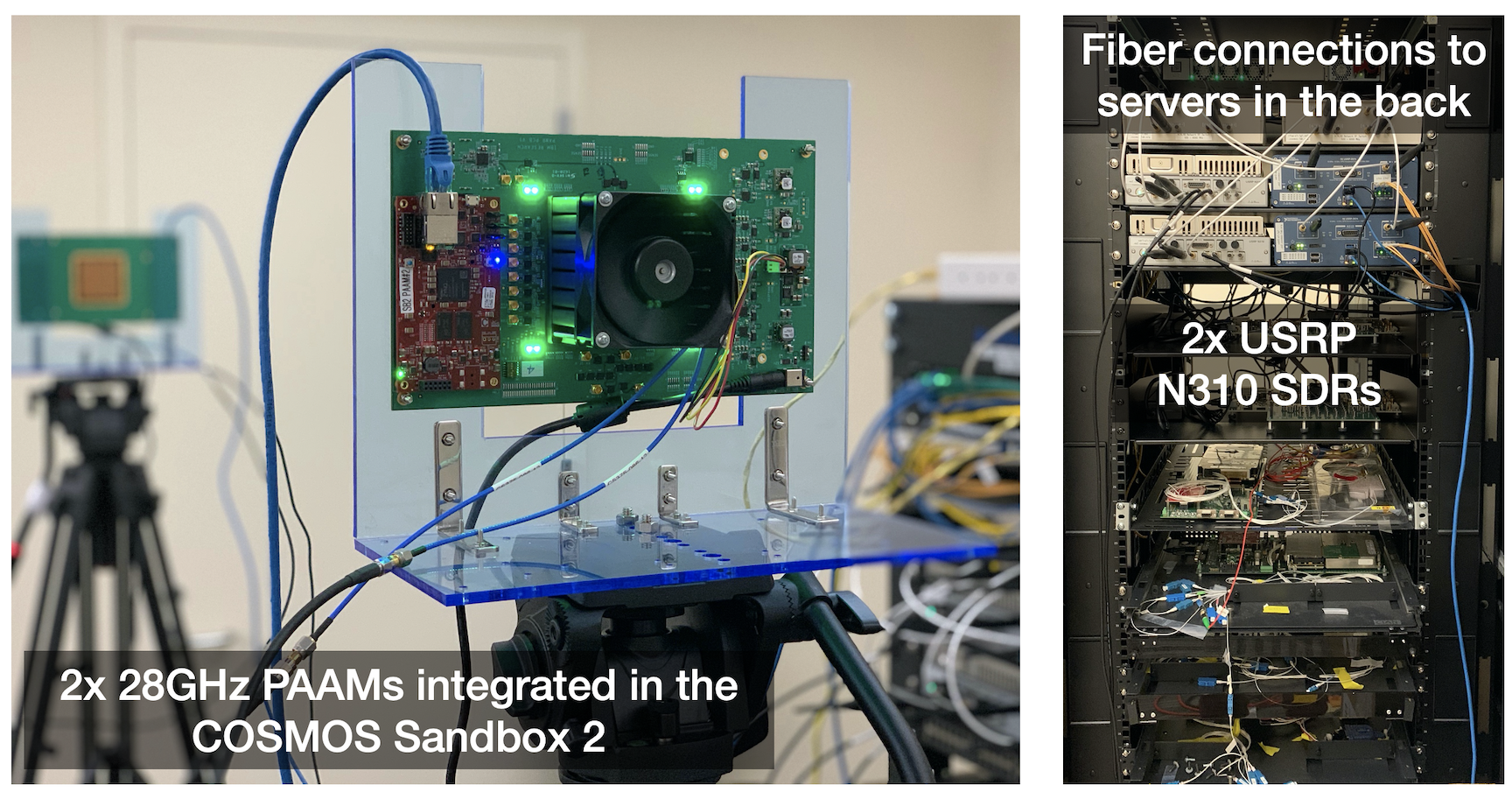
SB1 RF path connections:
sdr1-in1RF2 TX/RX →rfdev4-in1all ICs / TX / H
sdr1-in1RF2 RX2 →rfdev4-in1all ICs / RX / Hsdr1-in1RF3 TX/RX →rfdev4-in1all ICs / TX / V
sdr1-in1RF3 RX2 →rfdev4-in1all ICs / RX / Vsdr1-in2RF2 TX/RX →rfdev4-in2all ICs / TX / H
sdr1-in2RF2 RX2 →rfdev4-in2all ICs / RX / Hsdr1-in2RF3 TX/RX →rfdev4-in2all ICs / TX / V
sdr1-in2RF2 RX2 →rfdev4-in2all ICs / RX / V
SB2 RF path connections:
sdr1-s1-lg1RF2 TX/RX →rfdev2-1IC0 / TX / H
sdr1-s1-lg1RF2 RX2 →rfdev2-1IC1 / RX / Hsdr1-s1-lg1RF3 TX/RX →rfdev2-1IC0 / TX / V
sdr1-s1-lg1RF3 RX2 →rfdev2-1IC1 / RX / Vsdr1-md1RF2 TX/RX →rfdev2-2IC0 / TX / H
sdr1-md1RF2 RX2 →rfdev2-2IC1 / RX / Hsdr1-md1RF3 TX/RX →rfdev2-2IC0 / TX / V
sdr1-md1RF3 RX2 →rfdev2-2IC1 / RX / V
Note: SB1 uses combined IC I/O; SB2 uses split IC I/O.
SB1 full RF path configuration: SB1 RF Path Configurations for mmWave Development Platforms
IP address assignments: SB1 IP addresses · SB2 IP addresses
¶ Setup
¶ Current hardware status — read this before you start
Checked from each sandbox's console on 2026-09-25, and diagnosed with the
testbed operators:
Sandbox Resource Power control Reachable SB1 srv1-lg1,rfdev4-in1,rfdev4-in2yes yes SB1 sdr1-in2yes powered off, as expected SB1 sdr1-in1unavailable yes (responds to ping) SB2 srv1-lg1,sdr1-s1-lg1yes yes SB2 sdr1-md1unavailable yes SB2 rfdev2-1,rfdev2-2unavailable no — not responding The SB2 path cannot be completed at present. Its two PAAMs are powered
through a PDU that is itself unreachable, so there is no power path to them
and steps 3 and 4 have nothing to configure. The arrays have not been moved,
retired or renamed — this needs a physical check at the site, and has been
reported. Use SB1, which is intact.About the "Not registered (no BMC/IPMI entry)" message.
omf telland
omf statprint that for the resources marked unavailable above, and it is
misleading: the inventory records exist. The string meansomf-cmccould not
reach or instantiate that resource's chassis manager. So:
- Do not try to add inventory entries — the entries are already there.
- Those names will error inside the
omf tellcommands below. The other
resources in the same command still switch, and this is not a fault in your
session.sdr1-in1on SB1 is alive and usable despite the message; it simply
cannot be power-cycled from the console.
-
Reserve SB1 or SB2 and log into the console (open two SSH sessions):
ssh -Y <username>@console.sb1.cosmos-lab.orgor
ssh -Y <username>@console.sb2.cosmos-lab.orgUse
-Yon this hop too. X11 forwarding is negotiated per connection,
so thessh -Y root@srv1-lg1in step 5 has nothing to forward to unless
this first hop also carries a display. Without it the flowgraph in step 4
fails withcannot open display. (Verified on the consoles: they have
X11Forwarding yesandxauthinstalled, so this works once both hops
ask for it.) -
Turn off all nodes and RF devices used in the experiment. Use the command that matches your sandbox:
SB1:
omf tell -a offh -t sdr1-in1,sdr1-in2,rfdev4-in1,rfdev4-in2,srv1-lg1SB2:
omf tell -a offh -t sdr1-s1-lg1,sdr1-md1,rfdev2-1,rfdev2-2,srv1-lg1 -
Load the PAAM tutorial image onto the server node:
omf load -i paam28GHz-tutorial-cosmos-tone-crd.ndz -t srv1-lg1 -
Turn all required resources on and check their status:
SB1:
omf tell -a on -t sdr1-in1,sdr1-in2,rfdev4-in1,rfdev4-in2,srv1-lg1SB2:
omf tell -a on -t sdr1-s1-lg1,sdr1-md1,rfdev2-1,rfdev2-2,srv1-lg1omf stat -t all -
SSH to the server with X11 forwarding enabled (for GNU Radio Companion GUI):
ssh -Y root@srv1-lg1As an alternative to X11 forwarding, you can use Chrome Remote Desktop to view GNU Radio Companion. Set up Chrome Remote Desktop access as shown here. Chrome Remote Desktop is already installed in the image. SSH as "native" to set up remote access; skip the installation step.
¶ Instructions
¶ Step 1 — Configure 10G data interfaces on the server
Upon logging into srv1-lg1, run the eth_config.sh script to configure the 10G data interfaces (eno1, eno2):
root@srv1-lg1:~# ./eth_config.sh
After running the script, verify the data interfaces have the correct IP addresses. Expected output for each sandbox:
SB1:
root@srv1-lg1:~# ifconfig eno1
eno1: flags=4163<UP,BROADCAST,RUNNING,MULTICAST>  mtu 9000
        inet 10.38.1.1  netmask 255.255.0.0  broadcast 10.38.255.255
        inet6 fe80::1e34:daff:fe42:c3c  prefixlen 64  scopeid 0x20<link>
        ether 1c:34:da:42:0c:3c  txqueuelen 1000  (Ethernet)
        RX packets 712  bytes 74814 (74.8 KB)
        RX errors 0  dropped 595  overruns 0  frame 0
        TX packets 42  bytes 9132 (9.1 KB)
        TX errors 0  dropped 0 overruns 0  carrier 0  collisions 0
root@srv1-lg1:~# ifconfig eno2
eno2: flags=4163<UP,BROADCAST,RUNNING,MULTICAST>  mtu 9000
        inet 10.39.1.1  netmask 255.255.0.0  broadcast 10.39.255.255
        inet6 fe80::1e34:daff:fe42:c3d  prefixlen 64  scopeid 0x20<link>
        ether 1c:34:da:42:0c:3d  txqueuelen 1000  (Ethernet)
        RX packets 643  bytes 51548 (51.5 KB)
        RX errors 0  dropped 599  overruns 0  frame 0
        TX packets 42  bytes 9132 (9.1 KB)
        TX errors 0  dropped 0 overruns 0  carrier 0  collisions 0
SB2:
root@srv1-lg1:~# ifconfig eno1
eno1: flags=4163<UP,BROADCAST,RUNNING,MULTICAST>  mtu 9000
        inet 10.114.2.11  netmask 255.255.255.0  broadcast 10.114.2.255
        inet6 fe80::1e34:daff:fe42:d4c  prefixlen 64  scopeid 0x20<link>
        ether 1c:34:da:42:0d:4c  txqueuelen 1000  (Ethernet)
        RX packets 254  bytes 20924 (20.9 KB)
        RX errors 0  dropped 185  overruns 0  frame 0
        TX packets 25  bytes 4642 (4.6 KB)
        TX errors 0  dropped 0 overruns 0  carrier 0  collisions 0
root@srv1-lg1:~# ifconfig eno2
eno2: flags=4163<UP,BROADCAST,RUNNING,MULTICAST>  mtu 9000
        inet 10.115.2.11  netmask 255.255.255.0  broadcast 10.115.2.255
        inet6 fe80::1e34:daff:fe42:d4d  prefixlen 64  scopeid 0x20<link>
        ether 1c:34:da:42:0d:4d  txqueuelen 1000  (Ethernet)
        RX packets 218  bytes 22274 (22.2 KB)
        RX errors 0  dropped 186  overruns 0  frame 0
        TX packets 25  bytes 4642 (4.6 KB)
        TX errors 0  dropped 0 overruns 0  carrier 0  collisions 0
Verify the IP addresses match the SB1 or SB2 IP address tables.
¶ Step 2 — Verify USRP N310s are reachable
Run uhd_find_devices to confirm both N310s can be reached:
root@srv1-lg1:~# uhd_find_devices --args "product=n310"
Expected output on SB1:
[INFO] [UHD] linux; GNU C++ version 9.3.0; Boost_107100; UHD_4.1.0.4-release
--------------------------------------------------
-- UHD Device 0
--------------------------------------------------
Device Address:
        serial: 3176DEB
        addr: 10.39.6.1
        claimed: False
        fpga: XG
        mgmt_addr: 10.37.6.1
        mgmt_addr: 10.38.6.1
        mgmt_addr: 10.39.6.1
        name: ni-n3xx-3176DEB
        product: n310
        type: n3xx
--------------------------------------------------
-- UHD Device 1
--------------------------------------------------
Device Address:
        serial: 3176DFA
        addr: 10.39.6.2
        claimed: False
        fpga: XG
        mgmt_addr: 10.37.6.2
        mgmt_addr: 10.38.6.2
        mgmt_addr: 10.39.6.2
        name: ni-n3xx-3176DFA
        product: n310
        type: n3xx
Expected output on SB2:
[INFO] [UHD] linux; GNU C++ version 9.3.0; Boost_107100; UHD_4.1.0.4-release
--------------------------------------------------
-- UHD Device 0
--------------------------------------------------
Device Address:
        serial: 315A35A
        addr: 10.114.2.21
        claimed: False
        fpga: XG
        mgmt_addr: 10.113.2.21
        mgmt_addr: 10.114.2.21
        name: ni-n3xx-315A35A
        product: n310
        type: n3xx
--------------------------------------------------
-- UHD Device 1
--------------------------------------------------
Device Address:
        serial: 3176DF7
        addr: 10.115.2.31
        claimed: False
        fpga: XG
        mgmt_addr: 10.113.2.31
        mgmt_addr: 10.114.2.31
        mgmt_addr: 10.115.2.31
        name: ni-n3xx-3176DF7
        product: n310
        type: n3xx
If either device is missing, see Troubleshooting.
¶ Step 3 — Configure the IBM 28 GHz PAAMs
COSMOS provides a RESTful array management service for PAAM control. Two modes are available:
- Dynamic:
connect→steer→disconnect(can re-steer during the experiment). - Static:
configure(single call — connect, steer, and initialize in one step).
This tutorial uses static configuration. Run the commands from the console (not from srv1-lg1).
¶ SB1 — Configure PAAMs
Configure PAAM #1 (rfdev4-in1) in RX mode, V-polarization, 16 elements on all ICs, broadside (θ=0, φ=0):
root@console:~# curl "http://am-rt1.cosmos-lab.org:5054/array_mgmt/configure?dev_name=rfdev4-in1.sb1.cosmos-lab.org&ics=all&num_elements=16&txrx=rx&pol=v&theta=0&phi=0"
Expected response:
<?xml version="1.0" encoding="UTF-8"?>
<response status="OK">
  <action service="array_mgmt" name="configure" ipaddr="10.37.7.1">
    <step name="open" duration="3.599997"/>
    <step name="initializaition" duration="0.071123"/>
    <step name="enabling" duration="0.016817"/>
    <step name="steering" duration="0.007705"/>
    <state PAAM_ID="0x36" LO_switch="PLL" if_sw1="0x0" if_sw2="0x0" if_sw3="0x0" if_sw4="0x0"/>
    <adc>
      <conv index="0" name="1v2" tADC="120" tVolt="0.293" tCurr="0.147"/>
      <conv index="1" name="1v5" tADC="334" tVolt="0.816" tCurr="1.632"/>
      <conv index="2" name="1v8" tADC="24" tVolt="0.059" tCurr="0.029"/>
      <conv index="3" name="2v7_0" tADC="163" tVolt="0.398" tCurr="0.797"/>
      <conv index="4" name="2v7_1" tADC="206" tVolt="0.503" tCurr="1.007"/>
      <conv index="5" name="2v7_2" tADC="220" tVolt="0.538" tCurr="1.075"/>
      <conv index="6" name="2v7_3" tADC="180" tVolt="0.440" tCurr="0.880"/>
      <conv index="7" name="3v3_pll" tADC="408" tVolt="0.997" tCurr="0.499"/>
      <conv index="8" name="5v_uzed" tADC="206" tVolt="0.503" tCurr="0.503"/>
      <conv index="9" name="12v" tADC="244" tVolt="0.596" tCurr="1.988"/>
      <conv index="10" name="0V" tADC="0" tVolt="0.000"/>
      <conv index="11" name="1V8" tADC="737" tVolt="1.801"/>
    </adc>
    <step name="status" duration="0.020882"/>
    <step name="close" duration="0.100221"/>
  </action>
</response>
Check the 2v7_0, 2v7_1, 2v7_2, 2v7_3 ADC readings — non-zero values confirm all ICs are initialized.
Configure PAAM #2 (rfdev4-in2) in TX mode, V-polarization, 16 elements on all ICs, broadside (θ=0, φ=0):
root@console:~# curl "http://am-rt1.cosmos-lab.org:5054/array_mgmt/configure?dev_name=rfdev4-in2.sb1.cosmos-lab.org&ics=all&num_elements=16&txrx=tx&pol=v&theta=0&phi=0"
Expected response:
<?xml version="1.0" encoding="UTF-8"?>
<response status="OK">
  <action service="array_mgmt" name="configure" ipaddr="10.37.7.2">
    <step name="open" duration="3.558891"/>
    <step name="initializaition" duration="0.072244"/>
    <step name="enabling" duration="0.018709"/>
    <step name="steering" duration="0.008254"/>
    <state PAAM_ID="0x30" LO_switch="PLL" if_sw1="0x0" if_sw2="0x0" if_sw3="0x0" if_sw4="0x0"/>
    <adc>
      <conv index="0" name="1v2" tADC="125" tVolt="0.305" tCurr="0.153"/>
      <conv index="1" name="1v5" tADC="331" tVolt="0.809" tCurr="1.618"/>
      <conv index="2" name="1v8" tADC="22" tVolt="0.054" tCurr="0.027"/>
      <conv index="3" name="2v7_0" tADC="255" tVolt="0.623" tCurr="1.246"/>
      <conv index="4" name="2v7_1" tADC="250" tVolt="0.611" tCurr="1.222"/>
      <conv index="5" name="2v7_2" tADC="266" tVolt="0.650" tCurr="1.300"/>
      <conv index="6" name="2v7_3" tADC="264" tVolt="0.645" tCurr="1.290"/>
      <conv index="7" name="3v3_pll" tADC="410" tVolt="1.002" tCurr="0.501"/>
      <conv index="8" name="5v_uzed" tADC="215" tVolt="0.525" tCurr="0.525"/>
      <conv index="9" name="12v" tADC="300" tVolt="0.733" tCurr="2.444"/>
      <conv index="10" name="0V" tADC="0" tVolt="0.000"/>
      <conv index="11" name="1V8" tADC="734" tVolt="1.794"/>
    </adc>
    <step name="status" duration="0.021005"/>
    <step name="close" duration="0.100240"/>
  </action>
</response>
¶ SB2 — Configure PAAMs
Configure PAAM #1 (rfdev2-1) in TX mode, H-polarization, 4 elements on IC0, broadside:
root@console:~# curl "http://am-crf.cosmos-lab.org:5054/array_mgmt/configure?dev_name=rfdev2-1.sb2.cosmos-lab.org&ics=0&num_elements=4&txrx=tx&pol=h&theta=0&phi=0"
Configure PAAM #2 (rfdev2-2) in RX mode, H-polarization, 4 elements on IC1, broadside:
root@console:~# curl "http://am-crf.cosmos-lab.org:5054/array_mgmt/configure?dev_name=rfdev2-2.sb2.cosmos-lab.org&ics=1&num_elements=4&txrx=rx&pol=h&theta=0&phi=0"
¶ Switching on individual antenna elements
The commands above switch on whole groups of elements. To choose exactly which of the 64 elements
are on - a single element, one row, a sub-array, or any other pattern - use the elements=
parameter instead of ics/num_elements. Elements are numbered 1-64 row by row from the top-left
corner as seen facing the antenna face, and exactly the elements you list are on afterwards. For
example, to receive on element 28 alone:
root@console:~# curl "http://am-rt1.cosmos-lab.org:5054/array_mgmt/configure?dev_name=rfdev4-in1.sb1.cosmos-lab.org&elements=28&txrx=rx&pol=v&theta=0&phi=0"
The numbering diagram, more examples and all parameters are on the
mmWave Array Management service page.
¶ Step 4 — Run the GNU Radio Companion experiment
On srv1-lg1, start GNU Radio Companion and open the example flowgraph:
SB1:
root@srv1-lg1:~# gnuradio-companion example_paam_tone_sb1.grc
SB2:
root@srv1-lg1:~# gnuradio-companion example_paam_tone_sb2.grc
Both filenames are confirmed. Checked on 2026-09-26 by loading this image
onsrv1-lg1.sb1and listing what it actually ships. An earlier version of
this page warned that the SB2 name was inferred - it is not, it is there:root@srv1-lg1:~# ls -la ~ -rwxr-xr-x 1 root root 445 Jul 15 2024 eth_config.sh -rwxr-xr-x 1 root root 443 Jul 8 2025 eth_config_sb2.sh -rwxrwxr-- 1 root root 7540 Jul 8 2025 example_paam_tone.py -rw-r--r-- 1 root root 18368 Jul 8 2025 example_paam_tone_sb1.grc -rw-r--r-- 1 root root 18366 Jul 8 2025 example_paam_tone_sb2.grc
example_paam_tone.pyis the flowgraph that GNU Radio Companion generates
from the.grc, so it can be run directly withpython3instead of opening
the GUI - useful over a slow link, where X11 forwarding is painful.Note this image is Ubuntu 20.04 with GNU Radio 3.9.6 and UHD 4.1, one
generation behind the currentbaseline-sdr.ndz(Ubuntu 24.04, GNU Radio
3.10, UHD 4.9). The flowgraphs here are written for 3.9.
Configure the flowgraph blocks as follows:
- SB1: Set the USRP sink (TX) device address to
sdr1-in2:mgmt_addr=10.37.6.2,addr=10.39.6.2. Set the USRP source (RX) tosdr1-in1:mgmt_addr=10.37.6.1,addr=10.39.6.1. - SB2: Set the USRP sink (TX) to
sdr1-s1-lg1:mgmt_addr=10.113.2.21,addr=10.114.2.21. Set the USRP source (RX) tosdr1-md1:mgmt_addr=10.113.2.31,addr=10.114.2.31.
On both TX and RX blocks:
- Carrier frequency: 3 GHz (
3e9) - Subdev (SB1):
B:1(RF3) - Subdev (SB2):
B:0(RF2) - Sampling rate: 2.5 MHz (
2.5e6) - Tone frequency: 1 MHz (
1e6) - Tone amplitude:
1
Check the subdev before you run it — this one is silent when wrong.
Measured on SB1 on 2026-10-01, everything else identical:
subdev received tone SNR B:1+44.89 dB +71.29 dB the link B:0−22.47 dB +8.14 dB nothing The copy of
example_paam_tone_sb1.grccurrently onsrv1-lg1has
sd_spec0: B:0and will not work on SB1 until you change it toB:1.
Nothing about the failure points at the subdev: the flowgraph runs, both
radios stream, and the spectrum is simply empty.
Use a DATA address, never the control address. The device arguments
above pairmgmt_addr(control plane,10.37.x.y) withaddr(data plane,
10.38.x.yor10.39.x.y) — two different networks doing two different
jobs. Settingaddrto the control address is not refused and not reported:
it streams perfectly at 1 MS/s and delivers 3.4% of the samples at 25 MS/s,
with no error either way. Both data planes are fine; only the control plane
is not.
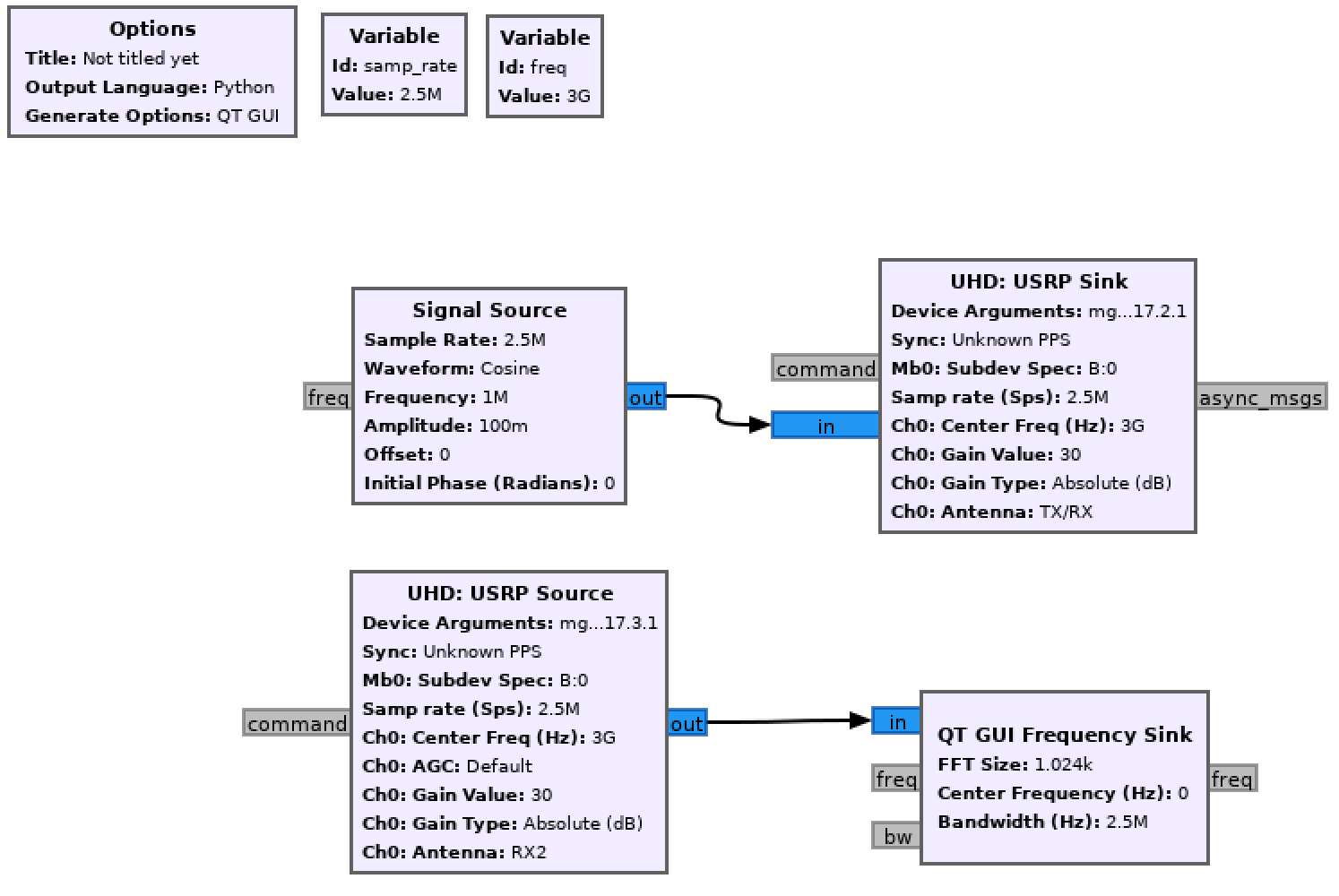
Run the flowgraph by clicking the play button in GNU Radio Companion.
¶ Verification
uhd_find_devices --args "product=n310"lists two N310 devices with the expected serial numbers and IP addresses for the sandbox.- The
configureAPI calls return<response status="OK">with non-zero2v7_*ADC readings, confirming all PAAM ICs are initialized. - The GNU Radio Companion frequency sink display shows a clear peak near, but not exactly at, the 1 MHz offset you transmitted — see below.
¶ The received tone is not where you put it
This is the single most confusing thing about this experiment, and it is
physics rather than a fault.
Each PAAM upconverts the 3 GHz IF to 28 GHz using its own internal PLL, and
the transmit and receive boards run those PLLs independently. Two free-running
oscillators are never at exactly the same frequency, so the receive board
downconverts with a slightly different LO than the transmit board used, and the
tone lands offset by the difference.
Measured on SB1, 2026-10-01:
transmitted   +1000.0 kHz
received       +747.9 kHz
offset          -252.1 kHz     ~10 ppm of the 25 GHz LO
A quarter of a megahertz. Looking at the spectrum you will see the peak and
think nothing of it; anything that checks a fixed bin at exactly +1 MHz will
report a perfectly good link as silence. That is a real trap — it is what
made an earlier attempt at this tutorial conclude the link was dead.
To prove a peak is your tone and not noise, toggle the transmitter and look at
the same bin. Measured at +747.8 kHz:
transmitter on    +24.6 dB
transmitter off   -59.9 dB
difference        +84.5 dB
The cfo parameter of the array_mgmt service exists to trim the internal PLL
and is the lever to close this offset if your experiment needs the tone where
you put it.
¶ Before you conclude anything is broken
Three things must all be true. On a first attempt none of them were, and each
one fails quietly:
- Both PAAMs are powered. If one is off,
configureanswers
Communication failed with array (exception: [Errno 113] No route to host).
With no transmit array there is no beam, and every measurement is noise.
omf stat -t rfdev4-in1,rfdev4-in2before you start. - The subdev is
B:1on SB1 (above). - You are looking at the right frequency (above).
¶ What a working link looks like
Measured end to end on SB1 with all 64 elements, both arrays at broadside:
SNR +62 to +77 dB
Steering the transmit beam moves it, which is the point of a phased array:
| TX θ | −60 | −45 | −30 | −20 | −10 | 0 | +10 | +20 | +30 | +45 | +60 |
|---|---|---|---|---|---|---|---|---|---|---|---|
| SNR dB | 64.6 | 71.7 | 74.3 | 71.8 | 77.4 | 77.3 | 74.2 | 75.1 | 69.8 | 69.3 | 71.3 |
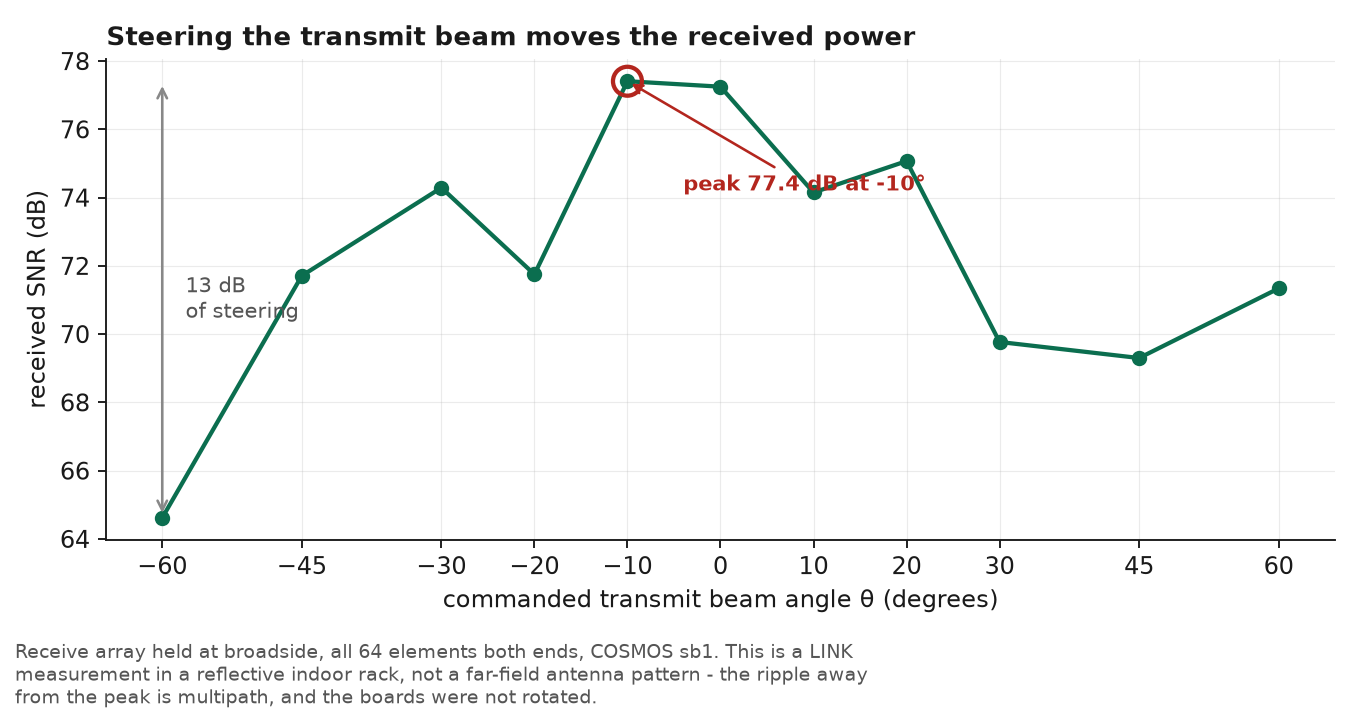
Read this as a link measurement, not an antenna pattern. The boards sit in a
reflective indoor rack and were never rotated, so the ripple away from the peak
is multipath rather than sidelobe structure. What it does show, unambiguously,
is that commanding a beam angle changes how much power arrives — which is the
entire point of a phased array.
And so does the number of elements. Received tone power against element count,
transmit beam at broadside:
elements |
1 | 1-4 |
1-16 |
all |
|---|---|---|---|---|
| tone, dB | 30.84 | 43.88 | 56.11 | 66.80 |
| step | — | +13.0 | +12.2 | +10.7 |
20·log₁₀(N) predicts |
— | +12.0 | +12.0 | +12.0 |
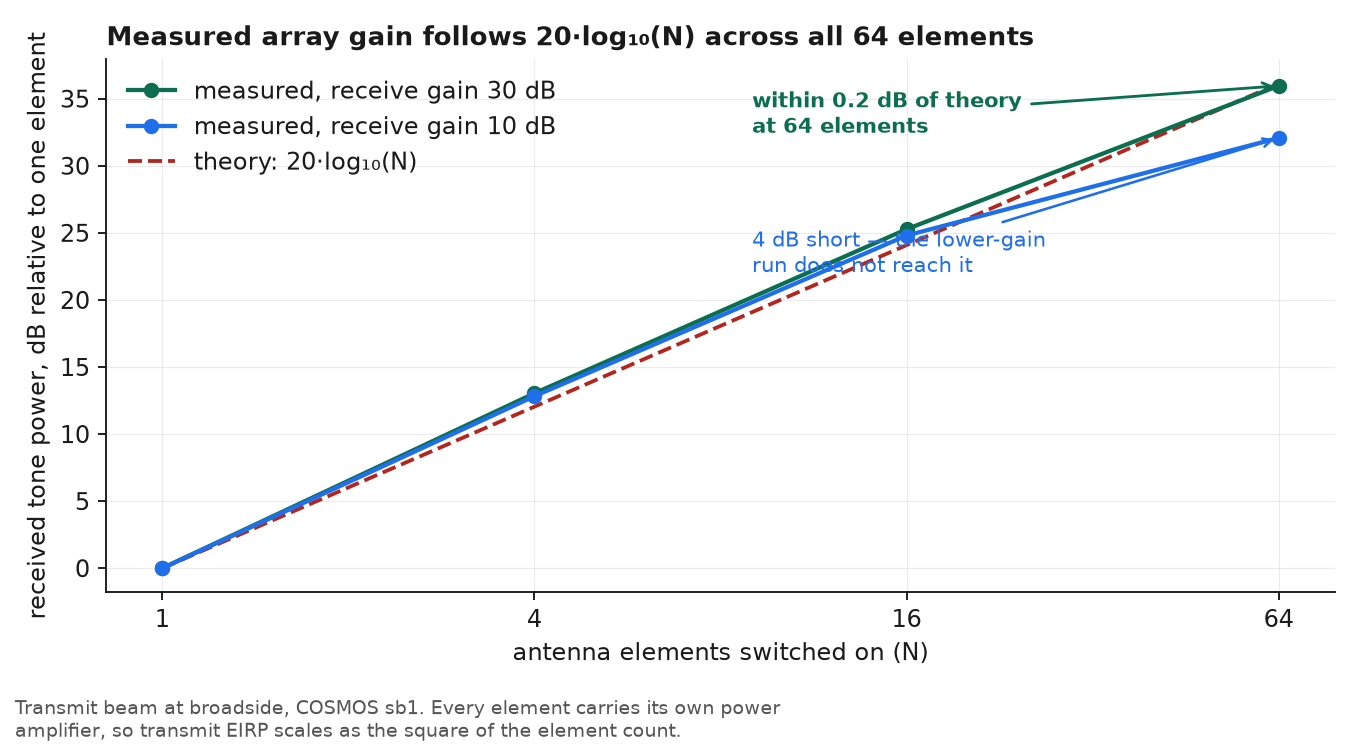
This is the transmit-side array gain from
the beamforming theory, measured on real
hardware. Each quadrupling of the element count adds about 12 dB, because every
element carries its own power amplifier — so you gain transmitted power and
directivity at the same time, and the two multiply.
Taken end to end at receive gain 30 dB, one element to all 64 measured
+35.96 dB against the +36.12 dB that 20·log₁₀(64) predicts: a gap of
0.16 dB. The individual steps wander either side of +12 dB and the last is
visibly short, but the total lands on the theory.
The lower-gain run does not: it reaches only +32.08 dB, four decibels short,
and the shortfall is entirely in the final step. A compressed receiver would
flatten the top of the strong run rather than the weak one, so that is not
the explanation and we do not yet have one. Worth repeating at a third gain if
you run this.
elements=4is element number 4 — a single element — not four elements.
Use a range such as1-4to vary the count.
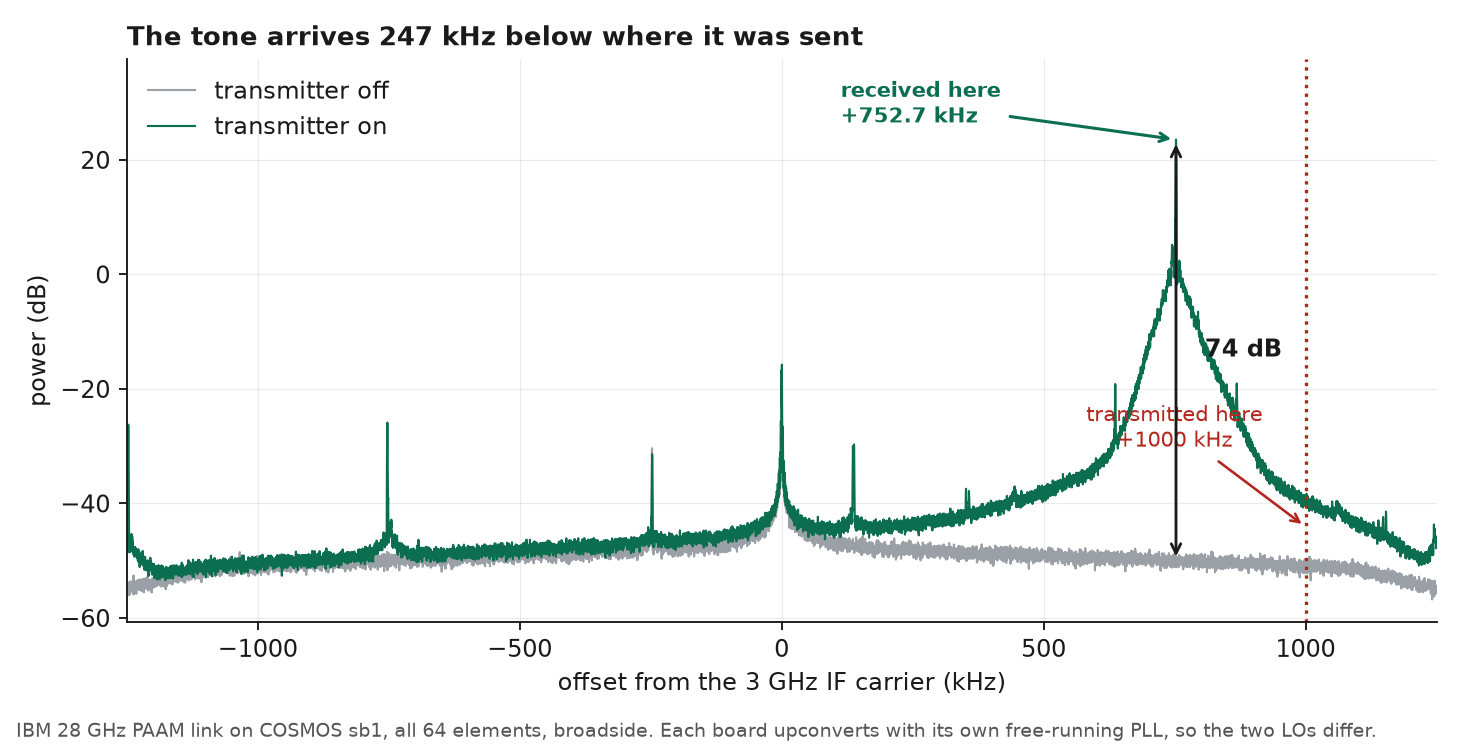
Measured on SB1, both arrays at broadside, all 64 elements. The two traces
are the same receiver seconds apart, differing only in whether the tone is
being radiated — that pairing is what makes the peak evidence rather than a
guess, and it is 74 dB clear of the transmitter-off floor.
Note where the peak is. The dotted line marks where the tone was transmitted,
+1000 kHz; it arrives at +752.7 kHz. The two boards' PLLs were 247 kHz apart
on this run and 252 kHz apart an hour earlier — free-running oscillators drift,
so expect your own offset to differ and do not hard-code it.
The original screenshot from the GUI flowgraph
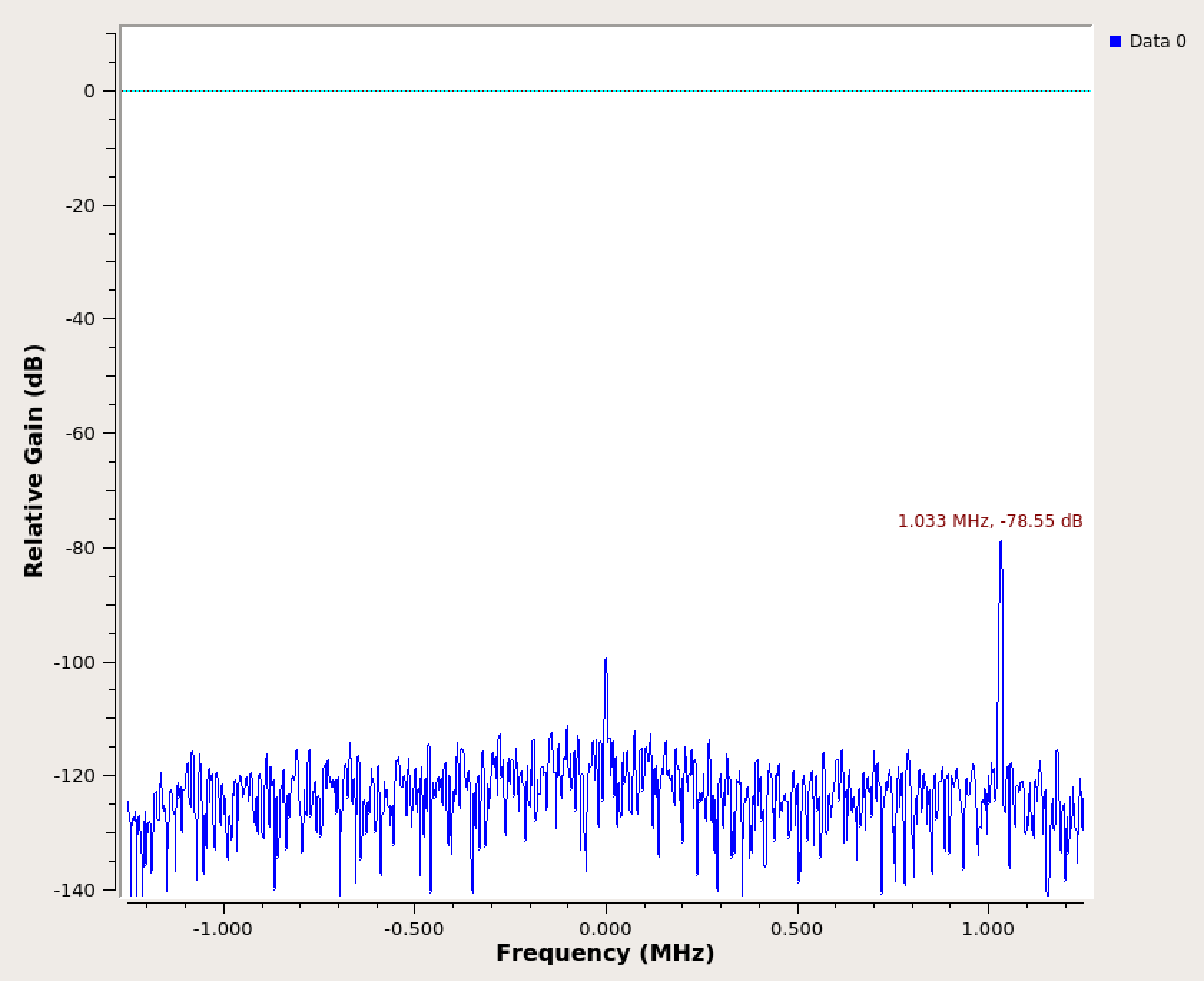
Kept for reference. Its original caption read "tone at 1 MHz offset", which is
not what the hardware does — see above.
¶ Cleanup
Stop the GNU Radio flowgraph, then from the console, clean up and turn off both PAAMs before powering down all nodes.
SB1:
root@console:~# curl "http://am-rt1.cosmos-lab.org:5054/array_mgmt/connect?dev_name=rfdev4-in1.sb1.cosmos-lab.org"
root@console:~# curl "http://am-rt1.cosmos-lab.org:5054/array_mgmt/cleanup?dev_name=rfdev4-in1.sb1.cosmos-lab.org"
root@console:~# curl "http://am-rt1.cosmos-lab.org:5054/array_mgmt/disconnect?dev_name=rfdev4-in1.sb1.cosmos-lab.org"
root@console:~# omf tell -a offh -t rfdev4-in1.sb1.cosmos-lab.org
root@console:~# curl "http://am-rt1.cosmos-lab.org:5054/array_mgmt/connect?dev_name=rfdev4-in2.sb1.cosmos-lab.org"
root@console:~# curl "http://am-rt1.cosmos-lab.org:5054/array_mgmt/cleanup?dev_name=rfdev4-in2.sb1.cosmos-lab.org"
root@console:~# curl "http://am-rt1.cosmos-lab.org:5054/array_mgmt/disconnect?dev_name=rfdev4-in2.sb1.cosmos-lab.org"
root@console:~# omf tell -a offh -t rfdev4-in2.sb1.cosmos-lab.org
SB2:
root@console:~# curl "http://am-crf.cosmos-lab.org:5054/array_mgmt/connect?dev_name=rfdev2-1.sb2.cosmos-lab.org"
root@console:~# curl "http://am-crf.cosmos-lab.org:5054/array_mgmt/cleanup?dev_name=rfdev2-1.sb2.cosmos-lab.org"
root@console:~# curl "http://am-crf.cosmos-lab.org:5054/array_mgmt/disconnect?dev_name=rfdev2-1.sb2.cosmos-lab.org"
root@console:~# omf tell -a offh -t rfdev2-1.sb2.cosmos-lab.org
root@console:~# curl "http://am-crf.cosmos-lab.org:5054/array_mgmt/connect?dev_name=rfdev2-2.sb2.cosmos-lab.org"
root@console:~# curl "http://am-crf.cosmos-lab.org:5054/array_mgmt/cleanup?dev_name=rfdev2-2.sb2.cosmos-lab.org"
root@console:~# curl "http://am-crf.cosmos-lab.org:5054/array_mgmt/disconnect?dev_name=rfdev2-2.sb2.cosmos-lab.org"
root@console:~# omf tell -a offh -t rfdev2-2.sb2.cosmos-lab.org
Then power off all remaining nodes:
omf tell -a offh -t system:topo:allres
(No omf save needed unless you customized the image on srv1-lg1.)
¶ Troubleshooting
| Symptom | Likely cause | Fix |
|---|---|---|
uhd_find_devices returns fewer than 2 devices |
eth_config.sh not run, or 10G interface down |
Re-run ./eth_config.sh; verify with ifconfig eno1 eno2 that IPs are assigned; ping the N310 mgmt address |
configure API returns non-OK status or zero 2v7_* ADC readings |
PAAM not powered on, or wrong dev_name |
Confirm rfdev4-in1/rfdev4-in2 (SB1) or rfdev2-1/rfdev2-2 (SB2) are powered (omf stat); check dev_name matches the sandbox |
| GNU Radio flowgraph throws UHD error | Wrong device address in USRP block | Double-check mgmt_addr and addr parameters match the sandbox IP table |
| No tone visible in frequency sink | Wrong subdev setting | SB1 needs B:1 (RF3); SB2 needs B:0 (RF2); confirm both TX and RX blocks have the same carrier frequency |
| X11 forwarding fails / GRC window does not appear | SSH not started with -Y |
Reconnect with ssh -Y root@srv1-lg1; alternatively use Chrome Remote Desktop |
¶ References
- IBM 28 GHz PAAM hardware page
- COSMOS Array Management Service
- SB1 domain architecture and IP assignments
- SB2 domain architecture and IP assignments
- COSMOS getting started guide
- SSH / console access
- Chrome Remote Desktop setup
- T. Chen et al., "Programmable and open-access millimeter-wave radios in the PAWR COSMOS testbed," WiNTECH'21.
- X. Gu et al., "Development of a compact 28-GHz software-defined phased array for a city-scale wireless research testbed," IMS'21.
- B. Sadhu et al., "A 28-GHz 32-element TRX phased-array IC with concurrent dual-polarized operation and orthogonal phase and gain control for 5G communications," IEEE JSSC, vol. 52, no. 12, pp. 3373–3391, 2017.
Author(s): COSMOS team (original: Tingjun Chen, Duke University) · Last verified: Not re-tested (migrated 2026-06-20) · Tested image/release: paam28GHz-tutorial-cosmos-tone-crd.ndz · Tags: mmwave, paam, ibm, usrp, n310, gnuradio, 28ghz, beamforming