¶ Getting Started with InterDigital 5G NR Performance System
Set up a 5G NR over-the-air link on COSMOS Sandbox 1 using the InterDigital 5G-NR Performance Platform, route IP traffic end-to-end through the mmWave link, and measure throughput with iperf3.
¶ Overview
This tutorial demonstrates how to use the InterDigital 5G-NR Performance Platform on COSMOS Sandbox 1. The experiment involves one gNodeB unit and one UE unit, together with two Sandbox 1 server nodes (srv1-in1 and srv1-in2). The first server (srv1-in1) acts as a gateway connected to the gNodeB; the second server (srv1-in2) is the UE computing platform, to which the UE modem is attached.
All four devices (two server nodes and two RF platform units) share a common Data 1 Ethernet network. IP routing is configured across three subnets to carry traffic from the client over the 5G NR 28 GHz mmWave OTA link:
- gNodeB Subnet (
192.168.1.X) — gateway (srv1-in1) to the gNodeB device - UE Subnet (
192.168.2.X) — UE compute node (srv1-in2) to the UE device - 5G Subnet (
192.168.3.X) — UE to gNodeB over the 5G NR air link
A browser-based GUI (NR Performance GUI, port 3005) running on srv1-in1 provides real-time status and link analytics.
¶ Learning outcomes
After completing this tutorial you will be able to:
- Reserve and image COSMOS Sandbox 1 server nodes with InterDigital 5G platform images.
- Configure IP routing tables on server nodes to route traffic through a 5G NR OTA link.
- Start the gNodeB and UE firmware on the InterDigital MPU devices via SSH.
- Verify the 5G link using the NR GUI and the
mtrrouting tool. - Run iperf3 downlink UDP traffic across the 28 GHz 5G NR link and read throughput results.
- Save a modified node image for future re-use.
¶ At a glance
| Difficulty | Intermediate |
| Estimated time | 60 min |
| Domain / sandbox | sb1.cosmos-lab.org |
| Topic group | Cellular / 4G–5G / O-RAN |
| Last verified | Not re-tested (migrated 2026-06-20) |
¶ Prerequisites
Background knowledge
- The COSMOS workflow / experiment life cycle.
- Basic IP routing concepts (subnets, default routes, NAT/masquerade).
- Familiarity with SSH and Linux shell commands.
Account & access
- A COSMOS account — register here.
- An approved reservation on Sandbox 1 — see Make a reservation.
- SSH access to the domain console — see SSH access.
- Browser access to the NR GUI via either:
- An SSH tunnel from your laptop mapping
localhost:3005→srv1-in1.sb1.cosmos-lab.org:3005, or - A VPN tunnel to COSMOS Sandbox 1.
- An SSH tunnel from your laptop mapping
¶ Resources required
Devices / nodes
| Resource | Role | Qty | Notes |
|---|---|---|---|
| srv1-in1.sb1.cosmos-lab.org | Gateway / gNodeB host | 1 | Runs gNodeB image; connects to gNodeB RF platform at 192.168.1.2 |
| srv1-in2.sb1.cosmos-lab.org | UE compute platform | 1 | Runs UE image; UE modem attached; iperf server runs here |
| rfdev2-in1 | InterDigital gNodeB RF platform | 1 | 28 GHz mmWave NR gNodeB; MPU at 192.168.1.2 |
| rfdev2-in2 | InterDigital UE RF platform | 1 | 28 GHz mmWave NR UE; MPU at 192.168.2.1 |
Disk images
| Image | Load onto | Provides |
|---|---|---|
| ID-5G-gNB-rc.ndz | srv1-in1 | gNodeB routing scripts (setup_gNodeB.sh, prepare.sh); NR GUI web server |
| ID-5G-UE.ndz | srv1-in2 | UE routing scripts (setup_UE.sh, prepare.sh) |
Software components
| Component | Version | Source |
|---|---|---|
| InterDigital NR Performance GUI | TODO: verify | Preinstalled in ID-5G-gNB-rc.ndz; served on port 3005 |
| iperf3 | TODO: verify | Preinstalled in images |
| mtr | TODO: verify | Preinstalled in images |
| sshpass | TODO: verify | Preinstalled in images |
| MongoDB | TODO: verify | Optional; preinstalled in ID-5G-gNB-rc.ndz for GUI logging |
Spectrum / RF / special
28 GHz mmWave OTA link between the InterDigital gNodeB and UE platform units. The two RF devices (rfdev2-in1, rfdev2-in2) must be physically present and aligned in Sandbox 1. Ensure antenna alignment for best throughput.
¶ Topology
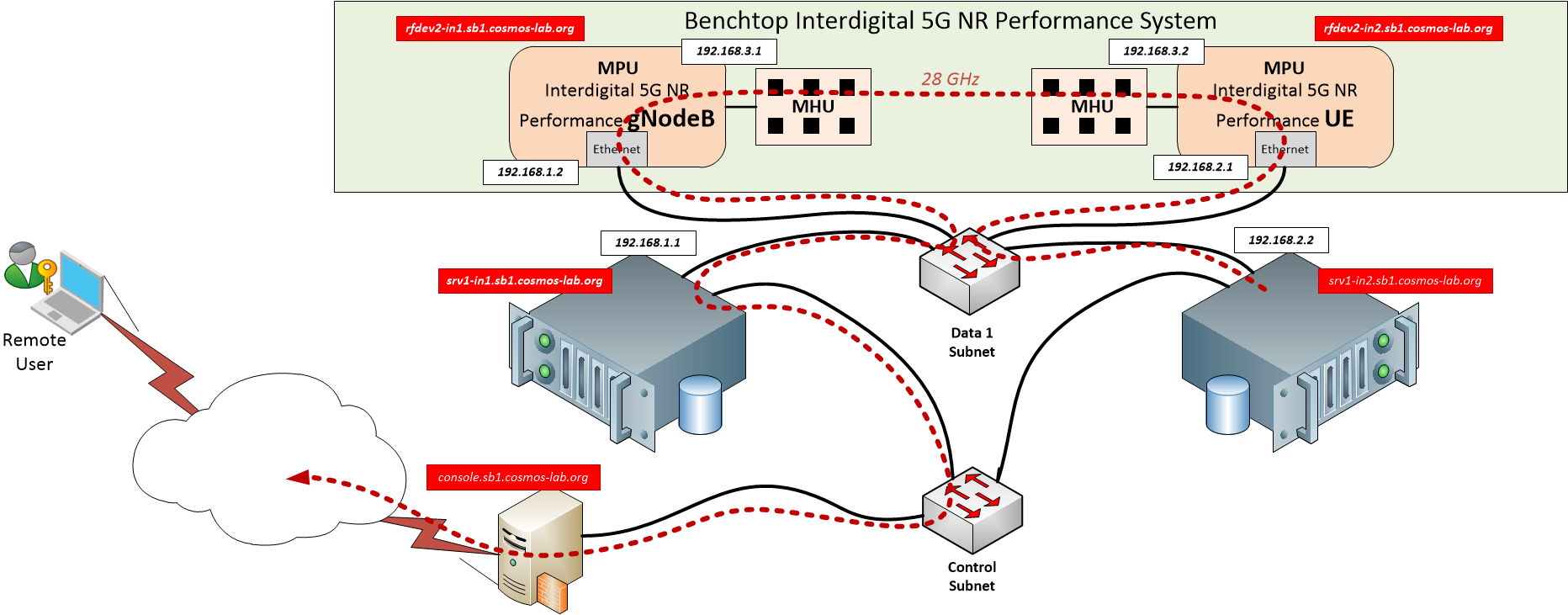
The setup consists of four devices sharing a common Data 1 Ethernet (Sandbox 1):
- srv1-in1 (gateway) connects to the gNodeB MPU via the gNodeB Subnet (
192.168.1.X). - srv1-in2 (UE host) connects to the UE MPU via the UE Subnet (
192.168.2.X). - The two MPUs communicate wirelessly over the 5G Subnet (
192.168.3.X) via the 28 GHz OTA link.
Traffic from the iperf client on srv1-in1 traverses: srv1-in1 → gNodeB MPU → 5G air link → UE MPU → srv1-in2.
A Control network provides a second Ethernet path to each server node for management and metrics collection (independent of the Data 1 / 5G traffic path).
¶ Setup
Open two SSH sessions to the console (one for gNodeB operations, one for UE operations).
-
Log into the Sandbox 1 console:
ssh <username>@console.sb1.cosmos-lab.org -
Prepare your laptop for GUI access — choose one option:
- SSH tunnel:
ssh -L 3005:srv1-in1.sb1.cosmos-lab.org:3005 <username>@console.sb1.cosmos-lab.org - VPN: Follow the VPN guide.
- SSH tunnel:
-
Turn off all nodes and RF platform devices before imaging:
omf tell -a offh -t srv1-in1,srv1-in2,rfdev2-in1,rfdev2-in2 -
Load the platform images — run each command in a separate console session simultaneously:
SSH session 1 (gNodeB):
omf load -t srv1-in1 -i ID-5G-gNB-rc.ndz -r 50SSH session 2 (UE):
omf load -t srv1-in2 -i ID-5G-UE.ndz -r 50 -
Turn the server nodes and NR platform devices on:
omf tell -a on -t srv1-in1,srv1-in2,rfdev2-in1,rfdev2-in2
¶ Instructions
¶ Step 1 — Configure routing on the two compute nodes
On srv1-in1 (Session 1 — gNodeB):
SSH into the gNodeB server node and run the routing setup script:
userid@console:~$ ssh root@srv1-in1
root@srv1-in1:~$ ./setup_gNodeB.sh
Expected output:
---------------
Make sure to start the gNodeB modem on the MPU by logging in with:
sshpass -p root ssh -o StrictHostKeyChecking=no root@192.168.1.2
and running:
root@NR-SW-MPU-gNB:~# ./start_all.sh
----------------
net.ipv4.ip_no_pmtu_disc = 1
root@srv1-in1:~#
On srv1-in2 (Session 2 — UE):
SSH into the UE server node and run the routing setup script:
userid@console:~$ ssh root@srv1-in2
root@srv1-in2:~$ ./setup_UE.sh
Expected output:
---------------
Make sure to start the UE modem on the MPU by logging in with:
sshpass -p root ssh -o StrictHostKeyChecking=no root@192.168.2.1
and running:
root@NR-SW-MPU-UE:~# ./start_all.sh
----------------
These scripts configure IP forwarding, routing tables, and NAT/masquerade rules on both server nodes to push test traffic through the 5G NR link. For reference, the full script content is shown below.
setup_gNodeB.sh (runs on srv1-in1):
#!/bin/bash
echo "---------------"
echo "Make sure to start the gNodeB modem on the MPU by logging in with:"
echo "sshpass -p "root" ssh -o StrictHostKeyChecking=no root@192.168.1.2"
echo "and running:"
echo "root@NR-SW-MPU-gNB:~# ./start_all.sh"
echo "----------------"
# Turn on routing
echo 1 > /proc/sys/net/ipv4/ip_forward
sysctl -w net.ipv4.ip_no_pmtu_disc=1
# Add routing for the two subnets "behind" the gNodeB
ip route add 192.168.2.0/24 via 192.168.1.2
ip route add 192.168.3.0/24 via 192.168.1.2
# as well as for the measurements to come back from the UE over the wire
ip route add 192.168.2.1 via 10.37.1.4 dev eth1
# and configure NAT for them
iptables -t nat -A POSTROUTING -o eth1 -j MASQUERADE
iptables -A FORWARD -i eth1 -o eth0 -m state --state RELATED,ESTABLISHED -j ACCEPT
iptables -A FORWARD -i eth0 -o eth1 -j ACCEPT
setup_UE.sh (runs on srv1-in2):
#!/bin/bash
echo "---------------"
echo "Make sure to start the UE modem on the MPU by logging in with:"
echo "sshpass -p "root" ssh -o StrictHostKeyChecking=no root@192.168.2.1"
echo "and running:"
echo "root@NR-SW-MPU-UE:~# ./start_all.sh"
echo "----------------"
# Turn on routing
echo 1 > /proc/sys/net/ipv4/ip_forward
sysctl -w net.ipv4.ip_no_pmtu_disc=1
# Route all internal 5G traffic through the UE MPU
ip route add 192.168.3.0/24 via 192.168.2.1 dev eth0
ip route add 192.168.1.0/24 via 192.168.2.1 dev eth0
# Testbed bound traffic still goes over the control subnet
ip r add 10/8 dev eth1
# Everything else goes over the 5G link
# (remove default over control network)
ip r del default dev eth1
ip r add default via 192.168.2.1 dev eth0
¶ Step 2 — Start services on the two MPUs
On the gNodeB MPU (from the srv1-in1 session):
SSH into the gNodeB MPU at 192.168.1.2 (username root, password root) and run the startup script:
root@srv1-in1:~# sshpass -p "root" ssh -o StrictHostKeyChecking=no root@192.168.1.2
root@NR-SW-MPU-gNB:~# ./start_all.sh
Expected output:
root@NR-SW-MPU-gNB:~# metal: info: metal_uio_dev_open: No IRQ for device 3ed80000.shm.
Exit back to srv1-in1:
root@NR-SW-MPU-gNB:~# exit
logout
Connection to 192.168.1.2 closed.
root@srv1-in1:~#
On the UE MPU (from the srv1-in2 session):
SSH into the UE MPU at 192.168.2.1 (username root, password root) and run the startup script:
root@srv1-in2:~# sshpass -p "root" ssh -o StrictHostKeyChecking=no root@192.168.2.1
root@NR-SW-MPU-UE:~# ./start_all.sh
Expected output:
root@NR-SW-MPU-UE:~# metal: info: metal_uio_dev_open: No IRQ for device 3ed80000.shm.
Exit back to srv1-in2:
root@NR-SW-MPU-UE:~# exit
logout
Connection to 192.168.2.1 closed.
root@srv1-in2:~#
The scripts start the appropriate firmware on both NR Platform devices. To stop execution at any time, run ./stop_all.sh on the respective MPU. The NR Platform will automatically establish a link between the gNodeB and UE; this can be verified via the NR GUI (see Step 4).
¶ Step 3 — Verify routing through the NR link
Use the mtr utility on srv1-in2 to confirm that traffic is traversing the NR air link (hops through 192.168.2.1, 192.168.3.1, 192.168.1.1 in that order):
root@srv1-in2:~# mtr -c 1 -r 8.8.8.8
Expected output:
Start: Fri Sep 22 13:14:06 2023
HOST: srv1-in2.sb1.cosmos-lab.org Loss%   Snt   Last   Avg  Best  Wrst StDev
  1.|-- 192.168.2.1                0.0%     1    0.2   0.2   0.2   0.2   0.0
  2.|-- 192.168.3.1                0.0%     1    1.1   1.1   1.1   1.1   0.0
  3.|-- 192.168.1.1                0.0%     1    1.2   1.2   1.2   1.2   0.0
  4.|-- ???                       100.0     1    0.0   0.0   0.0   0.0   0.0
  5.|-- ???                       100.0     1    0.0   0.0   0.0   0.0   0.0
  6.|-- vlan-102-ar01-winlab-fsci  0.0%     1    1.9   1.9   1.9   1.9   0.0
  7.|-- 172.29.50.14               0.0%     1    2.1   2.1   2.1   2.1   0.0
  8.|-- 172.29.6.25                0.0%     1    1.8   1.8   1.8   1.8   0.0
  9.|-- 172.29.6.58                0.0%     1    3.2   3.2   3.2   3.2   0.0
 10.|-- 172.29.6.96                0.0%     1    2.7   2.7   2.7   2.7   0.0
 11.|-- ???                       100.0     1    0.0   0.0   0.0   0.0   0.0
 12.|-- 142.251.249.125            0.0%     1    3.6   3.6   3.6   3.6   0.0
 13.|-- 216.239.40.167             0.0%     1    2.7   2.7   2.7   2.7   0.0
 14.|-- dns.google                 0.0%     1    2.8   2.8   2.8   2.8   0.0
root@srv1-in2:~#
The first three hops — 192.168.2.1 (UE MPU), 192.168.3.1 (5G subnet), 192.168.1.1 (gNodeB MPU) — confirm that traffic is routing through the 5G NR link.
¶ Step 4 — Open the NR GUI
The NR GUI web server starts automatically at Linux boot on srv1-in1.
Open a browser and navigate to:
- SSH tunnel:
http://localhost:3005 - VPN:
http://srv1-in1.sb1.cosmos-lab.org:3005
Login credentials: admin / admin
Once the page loads, navigate to the DEBUG tab:

Click on the gNB Applink and UE1 Applink circles (LEDs) under the Status bar:
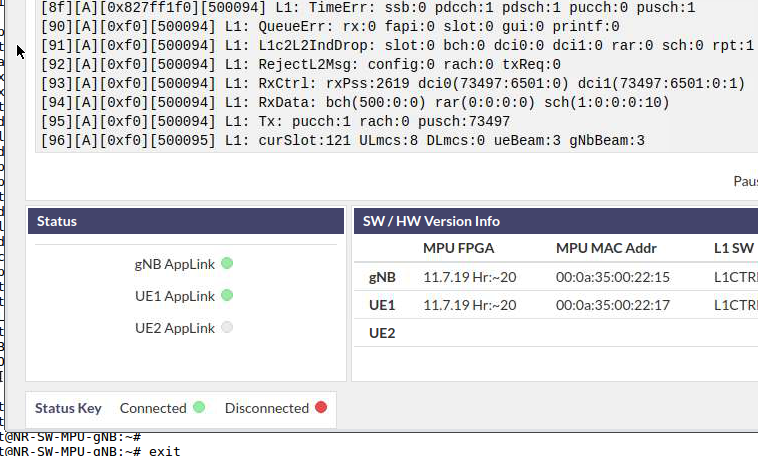
When selected, the LED turns green, indicating the GUI is communicating with the respective node.
Optional — Enable logging to MongoDB database:
Edit WEBSERVER/server/config.js on srv1-in1 to enable database logging:
//MongoDB Database parameters
  dbAvailable: true,
  dbStore: true,
  dbCollectionName: "nr_guidata", //This is not a fixed value and can be changed
  dbHost: "127.0.0.1", //Address of databases server
  dbPort: 27017,
  //End Database parameters
After saving, the server restarts automatically and all GUI data is saved to MongoDB. Use the Mongo client to browse or extract data. The data model is defined in WEBSERVER/server/backend/models/tlvDataItem.js.
¶ Step 5 — Run iperf3 downlink traffic over the 5G NR link
These commands demonstrate downlink UDP iperf3 traffic across the NR 28 GHz mmWave OTA link.
On srv1-in2 (UE — iperf server), Session 2:
iperf3 -s -i 1
On srv1-in1 (gNodeB — iperf client), Session 1:
iperf3 -c 192.168.2.2 -i 1 -u -b 20M -l 1472 -t 30
Expected output on srv1-in1 (gNodeB / client):
root@srv1-in1:~# iperf3 -c 192.168.2.2 -i 1 -u -b 20M -l 1472 -t 3
Connecting to host 192.168.2.2, port 5201
[  4] local 192.168.1.1 port 41249 connected to 192.168.2.2 port 5201
[ ID] Interval           Transfer     Bandwidth       Total Datagrams
[  4]   0.00-1.00   sec  2.15 MBytes  18.0 Mbits/sec  1532
[  4]   1.00-2.00   sec  2.38 MBytes  20.0 Mbits/sec  1698
[  4]   2.00-3.00   sec  2.39 MBytes  20.0 Mbits/sec  1699
- - - - - - - - - - - - - - - - - - - - - - - - -
[ ID] Interval           Transfer     Bandwidth       Jitter    Lost/Total Datagrams
[  4]   0.00-3.00   sec  6.92 MBytes  19.3 Mbits/sec  0.141 ms  69/4929 (1.4%)
[  4] Sent 4929 datagrams

iperf Done.
root@srv1-in1:~#
Expected output on srv1-in2 (UE / server):
root@srv1-in2:~# iperf3 -s -i 1
-----------------------------------------------------------
Server listening on 5201
-----------------------------------------------------------
Accepted connection from 192.168.1.1, port 55250
[  5] local 192.168.2.2 port 5201 connected to 192.168.1.1 port 41249
[ ID] Interval           Transfer     Bandwidth       Jitter    Lost/Total Datagrams
[  5]   0.00-1.00   sec  2.12 MBytes  17.7 Mbits/sec  0.130 ms  25/1532 (1.6%)
[  5]   1.00-2.00   sec  2.35 MBytes  19.7 Mbits/sec  0.142 ms  25/1698 (1.5%)
[  5]   2.00-3.00   sec  2.36 MBytes  19.8 Mbits/sec  0.141 ms  19/1699 (1.1%)
[  5]   3.00-3.04   sec  0.00 Bytes  0.00 bits/sec  0.141 ms  0/0 (-nan%)
- - - - - - - - - - - - - - - - - - - - - - - - -
[ ID] Interval           Transfer     Bandwidth       Jitter    Lost/Total Datagrams
[  5]   0.00-3.04   sec  6.92 MBytes  19.1 Mbits/sec  0.141 ms  69/4929 (1.4%)
-----------------------------------------------------------
Server listening on 5201
-----------------------------------------------------------
Note: actual link performance depends on physical antenna alignment.
¶ Step 6 — Analyze NR link performance via the GUI
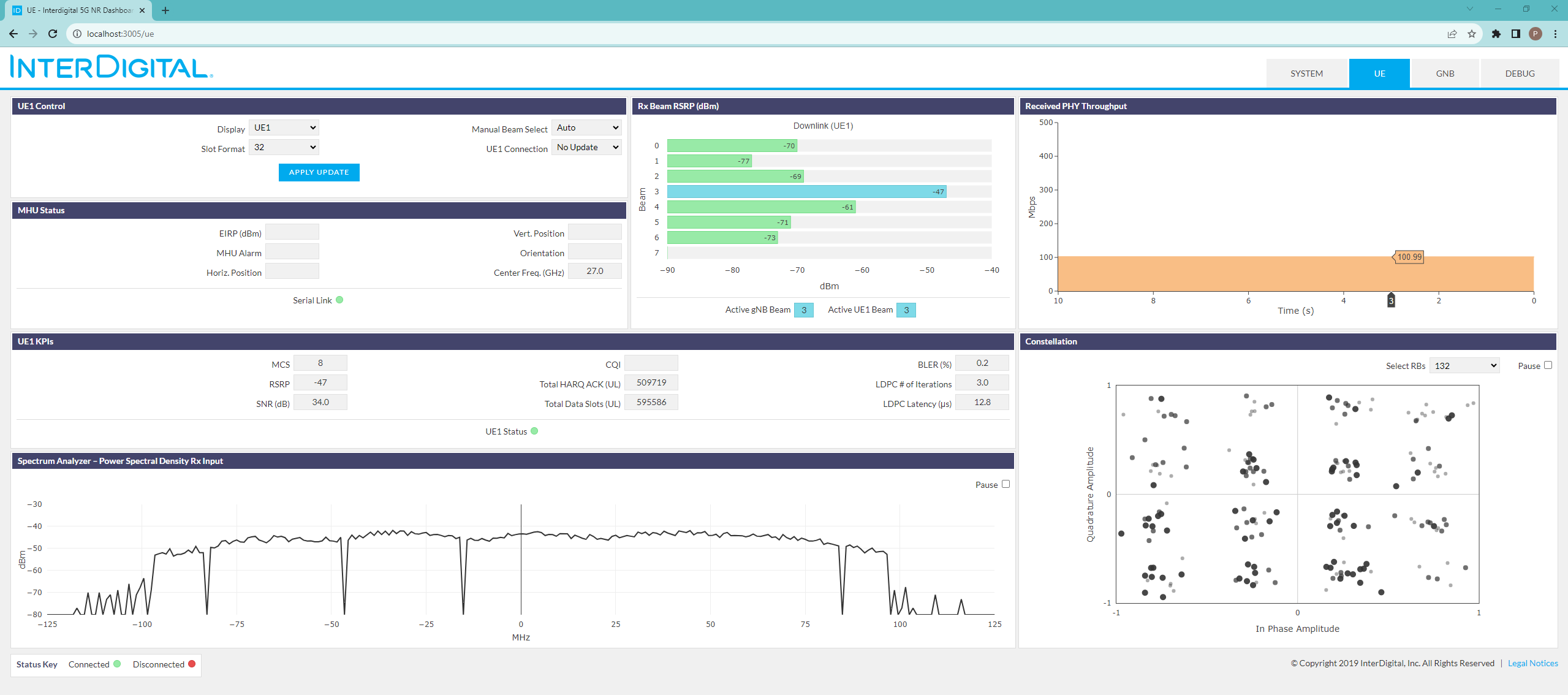
Navigate to the DEBUG tab of the GUI and select the gNB Applink and UE1 Applink buttons under the Status bar. LEDs should be green.
¶ Verification
mtr -c 1 -r 8.8.8.8from srv1-in2 shows hops through192.168.2.1→192.168.3.1→192.168.1.1, confirming traffic traverses the 5G NR air link.- The NR GUI DEBUG tab shows green LEDs for both gNB Applink and UE1 Applink.
- iperf3 downlink throughput reaches approximately 19–20 Mbits/sec UDP with ~1.4% loss at 20 Mbps target rate over the 28 GHz mmWave link.
¶ Cleanup
Turn off all server nodes and NR platform devices:
omf tell -a offh -t srv1-in1,srv1-in2,rfdev2-in1,rfdev2-in2
If you modified software on any server node and want to save the image, first prepare the node (example for srv1-in1):
root@srv1-in1:~# ./prepare.sh
This script cleans log files and unnecessary files to reduce image size. The node will shut down at the end of the script (this may disconnect your SSH session). Once the node is off, save the image from the console:
username@console:~# omf save -n srv1-in1.sb1.cosmos-lab.org
Note: the -n option and the full FQDN are both mandatory for the save operation to succeed.
¶ Troubleshooting
| Symptom | Likely cause | Fix |
|---|---|---|
| NR GUI LEDs remain grey / not green | MPU start_all.sh not run, or Applink buttons not clicked |
SSH into each MPU and verify start_all.sh completed; click the Applink circle in the GUI DEBUG tab |
mtr does not show 192.168.2.1 / 192.168.3.1 / 192.168.1.1 hops |
Routing script not run or failed, or 5G link not established | Re-run setup_gNodeB.sh and setup_UE.sh; check MPU link status in GUI |
| iperf3 shows 0 throughput or connection refused | iperf3 server not started on srv1-in2 | Start iperf3 -s -i 1 on srv1-in2 before running the client |
Cannot reach http://localhost:3005 in browser |
SSH tunnel not established or GUI server not running | Verify SSH tunnel command; check that srv1-in1 is booted and GUI server is up (ps aux | grep node or equivalent) |
| Low iperf throughput (much less than 20 Mbps) | Poor antenna alignment between gNodeB and UE RF units | Physically realign antennas; check GUI for signal quality indicators |
sshpass command not found on srv1-in1 or srv1-in2 |
Not installed in image | Install with apt-get install sshpass, or use ssh root@192.168.1.2 and enter password root manually |
¶ References
- InterDigital 5G-NR Performance Platform hardware page
- COSMOS Sandbox 1 domain
- COSMOS workflow / getting started
- SSH tunnel guide
- VPN access guide
- OMF load image guide
- OMF commands reference
Author(s): COSMOS team · Last verified: Not re-tested (migrated 2026-06-20) · Tested image/release: ID-5G-gNB-rc.ndz / ID-5G-UE.ndz · Tags: 5g, nr, mmwave, interdigital, iperf, sandbox1, routing