¶ Deploy Aether SD-Core — a Kubernetes-Native 5G Core on One COSMOS Server
Load the Aether SD-Core image onto a COSMOS server, adapt it to that host, bring every 5G core network function up on its single-node Kubernetes cluster, provision subscribers, and verify the core — including the user-plane association that decides whether a PDU session can ever be created. The end state is a core ready for a gNB on another server.
¶ Overview
In every tutorial before this step the 5G core was a dependency: Open5GS as systemd services or OAI CN5G as Docker containers, on the same machine as the gNB, started by a script and rarely looked at. This tutorial makes the core the object of study. Aether SD-Core runs each network function (NF) — the Access and Mobility Management Function (AMF), the Session Management Function (SMF), the User Plane Function (UPF), the NF Repository Function (NRF) and the rest — as a pod in a Kubernetes cluster, configured through a Helm chart, on a server of its own. The Aether SD-Core page describes each component; this tutorial stands them up and teaches you to read their health.
People run SD-Core for three reasons: to study a core the way a production operator runs one (declarative configuration, pods that are rescheduled, service discovery), to put the core on its own host so that N2 and N3 cross a real network, and to have a Kubernetes cluster for RAN-side services such as the SD-RAN near-RT RIC. The next tutorial, OCUDU + SD-Core on two servers, connects a gNB and a commercial UE to the core you build here.
How the pieces talk: the core host's cluster runs everything in namespace aether-5gc. The AMF is published on the host's data-plane address through a Kubernetes Service with an externalIP, so a gNB elsewhere reaches it for N2 (NGAP over SCTP, port 38412). The UPF reaches the data plane through two macvlan interfaces on fixed private subnets — access 192.168.252.0/24 (N3, GTP-U from the gNB) and core 192.168.250.0/24 (N6, toward the internet). simapp pushes subscribers, slices and the served PLMN/TAC into the core a few seconds after the NFs start. The Topology figure shows the core host on the right.
What is new compared with the previous steps: the core is Kubernetes workloads, so you work with kubectl and helm instead of systemctl and docker; configuration is a Helm values file, not per-NF files; and the image carries state tied to the host it was built on, which you must undo before the core will start anywhere else.
¶ Background
- Helm values → ConfigMaps → pods. The SD-Core Helm chart renders its values file into one Kubernetes ConfigMap per NF; each NF pod reads its ConfigMap at start. A
helm upgradere-renders all of them, so a ConfigMap edited by hand is overwritten at the next upgrade. Persistent changes — subscribers included — go into the values file. The Aether SD-Core page explains the RKE2 / Helm / OnRamp layering. - Why an image is tied to its host. A Kubernetes cluster stores its own identity: the node's IP address, the etcd cluster membership, the Service addresses and the network attachments that name physical interfaces. Saving a disk image freezes all of that. Loaded on another server, the cluster looks for addresses and interfaces that do not exist there. The host-portability tool in Step 2 rewrites each one from the new host's own interfaces.
- N2, N3 and N6. The reference points between gNB and core are introduced on 5G SA fundamentals.
¶ Learning outcomes
After completing this tutorial you will be able to:
- load the SD-Core image on a COSMOS server and adapt it to that host (node IP, interfaces, etcd membership, AMF Service address, network attachments, stale IP allocations);
- bring the core up from its scaled-to-zero image state and confirm every NF is
Running; - verify the two things
kubectlcannot show: the UPF's PFCP association with the SMF, and the BESS dataplane's health; - provision a subscriber through the Helm values and explain why a direct database write does not persist;
- apply the SD-Core operating rules: restart the AMF or
upf-0, never the SMF; - explain the pod and service address ranges COSMOS reserves for Kubernetes.
¶ At a glance
| Learning path | Step 5 of 7 — Cloud-native core. Previous: OCUDU with a commercial O-RU (O-RAN 7.2). Next: OCUDU + SD-Core on two servers |
| Difficulty | Advanced (Kubernetes and Helm) |
| Estimated time | not timed end to end; the bring-up script waits up to 5 min for the API and 5 min for pod readiness |
| Domain / sandbox | osc or sb1 — one server |
| Core | Aether SD-Core, Helm chart 4.0.0, on single-node RKE2 |
| Topic group | Cellular 4G/5G & O-RAN |
| Last verified | 2026-09-19 — image adapted and brought up on an sb1 server by the bring-up script: 16/16 pods Running, NG Setup from an OCUDU gNB. The host-portability delta, followed by a UE registration, PDU session and internet data, was first verified on an osc server on 2026-09-18; the same core served the O-RAN 7.2 rigs measured on 2026-09-22. Subscriber provisioning (Step 4) follows the recorded OnRamp procedure and was not re-run in September. · page written 2026-09-24 |
¶ Prerequisites
Background knowledge
- 5G SA fundamentals — the network functions and the N2/N3/N4/N6 reference points.
- Aether SD-Core — the components and the operating rules.
- Basic Kubernetes (pods, Deployments, StatefulSets, Services, namespaces) and Helm.
- Recommended first: an earlier tutorial with a single-host core, such as OCUDU soft-only, so that you know what a healthy registration looks like.
- The experiment life cycle and OMF commands.
Account & access
- A COSMOS account and an approved reservation for one server node — see Getting started.
- SSH access to the domain console — see SSH access.
¶ Resources required
Devices / nodes
| Resource | Role | Notes |
|---|---|---|
| One server (the core host) | RKE2 + SD-Core | needs a data-plane interface (N2/N3) and a control interface (Kubernetes node IP); see your domain page |
Disk image (load with omf load)
| Image | Provides |
|---|---|
aether-sdcore-4.0.0-data2-20260703.ndz |
RKE2, SD-Core Helm release 4.0.0 in namespace aether-5gc with every workload scaled to 0, Aether OnRamp in /home/native/onramp, the UPF macvlan and iptables services, /usr/local/sbin/core-start.sh and core-stop.sh |
Software components
| Component | Version | Source |
|---|---|---|
| Aether SD-Core | Helm chart 4.0.0 (oci://ghcr.io/omec-project/sd-core): AMF rel-3.0.0, SMF rel-4.0.0, UPF upf-bess / pfcp-agent rel-2.4.2 |
omec-project |
| Aether OnRamp | Ansible + Helm deployer in /home/native/onramp |
aether-onramp |
| RKE2 | per OnRamp vars/main.yml |
RKE2 docs |
sdcore-host.py, ipam-gc.sh |
host-portability tool and stale-IP cleaner | COSMOS 5G tutorial sources, configs/sdcore-host/ |
ocudu-sdcore_core.sh |
the core bring-up script of the ocudu-sdcore tutorial bundle |
COSMOS 5G tutorial sources, tutorials/ocudu-sdcore/ |
Info: The image predates
sdcore-host.pyand the bring-up script, so both are copied onto the core host in Setup. Where the bundle is published for readers was not recorded; ask the COSMOS team for theocudu-sdcorebundle if you do not have it.
Spectrum / RF — none. The core has no radio.
¶ Topology
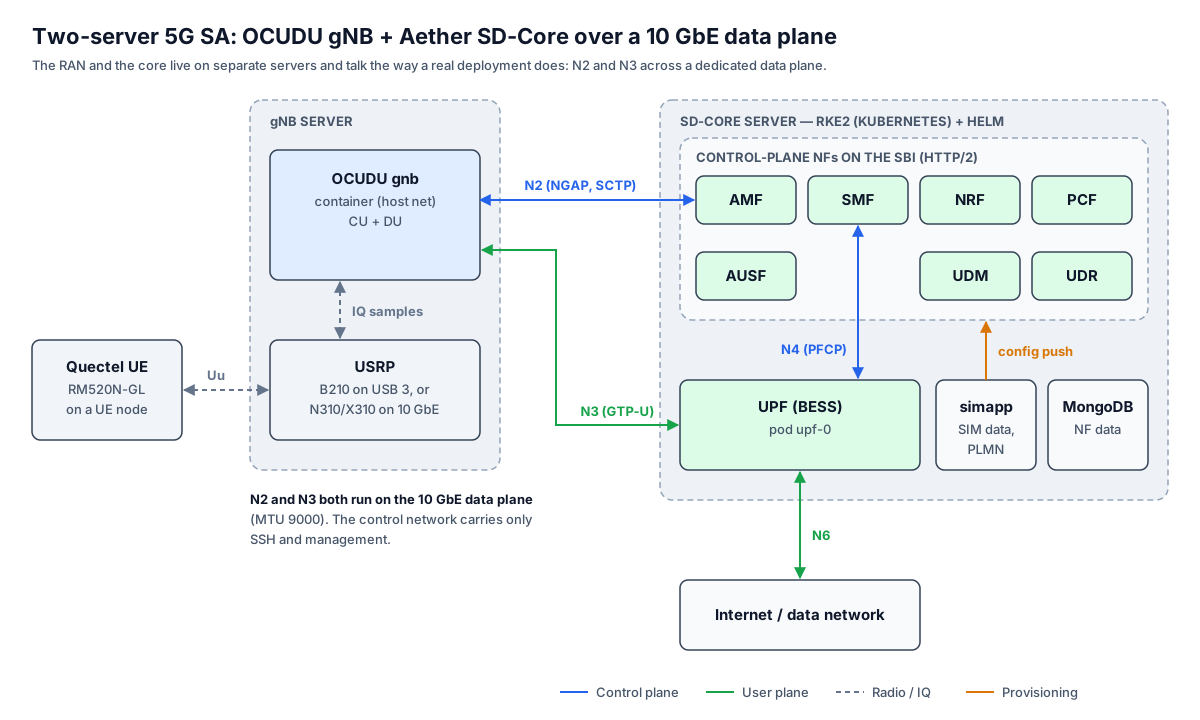
Figure — The two-server layout this tutorial prepares. You build the right-hand server: RKE2 running the AMF, SMF, UPF (BESS), NRF and the other NFs. The gNB server on the left and the UE are added in the next tutorial; N2 and N3 will arrive over the 10 GbE data plane.
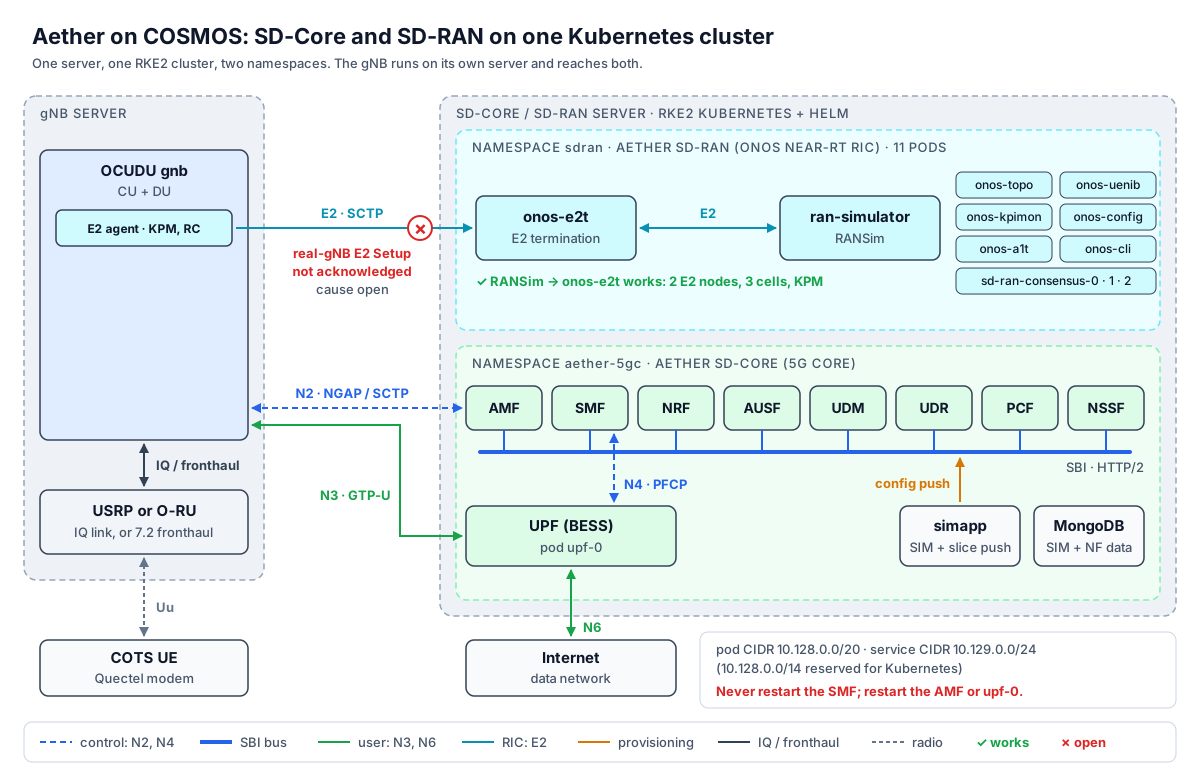
Figure — SD-Core (namespace aether-5gc) and SD-RAN (namespace sdran) share one RKE2 cluster; the gNB reaches the core over N2/N3 and the RIC over E2. RANSim completes E2 Setup; a real gNB does not yet.
                                core host
  control iface (CTRL) ── RKE2 node-ip ── Kubernetes API, etcd
  data iface (DATA2) ──┬── Service amf externalIP = data IP  ← N2 (NGAP/SCTP 38412) from a gNB
                       ├── macvlan access  192.168.252.0/24  ← N3 (GTP-U) from a gNB
                       └── macvlan core    192.168.250.0/24  → N6 toward the internet
  namespace aether-5gc:  amf  smf  upf-0 (bessd, pfcp-agent, routectl, web, arping)
                         nrf  ausf  udm  udr  pcf  nssf  webui  simapp  mongodb  kafka  ...
  pods: 10.42.0.0/16    services: 10.43.0.0/16   (RKE2 defaults carried by this image)
  UE pool: 192.168.100.0/24
Walk through it by plane. The control plane from a future gNB arrives on the data interface at the AMF's externalIP (N2); inside the cluster the AMF finds the SMF, the authentication functions and the policy functions through the NRF. The SMF programs the UPF over N4 (PFCP), pod to pod on the same node. The user plane enters the UPF on the access macvlan (N3) and leaves on the core macvlan (N6). The control interface carries only the Kubernetes node address and SSH. Interface names are COSMOS role names (CTRL, DATA2) on hosts with cosmos-ifname; on hosts without it — the image itself ships none, and sb1's servers have no role names — the real NIC names are used instead (for example eno2np1 and enp94s0f0np0).
¶ Setup
Imaging overwrites the node's disk, so the node is powered off first.
- Log into the console and power the core host off:
ssh <username>@console.<sandbox>.cosmos-lab.org omf tell -a offh -t <core-host> - Load the image and power the node on:
omf load -i aether-sdcore-4.0.0-data2-20260703.ndz -t <core-host> omf tell -a on -t <core-host> omf stat -t <core-host> - Copy the host-portability tool and the bring-up script to
/rooton the core host, from your copy of the tutorial sources:scp sdcore-host.py ocudu-sdcore_core.sh root@<core-host>.<sandbox>.cosmos-lab.org:/root/
¶ Instructions
Everything below runs as root on the core host. kubectl and helm need the RKE2 kubeconfig:
export KUBECONFIG=/etc/rancher/rke2/rke2.yaml
¶ Step 1 — See what this host should use
sdcore-host.py show derives, from this host's own interfaces, every value the image hard-codes for its build host, and changes nothing. Pass the control and data interfaces: role names where they exist, real NIC names otherwise.
python3 /root/sdcore-host.py show
#   or, on a host without role names:
python3 /root/sdcore-host.py --ctrl-role <ctrl-nic> --data-role <data-nic> show
What to look for: the control address that will become the RKE2 node-ip; the data interface that will become the macvlan master, OnRamp's data_iface and the network-attachment master; and the data address that will become OnRamp's amf.ip, the AMF Service's externalIP and the address a gNB must target. It also prints the route a gNB host needs to reach the UPF (ip route replace 192.168.252.0/24 via <data-ip> dev <data-iface>). If it stops with no IPv4 on …, the interface names are wrong for this host; the message lists the interfaces it found.
¶ Step 2 — Adapt the image and bring the core up
The image records its build host in seven places, and a core loaded elsewhere does not start: RKE2 hangs in activating, and past that the UPF alone stays in Init while the other pods look healthy.
| # | What the image carries | What the script sets it to |
|---|---|---|
| 1 | node-ip: in /etc/rancher/rke2/config.yaml |
this host's control address |
| 2 | the raw NIC name in the macvlan unit aether-5gc-macvlan.service |
the data interface |
| 3 | data_iface: in /home/native/onramp/vars/main.yml |
the data interface |
| 4 | amf.ip: in the same file |
this host's data address |
| 5 | the etcd membership, pinned to the build host | reset with rke2 server --cluster-reset |
| 6 | externalIPs on the Service aether-5gc/amf |
this host's data address |
| 7 | master: on the multus network attachments access-net and core-net |
the data interface |
Two further traps are not configuration. RKE2's network plugin keeps one file per allocated pod address under /var/lib/cni/networks/k8s-pod-network/, and the image carries hundreds of stale ones, so new pods fail with no IP addresses available in range set; the script deletes every file that has no live pod. And every Deployment and StatefulSet is saved scaled to 0 — correct practice for an image — so the script reads the intended replica counts from the Helm release rather than guessing.
ocudu-sdcore_core.sh does all of this, idempotently, in six stages that each print a [core] line: (1) apply the host delta with sdcore-host.py apply; (2) start RKE2 and, if the journal says the node is not a member of the etcd cluster, run the cluster reset; (3) report whether the SIM inventory tool is present; (4) scale every workload to the replica count in helm get manifest sd-core; (5) wait for every pod to be ready, deleting the UPF pod once if it is still waiting on its network attachment; (6) restart the AMF deployment and, if an IMSI was given, clear that subscriber's stored AMF and SMF context. Its arguments are the data interface, an optional IMSI and the control interface:
bash /root/ocudu-sdcore_core.sh DATA2 001010000000033 CTRL
#   on a host without role names, pass the real NIC names instead of DATA2 / CTRL
What to look for: [core] k8s ready: …, then [core] pods ready: 16/16, then [core] AMF reachable at <data-ip>:38412 (N2), UPF access at 192.168.252.1 (N3) and finally [core] READY. A re-run reports every host value already correct.
--cluster-reset rewrites the single-member etcd to this node's address while keeping the cluster's data and the sd-core Helm release, which saves a full redeploy. If you need to run it by hand — sdcore-host.py apply prints this sequence when the API is unreachable:
systemctl stop rke2-server && /usr/local/bin/rke2-killall.sh
/usr/local/bin/rke2 server --cluster-reset   # then Ctrl-C when it says to
systemctl start rke2-server
Info: On the server the image was built on, none of this is needed: the image's own
/usr/local/sbin/core-start.shverifies or restarts the core, as in the two-server tutorial.
¶ Step 3 — Verify the network functions
Pod status is necessary but not sufficient. Check it, then check the address a gNB will use, then the deployed chart:
kubectl get pods -n aether-5gc
kubectl get svc amf -n aether-5gc
helm list -n aether-5gc
What to look for: every pod Running, upf-0 at 5/5; the amf Service's external IP equal to this host's data address; the sd-core release at chart 4.0.0. Trust helm list, not OnRamp's vars/main.yml, for the deployed version: a git operation in the OnRamp checkout can revert that file while the cluster keeps running the chart that was installed.
The UPF's dataplane health and its association with the SMF are invisible to kubectl. The association line is the one that predicts whether a PDU session can be created:
kubectl -n aether-5gc logs upf-0 -c pfcp-agent --since=3m | grep -i association
# healthy:  association setup done between nodes local: <upf> remote: <smf-pod-ip>
kubectl -n aether-5gc exec upf-0 -c bessd -- bessctl show worker   # expect a RUNNING worker
kubectl -n aether-5gc exec upf-0 -c bessd -- bessctl show port     # expect Link UP + counters
What to look for: association setup done, a RUNNING worker, and the access and core ports Link UP. attached workers 0 in the bessd log is pipeline-construction noise, present on working runs too.
¶ Step 4 — Provision subscribers
Subscribers, device groups and slices live in OnRamp's values template, /home/native/onramp/deps/5gc/roles/core/templates/radio-5g-values.yaml, under omec-sub-provision → simapp. The shape of one subscriber, its device group and the slice — an excerpt, with other keys omitted and the secret values redacted (never put a SIM's key or OPc on a wiki page or in a shared file):
            subscribers:
            - ueId-start: "001010000000033"
              ueId-end: "001010000000033"
              plmnId: "00101"
              opc: <redacted>
              op: <redacted>
              key: <redacted>
              sequenceNumber: <redacted>

            device-groups:
            - name:  "user-group1"
              imsis:
                - "001010000000033"
              ip-domains:
                - dnn: internet
                  mtu: 1460                     # Value is sent to UE when PDU Session Established
                  ue-ip-pool: {{ core.upf.default_upf.ue_ip_pool }}  # IP address pool for subscribers

            network-slices:
            - name: "default"
              slice-id:
                sd: "010203"
                sst: 1
The same file carries the served sites: gnb1 with tac: 1, gnb2 with tac: 2, PLMN 001/01. SD-Core serves only the TACs listed there.
To apply a change, re-render the values and upgrade the release. OnRamp's own Helm step fails on this OCI-only setup with no repositories found, so render with OnRamp and upgrade by hand:
cd /home/native/onramp && make 5gc-core-install
helm upgrade sd-core oci://ghcr.io/omec-project/sd-core --version 4.0.0 -n aether-5gc -f /tmp/sdcore-5g-values.yaml
If the upgrade fails with buildCustomCert: unable to decode base64 certificate, delete the control-plane CA secrets and retry; every NF certificate is re-issued:
kubectl delete secret 5g-control-plane-ca 5g-control-plane-ca-private -n aether-5gc
After the upgrade simapp pushes the subscribers into the core a few seconds after the NFs restart. A subscriber written directly into MongoDB also works, but only until the next redeploy replaces it from the values.
Info: The COSMOS SIM inventory can generate the
subscribers:anddevice-groups:block for every COSMOS card:ocudu-sdcore_provision.py <values.yaml>splices the output ofcosmos-sim-gen sd-coreinto the template and keeps a.pre-simgenbackup (--dryshows what it would write). Its dry run against the live template found the two entries shipped with the image (the…033card and an emulator range) and generated nine, including the sb1 card…032. A full write followed by an upgrade was not recorded, andcosmos-sim-gen'ssd-coretarget was not yet in a packaged release on 2026-09-19. Check withcosmos-sim-gen sd-core --no-poolon the core host.
¶ Step 5 — Prepare the core for a gNB
Two rules decide whether the next tutorial's gNB comes up cleanly.
Restart the AMF before a gNB connects. A long-lived AMF process can fail to encode the Initial Context Setup Request, which stalls a UE's registration at T3550 in a way that looks like a radio fault. Restarting the deployment clears those encode errors and costs about 20 s; the bring-up script already did it. Do it again whenever the core has run for a long time before a gNB starts. Restarting the AMF drops any gNB's SCTP association, so do it before the gNB starts, not after.
kubectl -n aether-5gc rollout restart deployment/amf
kubectl -n aether-5gc rollout status  deployment/amf --timeout=180s
Never restart the SMF. One SMF restart wedges the UPF's PFCP agent — it keeps the association to the old SMF pod, then refuses every new one with datapath down — and re-stales the AMF's cached SMF entry. The fixes are to restart the AMF or upf-0:
| Symptom | Restart |
|---|---|
AMF logs transport 5GSM Message to SMF then goes silent |
AMF — kubectl -n aether-5gc rollout restart deployment/amf |
UPF logs datapath down; SMF logs PfcpSessCreateFailure |
upf-0 — kubectl -n aether-5gc delete pod upf-0 |
| anything | never the SMF |
Danger: An SMF restart breaks every PDU session on the core, silently, until the UPF pod is restarted. The core may be shared with a RIC or other users' gNBs; restart only what the table names.
About a simulated UE. Aether ships gnbsim, a simulated gNB and UE for testing a core without a radio. It has not been run on COSMOS, so this tutorial does not cover it. The recorded end-to-end check of this core is a real gNB and a commercial UE in the next tutorial.
¶ Pod and service address ranges
Kubernetes gives pods and Services their own address ranges. This image's cluster carries RKE2's defaults in /etc/rancher/rke2/config.yaml:
cni: multus,canal
cluster-cidr: 10.42.0.0/16     # pods    (RKE2 default)
service-cidr: 10.43.0.0/16     # services (RKE2 default)
Both lie inside COSMOS NJ's 10.0.0.0/10. They are not routed off the node — from another server the pod addresses fall through to the default route — so nothing collides today. The hazard is a future testbed allocation in either range: every node hosting pods would silently lose reachability to it, while every other host reached it fine. COSMOS therefore reserves 10.128.0.0/14 for node-local virtualised workloads. A newly created SD-Core cluster takes:
cluster-cidr: 10.128.0.0/20      # pods
service-cidr: 10.129.0.0/24      # services
and the next cluster 10.128.16.0/20 and 10.129.1.0/24. The pod range is carved into one /24 per node, so a /20 serves 16 nodes; the service range needs one address per Service, and SD-Core has about thirty. These values take effect only when a cluster is created; they cannot be changed on a running RKE2 cluster, and the current image still carries the defaults. The stale-IP cleaner in Step 2 matches the image's 10.42. pod range.
¶ Verification
| Check | Command | Expected |
|---|---|---|
| Kubernetes up | kubectl get nodes |
the node Ready |
| All NFs | kubectl get pods -n aether-5gc |
every pod Running; upf-0 5/5 (16/16 on the verified run) |
| Deployed chart | helm list -n aether-5gc |
sd-core at chart 4.0.0 |
| AMF reachable for N2 | kubectl get svc amf -n aether-5gc |
external IP = this host's data address |
| UPF ↔ SMF | kubectl -n aether-5gc logs upf-0 -c pfcp-agent --since=3m \| grep -i association |
association setup done between nodes … |
| UPF dataplane | kubectl -n aether-5gc exec upf-0 -c bessd -- bessctl show worker / show port |
a RUNNING worker; ports Link UP |
| End to end | the two-server tutorial | NG Setup from the gNB; UE registration, PDU session, ping 0 % loss |
¶ Cleanup
core-stop.sh scales the NF deployments to 0 and keeps MongoDB and Kafka, so the subscriber data survives:
/usr/local/sbin/core-stop.sh
To keep a modified core as a new image, follow the save procedure in the two-server tutorial's Cleanup: run /root/prepare.sh first, scale the workloads to 0 before saving, and verify the new image boots and works before deleting any earlier one. Then power the node off from the console and release the reservation:
omf tell -a offh -t <core-host>
¶ Troubleshooting
| Symptom | Cause | Fix |
|---|---|---|
rke2-server hangs in activating; journal says not a member of the etcd cluster |
etcd membership still names the build host | rke2 server --cluster-reset (Step 2); do not wipe etcd |
| Kubernetes API down after moving to another host or domain | RKE2 node-ip not set to this host's control address |
sdcore-host.py apply, or set node-ip in /etc/rancher/rke2/config.yaml |
upf-0 alone stuck in Init, multus Link not found; every other pod healthy |
the access-net / core-net network attachments still name the build host's NIC |
sdcore-host.py apply, then delete the upf-0 pod so it re-attaches |
New pods fail with no IP addresses available in range set |
stale per-IP allocation files carried in the image | sdcore-host.py ipam-gc or ipam-gc.sh |
Pods Pending for minutes after a hard reboot; node tainted disk-pressure |
kubelet latches a false DiskPressure taint for the eviction transition period | wait it out, or set --eviction-pressure-transition-period=30s under kubelet-arg: in /etc/rancher/rke2/config.yaml; force-delete Unknown pods |
make 5gc-core-install fails at Helm with no repositories found |
OnRamp's Helm module runs helm repo update on an OCI-only setup |
let it render, then run the manual helm upgrade (Step 4) |
make 5gc-router-install fails on a sysctl reload |
/etc/sysctl.conf still names the build host's NICs |
remove those forwarding lines |
helm upgrade fails: buildCustomCert: unable to decode base64 certificate |
CA reuse on 4.x upgrades | delete 5g-control-plane-ca and 5g-control-plane-ca-private, retry |
After a chart upgrade bessd crash-loops; PFCP datapath down |
chart 4.1.0's UPF (upf-bess rel-2.4.3) regression |
stay on chart 4.0.0; helm rollback sd-core 1 |
UPF logs datapath down; SMF PfcpSessCreateFailure; UE gets PDU Session Establishment Reject cause 31 |
the UPF holds its PFCP association to an old SMF pod — usually after an SMF restart | delete upf-0; never restart the SMF |
AMF logs transport 5GSM Message to SMF, then nothing |
the AMF's cached SMF entry is stale | restart the AMF |
gNB NG Setup rejected with unknown-PLMN just after the core starts |
simapp has not yet pushed the PLMN/TAC; an OCUDU gNB does not retry |
restart the gNB until NG Setup succeeds |
| gNB NG Setup fails although PLMN matches | the gNB's TAC is not 1 or 2 | set the TAC in both supported_tracking_areas[].tac and cell_cfg.tac |
Registration stalls at T3550; AMF log shows build InitialContextSetupRequest failed: sequence of size is larger than upperbound |
the AMF process fails to encode the request; the gNB never gets a UE context | restart the AMF deployment before the gNB (Step 5); intermittent, so a precaution rather than a proven cure |
One Quectel modem deregisters right after Registration Accept (gNB release cause nas), another registers fine |
the AMF puts the same S-NSSAI twice in Allowed NSSAI; the sb1 card …032 rejects that Accept, the osc card …033 accepts it |
use a UE known to tolerate it; the fix needs a deduplicating AMF |
| UE has an address but downlink is exactly 0.00 Mbit/s | the core advertises MTU 1460; the GTP path carries 1440 | set the UE interface MTU to 1400 |
iperf3 server on the core host never works |
traffic from the core host reaches the UPF over macvlan with unfinished checksums | run the server on the gNB host or any other host |
¶ References
On this wiki
- Aether SD-Core — components, operating rules, open issues.
- OCUDU + SD-Core on two servers — the next tutorial: a gNB and a UE on this core.
- Aether SD-RAN · SD-RAN with RANSim — the RIC that runs on the same cluster.
- 5G SA fundamentals · 5G SA platforms · COTS UE: Quectel.
- Domains · Data-plane MTU · OMF commands.
- Previous: OCUDU with a commercial O-RU · Next: OCUDU + SD-Core on two servers.
External
- Aether documentation — the platform, OnRamp and SD-Core guides.
- omec-project on GitHub — SD-Core NF source and the
sd-coreHelm chart. - Aether OnRamp — the deployer.
- RKE2 documentation · Kubernetes documentation.
- 3GPP TS 23.501 — the network functions and reference points.
Author(s): COSMOS team · Last verified: 2026-09-19 (bring-up script on an sb1 server, 16/16 pods, NG Setup from OCUDU; host delta + UE PDU session and internet data on osc 2026-09-18) · page written 2026-09-24 · Tested image/release: aether-sdcore-4.0.0-data2-20260703.ndz · SD-Core chart 4.0.0 · Tags: aether, sd-core, omec, 5gc, core, kubernetes, rke2, helm, onramp, 5g, sa, tutorial