¶ Wideband Channel Sounding with USRP 2974s (RFNoC)
Evaluate the Power Delay Profile (PDP) of a wideband radio channel up to 100 MHz wide using two rooftop USRP 2974s and an RFNoC-based channel sounder on COSMOS Sandbox 1.
¶ Overview
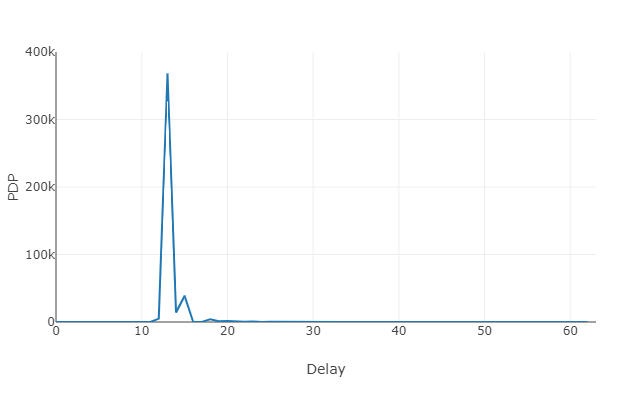
Channel sounding is the process of measuring the characteristics of a radio propagation environment. One key metric is the Power Delay Profile (PDP), which captures how signal power is distributed across multipath delay taps — information used to build statistical channel models for simulation.
This tutorial uses an RFNoC-based channel sounder design running on two USRP 2974s (Ettus X300-class, 3rd-generation devices). On the transmit side, data samples are spread using a PN sequence loaded into the FPGA Spreader block. On the receive side, an FPGA correlator module (Corrmag63avg8k) computes the real-time correlation power and an averaging module accumulates contiguous PDP snapshots. The averaged PDP is streamed continuously to a web-based visualization running in a browser on the experimenter's laptop.
The USRPs are used in standalone mode (the UHD application runs on the internal PC of each USRP 2974). For this reason, the HG FPGA image is sufficient. If you need to run the UHD application on an external host server instead, you must use the XG FPGA image.
¶ Learning outcomes
After completing this tutorial you will be able to:
- Verify that a USRP 2974 is loaded with the correct RFNoC FPGA image using
uhd_usrp_probe. - Configure and run an RFNoC transmit flowgraph (
rfnoc_tx_spreader) for PN-spread wideband channel sounding. - Configure and run an RFNoC receive flowgraph (
rfnoc_rx_channel_sounder) that streams PDP data over TCP. - Set up a WebSocket proxy on the COSMOS console and an SSH tunnel to reach the receive server from a browser.
- Visualize the Power Delay Profile of a real radio channel in real time via a web application.
¶ At a glance
| Difficulty | Intermediate |
| Estimated time | TODO: verify |
| Domain / sandbox | sb1.cosmos-lab.org |
| Topic group | Channel Sounding & MIMO |
| Last verified | Not re-tested (migrated 2026-06-20) |
¶ Prerequisites
Background knowledge
- Basic RF/SDR concepts (carrier frequency, sampling rate, FPGA data paths).
- Familiarity with the COSMOS experiment workflow — see Getting started / workflow.
- Basic understanding of RFNoC (Radio Frequency Network-on-Chip) is helpful but not required.
Account & access
- A COSMOS account — register here.
- An approved reservation on sb1.cosmos-lab.org — see Make a reservation.
- SSH access to the console — see SSH access.
- An SSH tunnel from your laptop port 5105 to
console.sb1.cosmos-lab.org:5100— see SSH tunnels. This tunnel must be in place before running the web visualization.
¶ Resources required
Devices / nodes
| Resource | Role | Qty | Notes |
|---|---|---|---|
| sdr2-md1 | Transmitter (TX) | 1 | USRP 2974 on sb1 rooftop; standalone mode (HG FPGA image) |
| sdr2-s1-lg1 | Receiver (RX) | 1 | USRP 2974 on sb1 rooftop; runs TCP server for web display |
Disk images
| Image | Load onto | Provides |
|---|---|---|
| channel-sounder.ndz | sdr2-md1, sdr2-s1-lg1 | UHD + GNU Radio with RFNoC enabled; custom RFNoC channel-sounding modules (Spreader, Corrmag63avg8k) pre-built |
Software components
| Component | Version | Source |
|---|---|---|
| UHD (USRP Hardware Driver) | TODO: verify | preinstalled in channel-sounder.ndz |
| GNU Radio (with RFNoC) | TODO: verify | preinstalled in channel-sounder.ndz |
| rfnoc_tx_spreader | TODO: verify | built at /root/uhd/host/build/examples/ in the image |
| rfnoc_rx_channel_sounder | TODO: verify | built at uhd/host/build/examples/ in the image |
| channel_sounding_display_cosmos.html | TODO: verify | attached to this tutorial page; download before running |
| run-websock | TODO: verify | available on the sb1 console |
Spectrum / RF / special
- Center frequency: 3 GHz (3e9 Hz) — used in the examples below.
- Transmit gain: 30 dB; receive gain: 10 dB (example values; adjust within your reservation's power limits).
- Bandwidth: up to 100 MHz (supported by the RFNoC design).
- Antennas: rooftop deployment on COSMOS sb1; over-the-air between sdr2-md1 and sdr2-s1-lg1.
¶ Topology
Two USRP 2974 nodes on the COSMOS Sandbox 1 (sb1) rooftop: sdr2-md1 (TX) and sdr2-s1-lg1 (RX). Both are managed from console.sb1.cosmos-lab.org via OMF. Each USRP 2974 runs its UHD application on its internal PC (standalone mode).
The receive node (sdr2-s1-lg1) opens a TCP server on port 5100 to stream PDP data. The console acts as a WebSocket proxy (port 5100 → sdr2-s1-lg1:5100). An SSH tunnel from the experimenter's laptop (port 5105) to console.sb1.cosmos-lab.org:5100 allows the browser-based visualization to reach the receive server.
¶ Setup
-
Reserve Sandbox 1 resources and open two SSH sessions to the console:
ssh <username>@console.sb1.cosmos-lab.org -
In a separate terminal on your local laptop, set up the SSH tunnel needed for the web visualization (do this before running the experiment):
ssh -L 5105:console.sb1.cosmos-lab.org:5100 <username>@console.sb1.cosmos-lab.orgSee SSH tunnels for details.
-
Make sure both nodes are powered off before loading images:
omf tell -a offh -t sdr2-md1,sdr2-s1-lg1 -
Load the channel sounder image onto both nodes:
omf load -i channel-sounder.ndz -t sdr2-md1,sdr2-s1-lg1 -
Turn the nodes on and verify they are up:
omf tell -a on -t sdr2-md1,sdr2-s1-lg1 omf stat -t system:topo:allres -
SSH into each node (use
-Yif you need GUI forwarding):ssh root@sdr2-md1ssh root@sdr2-s1-lg1
¶ Instructions
¶ Step 1 — Verify RFNoC modules on each USRP
On each node (sdr2-md1 and sdr2-s1-lg1), probe the USRP and confirm that the custom RFNoC blocks are present:
root@sdr2-md1:~# uhd_usrp_probe --args="type=x300,fpga=HG"
Look for the RFNoC block list near the end of the output. You should see:
|   |     _____________________________________________________
|   |    /
|   |   |       RFNoC blocks on this device:
|   |   |
|   |   |   * DmaFIFO_0
|   |   |   * Radio_0
|   |   |   * Radio_1
|   |   |   * DDC_0
|   |   |   * DUC_0
|   |   |   * Corrmag63avg8k_0
|   |   |   * Spreader_0
|   |   |   * SpecSense2k_0
|   |   |   * FIFO_0
|   |   |   * FIFO_1
Spreader_0 is the PN-sequence spreader used on the transmit side. Corrmag63avg8k_0 is the correlator/averaging block used on the receive side. If either is missing, the FPGA image is not correct — see Troubleshooting.
¶ Step 2 — Set up the WebSocket proxy on the console
In one of your console SSH sessions, start the WebSocket proxy so that the browser can reach the receive node's TCP server:
user@console:~$ run-websock 5100 sdr2-s1-lg1.sb1.cosmos-lab.org:5100 --daemon
WebSocket server settings:
  - Listen on :5100
  - Flash security policy server
  - No SSL/TLS support (no cert file)
  - Backgrounding (daemon)
The proxy listens on console.sb1.cosmos-lab.org:5100 and forwards to sdr2-s1-lg1.sb1.cosmos-lab.org:5100. Combined with the SSH tunnel set up in Step 2 of Setup, your browser at localhost:5105 can reach the channel sounder receive server.
¶ Step 3 — Start the transmit application
On the TX node (sdr2-md1), start rfnoc_tx_spreader. This configures the RFNoC transmit flowgraph, loads the Spreader module in the FPGA, and begins transmitting PN-spread samples:
root@sdr2-md1:~# /root/uhd/host/build/examples/rfnoc_tx_spreader --args="type=x300,skip_ddc,skip_duc,fpga=HG" --freq 3e9 --gain 30 --duc-args="input_rate=50000000.0,output_rate=200000000.0"
Leave this running. The skip_ddc / skip_duc flags bypass the software-side digital up/downconverter stages since the FPGA handles them in the RFNoC path.
¶ Step 4 — Start the receive application
On the RX node (sdr2-s1-lg1), start rfnoc_rx_channel_sounder. This configures the receive RFNoC flowgraph, sets up the correlator and averaging modules in the FPGA, and opens a TCP server that streams PDP data to the web visualization:
root@sdr2-s1-lg1:~# uhd/host/build/examples/rfnoc_rx_channel_sounder --args="type=x300,skip_ddc,skip_duc,fpga=HG" --freq 3e9 --gain 10 --ddc-args="output_rate=50000000.0,input_rate=200000000.0"
The TX and RX center frequencies must match (--freq 3e9 on both sides). The DDC/DUC rates set the effective baseband bandwidth.
¶ Step 5 — Visualize the PDP in a browser
Download the file channel_sounding_display_cosmos.html attached to this tutorial page to your local laptop.
Open it in a browser and click the Start button. The application connects to localhost:5105 (which tunnels through to the receive node's TCP server) and begins displaying the real-time Power Delay Profile.
You should see live PDP plots updating as the channel sounder collects and averages multipath delay taps.
¶ Verification
uhd_usrp_probe --args="type=x300,fpga=HG"on both nodes listsSpreader_0andCorrmag63avg8k_0in the RFNoC block inventory.- The
rfnoc_tx_spreaderprocess runs without errors on sdr2-md1. - The
rfnoc_rx_channel_sounderprocess runs without errors on sdr2-s1-lg1 and prints a message indicating the TCP server is listening. - Opening
channel_sounding_display_cosmos.htmland clicking Start shows a live, updating PDP plot in the browser.
¶ Cleanup
omf tell -a offh -t sdr2-md1,sdr2-s1-lg1
Also stop the WebSocket proxy on the console if it was daemonized:
# find and kill the run-websock process
pkill -f "run-websock 5100"
No omf save is needed unless you modified the image.
¶ Troubleshooting
| Symptom | Likely cause | Fix |
|---|---|---|
uhd_usrp_probe does not show Spreader_0 or Corrmag63avg8k_0 |
Wrong FPGA image loaded | Reload channel-sounder.ndz; confirm --args="type=x300,fpga=HG" matches the actual FPGA variant on the device |
rfnoc_tx_spreader or rfnoc_rx_channel_sounder exits immediately |
UHD args mismatch or USRP not reachable | Confirm the USRP is powered and responsive; check UHD --args string |
| Browser shows no PDP data after clicking Start | SSH tunnel or WebSocket proxy not running | Verify the tunnel (ssh -L 5105:...) is active; verify run-websock daemon is running on the console; confirm the receive node's TCP server is listening on port 5100 |
| TX and RX frequencies do not match | --freq argument differs between the two applications |
Set identical --freq values on both rfnoc_tx_spreader and rfnoc_rx_channel_sounder |
omf load fails or nodes do not come up |
Nodes still powered on before imaging | Run omf tell -a offh -t sdr2-md1,sdr2-s1-lg1 and retry omf load |
¶ References
- COSMOS Sandbox 1 hardware
- COSMOS Getting Started / Workflow
- SSH access to COSMOS resources
- SSH tunnels
- OMF commands reference
- Ettus RFNoC documentation
- UHD documentation
Author(s): COSMOS team · Last verified: Not re-tested (migrated 2026-06-20) · Tested image/release: channel-sounder.ndz · Tags: channel-sounding, rfnoc, usrp-2974, pdp, wideband, sb1