¶ Amarisoft 5G NR over FR3 with Pi-Radio Front-Ends
Run a complete Amarisoft 5G NR Stand-Alone network — 5G Core (MME), gNodeB, and UE simulator — on USRP 2974 nodes in COSMOS SB1, then upconvert the sub-6 GHz signal to 12 GHz over-the-air using Pi-Radio FR3 front-ends and verify end-to-end connectivity with an iperf3 throughput test.
¶ Overview
This tutorial sets up a full software-based 5G NR SA network using the Amarisoft stack and COSMOS SB1's Pi-Radio FR3 infrastructure. Amarisoft provides software-defined gNB, 5G Core (MME/AMF), and UE simulator components that run on commodity PCs paired with SDR hardware.
The experiment uses two USRP 2974 nodes (each an embedded X310). One node (sdr1-piradio) runs the Amarisoft 5G Core (MME) and gNodeB; the other (sdr2-piradio) runs the Amarisoft UE simulator. Each USRP 2974 is paired with a Pi-Radio FR3 front-end (rfdev-sdr1-piradio and rfdev-sdr2-piradio respectively).
The signal path is: the USRP 2974 generates a 5G NR waveform in Band n7 (FDD, 2680/2560 MHz, 5 MHz BW). The Pi-Radio front-end on the transmit side upconverts this sub-6 GHz IF signal to ~12 GHz for over-the-air transmission. The Pi-Radio front-end on the receive side downconverts the 12 GHz signal back to the sub-6 GHz band so the USRP 2974 can process it as standard Band n7 5G NR.
¶ Learning outcomes
After completing this tutorial you will be able to:
- Configure Pi-Radio FR3 front-ends via their web UI for frequency upconversion/downconversion.
- Launch the Amarisoft 5G Core (MME), gNodeB (SA), and UE simulator on COSMOS testbed nodes.
- Verify UE registration with the Amarisoft interactive console commands (
ue,gnb,power_on,cell phy,t). - Run an iperf3 UDP throughput test over a simulated 5G NR link operating at 12 GHz.
- Interpret Amarisoft link-quality telemetry (SINR, RSRP, MCS, bitrate).
¶ At a glance
| Difficulty | Advanced |
| Estimated time | 90 min |
| Domain / sandbox | sb1.cosmos-lab.org |
| Topic group | FR3 |
| Last verified | Not re-tested (migrated 2026-06-20) |
¶ Prerequisites
Background knowledge
- Familiarity with USRP 2974 hardware (embedded X310, 10 MHz–6 GHz, 160 MHz BW).
- Basic 5G NR concepts (SA architecture, gNB, MME/AMF, UE registration, SIB, PDCCH/PDSCH).
- The six-step experiment life cycle.
- Review the Pi-Radio FR3 hardware page before running this tutorial.
Account & access
- A COSMOS account — register here.
- An approved reservation on sandbox 1 — see Make a reservation.
- SSH access to the sandbox 1 console — see SSH access.
- Chrome Remote Desktop access to sdr1-piradio and sdr2-piradio — see Chrome Remote Desktop instructions.
- Browser access to the Pi-Radio web UI on the rfdev-* nodes (port 5006).
¶ Resources required
Devices / nodes
| Resource | Role | Qty | Notes |
|---|---|---|---|
| sdr1-piradio | 5G Core (MME) + gNodeB host | 1 | USRP 2974 (embedded X310) |
| sdr2-piradio | UE simulator host | 1 | USRP 2974 (embedded X310) |
| rfdev-sdr1-piradio | Pi-Radio FR3 front-end (Tx side) | 1 | Web UI accessible at port 5006 |
| rfdev-sdr2-piradio | Pi-Radio FR3 front-end (Rx side) | 1 | Web UI accessible at port 5006 |
Disk images
| Image | Load onto | Provides |
|---|---|---|
| 5G-tutorial-cosmos_pi_radio_1.ndz | sdr1-piradio, sdr2-piradio | Amarisoft ltemme, lteenb, lteue (2024-09-13); UHD 4.4.0; NI/USRP RIO drivers; pre-tuned config files |
Software components
| Component | Version | Source |
|---|---|---|
| Amarisoft ltemme (5G Core / MME) | 2024-09-13 | preinstalled in 5G-tutorial-cosmos_pi_radio_1.ndz |
| Amarisoft lteenb (gNodeB SA) | 2024-09-13 | preinstalled in 5G-tutorial-cosmos_pi_radio_1.ndz |
| Amarisoft lteue (UE simulator) | 2024-09-13 | preinstalled in 5G-tutorial-cosmos_pi_radio_1.ndz |
| UHD (USRP Hardware Driver) | 4.4.0 | preinstalled in image |
| NI USRP RIO driver | TODO: verify | preinstalled in image |
| iperf3 | TODO: verify | preinstalled in image |
Spectrum / RF
- Over-the-air at ~12 GHz using Pi-Radio FR3 front-ends with Vivaldi antennas (2× Vivaldi: one Tx, one Rx).
- 5G NR Band n7, FDD: DL 2680 MHz / UL 2560 MHz, 5 MHz bandwidth, 15 kHz SCS.
- Pi-Radio LO settings: Low LO = 2.680000 GHz, High LO = 12.000000 GHz.
- USRP 2974 TX gain: 20 dB (gNB side). USRP 2974 RX gain: 30 dB (UE side).
- See FR3 hardware page for antenna layout and cabling details.
¶ Topology
Two USRP 2974 nodes in COSMOS SB1, each paired with a Pi-Radio FR3 front-end. sdr1-piradio runs both the 5G Core (MME) and gNodeB; sdr2-piradio runs the UE simulator. The USRP 2974 connects to its Pi-Radio front-end (rfdev-*) via RF cables. On the transmit side, the Pi-Radio upconverts the Band n7 signal (2680 MHz IF) to ~12 GHz using a 12 GHz high-side LO and transmits over the air via Vivaldi antenna. On the receive side, the Pi-Radio downconverts from 12 GHz back to Band n7 and feeds the signal into the receiving USRP 2974.
Both USRP 2974 nodes are also reachable via Chrome Remote Desktop sessions for browser-based access to the Pi-Radio web UI pages on the rfdev-* nodes.
¶ Setup
-
Reserve sandbox 1 resources and log into the console with two SSH sessions:
ssh <username>@console.sb1.cosmos-lab.org -
Make sure all resources in the domain are turned off:
omf tell -a offh -t system:topo:allres -
Load the tutorial disk image onto both USRP 2974 nodes:
omf load -i 5G-tutorial-cosmos_pi_radio_1.ndz -t sdr1-piradio,sdr2-piradio -
Turn on all required resources (2 USRP 2974 nodes and 2 Pi-Radio front-ends) and check status:
omf tell -a on -t sdr1-piradio,sdr2-piradio,rfdev-sdr1-piradio,rfdev-sdr2-piradioomf stat -t sdr1-piradio,sdr2-piradio,rfdev-sdr1-piradio,rfdev-sdr2-piradio -
After about one minute (allowing the USRP 2974 internal PCs to finish booting), SSH into each USRP 2974 node and start a Chrome Remote Desktop session — follow the Chrome Remote Desktop instructions.
-
Open a Chrome browser in each Chrome Remote Desktop session and access the Pi-Radio configuration pages:
http://rfdev-sdr1-piradio.sb1.cosmos-lab.org:5006/
http://rfdev-sdr2-piradio.sb1.cosmos-lab.org:5006/
¶ Instructions
¶ Step 1 — Configure the Pi-Radio front-ends
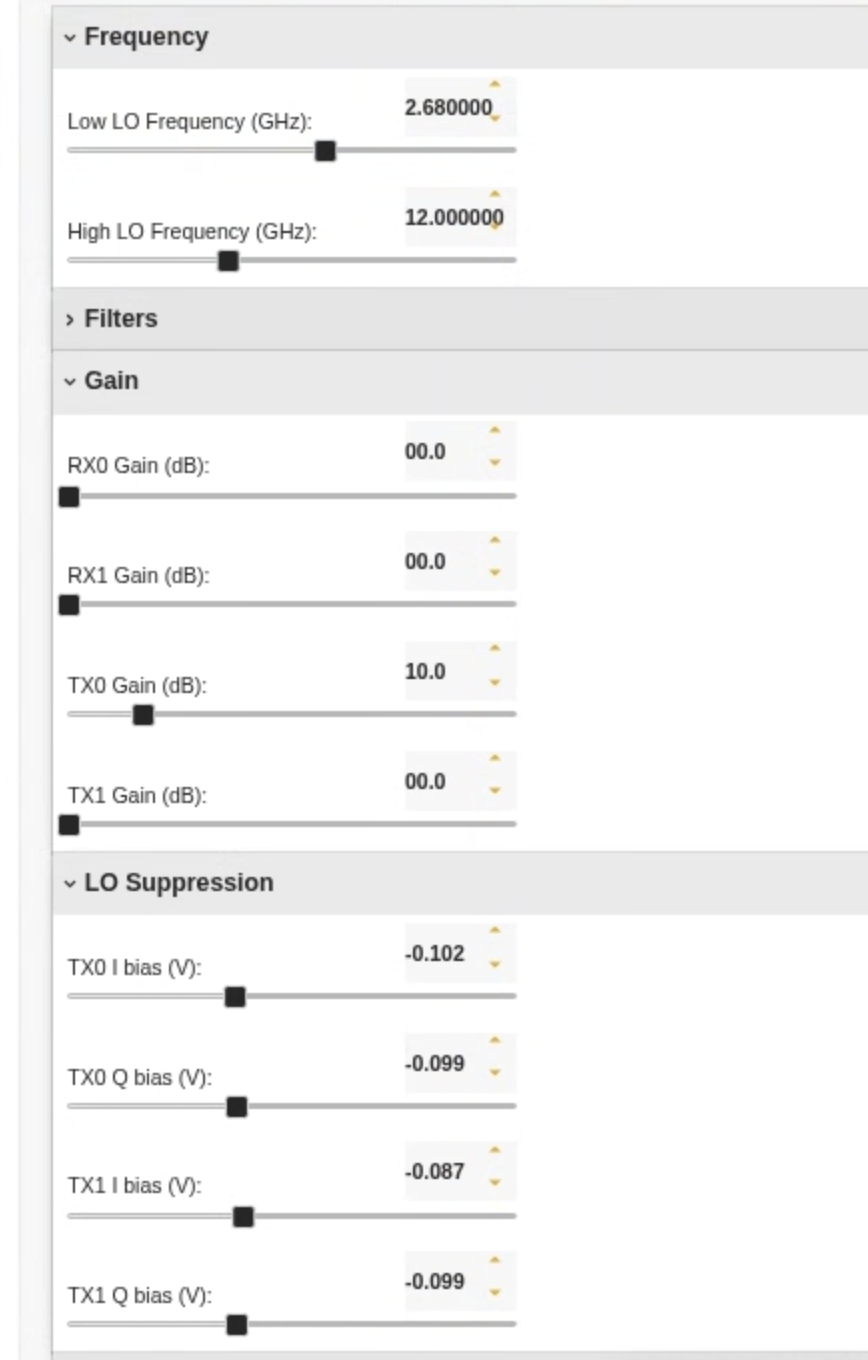
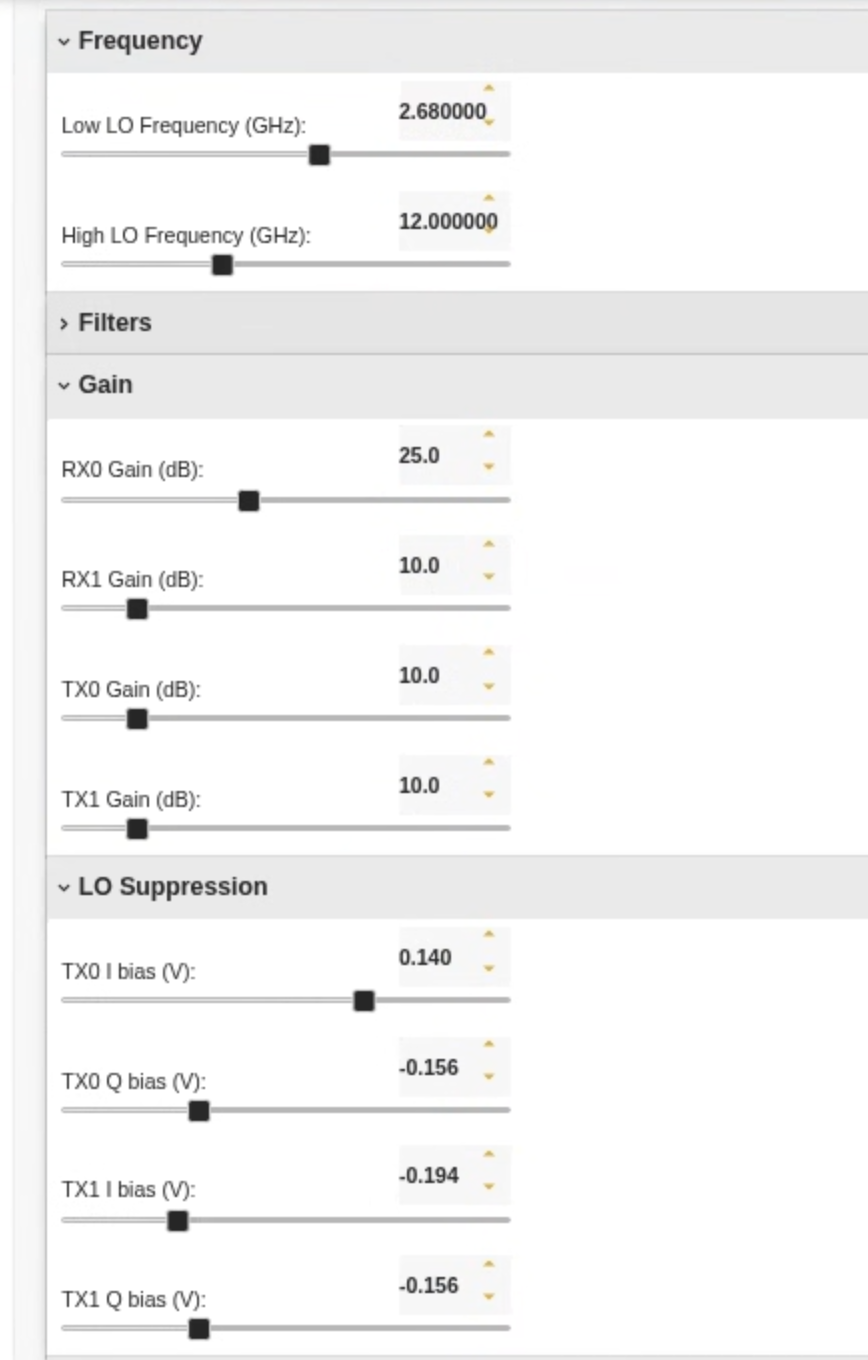
Use the Pi-Radio web UI Frequency panel on both rfdev pages (Tx side: rfdev-sdr1-piradio, Rx side: rfdev-sdr2-piradio) and set:
- Low LO Frequency (GHz): 2.680000
- High LO Frequency (GHz): 12.000000
This pairs a 2.68 GHz IF with a 12 GHz high-side LO (and a 2.68 GHz low-side LO) to place the RF carrier at ~12 GHz on transmit, and to downconvert back to 2.68 GHz on the receive path. Leave Filters, Gain (except where noted), and LO Suppression at defaults for the first run.
rfdev-sdr1 (Tx side) configured:
rfdev-sdr2 (Rx side) configured:
¶ Step 2 — Run the 5G Core (MME) on sdr1-piradio
Open an SSH session to sdr1-piradio from the console. The MME and gNodeB both run on this node.
Run lte_init.sh to set up IP forwarding so UEs can reach the Internet after registration. This network uses PLMN 310014 (USA Test network) as configured in mme.cfg.
root@sdr1-piradio:~# cd /opt/amarisoft/ltemme-linux-2024-09-13
root@sdr1-piradio:/opt/amarisoft/ltemme-linux-2024-09-13# ./lte_init.sh
Select eno0 default interface
Configure NAT for eno0
net.ipv4.tcp_congestion_control = bbr
net.core.rmem_max = 50000000
net.core.wmem_max = 5000000
root@sdr1-piradio:/opt/amarisoft/ltemme-linux-2024-09-13# ./ltemme config/mme.cfg
Core Network version 2024-09-13, Copyright (C) 2012-2024 Amarisoft
This software is licensed to Rutgers University (The State University of New Jersey).
License server: license.orbit-lab.org (0b-b4-46-dc-2f-83-58-cb)
Support and software update available until 2025-08-18.

(mme)
Type help at the (mme) prompt to explore available MME commands.
¶ Step 3 — Run the gNodeB on sdr1-piradio
Open a second SSH session (or terminal tab) to sdr1-piradio.
Disable CPU hyper-threading to ensure stable CPU timing for real-time SDR tasks:
root@sdr1-piradio:~# echo off | sudo tee /sys/devices/system/cpu/smt/control
off
root@sdr1-piradio:
Run the Amarisoft 5G NR SA gNodeB, passing the configuration file that defines the USRP 2974 address, Band n7 operating parameters, bandwidth, and other settings. Keep tx_gain at 20.
root@sdr1-piradio:~# cd /opt/amarisoft/lteenb-linux-2024-09-13
root@sdr1-piradio:/opt/amarisoft/lteenb-linux-2024-09-13# ./lteenb config/gnb-sa-2974-n7-5M.cfg
Base Station version 2024-09-13, Copyright (C) 2012-2024 Amarisoft
This software is licensed to Rutgers University (The State University of New Jersey).
License server: license.orbit-lab.org (0b-b4-46-dc-2f-83-58-cb)
Support and software update available until 2025-08-18.

[INFO] [UHD] linux; GNU C++ version 11.4.0; Boost_107400; UHD_4.4.0.HEAD-0-g3cf9529f
[INFO] [X300] X300 initialization sequence...
[INFO] [X300] Connecting to niusrpriorpc at localhost:5444...
[INFO] [X300] Using LVBITX bitfile /usr/local/share/uhd/images/usrp_x310_fpga_XG.lvbitx
[INFO] [GPS] Found an internal GPSDO: LC_XO, Firmware Rev 0.929b
[INFO] [X300] Radio 1x clock: 184.32 MHz
RF0: sample_rate=7.680 MHz dl_freq=2680.000 MHz ul_freq=2560.000 MHz (band n7) dl_ant=1 ul_ant=1
WARNING: The GPS is not locked. If you need time synchronization, you should restart the program when the GPS is locked.
(enb) ng
gNB NG connection state:
  - server=127.0.1.100:38412 state=setup_done name=amarisoft.amf.5gc.mnc014.mcc310.3gppnetwork.org PLMN=310014
(enb)
(enb) cell phy
[gnb0012345] PLMN=310014 gNB_ID=0x12345
--------Global-------- -----------DL-------------- -----------UL---------- -----SSB---
Cell    RAT BAND  BW P   ARFCN ANT NL SCS  QAM POW   ARCFN ANT NL SCS  QAM   ARFCN SCS
0x001    NR   n7   5 0  536000   1  1  15  256 -39  512000   1  1  15  256  535937  15
(enb)
(enb) tx_gain 20
(enb)
Due to the current limited processing power of the USRP 2974, this example uses 5G NR transmission with 5 MHz bandwidth in Band n7 (DL: 2680 MHz, UL: 2560 MHz) with FDD and 15 kHz subcarrier spacing. The Pi-Radio front-end then upconverts this to 12 GHz for over-the-air transmission.
Type help at the (enb) prompt and use commands such as cell phy to inspect base station parameters.
¶ Step 4 — Run the UE simulator on sdr2-piradio
Open an SSH session to sdr2-piradio.
Disable CPU hyper-threading:
root@sdr2-piradio:~# echo off | sudo tee /sys/devices/system/cpu/smt/control
off
root@sdr2-piradio:
Run the Amarisoft UE simulator, passing ue-nr-sa-2974-n7-5M.cfg. Keep rx_gain at 30.
root@sdr2-piradio:~# cd /opt/amarisoft/lteue-linux-2024-09-13
root@sdr2-piradio:/opt/amarisoft/lteue-linux-2024-09-13# ./lteue config/ue-nr-sa-2974-n7-5M.cfg
UE version 2024-09-13, Copyright (C) 2012-2024 Amarisoft
This software is licensed to Rutgers University (The State University of New Jersey).
License server: license.orbit-lab.org (0b-b4-46-dc-2f-83-58-cb)
Support and software update available until 2025-08-18.

[INFO] [UHD] linux; GNU C++ version 11.4.0; Boost_107400; UHD_4.4.0.HEAD-0-g3cf9529f
[INFO] [X300] X300 initialization sequence...
[INFO] [X300] Connecting to niusrpriorpc at localhost:5444...
[INFO] [X300] Using LVBITX bitfile /usr/local/share/uhd/images/usrp_x310_fpga_XG.lvbitx
[INFO] [GPS] Found an internal GPSDO: LC_XO, Firmware Rev 0.929a
[INFO] [X300] Radio 1x clock: 184.32 MHz
RF0: sample_rate=23.040 MHz dl_freq=2680.000 MHz ul_freq=2560.000 MHz (band n7) dl_ant=1 ul_ant=1
WARNING: The GPS is not locked. If you need time synchronization, you should restart the program when the GPS is locked.
(ue) Cell 0: SIB found

(ue) ue
        # UE_ID CL RNTI    RRC_STATE               EMM_STATE #ERAB IP_ADDR
  NR    0     1  0    0      offline               power off     0
(ue) power_on
(ue) ue
        # UE_ID CL RNTI    RRC_STATE               EMM_STATE #ERAB IP_ADDR
  NR    0     1  0 4601      running              registered     1 192.168.2.2
(ue) rx_gain 30
(ue) t
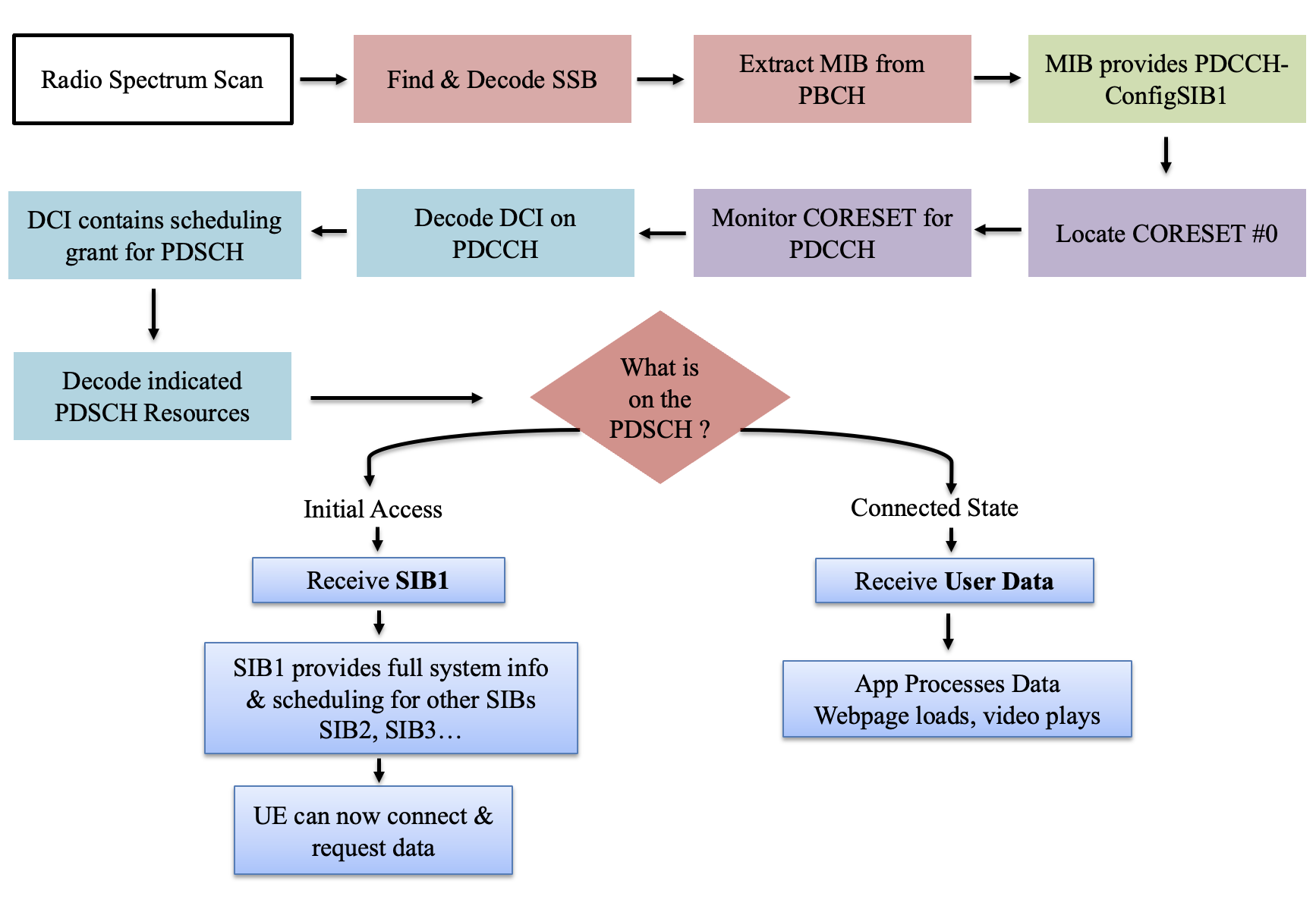
After powering the UE on, it detects the SSB, decodes the PBCH/MIB, locates CORESET#0, monitors the PDCCH/DCI, decodes the PDSCH, and receives the System Information Block (SIB):
The UE_COUNT parameter in the configuration file controls how many UEs the simulator spawns.
¶ Step 5 — Verify UE registration in the MME
Go back to the (mme) session on sdr1-piradio and check the gNB and UE lists:
(mme) gnb
  PLMN     RAN_ID                        IP:Port #UEctx     TACs
310014    0x12345                127.0.1.1:49084      0      0x1
(mme) ue
            SUPI           IMEISV  CN M-TMSI/5G-TMSI REG           TAC #BEARER IP_ADDR
 001010123456789 0123456700000101 5GC      0xa5fa281   Y 310014.   0x1       1 cosmos-5G/192.168.2.2
(mme)
The base station (sdr1-piradio) can now communicate with the UEs via the assigned IP addresses.
¶ Step 6 — Run an iperf3 throughput test
On sdr2-piradio, list the network namespaces and UE tunnel interfaces:
root@sdr2-piradio:~# ip netns list
ue1 (id: 1)
root@sdr2-piradio:~# ip netns exec ue1 ip addr
1: lo: <LOOPBACK,UP,LOWER_UP> mtu 65536 qdisc noqueue state UNKNOWN group default qlen 1000
    link/loopback 00:00:00:00:00:00 brd 00:00:00:00:00:00
    inet 127.0.0.1/8 scope host lo
       valid_lft forever preferred_lft forever
    inet6 ::1/128 scope host
       valid_lft forever preferred_lft forever
19: pdn0: <POINTOPOINT,MULTICAST,NOARP,UP,LOWER_UP> mtu 1500 qdisc fq_codel state UNKNOWN group default qlen 500
    link/none
    inet 192.168.2.2/24 scope global pdn0
       valid_lft forever preferred_lft forever
Start an iperf3 server inside the UE network namespace on sdr2-piradio (open a new terminal tab for this):
root@sdr2-piradio:~# ip netns exec ue1 iperf3 -s -B 192.168.2.2
-----------------------------------------------------------
Server listening on 5201
-----------------------------------------------------------
Run the iperf3 client from sdr1-piradio (open a new terminal tab on sdr1-piradio):
root@sdr1-piradio:~# iperf3 -c 192.168.2.2 -b 30M -i 1 -u -t 10
Connecting to host 192.168.2.2, port 5201
[  5] local 192.168.2.1 port 59636 connected to 192.168.2.2 port 5201
[ ID] Interval           Transfer     Bitrate         Total Datagrams
[  5]   0.00-1.00   sec  3.57 MBytes  30.0 Mbits/sec  2588
[  5]   1.00-2.00   sec  3.58 MBytes  30.0 Mbits/sec  2590
[  5]   2.00-3.00   sec  3.58 MBytes  30.0 Mbits/sec  2589
[  5]   3.00-4.00   sec  3.58 MBytes  30.0 Mbits/sec  2590
[  5]   4.00-5.00   sec  3.58 MBytes  30.0 Mbits/sec  2590
[  5]   5.00-6.00   sec  3.58 MBytes  30.0 Mbits/sec  2590
[  5]   6.00-7.00   sec  3.58 MBytes  30.0 Mbits/sec  2590
[  5]   7.00-8.00   sec  3.58 MBytes  30.0 Mbits/sec  2589
[  5]   8.00-9.00   sec  3.58 MBytes  30.0 Mbits/sec  2590
[  5]   9.00-10.00  sec  3.58 MBytes  30.0 Mbits/sec  2590
- - - - - - - - - - - - - - - - - - - - - - - - -
[ ID] Interval           Transfer     Bitrate         Jitter    Lost/Total Datagrams
[  5]   0.00-10.00  sec  35.8 MBytes  30.0 Mbits/sec  0.000 ms  0/25896 (0%)  sender
[  5]   0.00-17.09  sec  23.8 MBytes  11.7 Mbits/sec  0.600 ms  8669/25889 (33%)  receiver

iperf Done.
root@sdr1-piradio:~#
¶ Step 7 — Inspect link-quality telemetry
A comprehensive per-UE report (UE_ID, SINR, RSRP, MCS, bitrate) is available by activating the status trace on the UE side. In the (ue) session:
(ue) power_on
(ue) ue
        # UE_ID CL RNTI    RRC_STATE               EMM_STATE #ERAB IP_ADDR
  NR    0     1  0 4601      running              registered     1 192.168.2.2
(ue) rx_gain 30
(ue) t
Press [return] to stop the trace
----------------------Hz---ppm----dB----dBm-----------------------DL---------- ---------------------UL-
UE_ID  RAT CL RNTI   CFO   SRO  SINR   RSRP  mcs retx rxko rxok brate     #its  mcs  ta retx   tx brate
    1   NR 00 4602  -776  -0.4  18.7  -45.8 16.7   10    9   84 11.8M  1/3.4/5  3.5   0    0    2 22.7k
    1   NR 00 4602  -767  -0.4  15.6  -45.7 16.9  155  155 1701 12.0M  1/3.4/5  3.9   0    2   48 27.0k
    1   NR 00 4602  -778  -0.4  16.4  -45.9 16.8  132  132 1730 12.1M  1/3.4/5  4.0   0    3   47 26.5k
    1   NR 00 4602  -772  -0.4  16.0  -45.9 16.9  149  149 1709 12.0M  1/3.4/5  4.0   0    3   47 26.5k
    1   NR 00 4602  -762  -0.4  17.4  -46.0 16.9  134  134 1721 12.1M  1/3.4/5  4.0   0    4   49 27.6k
    1   NR 00 4602  -764  -0.4  19.8  -45.9 16.7  131  131 1725 12.0M  1/3.3/5  4.0   0    4   45 25.3k
    1   NR 00 4602  -754  -0.4  16.9  -45.8 16.9  149  149 1707 12.0M  1/3.4/5  4.0   0    4   48 27.0k
    1   NR 00 4602  -756  -0.4  15.8  -45.8 17.0  157  158 1698 12.1M  1/3.4/5  4.0   0    3   45 25.3k
    1   NR 00 4602  -762  -0.4  15.2  -45.9 17.0  149  149 1705 12.1M  1/3.4/5  4.0   0    2   48 27.0k
    1   NR 00 4602  -737  -0.4  15.4  -45.9 16.8  142  142 1716 12.0M  1/3.4/5  4.0   0    1   47 26.5k
----------------------Hz---ppm----dB----dBm-----------------------DL---------- ---------------------UL-
UE_ID  RAT CL RNTI   CFO   SRO  SINR   RSRP  mcs retx rxko rxok brate     #its  mcs  ta retx   tx brate
    1   NR 00 4602  -762  -0.4  14.6  -46.0 16.9  138  137 1728 12.1M  1/3.4/5  4.1   0    5   45 25.4k
    1   NR 00 4602  -751  -0.4  14.5  -45.8 16.8  136  136 1725 12.0M  1/3.4/5  4.0   0    4   43 24.2k
    1   NR 00 4602  -779  -0.4  16.1  -45.9 16.9   22   22  294 2.00M  1/3.3/5  4.1   0    2   18 10.5k
    1   NR 00 4602  -785  -0.4  16.7  -45.9 17.5    0    0    4 1.24k  1/1.0/1    -   0    0    0     0
Press [return] to stop the trace.
¶ Verification
(ue) ueshows the UE withRRC_STATE=runningandEMM_STATE=registeredwith an assigned IP address (e.g.192.168.2.2).(mme) ueshows the registered UE with its SUPI, 5G-TMSI, and IP address.(mme) gnbshows the gNB connected with#UEctxincrementing as UEs attach.(enb) cell phyconfirms the cell is broadcasting on Band n7, ARFCN 536000, 5 MHz.- The iperf3 UDP test completes with ~30 Mbits/sec sender bitrate and reasonable receiver throughput through the 5 MHz NR link.
- The
(ue) ttrace shows stable SINR (~15–20 dB) and RSRP (~-46 dBm) across intervals.
¶ Cleanup
Stop all running Amarisoft processes (Ctrl-C in each terminal: lteue, lteenb, ltemme), then power off the nodes:
omf tell -a offh -t system:topo:allres
No omf save is needed unless you modified the disk image.
¶ Troubleshooting
| Symptom | Likely cause | Fix |
|---|---|---|
lteenb exits with license error or "no license server" |
License server unreachable | Verify connectivity to license.orbit-lab.org from sdr1-piradio; check that the node has a valid control-plane route |
UE stuck at offline / power off after power_on |
Pi-Radio LO not configured, or RF path not established | Verify Pi-Radio web UI LO settings on both rfdev nodes (Low=2.680 GHz, High=12.000 GHz); confirm the Vivaldi antennas are connected |
Cell 0: SIB found never appears in lteue output |
gNB not transmitting / Pi-Radio not upconverting | Confirm (enb) cell phy shows an active cell; re-check rfdev LO settings and RF cabling |
| iperf3 receiver throughput much lower than sender | Expected for 5 MHz NR link; some UDP packet loss is normal | Check (ue) t trace for low SINR or high retx; adjust antenna alignment or gains |
| GPS not locked warning on startup | No GPS signal available indoors | Warning is cosmetic for this experiment; time synchronization is not required for the two-node loopback setup |
| Chrome Remote Desktop session unavailable | USRP 2974 not fully booted yet | Wait ~60–90 seconds after omf tell -a on before trying to connect |
¶ References
- Amarisoft — commercial 5G NR software stack
- Pi-Radio FR3 hardware page
- COSMOS SB1 domain
- Chrome Remote Desktop instructions
- Make a reservation
- SSH access
Author(s): COSMOS team · Last verified: Not re-tested (migrated 2026-06-20) · Tested image/release: 5G-tutorial-cosmos_pi_radio_1.ndz / Amarisoft 2024-09-13 · Tags: fr3, 5g-nr, amarisoft, piradio, usrp-2974, mmwave, sa