¶ Reading SDR Samples with a Web-Based Spectrum Viewer (USRP 2974 / N310)
Navigate from the COSMOS sb1 console to a single SDR node, compile and run the app_read_sdr_samples server, and visualize live spectrum data in a browser-based viewer.
¶ Overview
This tutorial demonstrates how to access a single software-defined radio on the sb1.cosmos-lab.org sandbox, configure it via UHD, and stream received spectrum samples to a lightweight web client. Two radio types are supported side-by-side: the USRP 2974 (PCIe-attached, internally an X310) and the N310 (network-attached). You will compile the spectrum_view application on the node, start its WebSocket server, and connect to it from a browser running on your desktop via an SSH tunnel.
¶ Learning outcomes
After completing this tutorial you will be able to:
- Reserve an sb1 node with a PCIe-based (USRP 2974) or network-based (N310) SDR.
- Configure the host↔SDR interface and verify radio detection with
uhd_find_devices/uhd_usrp_probe. - Build and run the
app_read_sdr_samplesWebSocket server on the node. - Tunnel the WebSocket port through SSH and connect the spectrum viewer web client.
- Adjust RF parameters (center frequency, sample rate, gain) and stream live spectrum data.
¶ At a glance
| Difficulty | Beginner |
| Estimated time | 60 min |
| Domain / sandbox | sb1.cosmos-lab.org |
| Topic group | Getting Started |
| Last verified | Not re-tested (migrated 2026-06-20) |
¶ Prerequisites
Background knowledge
- Familiarity with the COSMOS workflow — reservation, imaging, and OMF commands.
- Basic RF concepts (center frequency, sample rate, gain).
Account & access
- A COSMOS account — register here.
- An approved reservation on sb1.cosmos-lab.org — see Make a reservation.
- SSH access to the domain console — see SSH access.
- Ability to set up an SSH tunnel from your desktop — see SSH tunnel setup.
¶ Resources required
Devices / nodes
| Resource | Role | Qty | Notes |
|---|---|---|---|
| sdr2-s1-lg1 | SDR host (USRP 2974 / X310 via PCIe) | 1 | Use when working with the USRP 2974 path |
| srv1-lg1 | SDR host (N310 via network) | 1 | Use when working with the N310 path |
Disk images
| Image | Load onto | Provides |
|---|---|---|
| baseline-uhd.ndz | sdr2-s1-lg1 or srv1-lg1 | UHD drivers, PCIe/network SDR support preinstalled |
Software components
| Component | Version | Source |
|---|---|---|
| UHD (USRP Hardware Driver) | TODO: verify | preinstalled in baseline-uhd.ndz |
spectrum_view (app_read_sdr_samples) |
TODO: verify | download from COSMOS wiki attachment (see Instructions) |
| Boost libraries (program-options, system, thread, filesystem, regex) | TODO: verify | installed via apt during tutorial |
| log4cxx, cmake, libfftw3, libxml2, libpopt, libsqlite3 | TODO: verify | installed via apt during tutorial |
| Chrome browser | any recent | on your local desktop, to run the web viewer |
Spectrum / RF
Default demo parameters target the 2.4 GHz Wi-Fi band (RATE=25e6, FREQ=2400e6, GAIN=30). Stay within your reservation's allowed spectrum.
¶ Topology
One sb1 node hosts the SDR (either USRP 2974 via PCIe or N310 via a dedicated Ethernet interface). The app_read_sdr_samples server runs on that node and listens on port 9002 (WebSocket). A command server also listens on port 5180. You access both from your desktop through an SSH tunnel (localhost:5002 → node:9002) established when you connect to the console.
¶ Setup
-
Log into the console:
ssh <username>@console.sb1.cosmos-lab.org -
Make sure the target node is off before imaging:
omf tell -a offh -t sdr2-s1-lg1 # if using USRP 2974 # OR omf tell -a offh -t srv1-lg1 # if using N310 -
Load the baseline image onto your chosen node:
USRP 2974 path:
omf load -i baseline-uhd.ndz -t sdr2-s1-lg1N310 path:
omf load -i baseline-uhd.ndz -t srv1-lg1 -
Turn the node on and confirm it is up:
USRP 2974 path:
omf tell -a on -t sdr2-s1-lg1 omf stat -t sdr2-s1-lg1N310 path:
omf tell -a on -t srv1-lg1 omf stat -t srv1-lg1 -
After the node has booted, open a second terminal to your desktop and create an SSH tunnel from localhost:5002 to the node's WebSocket port 9002. This is needed for the web viewer to reach the server running on the node.
USRP 2974 path:
See SSH tunnel setup — tunnel localhost:5002 to
sdr2-s1-lg1.sb1.cosmos-lab.org:9002.N310 path:
See SSH tunnel setup — tunnel localhost:5002 to
srv1-lg1.sb1.cosmos-lab.org:9002. -
In the console session, SSH into the node:
USRP 2974 path:
ssh root@sdr2-s1-lg1N310 path:
ssh root@srv1-lg1
¶ Instructions
¶ Step 1 — Configure and detect the radio
The USRP 2974 uses a PCIe driver; the N310 uses a network interface. Follow the appropriate sub-section.
¶ USRP 2974 (X310 via PCIe)
The PCIe driver (niusrprio.service) loads automatically on boot from the baseline-uhd image. If it has issues, restart it manually:
systemctl restart niusrprio.service
Detailed driver installation and radio detection steps are on the Krypton usage page. That page also contains a troubleshooting section for updating the Krypton's internal firmware if necessary.
Find the X310 over PCIe:
uhd_find_devices --args="type=x300"
Probe the radio (the resource=rio0 argument targets only the directly connected radio, not radios on the network):
uhd_usrp_probe --args="resource=rio0,type=x300"
¶ N310 (network-attached)
The N310 requires a network interface for control. Detailed instructions are on the N310 usage page.
Display all network interfaces:
ifconfig -a
Configure the control interface and network buffers:
ifconfig eno1 10.115.1.1 netmask 255.255.0.0 mtu 9000
sysctl -w net.core.wmem_max=62500000
sysctl -w net.core.rmem_max=62500000
Find all network-attached SDRs of type n3xx:
uhd_find_devices --args="type=n3xx"
Probe the radio:
uhd_usrp_probe --args="mgmt_addr=10.113.2.1,addr=10.115.2.1"
¶ Step 2 — Download and install the spectrum_view application
Go back to the console session (not the node session) and download the application source:
username@console:~$ wget https://wiki.cosmos-lab.org/raw-attachment/wiki/Tutorials/Wireless/BasicUsage/spectrum_view.tar.gz
username@console:~$ scp spectrum_view.tar.gz root@sdr2-s1-lg1:~/
Note: Replace
sdr2-s1-lg1withsrv1-lg1in thescpcommand if you are using the N310 path.
Switch back to the node session and unpack the archive:
root@sdr2-s1-lg1:~# tar -zxvf spectrum_view.tar.gz
root@sdr2-s1-lg1:~# cd SPECTRUM_VIEW
Read the README for additional context, then install the required libraries:
root@sdr2-s1-lg1:~/SPECTRUM_VIEW# apt update
root@sdr2-s1-lg1:~/SPECTRUM_VIEW# apt-get -y install libboost-program-options-dev libboost-system-dev libboost-thread-dev libboost-filesystem-dev libboost-regex-dev liblog4cxx-dev cmake libfftw3-dev libxml2-dev libpopt-dev libsqlite3-dev pkg-config libxml2-utils gnulib
Compile the WebSocket library:
root@sdr2-s1-lg1:~/SPECTRUM_VIEW# make websock
Compile the main application (this produces the app_read_sdr_samples executable):
root@sdr2-s1-lg1:~/SPECTRUM_VIEW# make
¶ Step 3 — Run the application server
Start the server. It listens for radio configuration commands on port 5180 and streams spectrum samples to browsers via WebSocket on port 9002:
root@sdr2-s1-lg1:~/SPECTRUM_VIEW# ./app_read_sdr_samples
. INFO  21:17:51.808 (main.cpp:649) - Starting command server at 5180
 INFO  21:17:51.808 (main.cpp:171) - Starting websock server at 9002
.....
¶ Step 4 — Connect the spectrum viewer
Download the spectrum visualizer web client (spectrum_view.zip) to your local desktop from the attachments section of the original COSMOS wiki page spectrum_view.zip. Unzip it and open spectrum_view.html in a Chrome browser.
When the viewer first opens it should look like this:
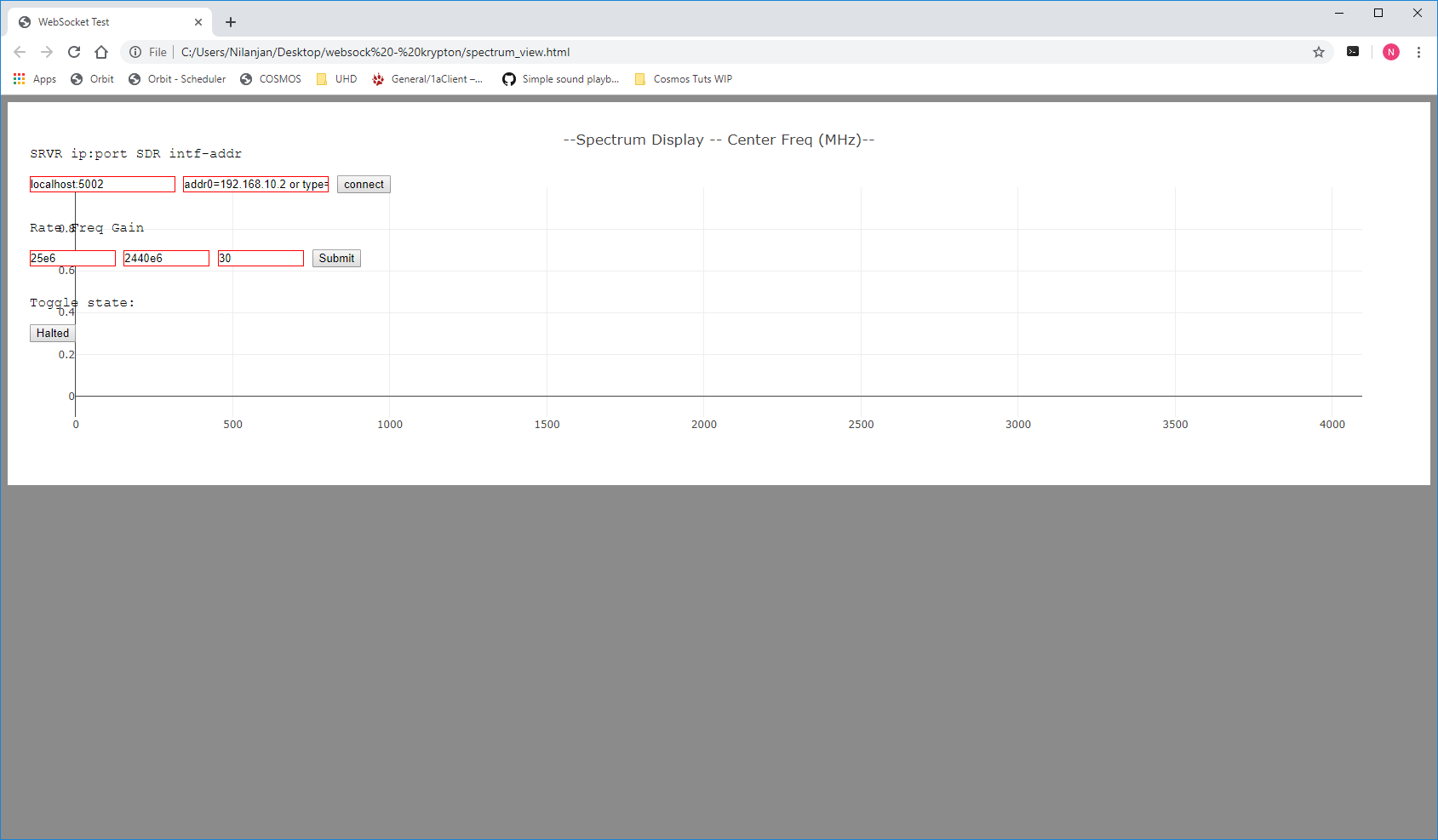
USRP 2974: Set the localhost field to localhost:5002 and the device type field to type=x300.
N310: Set the localhost field to localhost:5002 and the device type field to type=n3xx.
(The tunnel you created in Setup step 5 forwards localhost:5002 to the node's WebSocket port 9002.)
Click connect once. The application terminal should print a "Websocket Connection" message.
Click make to create a device handle.
The RF parameters are pre-filled with defaults for the 2.4 GHz Wi-Fi band:
| RF Parameter | Default value | Description |
|---|---|---|
| RATE | 25e6 | Sampling rate (samples/sec) |
| FREQ | 2400e6 | Center frequency (Hz) |
| GAIN | 30 | Receive gain (dB) |
Adjust the fields as needed, then click Submit to apply the settings to the SDR.
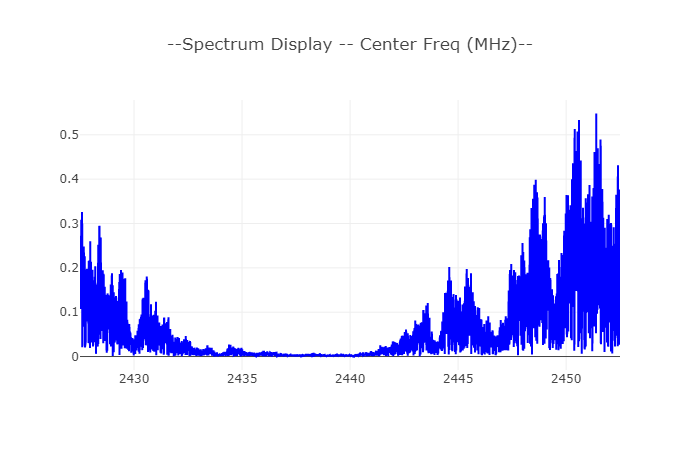
Click the Halted button to begin streaming. The button changes to Running and the spectrum display should become active.
¶ Verification
uhd_find_devicesreturns the attached radio (USRP 2974:type=x300via RIO0; N310:type=n3xxat the configured address).uhd_usrp_probereturns radio details without errors.- The
app_read_sdr_samplesterminal shows both server-start messages and then a "Websocket Connection" line after the browser connects. - The spectrum viewer displays a live spectrum trace after clicking Halted → Running.
- Tuning to the 2.4 GHz band shows Wi-Fi activity if nearby access points are active.
¶ Cleanup
omf tell -a offh -t sdr2-s1-lg1 # or srv1-lg1
No omf save is needed unless you modified the disk image.
¶ Troubleshooting
| Symptom | Likely cause | Fix |
|---|---|---|
uhd_find_devices returns nothing (USRP 2974) |
PCIe driver not loaded | Run systemctl restart niusrprio.service; see Krypton usage page |
uhd_find_devices returns nothing (N310) |
Network interface not configured | Confirm ifconfig eno1 10.115.1.1 netmask 255.255.0.0 mtu 9000 was applied; ping 10.115.2.1 to test L2 reach |
| Browser cannot connect at localhost:5002 | SSH tunnel not established or wrong ports | Verify the tunnel maps localhost:5002 → nodeHostname:9002; confirm app_read_sdr_samples is running |
make websock or make fails |
Missing build dependencies | Re-run the apt-get -y install ... command in Step 2 |
| Spectrum viewer shows no data after clicking Running | Wrong device type or radio not yet initialized | Click make again, confirm device type field matches the SDR in use, then click Submit before streaming |
For additional USRP 2974 troubleshooting, see the Krypton usage page.
¶ References
- COSMOS workflow
- SSH tunnel setup
- Krypton (USRP 2974) usage page
- N310 usage page
- Available SDR / USRP hardware
- UHD documentation
Author(s): COSMOS team · Last verified: Not re-tested (migrated 2026-06-20) · Tested image/release: baseline-uhd.ndz · Tags: sdr, uhd, usrp2974, n310, spectrum, websocket, getting-started