¶ IBM 28 GHz PAAM MIMO with Agora-UHD Real-Time Baseband Processing
Integrate IBM 28 GHz Phased Array Antenna Module (PAAM) boards with USRP N310 SDRs on COSMOS SB2 and run a real-time MIMO baseband processing pipeline using Agora-UHD, observing live constellation, EVM, SNR, and BER.
¶ Overview
This tutorial demonstrates the integration of IBM 28 GHz PAAM boards with USRP N310 radios on the COSMOS SB2 sandbox. The experiment configures two PAAMs (one as transmitter, one as receiver) driven by two N310 SDRs, and runs real-time baseband processing using Agora-UHD — a UHD-integrated pipeline derived from the RENEW Agora project.
The tutorial covers PAAM initialization via the COSMOS array management service, optional carrier-frequency-offset (CFO) calibration between the two PAAM boards, and execution of the Agora-UHD BS and UE processes. Three live visualization tools display raw IQ + FFT, constellation diagrams, and EVM/SNR/BER metrics.
The instructions for the RENEW Platform Agora software can be found at the Agora GitHub repository under the RENEW license. The COSMOS team contributes UHD support for Agora under the UHD license.
The following paper describes the integration of the IBM 28 GHz PAAMs with Agora-UHD in the COSMOS testbed. Please cite it when publishing results obtained using the PAAMs deployed in COSMOS:
Z. Qi, Z. Gao, C. Tung, and T. Chen, "Programmable Millimeter-Wave MIMO Radios with Real-Time Baseband Processing". in Proc. ACM MobiCom '23 Workshop on Wireless Network Testbeds, Experimental evaluation & Characterization (WiNTECH '23), 2023.
¶ Learning outcomes
After completing this tutorial you will be able to:
- Configure 10 GbE data interfaces on a server node to reach USRP N310 radios over the COSMOS data plane.
- Initialize IBM 28 GHz PAAM boards via the COSMOS array management API.
- Perform optional coarse CFO calibration between two PAAM boards.
- Run the Agora-UHD BS and UE processes for real-time MIMO baseband processing at 28 GHz.
- Interpret live EVM, SNR, BER, and constellation visualizations produced by the Agora-UHD pipeline.
¶ At a glance
| Difficulty | Advanced |
| Estimated time | 90 min |
| Domain / sandbox | sb2.cosmos-lab.org |
| Topic group | mmwave-paam |
| Last verified | Not re-tested (migrated 2026-06-20) |
¶ Prerequisites
Background knowledge
- Familiarity with the six-step experiment life cycle.
- Basic SDR concepts (IQ samples, carrier frequency, baseband processing).
- Familiarity with USRP N310 hardware and UHD is helpful; see Available SDR hardware.
- Basic understanding of MIMO systems and phased-array antennas at millimeter-wave frequencies.
Account & access
- A COSMOS account — register here.
- An approved reservation on COSMOS SB2 — see Make a reservation.
- SSH access to the SB2 console — see SSH access.
- Four simultaneous SSH terminal sessions are required during the experiment.
¶ Resources required
Devices / nodes
| Resource | Role | Qty | Notes |
|---|---|---|---|
srv1-lg1 |
Server running Agora-UHD BS + UE + visualization | 1 | Loaded with CubiC24.ndz; requires X11 forwarding (-Y) for GUI visualization |
sdr1-s1-lg1 |
USRP N310 SDR (TX side) | 1 | RF2 and RF3 ports connected to rfdev2-1 |
sdr1-md1 |
USRP N310 SDR (RX side) | 1 | RF2 and RF3 ports connected to rfdev2-2 |
rfdev2-1 |
IBM 28 GHz PAAM (TX) | 1 | IC0/TX/H+V connected to sdr1-s1-lg1 RF2/RF3 TX/RX; IC1/RX/H+V connected to sdr1-s1-lg1 RF2/RF3 RX2 |
rfdev2-2 |
IBM 28 GHz PAAM (RX) | 1 | IC0/TX/H+V connected to sdr1-md1 RF2/RF3 TX/RX; IC1/RX/H+V connected to sdr1-md1 RF2/RF3 RX2 |
Disk images
| Image | Load onto | Provides |
|---|---|---|
CubiC24.ndz |
srv1-lg1 |
Ubuntu 20.04, UHD 4.1.0, PAAM Control, PAAM CFO calibration tools, Agora-UHD (Cubic23 branch), real-time visualization scripts, Intel oneAPI environment, MATLAB R2022b |
Software components
| Component | Version | Source |
|---|---|---|
| Ubuntu | 20.04 | preinstalled in CubiC24.ndz |
| UHD (USRP Hardware Driver) | 4.1.0 | preinstalled in CubiC24.ndz |
| Agora-UHD | Cubic23 branch |
preinstalled in CubiC24.ndz; see GitHub |
| PAAM Control | TODO: verify | preinstalled in CubiC24.ndz (~/PAAM_Control/main.py) |
| PAAM CFO calibration | TODO: verify | preinstalled in CubiC24.ndz (~/5G_Pipeline/) |
| Real-time visualization | TODO: verify | preinstalled in CubiC24.ndz (~/Cubic23/Agora/files/log/csv/) |
| Intel oneAPI | TODO: verify | preinstalled in CubiC24.ndz at /opt/intel/oneapi/ |
| MATLAB | R2022b | preinstalled in CubiC24.ndz (optional; required only for CFO calibration step) |
Spectrum / RF / special
- Operates at 28 GHz (millimeter-wave). All RF connections are via SMA cables as described in the Topology section; no over-the-air transmission outside the shielded SB2 environment.
- Two polarizations (horizontal and vertical) are used per PAAM board.
- Pre-set CFO offset of
97400is baked into the image based on empirical calibration; re-calibration is optional.
¶ Topology
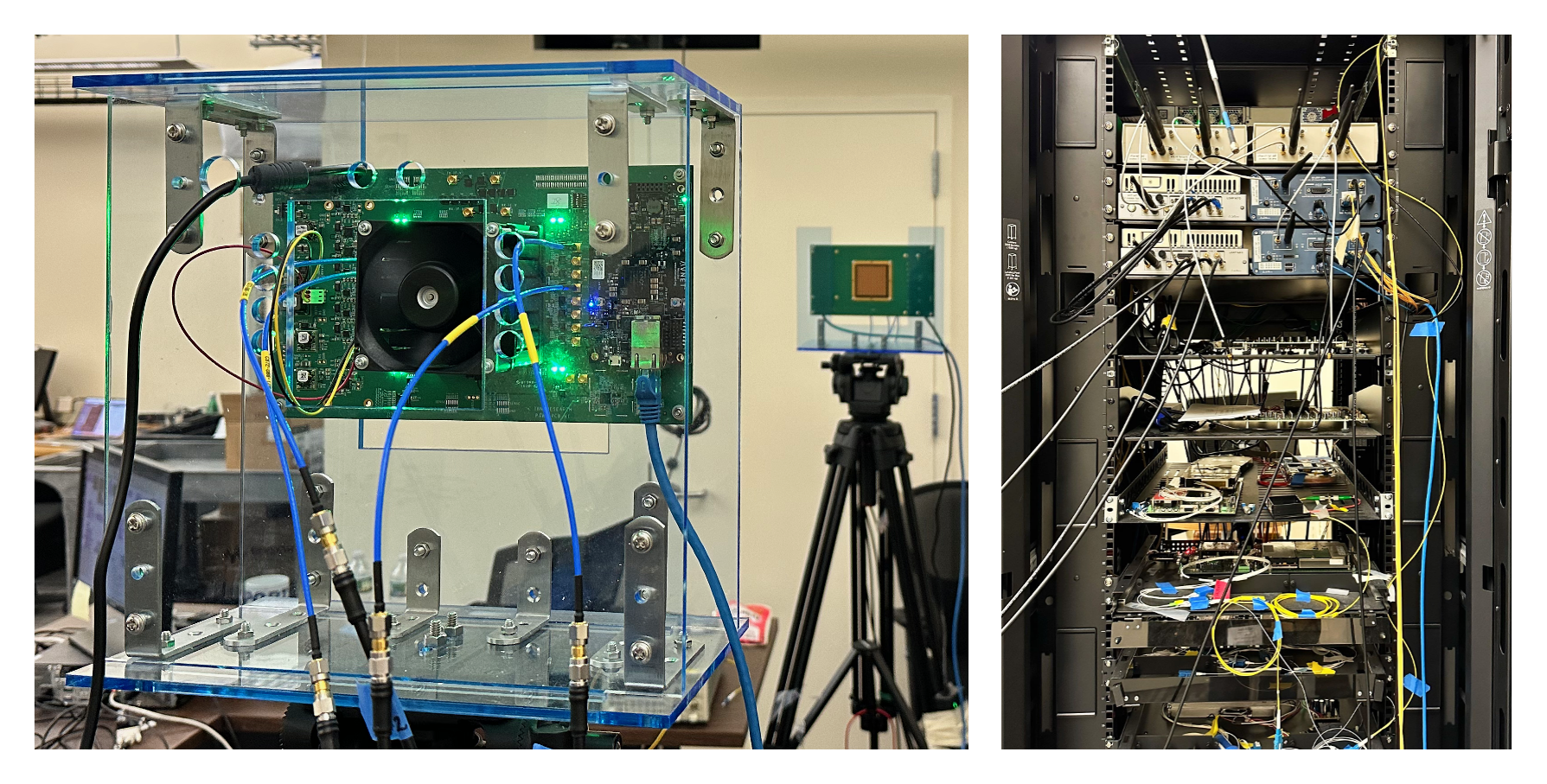 The hardware connection topology for the SB2 experiment is as follows (image reference from source — see note):
RF cable connections between USRP N310s and IBM 28 GHz PAAM boards in SB2:
sdr1-s1-lg1RF2 TX/RX →rfdev2-1IC0/TX/Hsdr1-s1-lg1RF2 RX2 →rfdev2-1IC1/RX/Hsdr1-s1-lg1RF3 TX/RX →rfdev2-1IC0/TX/Vsdr1-s1-lg1RF3 RX2 →rfdev2-1IC1/RX/Vsdr1-md1RF2 TX/RX →rfdev2-2IC0/TX/Hsdr1-md1RF2 RX2 →rfdev2-2IC1/RX/Hsdr1-md1RF3 TX/RX →rfdev2-2IC0/TX/Vsdr1-md1RF3 RX2 →rfdev2-2IC1/RX/V
The server (srv1-lg1) connects to both N310s over the 10 GbE data plane (DATA1 → sdr1-s1-lg1, DATA2 → sdr1-md1). The PAAM boards are controlled via the COSMOS array management service at am-rt1.cosmos-lab.org:5054.
¶ Setup
Open four SSH terminal sessions to the SB2 console before starting.
-
Log into the sandbox console:
ssh <username>@console.sb2.cosmos-lab.org -
In terminal 1, turn off all resources used in the experiment:
omf tell -a offh -t sdr1-s1-lg1,sdr1-md1,rfdev2-1,rfdev2-2,srv1-lg1 -
Load
CubiC24.ndzonto the server. This image is large — it may take up to 8–9 attempts to fully load:omf load -i CubiC24.ndz -t srv1-lg1 -r 0 -
Turn all required resources on and verify their status:
omf tell -a on -t sdr1-s1-lg1,sdr1-md1,rfdev2-1,rfdev2-2,srv1-lg1omf stat -t all -
SSH to the server with X11 forwarding enabled (required for GUI visualization):
ssh -Y root@srv1-lg1 -
In all four SSH sessions for
srv1-lg1, source the Intel oneAPI environment:source /opt/intel/oneapi/setvars.sh --force --config="/opt/intel/oneapi/renew-config.txt"
¶ Instructions
¶ Step 1 — Configure 10 GbE data interfaces and find USRPs
In terminal 1 on srv1-lg1, set up the DATA1 and DATA2 interfaces with MTU 9000 and increase socket buffer limits:
ifconfig DATA1 10.114.2.11 netmask 255.255.255.0 mtu 9000 up
ifconfig DATA2 10.115.2.11 netmask 255.255.255.0 mtu 9000 up
sudo sysctl -w net.core.rmem_max=536870912
sudo sysctl -w net.core.wmem_max=536870912
After running the above commands, verify that the interfaces have the correct IP addresses:
root@srv1-lg1:~# ifconfig DATA1
DATA1: flags=4163<UP,BROADCAST,RUNNING,MULTICAST>  mtu 1500
        inet6 fe80::1e34:daff:fe42:d4c  prefixlen 64  scopeid 0x20<link>
        ether 1c:34:da:42:0d:4c  txqueuelen 1000  (Ethernet)
        RX packets 21092  bytes 1881634 (1.8 MB)
        RX errors 0  dropped 19183  overruns 0  frame 0
        TX packets 686  bytes 204975 (204.9 KB)
        TX errors 0  dropped 0 overruns 0  carrier 0  collisions 0
root@srv1-lg1:~# ifconfig DATA2
DATA2: flags=4163<UP,BROADCAST,RUNNING,MULTICAST>  mtu 1500
        inet6 fe80::1e34:daff:fe42:d4d  prefixlen 64  scopeid 0x20<link>
        ether 1c:34:da:42:0d:4d  txqueuelen 1000  (Ethernet)
        RX packets 21091  bytes 1881530 (1.8 MB)
        RX errors 0  dropped 19184  overruns 0  frame 0
        TX packets 690  bytes 226549 (226.5 KB)
        TX errors 0  dropped 0 overruns 0  carrier 0  collisions 0
Run uhd_find_devices to confirm that both USRP N310s are reachable:
[INFO] [UHD] linux; GNU C++ version 9.4.0; Boost_107100; UHD_4.1.0.HEAD-0-g25d617ca
--------------------------------------------------
-- UHD Device 3
--------------------------------------------------
Device Address:
    serial: 315A35A
    addr: 10.114.2.21
    claimed: False
    fpga: XG
    mgmt_addr: 10.113.2.21
    mgmt_addr: 10.114.2.21
    product: n310
    type: n3xx

--------------------------------------------------
-- UHD Device 4
--------------------------------------------------
Device Address:
    serial: 3176DF7
    addr: 10.115.2.31
    claimed: False
    fpga: XG
    mgmt_addr: 10.113.2.31
    mgmt_addr: 10.115.2.31
    product: n310
    type: n3xx
Both N310s must appear before proceeding. If either is missing, see Troubleshooting.
¶ Step 2 — Configure IBM 28 GHz PAAM boards
In terminal 2 on the console (console.sb2.cosmos-lab.org), run the following four curl commands to configure and initialize the PAAM boards. The first two configure rfdev2-1 as the transmitter (TX) for H and V polarizations; the last two configure rfdev2-2 as the receiver (RX):
<user_name>@console:~$ curl "http://am-rt1.cosmos-lab.org:5054/array_mgmt/configure?dev_name=rfdev2-1.sb2.cosmos-lab.org&ics=0&num_elements=16&txrx=tx&pol=h&theta=0&phi=0"
<user_name>@console:~$ curl "http://am-rt1.cosmos-lab.org:5054/array_mgmt/configure?dev_name=rfdev2-1.sb2.cosmos-lab.org&ics=0&num_elements=16&txrx=tx&pol=v&theta=0&phi=0"
<user_name>@console:~$ curl "http://am-rt1.cosmos-lab.org:5054/array_mgmt/configure?dev_name=rfdev2-2.sb2.cosmos-lab.org&ics=1&num_elements=16&txrx=rx&pol=h&theta=0&phi=0"
<user_name>@console:~$ curl "http://am-rt1.cosmos-lab.org:5054/array_mgmt/configure?dev_name=rfdev2-2.sb2.cosmos-lab.org&ics=1&num_elements=16&txrx=rx&pol=v&theta=0&phi=0"
After each command, a successful response looks like:
<?xml version="1.0" encoding="UTF-8"?>
<response status="OK">
  <action service="array_mgmt" name="configure" ipaddr="10.113.2.52">
    <step name="open" duration="3.780022"/>
    <step name="initializaition" duration="0.125465"/>
    <step name="enabling" duration="0.022732"/>
    <step name="steering" duration="0.006349" theta="0" phi = "0" ipaddr = "10.113.2.52" />
    <state PAAM_ID="0x23" LO_switch="PLL" if_sw1="0xF" if_sw2="0xF" if_sw3="0xF" if_sw4="0xF" txrx="rx" polarization="v" />
    <adc>
      <conv index="0" name="1v2" tADC="114" tVolt="0.279" tCurr="0.139"/>
      <conv index="1" name="1v5" tADC="214" tVolt="0.523" tCurr="1.046"/>
      <conv index="2" name="1v8" tADC="4" tVolt="0.010" tCurr="0.005"/>
      <conv index="3" name="2v7_0" tADC="13" tVolt="0.032" tCurr="0.064"/>
      <conv index="4" name="2v7_1" tADC="183" tVolt="0.447" tCurr="0.894"/>
      <conv index="5" name="2v7_2" tADC="18" tVolt="0.044" tCurr="0.088"/>
      <conv index="6" name="2v7_3" tADC="40" tVolt="0.098" tCurr="0.196"/>
      <conv index="7" name="3v3_pll" tADC="303" tVolt="0.740" tCurr="0.370"/>
      <conv index="8" name="5v_uzed" tADC="276" tVolt="0.674" tCurr="0.674"/>
      <conv index="9" name="12v" tADC="140" tVolt="0.342" tCurr="1.140"/>
      <conv index="10" name="0V" tADC="0" tVolt="0.000"/>
      <conv index="11" name="1V8" tADC="735" tVolt="1.796"/>
    </adc>
    <step name="status" duration="0.069065"/>
    <step name="close" duration="0.100179"/>
  </action>
</response>
The <response status="OK"> and the <state> element confirming txrx and polarization indicate the board is correctly initialized.
¶ Step 3 — (Optional) CFO calibration for PAAM boards
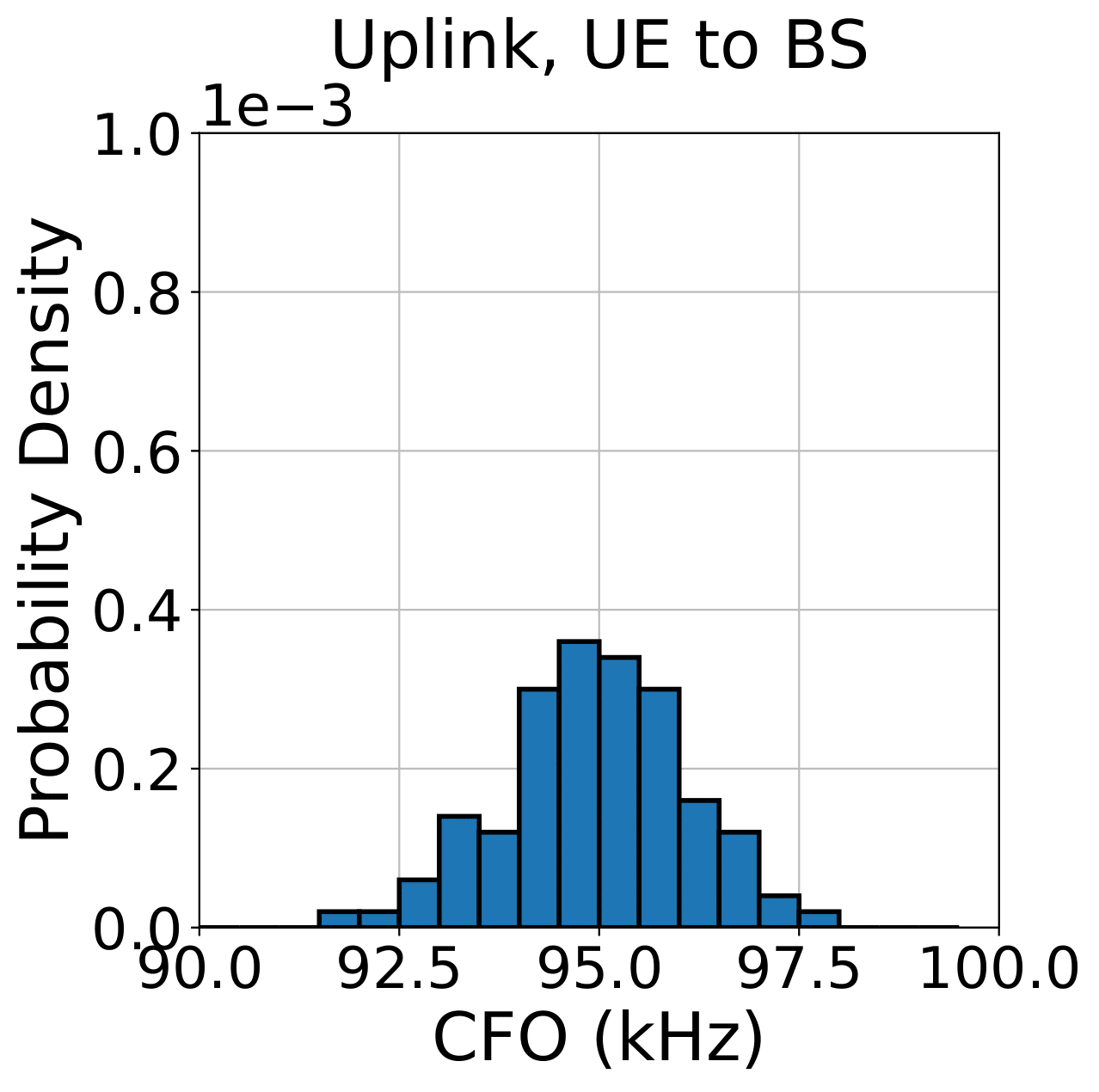
This section is optional for users who only want to run the experiment. A pre-calibrated CFO value of 97400 is already baked into the image, based on empirical measurements across 100+ runs.
Since each 28 GHz PAAM board is driven by its own on-board phase-locked loop (PLL), the CFO between the two boards must be calibrated to establish a 28 GHz communication link. The procedure below performs a coarse CFO calibration using MATLAB.
-
In terminal 1, set the
cfoBSvalue to0inPAAM_Control/main.py(line 15):vim PAAM_Control/main.py -
Configure and bring up the PAAM board:
root@srv1-lg1:~/PAAM_Control# python3 main.py -
In terminal 2, fix the MATLAB licensing if needed:
cd /usr/local/MATLAB/R2022b/bin root@srv1-lg1:/usr/local/MATLAB/R2022b/bin# ./deactivate_matlab.sh root@srv1-lg1:/usr/local/MATLAB/R2022b/bin# ./activate_matlab.shWhen prompted for the computer username, enter root.
-
In terminal 2, navigate to the CFO calibration folder and launch MATLAB:
cd 5G_Pipeline root@srv1-lg1:~/5G_Pipeline# matlab -
In the MATLAB command window, run:
>>mainAn example output:
CFO: 9.8310e+03 SNR: 22.5722 EVM: 12.7090 BER: 0 -
In terminal 1, stop the PAAM control script by pressing Ctrl+C once.
-
Apply the estimated CFO value to
cfoBSin5G_Pipeline/main.py, then restart the PAAM boards:root@srv1-lg1:~/PAAM_Control# python3 main.pyThe pre-set value of
97400was determined from the probability density distributions of CFO estimates shown below. The CFO was found to be approximately constant across repeated measurements.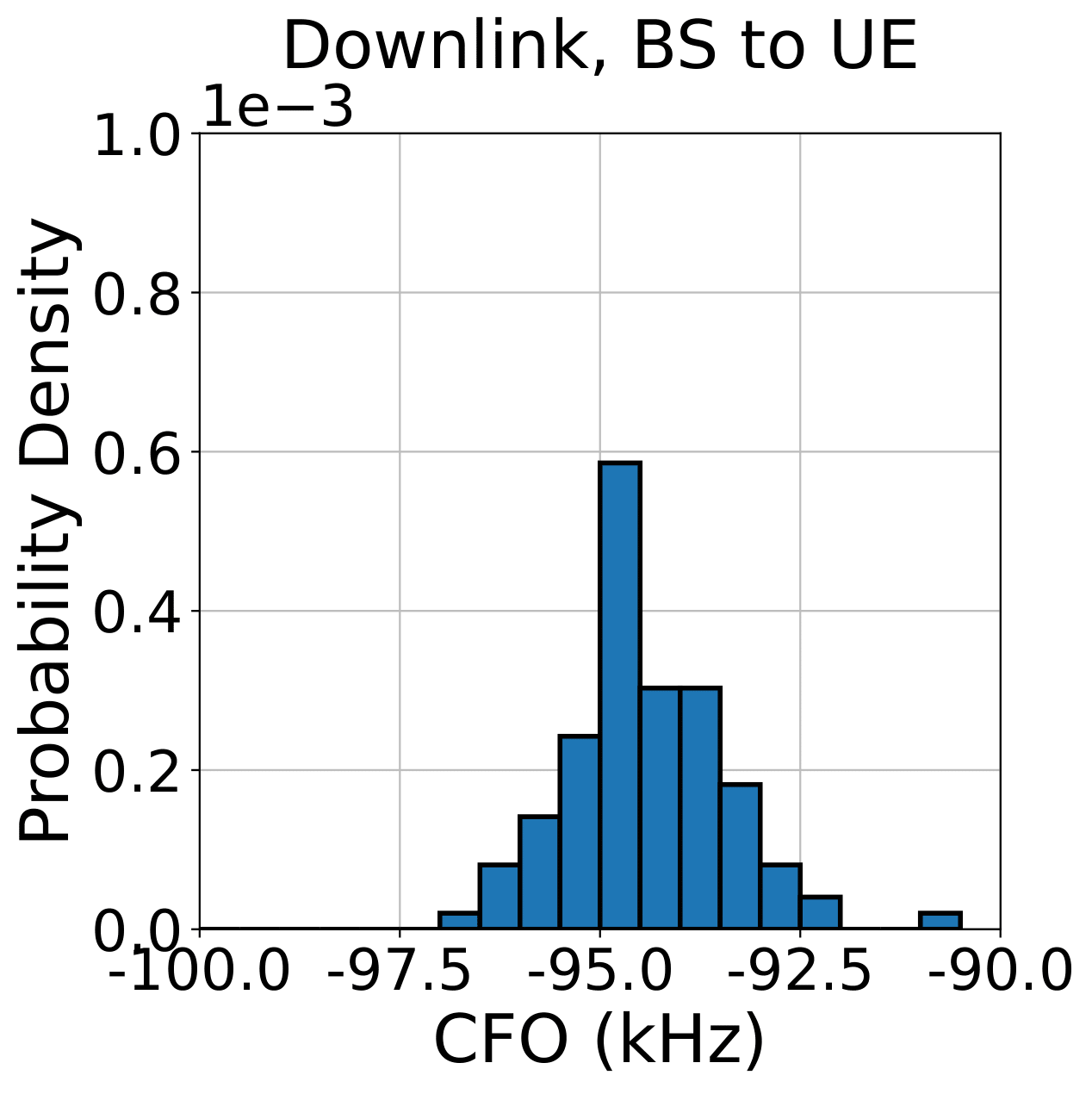
¶ Step 4 — Bring up real-time visualization
Navigate to the visualization script directory on srv1-lg1:
cd ~/Cubic23/Agora/files/log/csv
Three visualization tools are available. Launch whichever is appropriate in terminal 2 (one at a time, or on separate terminals/cores):
Raw IQ samples and FFT:
root@srv1-lg1:~/Cubic23/Agora/files/log/csv# taskset -c 31 python3 cubic_timeD.py
Constellation diagram:
root@srv1-lg1:~/Cubic23/Agora/files/log/csv# taskset -c 32 python3 cubic_conste.py --SISO --QAM16
Use --SISO or --MIMO to select the mode; use --QAM16 or --QAM64 for the reference constellation.
EVM, SNR, and BER:
root@srv1-lg1:~/Cubic23/Agora/files/log/csv# taskset -c 33 python3 cubic_mimo.py
taskset pins visualization processes to dedicated CPU cores to avoid interfering with Agora-UHD performance.
¶ Step 5 — Run the experiment
In terminal 3, start the UE process:
root@srv1-lg1:~/Cubic23/Agora# ./build/user --conf_file files/config/examples/ul-usrp-cubic.json
The UE will finish initializing and enter a waiting mode, polling for beacon signals from the BS.
In terminal 4, start the BS process:
root@srv1-lg1:~/Cubic23/Agora# ./build/agora --conf_file files/config/examples/ul-usrp-cubic.json
The BS will start receiving and processing signals; the UE will detect the BS beacon and begin transmitting.
Expected BS output (abridged):
BS end
[02:095853][I] Main [frame 6399 + 0.56 ms]: Completed LDPC decoding (4 UL symbols)
[02:095876][I] Frame 6399 Summary: FFT (8 tasks): 0.0116162 ms (~0.000452769 + 0.00189833 + 0.00862035 ms), CSI (4 tasks): 0.0105033 ms (~0.000363756 + 0.00249357 + 0.00756129 ms),
Beamweights (768 tasks): 0.085955 ms (~0.0107782 + 0.00207422 + 0.0715803 ms),
Demul (3072 tasks): 0.190205 ms (~0.001613 + 0.12422 + 0.00181191 ms),
Decode (8 tasks): 0.0964143 ms (~2.69174e-05 + 0.0958194 + 0 ms), Total: 0.394694 ms
[02:095887][I] Main [frame 6400 + 0.60 ms since last frame]: Received first packet. Remaining packets in prev frame: 0
[02:095900][I] Main [frame 6400 + 0.01 ms]: Received all pilots
frame_id 6400, ul_symbol_id 0, ant_id 0
[02:095946][I] Main [frame 6400 + 0.06 ms]: FFT-ed all pilots
[02:095951][I] Frame 6400 Pilot Signal SNR (dB) Range at BS Antennas: User 0: [-6.0,27.2] (Possible bad antenna 1) User 1: [-4.0,28.5] (Possible bad antenna 0)
frame_id 6400, ul_symbol_id 0, ant_id 1
[02:096012][I] Main [frame 6400 + 0.12 ms]: Received all packets
[02:096109][I] Main [frame 6400 + 0.22 ms]: Completed ZF beamweight calc
[02:096446][I] Main [frame 6400 + 0.56 ms]: Completed demodulation
symbol id is: 6
[02:096463][I] Frame 6400 Constellation:
  EVM    13.3263   11.3116
, SNR    17.5058   18.9295
True SNR is: 29.4157
Expected UE output (abridged):
UE End:
[02:552790][I] PhyUe [frame 6767 + 0.84 ms since last frame]: Received first packet. Remaining packets in prev frame: 0
[02:552793][I] PhyUe [frame 6767 + 0.00 ms]: Received all packets
[02:552834][I] PhyUe [frame 6767 + 0.04 ms]: Completed encoding
[02:552838][I] PhyUe [frame 6767 + 0.05 ms]: Completed modulation
[02:552874][I] PhyUe [frame 6767 + 0.08 ms]: Completed iFFT
[02:552955][I] PhyUe [frame 6767 + 0.17 ms]: Completed TX
¶ Verification
- Both USRP N310s appear in
uhd_find_devicesoutput (Device 3 and Device 4 withproduct: n310). - Each of the four PAAM
curlcommands returns<response status="OK">with a valid<state>element. - The BS log shows per-frame summaries with completed FFT, ZF beamweight calculation, demodulation, and LDPC decoding.
- The UE log shows completed encoding, modulation, iFFT, and TX steps per frame.
- The visualization tools display:
-
cubic_timeD.py: raw IQ waveform and its FFT spectrum.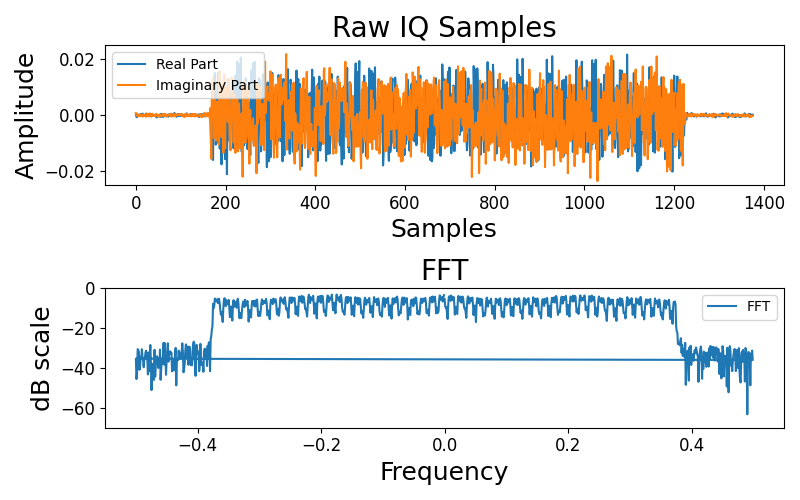
-
cubic_mimo.py: EVM, SNR, and BER readings.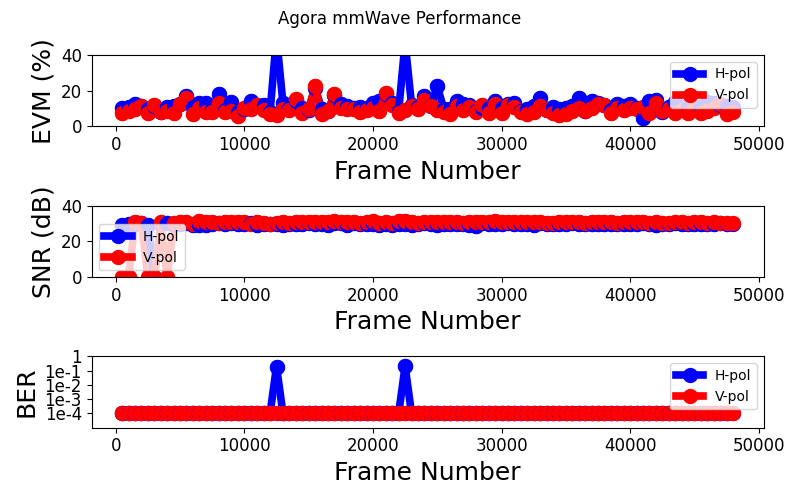
-
cubic_conste.pyin MIMO mode with 16QAM: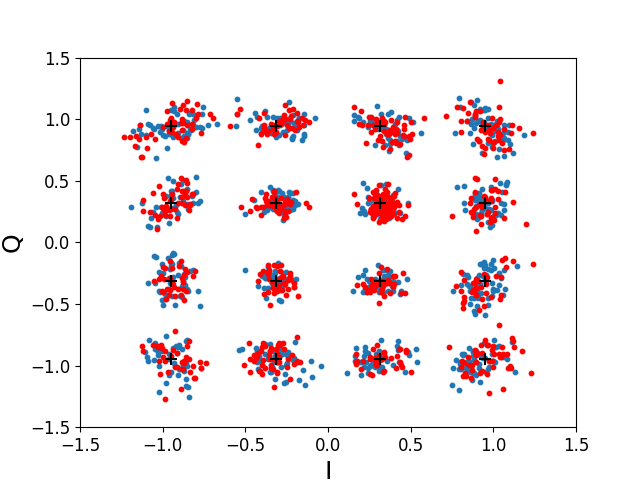
-
cubic_conste.pyin SISO mode with 64QAM: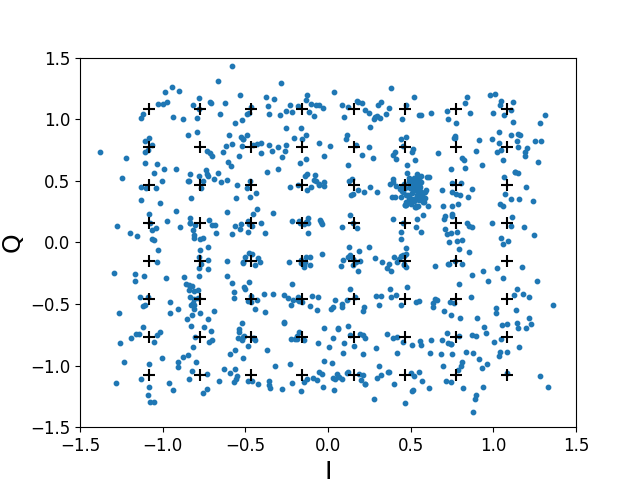
-
¶ Cleanup
When the experiments are complete, stop all processes by pressing Ctrl+C in terminals 1, 2, 3, and 4.
Turn off all resources:
omf tell -a offh -t sdr1-s1-lg1,sdr1-md1,rfdev2-1,rfdev2-2,srv1-lg1
No omf save is required unless you have modified the image.
¶ Troubleshooting
| Symptom | Likely cause | Fix |
|---|---|---|
uhd_find_devices shows fewer than 2 N310s |
DATA1/DATA2 interfaces not configured or wrong IP | Verify ifconfig DATA1 / ifconfig DATA2 show the correct IPs; re-run the ifconfig and sysctl commands |
PAAM curl returns non-OK status or connection refused |
PAAM not powered on, or wrong AM endpoint | Confirm rfdev2-1 and rfdev2-2 are on (omf stat); verify AM URL resolves |
| BS or UE process exits immediately | oneAPI environment not sourced | Ensure source /opt/intel/oneapi/setvars.sh --force --config=... was run in every terminal before starting Agora |
CubiC24.ndz fails to load |
Image is large; intermittent imaging failures | Re-run omf load -i CubiC24.ndz -t srv1-lg1 -r 0; up to 8–9 attempts may be needed |
| Constellation shows no points / BS shows no decoded frames | PAAM not initialized correctly, or CFO too large | Re-run the four PAAM curl configure commands; if problem persists, perform the optional CFO calibration in Step 3 |
| Visualization script crashes or shows no data | Wrong terminal / CSV folder | Navigate to ~/Cubic23/Agora/files/log/csv before running; confirm Agora BS is running |
¶ References
- Agora-wireless/Agora on GitHub (Cubic23 branch)
- RENEW Wireless Documentation
- UHD License
- COSMOS Getting Started
- Available SDR hardware on COSMOS
- Z. Qi, Z. Gao, C. Tung, and T. Chen, "Programmable Millimeter-Wave MIMO Radios with Real-Time Baseband Processing". WiNTECH '23, ACM MobiCom 2023.
Author(s): COSMOS team (original: Zhenzhou Qi, Zhihui Gao, Chung-Hsuan Tung, Tingjun Chen — Duke University) · Last verified: Not re-tested (migrated 2026-06-20) · Tested image/release: CubiC24.ndz / TODO: verify omf version · Tags: mmwave, paam, agora, mimo, 28ghz, usrp, n310, sdr