¶ mmWave PAAM Mobile Beam-Steering Experiment
Transmit and receive mmWave signals between two mobile PAAM (Phased-Array Antenna Module) nodes on sb1.cosmos-lab.org, then run beam-steering scripts as used in the NRDZ project and collect received-signal data.
¶ Overview
This tutorial demonstrates over-the-air mmWave communication between two mobile nodes equipped with Phased-Array Antenna Modules (PAAMs) in the COSMOS sb1 sandbox. One node (mob4-1) acts as the transmitter and the other (mob4-2) as the receiver. Both nodes run GNU Radio Companion flowgraphs (tx.grc / rx.grc) for basic TX/RX, and then a pair of REST-based beam-steering Python scripts (tx-rest.py / rx-rest.py) perform automated beam sweeping as used in the NRDZ (National Radio Dynamic Zone) project.
The experiment covers PAAM activation via the Array Management REST API, GNU Radio–based waveform generation and reception, beam-steering control, and collection of binary sample data for offline analysis.
¶ Learning outcomes
After completing this tutorial you will be able to:
- Load and boot custom PAAM-enabled disk images onto COSMOS mobile nodes.
- Activate, enable, and steer a PAAM antenna array using the Array Management REST API.
- Run GNU Radio Companion flowgraphs for mmWave TX and RX on COSMOS nodes.
- Execute beam-steering REST scripts (
tx-rest.py/rx-rest.py) for automated sweeping. - Retrieve recorded sample data from a node and process it offline.
¶ At a glance
| Difficulty | Intermediate |
| Estimated time | TODO: verify |
| Domain / sandbox | sb1.cosmos-lab.org |
| Topic group | mmwave-paam |
| Last verified | Not re-tested (migrated 2026-06-20) |
¶ Prerequisites
Background knowledge
- Basic GNU Radio / GNU Radio Companion (GRC) usage.
- Familiarity with the COSMOS experiment life cycle (reserve → load → on → experiment → off).
- Basic REST API / curl usage.
Account & access
- A COSMOS account — register here.
- An approved reservation on sb1.cosmos-lab.org covering
mob4-1andmob4-2— see Make a reservation. - SSH access to the sb1 console — see SSH access.
- X11 forwarding enabled on your SSH client (required for GNU Radio Companion GUI).
¶ Resources required
Devices / nodes
| Resource | Role | Qty | Notes |
|---|---|---|---|
| mob4-1 | Transmitter (TX) | 1 | Mobile node with PAAM; RF device at rfdev-mob4-1.sb1.cosmos-lab.org |
| mob4-2 | Receiver (RX) | 1 | Mobile node with PAAM; RF device at rfdev-mob4-2.sb1.cosmos-lab.org |
Disk images
| Image | Load onto | Provides |
|---|---|---|
| abhiadhikari-node-mob4-1.sb1.cosmos-lab.org-2024-02-18-17-27-10.ndz | mob4-1 | GNU Radio, tx.grc, tx-rest.py, PAAM software stack |
| abhiadhikari-node-mob4-1.sb1.cosmos-lab.org-2024-02-18-17-27-10.ndz | mob4-2 | GNU Radio, rx.grc, rx-rest.py, PAAM software stack (same image as mob4-1 per Feb 18 update) |
The Feb 18 2024 image (used for both nodes) is the most recent revision. Earlier dated image revisions and their original omf load commands are preserved under Earlier image revisions below.
Software components
| Component | Version | Source |
|---|---|---|
| GNU Radio / GNU Radio Companion | TODO: verify | Preinstalled in disk image |
Array Management REST API (array_mgmt) |
TODO: verify | Preinstalled on rfdev-mob4-{1,2} at port 3000 |
tx.grc / rx.grc |
TODO: verify | /root/ on respective nodes |
tx-rest.py / rx-rest.py |
TODO: verify | /root/rest/ on respective nodes |
Spectrum / RF / special
- mmWave band; exact frequency configured in
tx.grc/rx.grc— TODO: verify center frequency. - 16-element PAAM arrays; horizontal polarization (
pol=h); initial beam angle θ=0°, φ=0°. - Over-the-air transmission within the COSMOS sb1 testbed.
¶ Topology
Two mobile nodes (mob4-1 and mob4-2) are each physically connected to a PAAM RF device (rfdev-mob4-1, rfdev-mob4-2). The RF devices are controlled via the Array Management REST API running on port 3000. The nodes are booted and managed from the sb1 console. GNU Radio flowgraphs run on the compute nodes over an X11-forwarded SSH session.
¶ Setup
-
Log into the sb1 console:
ssh <username>@console.sb1.cosmos-lab.org -
Turn off the nodes before imaging:
omf tell -a offh -t mob4-1 omf tell -a offh -t mob4-2 -
Load the disk images (Feb 18 2024 — same image for both nodes,
-r 0disables reboot-on-fail):omf load -i abhiadhikari-node-mob4-1.sb1.cosmos-lab.org-2024-02-18-17-27-10.ndz -t mob4-1 -r 0 omf load -i abhiadhikari-node-mob4-1.sb1.cosmos-lab.org-2024-02-18-17-27-10.ndz -t mob4-2 -r 0¶ Earlier image revisions
The image set evolved across several sessions. The Feb 18 2024 image above is current; the earlier
omf loadcommand sets are preserved here for reference.Oct 2023 (original):
omf load -i abhiadhikari-node-mob4-3.sb1.cosmos-lab.org-2023-10-27-21-13-48.ndz -t mob4-2 omf load -i abhiadhikari-node-mob4-2.sb1.cosmos-lab.org-2023-10-27-20-40-46.ndz -t mob4-1Jan 3 2024:
omf load -i abhiadhikari-node-mob4-2.sb1.cosmos-lab.org-2024-01-03-21-04-03.ndz -t mob4-2 omf load -i abhiadhikari-node-mob4-1.sb1.cosmos-lab.org-2024-01-03-21-12-31.ndz -t mob4-1Feb 13 2024:
omf load -i abhiadhikari-node-mob4-2.sb1.cosmos-lab.org-2024-02-14-01-47-04.ndz -t mob4-2 omf load -i abhiadhikari-node-mob4-1.sb1.cosmos-lab.org-2024-02-14-01-46-05.ndz -t mob4-1Feb 14 2024 (morning):
omf load -i abhiadhikari-node-mob4-2.sb1.cosmos-lab.org-2024-02-14-09-05-28.ndz -t mob4-2 omf load -i abhiadhikari-node-mob4-1.sb1.cosmos-lab.org-2024-02-14-09-04-40.ndz -t mob4-1 -
Turn the nodes on and confirm they are up:
omf tell -a on -t mob4-1 omf tell -a on -t mob4-2 omf stat -t mob4-1 omf stat -t mob4-2 -
Activate the PAAMs from the console.
On
mob4-1(TX, 16-element, horizontal polarization, θ=0°, φ=0°):curl "http://rfdev-mob4-1.sb1.cosmos-lab.org:3000/array_mgmt/connect?dev_name=Local&ics=all&num_elements=16&txrx=tx&pol=h&theta=0&phi=0" curl "http://rfdev-mob4-1.sb1.cosmos-lab.org:3000/array_mgmt/enable?dev_name=Local&ics=all&num_elements=16&txrx=tx&pol=h&theta=0&phi=0" curl "http://rfdev-mob4-1.sb1.cosmos-lab.org:3000/array_mgmt/steer?dev_name=Local&theta=0&phi=0"On
mob4-2(RX, 16-element, horizontal polarization, θ=0°, φ=0°):curl "http://rfdev-mob4-2.sb1.cosmos-lab.org:3000/array_mgmt/connect?dev_name=Local&ics=all&num_elements=16&txrx=rx&pol=h&theta=0&phi=0" curl "http://rfdev-mob4-2.sb1.cosmos-lab.org:3000/array_mgmt/enable?dev_name=Local&ics=all&num_elements=16&txrx=rx&pol=h&theta=0&phi=0" curl "http://rfdev-mob4-2.sb1.cosmos-lab.org:3000/array_mgmt/steer?dev_name=Local&theta=0&phi=0"
¶ Instructions
¶ Step 1 — Open terminal sessions to each node
Open two terminals from the console. Terminal 1 is for mob4-1 (TX); Terminal 2 is for mob4-2 (RX). Use -Y for X11 forwarding so GNU Radio Companion can open its GUI.
Terminal 1:
ssh -Y root@mob4-1
Terminal 2:
ssh -Y root@mob4-2
¶ Step 2 — Run GNU Radio Companion flowgraphs
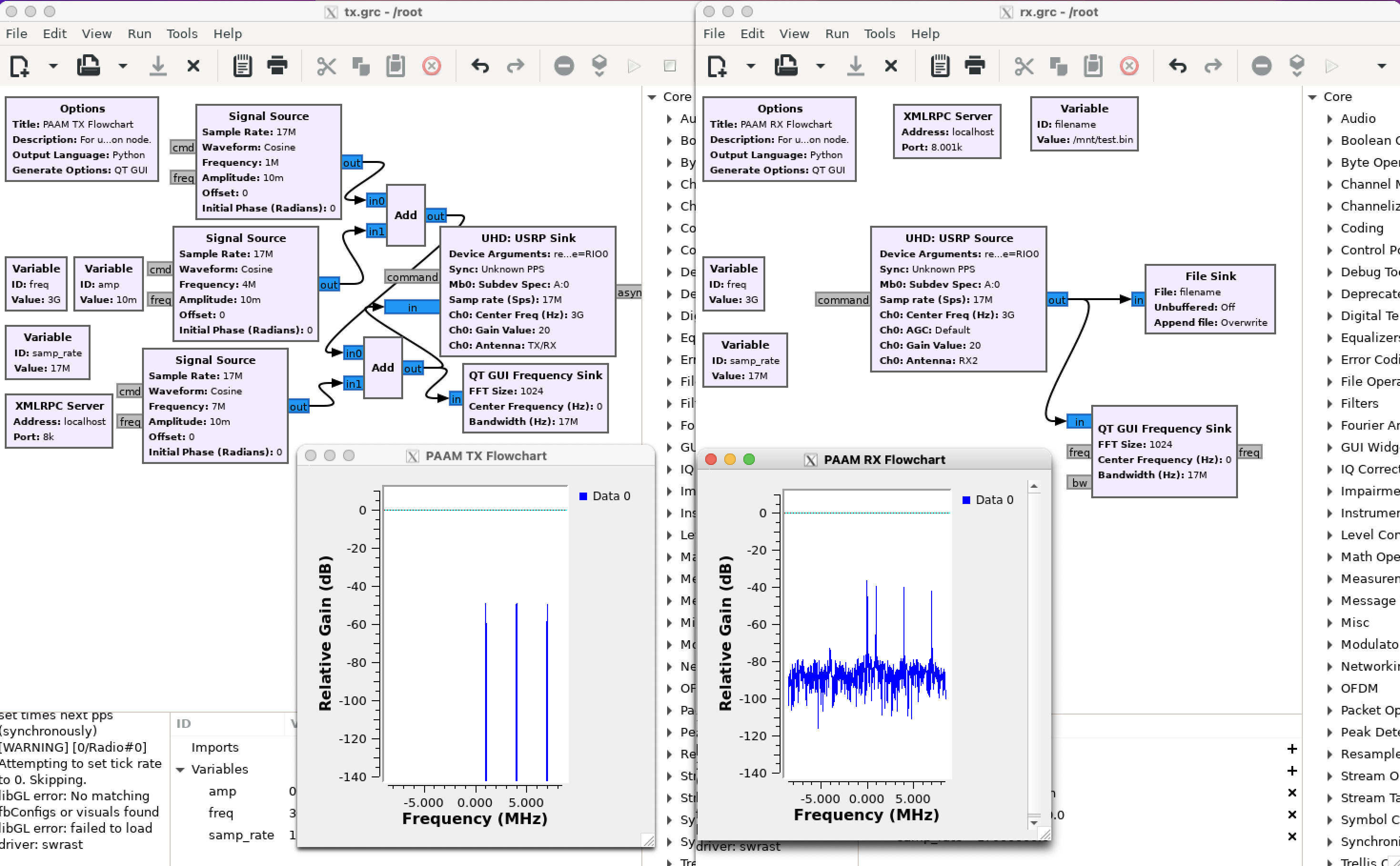
In Terminal 1, launch GNU Radio Companion and open the TX flowgraph:
gnuradio-companion
Open /root/tx.grc and run it.
In Terminal 2, launch GNU Radio Companion and open the RX flowgraph:
gnuradio-companion
Open /root/rx.grc and run it.
You should observe a frequency plot showing the received mmWave signal.
¶ Step 3 — Run the beam-steering scripts (NRDZ experiment)
The beam-steering scripts perform automated sweeping and data capture. Make sure to start the receiver first.
In Terminal 2 (receiver, mob4-2):
root@mob4-2:~/rest# ./rx-rest.py
Then in Terminal 1 (transmitter, mob4-1):
root@mob4-1:~/rest# ./tx-rest.py
Note: Inside
tx-rest.pyandrx-rest.py, verify that therfdevvariable is set to the correct RF device name corresponding to the mobile node in use (e.g.,rfdev-mob4-1andrfdev-mob4-2respectively).
¶ Step 4 — Collect the recorded data
After the beam-steering run completes, copy the binary sample file from mob4-2 to the sb1 console:
scp root@mob4-2:/mnt/test.bin .
Then exit the console and copy the data to your local computer:
scp <username>@console.sb1.cosmos-lab.org:/home/<username>/test.bin .
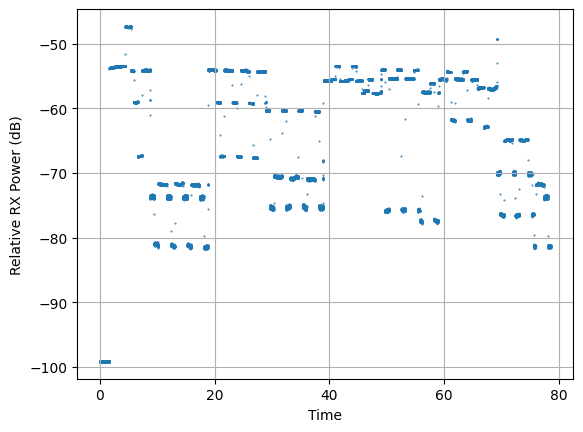
A data processing Jupyter notebook is available for offline analysis of test.bin.
An experiment video is also available.
¶ Verification
- After Step 2, the GNU Radio Companion RX flowgraph on
mob4-2should display a frequency plot with a visible mmWave signal peak frommob4-1. - After Step 3,
rx-rest.pyterminates without error and/mnt/test.binexists onmob4-2with non-zero size:ls -lh /mnt/test.bin - The data processing notebook produces a recognizable received-signal plot after loading
test.bin.
¶ Cleanup
Turn off the nodes when finished:
omf tell -a offh -t mob4-1
omf tell -a offh -t mob4-2
Save a new image only if you modified the disk image and want to preserve the changes:
omf save -n mob4-1
omf save -n mob4-2
¶ Troubleshooting
| Symptom | Likely cause | Fix |
|---|---|---|
curl to rfdev-mob4-{1,2} returns connection refused |
PAAM service not running or node not fully booted | Wait for node to fully boot (omf stat); check that the Array Management service is running on the rfdev host |
| GNU Radio Companion fails to open (no display) | X11 forwarding not enabled | Use ssh -Y (not plain ssh) when connecting to the node; ensure your local X server is running |
rx-rest.py exits immediately with an error |
Wrong rfdev variable inside the script |
Edit rx-rest.py and set the rfdev field to rfdev-mob4-2 (or the correct device for the node in use) |
/mnt/test.bin not found or empty after rx-rest.py |
RX script did not run long enough or TX started before RX | Always start rx-rest.py before tx-rest.py; verify the RX script ran to completion |
omf load fails or node does not come up |
Image name mismatch or node hardware issue | Confirm image name exactly as shown; try omf stat and retry omf load |
¶ References
- COSMOS Array Management API documentation
- NRDZ project information
- GNU Radio documentation
- COSMOS sb1 sandbox hardware
- Experiment video (NRDZ low resolution)
- Data processing notebook
Author(s): COSMOS team · Last verified: Not re-tested (migrated 2026-06-20) · Tested image/release: abhiadhikari-node-mob4-1.sb1.cosmos-lab.org-2024-02-18-17-27-10.ndz · Tags: mmwave, paam, beam-steering, gnuradio, mobile, nrdz, sb1